
More than Tally on mobile
Sell beyond the counter. Stay close to Tally.
Not just your Tally books on a phone. Run sales, your field team, collections, documents and your own online store on the same Tally — and every order, quote and entry made there goes straight back into Tally.
- 14-day free trial
- Plans from ₹3,000 a year
- App in English and हिन्दी
- Your whole team, one set of books


One app on top of your Tally
Not just Tally on mobile. Run the business on it.
Most Tally apps let you look at your books. Cashflow OS also lets your team sell, visit, collect, quote and take store orders — and all of it lands in Tally.
Books and reports
Ledgers, bill-wise outstanding with ageing, 20+ reports, and a P&L and Balance Sheet that match Tally. GSTR-1 and 3B style views.
Entries into Tally
Sales, purchase, receipts, payments, credit and debit notes and orders from the phone or web. TallyPrime creates them.
Sales and orders
Quotations, proforma, sales orders and delivery challans. Dealer price lists fill the rate; staff orders can wait for approval.
Field team
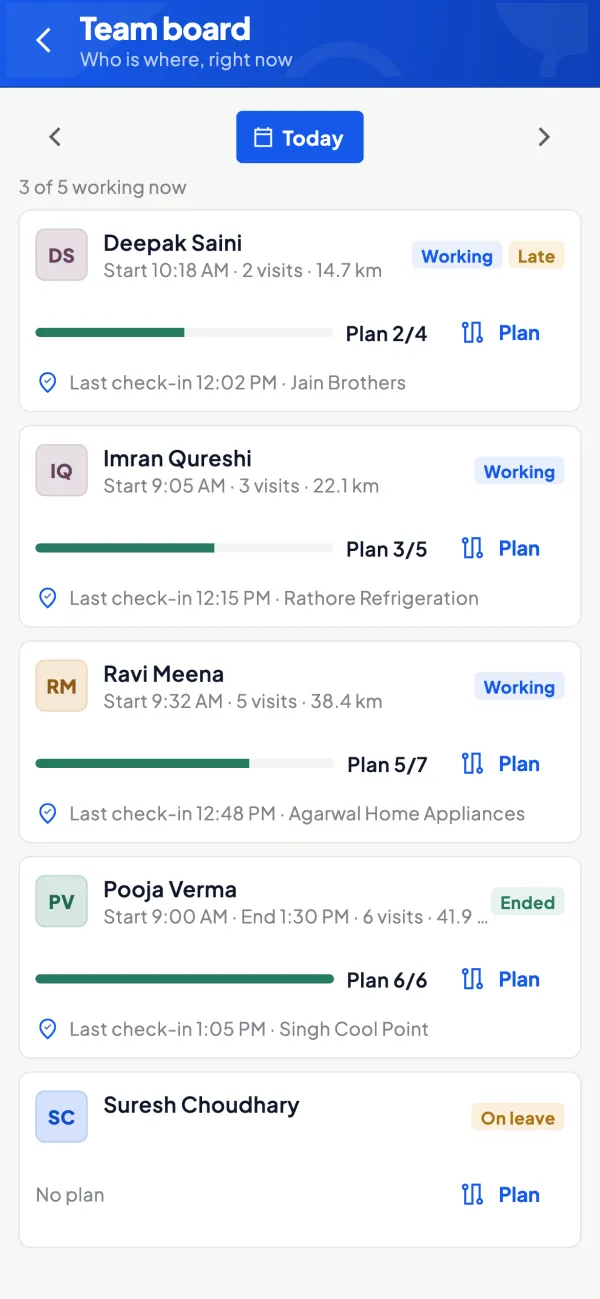
Attendance, GPS visits, route plans, geofence, a dealer map, leave and performance — for every salesperson.
Collections
Outstanding before every visit, statements and payment reminders on WhatsApp, and what each salesperson collected.
E-invoice and e-way bill
Generate the IRN and the e-way bill for a Tally sales voucher. The numbers go back onto the voucher in Tally.
Catalogue and store
A catalogue link and a shop at shop.cashflowos.in, built from your Tally items. Orders come into Tally.
Alerts from Tally
A push when a voucher is added, changed or deleted in Tally, and the day’s summary every evening.
Start with one company. Build from there.
Set up in three steps.
- 01
Install the Tally Connector
On the Windows PC where TallyPrime runs. It sits in the tray, reads every open company and updates itself.
- 02
Scan its QR from the app
Sign in with your mobile number and scan the QR the connector shows. That links the company.
- 03
Bring in your team
Invite people with a link. Each gets their own role, on the same books, on phone or web.
Your connected books, wherever work takes you
Your Tally. Wherever you are.
See the figures. Open the detail. Take the next step — on your phone and in the browser.
01 / Overview
Know where you stand.
Sales, purchases, collections, dues, cash and bank — today, this month or the year, against the period before. Every connected company in one place.
02 / Books
Carry the detail.
Ledgers, vouchers, bill-wise outstanding and stock. Share a party's statement as a PDF on WhatsApp — in Tally's format or a simple हिसाब page.
03 / Reports & GST
Read familiar reports.
Profit & Loss, Balance Sheet, Trial Balance and Day Book for any year or a custom range. GSTR-1 and GSTR-3B views with bill-wise and HSN detail and JSON download.
04 / Create & alter
Make entries on the move.
Sales, purchases, receipts, payments, notes and orders go to the connector and TallyPrime creates them — usually within a minute. A refused one comes back with Tally's reason.




From the first conversation to the next order
Turn interest into orders.
Keep customers, products and follow-ups connected — at your counter and on every field visit.

01 / Discover
Show the range.
Items from Tally with photos and barcodes. Share a catalogue link customers can browse without the app.
02 / Remember
Keep their favourites.
Save wishlists with quantities, notes and interest — hot, warm or cold. Share the selection on WhatsApp.
03 / Follow up
Continue the conversation.
Look a customer up by mobile number, reopen their picks and see every past visit.
04 / Convert
Take the order to Tally.
A sales order with rates, dealer prices, discounts and GST. The connector posts it to Tally for billing.
For the people out selling
One clean screen for every salesperson.
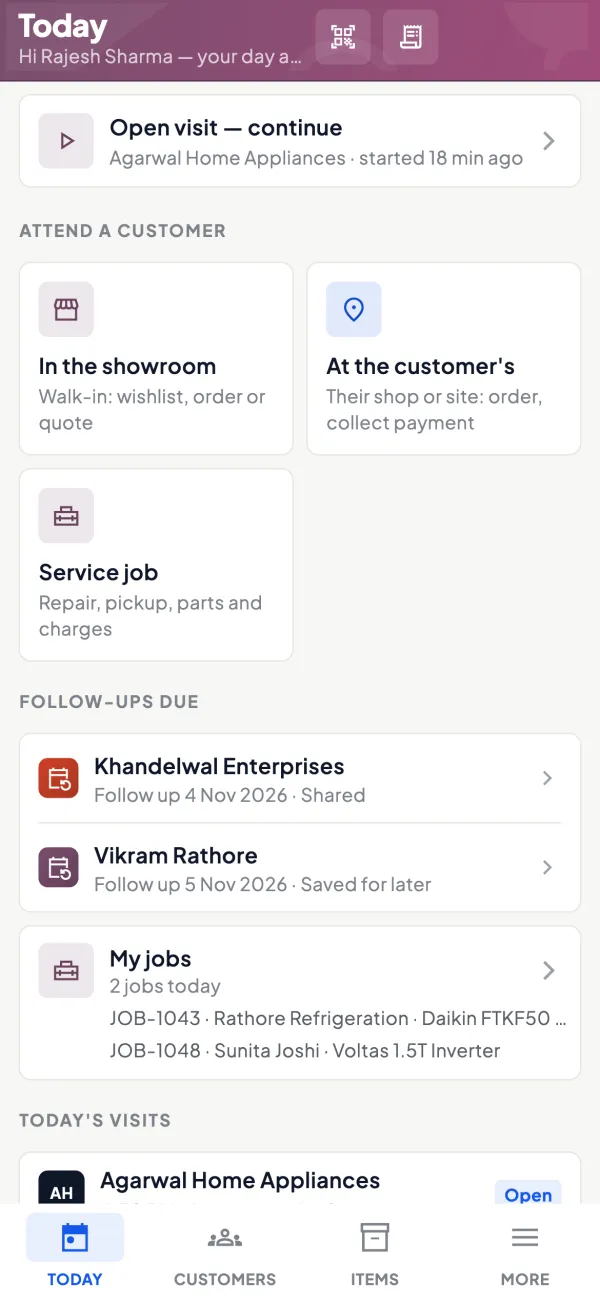
Each morning the staff app shows what to do today. They pick where they are attending the customer — the app shows what fits.
- In the showroom. A walk-in: wishlist, quotation or order.
- At the customer's. Their shop or site: take the order, collect a payment, see their outstanding first.
- Service job. Repair or pickup: add parts and charges, close it and invoice.
- For the owner. Dealer locations, areas and route plans, check-ins with location and photos, leave and performance.
Switch them on when you need them
Selling tools Tally never had.

Barcodes and labels
A barcode per item or per piece. Thermal or A4 labels; scan with the phone camera.

Catalogue and online store
A catalogue link and a shop at shop.cashflowos.in, built from your Tally items. Payments through your own gateway.
Dealer price lists
Dealer types A, B, C with layered discounts that fill the rate on every order.
Quotes and challans
Quotation, proforma, purchase order and delivery challan with your logo, bank and UPI details. Convert a yes into a Tally invoice.
Service jobs
Repairs and pickups with parts and charges, closed into an invoice.
Collections
What each salesperson collected, against the party's outstanding.
Ask Digit
The assistant in the app answers questions from your synced Tally data. It reads; it never posts.
Leads and enquiries
Enquiry forms and leads in one list, with follow-ups for the team.
Referrals
Track who sent you a customer — a fitter, an architect — and the commission they earned.
All features →
Thirty things Cashflow OS does on top of your Tally books.
Document maker
Quotes that look like your brand.
Fill in the details, pick a design, share. When the customer says yes, convert it into a sales order or a Tally sales invoice in one tap.
- Quotation — converts to a sales order or sales invoice
- Proforma invoice — converts to a sales invoice
- Purchase order — for your suppliers
- Delivery challan — goods out, with or without prices
- Your logo, colours, letterhead and signature; bank details, UPI QR and terms on every page; share on WhatsApp, as a PDF or by email.

Compared, feature by feature
More than a Tally viewer.
Seeing your books on the phone is where Cashflow OS starts, not where it stops. Here is what you get next to the apps owners usually look at.
Swipe the table sideways to see every column.
| What you get | Cashflow OS | LiveKeeping | BizAnalyst | Tally’s browser access |
|---|---|---|---|---|
| Phone app | Android; iPhone coming soon | Android and iPhone | Android and iPhone | No app — the phone’s browser |
| Web access | Yes, app.cashflowos.in | Yes | — | Yes, in the browser |
| Books and reports | Ledgers, bill-wise ageing, 20+ reports | 35+ reports | Outstanding and sales analysis | Tally reports, to view |
| Entries back into Tally | Vouchers, notes and orders | Yes, on Pro | Invoices, orders, receipts, payments | Entry stays on desktop or cloud |
| Check entries before Tally | Approval for staff orders | Checker Maker | Pending entries on the desktop | Optional vouchers approved remotely |
| Quotation, proforma, challan | Yes, with your branding | Quotations, custom PDF templates | — | — |
| E-invoice and e-way bill | Yes, on Pro+ | Yes, on Pro Plus | — | — |
| WhatsApp statements and reminders | Yes | WhatsApp, SMS and email | WhatsApp, SMS and email | — |
| Alerts when Tally entries change | Push alerts and an evening summary | — | — | — |
| Field team on GPS | Attendance, visits, routes, geofence | GPS sales tracking | Geo-tagged visit check-in | — |
| Dealer price lists | A, B, C types with discount rules | — | — | — |
| Catalogue and online store | Yes, orders go into Tally | — | — | — |
| Leads, service jobs, referrals | Yes | — | — | — |
| App in Hindi | Yes | — | — | — |
| Free trial | 14 days | 7 days | 7 days | Comes with TSS |
As of November 2026, from their public websites and Google Play listings. “—” means we could not confirm it from public pages, not that they lack it. Features and prices change, so check with each provider. LiveKeeping, BizAnalyst, Tally and TallyPrime are trademarks of their owners; Cashflow OS is not connected with them.
Cashflow OS vs LiveKeepingCashflow OS vs BizAnalystvs Tally’s browser accessChoosing a Tally mobile app
One business. A shared way to work.
A connected team. A clearer picture.
Give each person the access their work needs. Keep Tally at the heart of your business.
Owners
See the business.
Connected companies, figures and team activity.
Accounts
Keep books in step.
Entries, ledgers, reports and GST views.
Sales teams
Keep selling moving.
Customers, visits, wishlists and orders — never your accounts.
Writing into Tally stays off until you switch it on for a company. App lock with fingerprint, face or PIN. The app, statements and reports read in Hindi or English — each person picks their own.
Download
One account. Every screen.
The app on every phone in the team, the web app on the office computer, and the connector on the PC that runs Tally.
Web app
Any computer, any browser. Sign in by scanning a QR with the phone app.
Android
The app for every phone in the team — owner, accounts and sales.
iPhone
The iPhone and iPad app is with Apple for review.
On the App Store, for iPhone and iPad.
Tally Connector
For the Windows PC running TallyPrime. Keeps your books in sync and updates itself.
Plans
Try it free for 14 days. Then pick a plan.
Growth
₹3,000 a year + GST
Your Tally books on every phone and on the web.
- Phone, web and Tally Connector
- Ledgers, outstanding and 20+ reports
- GST views, WhatsApp sharing and reminders
Pro
₹5,000 a year + GST
Make entries from the phone that go into Tally.
- Everything in Growth
- Sales, purchase, receipts and payments into Tally
- Orders and notes on the move
Pro+
₹7,000 a year + GST
For businesses that issue e-invoices and e-way bills.
- Everything in Pro
- E-invoice (IRN) and e-way bill
- Numbers written back onto the Tally voucher
Save up to 25% on a 3-year plan. Premium modules — field force, catalogue and store, price lists, CRM and service jobs — are priced on top. Every company starts with a 14-day free trial.
For your trade, your city, your questions
Made for how Indian businesses work.
Does it change my Tally data?
Only if you let it. Out of the box Cashflow OS only reads. When you switch writing on for a company, the entries made in the app are created by TallyPrime’s own import, so Tally’s rules still apply, and the app shows each one as waiting, created or refused.
Which Tally versions does it work with?
TallyPrime, including older TallyPrime releases — that is what we test with, including creating entries. Tally.ERP 9 uses the same XML port, so reading your books usually works; tell us if yours does not.
What does the PC need?
Windows with .NET Framework 4.6.2 or later (built into Windows 10 and 11) and TallyPrime open. The connector runs in the tray and updates itself.
Does the PC need to stay on?
Only for syncing, and for new entries to reach Tally. An entry made while the PC is off waits, and goes in when Tally is open again.
Does it work offline?
Yes, for reading. Once synced, ledgers, statements and items open without internet. Creating an entry needs internet on the phone.
Is there an iPhone app?
Yes — it is with Apple for review and will be on the App Store soon. Until then, use the web app in your iPhone’s browser.
Yes. Get it from the App Store and sign in with the same mobile number.
Can my accountant or staff use it?
Yes. Invite them with a link; they sign in with their own number and get the role you choose for that company.
Can my salespeople see my accounts?
No. A salesperson sees items and their own customers, never your accounts. Orders from frontline staff can need approval before they go to Tally.
What are premium modules?
Selling tools over and above Tally — showroom walk-ins, field force, barcodes and labels, catalogue and online store, wishlists, price lists, CRM, service jobs and referrals. We switch them on for your company when you need them.
What does it cost?
Every company starts with a 14-day free trial. Then Growth is ₹3,000, Pro ₹5,000 and Pro+ ₹7,000 a year (plus GST), and a 3-year plan saves up to 25%. Premium modules are extra — book a demo for the exact price for your business.
How is it different from other Tally mobile apps?
Most of them show your Tally books on the phone, and some let you make entries. Cashflow OS does that and also runs the selling side: orders with dealer prices and approvals, a field team on GPS, quotations and challans with your branding, a catalogue and online store, and alerts when entries change in Tally.
Book a free demo
See it on your own Tally data.
Leave your number. We will call, show you Cashflow OS on your own books, share the price for your business and set the connector up with you.
- On a call or a video call
- In Hindi or English
- No obligation, no card
- Or call or WhatsApp 70738 53555