Feature
Create Tally vouchers from your phone
With Cashflow OS you can make a voucher on the phone or the web app and have it land in TallyPrime. The entry goes to the connector on your Tally PC, Tally checks it by its own rules, and a refused entry comes back with Tally's reason. Writing is off until the owner switches it on.
- 13 voucher types into Tally
- Tally checks every entry
- Off until the owner says so
- GST worked out from the state
Start free trialBook a free demo
Works with your TallyPrime14-day free trialJaipur team, call +91 70738 53555

Who it’s for
Who uses vouchers from the phone
- OwnersA receipt or payment booked on the spot
- Accountants working from homeJournals and contras on the web app
- SalespeopleSales orders from the field, with approval if you set it
- Godown and dispatch staffDelivery notes, receipt notes and stock journals at the bay
- DistributorsOrders and receipts from the route, straight into Tally
- Businesses with one Tally PCMore people entering without queueing at one desk
- Owners with several companiesWriting switched on company by company
Pain → fix
The problems vouchers from the phone solves
What goes wrong without it, and what changes with Cashflow OS.
- The problemEveryone waits for the one Tally PC
Billing, receipts and journals all queue at the desk where Tally is open.
With Cashflow OSEnter from any phone or from the web appEntries go to the connector on the Tally PC, which asks TallyPrime to create them, so the work spreads across the team.
Tally on the web - The problemNotes on paper that reach Tally days later
A receipt taken on Monday is entered on Thursday, and statements are wrong till then.
With Cashflow OSBook the receipt the same day it comes inMake the receipt on the phone against the right bills, and the outstanding updates once Tally accepts it.
Collections - The problemWorried phone entries will spoil the books
Owners fear a stray entry from someone's phone will land in the accounts unchecked.
With Cashflow OSTally checks each entry; refusals come back with reasonsTally applies its own rules, ledgers, open periods, stock, and a refused entry shows Tally's reason in the app.
- The problemCGST and SGST charged on an inter-state sale
A wrong tax split on one bill turns into a correction at return time.
With Cashflow OSGST worked out from the item and the party's stateIntra-state sales get CGST and SGST, inter-state sales get IGST, using the rates set on items in Tally.
GST reports from your Tally data - The problemSalesmen's orders reaching Tally unchecked
A wrong rate or quantity from the field becomes an order before anyone sees it.
With Cashflow OSOrders from frontline staff can need approval firstA company setting holds staff and salesperson orders for approval before they go to Tally.
Sales orders to Tally - The problemStock moves at the godown, not in Tally
Goods leave on a slip and the stock summary still shows them on the shelf.
With Cashflow OSDelivery notes and stock journals from the bayGodown staff post delivery notes, receipt notes and stock journals from the phone as the goods move.
Delivery challans
What it does
What you can do with vouchers from the phone
Sales and purchases with GST worked out
How it works. Pick the party, add items and quantities, and GST is worked out from the item and the party's state. Save, and the voucher goes to the connector and into Tally.
- IGST or CGST and SGST chosen from the party's state
- Rates come from your Tally item setup
- Tally accepts it or tells you why not
In practiceA ₹24,000 sale of an 18% item to a party in Gujarat from a Rajasthan business carries ₹4,320 IGST; to a Jaipur party, ₹2,160 CGST and ₹2,160 SGST.

Sales orders from the field
How it works. Salespeople book sales orders with lines and GST from the customer's shop. If approval is on, the order waits for the owner or admin before it goes to Tally.
- Orders reach Tally the same day
- Approval for frontline staff, if you want it
- No order book retyped in the office
In practiceImran books an order for 60 cartons at Sai Agencies at 3 p.m.; the owner approves it at 5 p.m. and it is a sales order in Tally before dispatch planning.

Receipts and payments against bills
How it works. Make a receipt or payment, pick the party and set it against the right bills, so the bill-wise outstanding stays accurate after it syncs.
- Part payments set against the oldest bills
- Party statements correct by the next day
- Owners record money on the spot
In practiceA retailer pays ₹60,000 against bills of ₹38,500 and ₹21,500. The receipt is set against both, and his outstanding drops to the one newer bill.

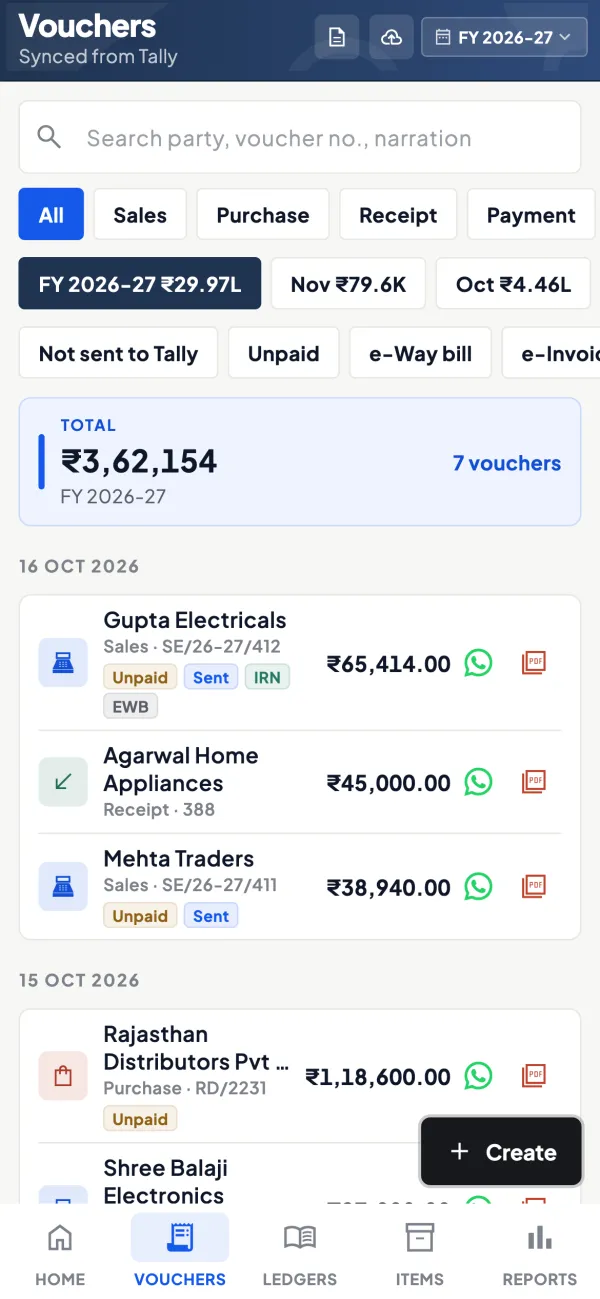
Every voucher, and whether it reached Tally
How it works. The vouchers list shows entries by type, with markers for those not yet sent to Tally and for IRN and e-way bill where your plan includes them.
- Spot an entry still waiting for the connector
- Alter a voucher, or delete one with a reason
- E-invoice and e-way bill on plans that include them
In practiceA payment to 'HDFC OD' is refused because that ledger is named differently in Tally; the accountant picks the right ledger and sends it again.
Masters from the phone too
How it works. Create and alter ledgers, stock items, stock groups and categories, units and cost centres, so a new party or item does not wait for the Tally PC.
- New customer ledger before the first bill
- Items created with the right unit and group
- Fewer refused entries from missing masters
In practiceA new retailer, Jain Provision Store, is added as a ledger from the phone at his counter, and his first order follows five minutes later.

Guide
Vouchers from the phone: the full guide
How it works day to day, who does what, and the points to watch.
Which entries you can make
Cashflow OS can create and alter these voucher types in Tally:
| Group | Voucher types |
|---|---|
| Selling | Sales, sales order, delivery note, credit note |
| Buying | Purchase, purchase order, receipt note, debit note |
| Money | Receipt, payment, contra |
| Adjustments | Journal, stock journal |
It can also create and alter masters: ledgers, stock items, stock groups and categories, units and cost centres. Authorised users can delete a voucher in Tally, with a reason. If you are unsure which voucher type fits a transaction, our guide to Tally voucher types has a plain-language list.
How an entry reaches Tally
Tally is a desktop program; nothing outside it can write into its data directly. Cashflow OS hands the entry to the connector running on the Tally PC, and the connector asks TallyPrime to create it. Tally applies the same checks it applies when someone types the entry at the keyboard: ledgers must exist, dates must be in an open period, stock rules must be met. If Tally refuses, the app shows the reason Tally gave, so you can fix the entry and try again.
This design matters for trust. The books are only ever changed by Tally itself, and what is in Tally is what the synced copy shows afterwards. It also means the connector must be running, with Tally open on that company, for entries to go through.
GST on entries made from the phone
When you add items to a sales or purchase voucher, GST is worked out from the item and the party's state: intra-state supplies get CGST and SGST, inter-state supplies get IGST. For example, a ₹10,000 sale of an item at 18% to a party in your own state gives ₹900 CGST and ₹900 SGST; to a party in another state, ₹1,800 IGST. The rates themselves come from how items are set up in Tally, so keep HSN and rates correct there. Our explainer on IGST vs CGST and SGST covers the rule. This is general information, not tax advice.
Who uses it, and for what
- Owners recording a receipt or payment on the spot, instead of passing a note to the accountant.
- Salespeople booking sales orders from the field; frontline orders can be set to need approval first.
- Accountants passing a journal or a contra from home on the web app.
- Godown staff posting delivery notes, receipt notes and stock journals at the loading bay.
Tips for a safe start
- Read first, write later. Use the reading side for a week or two and get comfortable with the data.
- Switch writing on for one company at a time. The setting is per company.
- Start with simple vouchers: receipts and payments, then sales orders, then invoices.
- Use roles. Give writing work only to people who need it, and keep approval on for frontline staff.
- Keep masters clean. Most refused entries are about a ledger or item that does not exist or is set up differently in Tally.
- Check the Day Book in the evening for a few weeks; see the Day Book explained.
A worked example: a receipt at the customer's shop
A salesperson collects a cheque for ₹75,000 from a retailer who owes ₹1,12,400 across three bills. The owner, who has writing on and has given his accountant the job of receipts, wants it booked the same day. The accountant opens a receipt voucher on the web app, picks the retailer, enters ₹75,000 and sets it against the two oldest bills of ₹48,200 and ₹26,800. The entry goes to the connector, Tally accepts it, and the retailer's outstanding now shows one bill of ₹37,400. If the accountant had picked a bank ledger that does not exist in that company, Tally would have refused and the app would show why.
What it does not do
- It does not write into Tally unless the owner has switched writing on for that company.
- It does not work without the connector running and TallyPrime open on that company.
- It does not bypass Tally's rules; Tally can refuse an entry.
- It does not file GST returns. E-invoices (IRN) and e-way bills for a sales voucher are a separate step, on plans that include them.
This page is general information for Indian businesses, not tax, legal or financial advice. Rules and rates change — check the official portals or your CA before acting.
Set-up
Start using vouchers from the phone in 4 steps
Works on top of your TallyPrime — nothing to migrate, no second set of books.
- 1
Install the Tally Connector on the PC where TallyPrime is open
- 2
Owner switches writing into Tally on for the company
- 3
Give writing work only to those who need it; keep approval on for staff
- 4
Start with receipts and payments, then orders, then invoices
Buyer’s checklist
What to look for in vouchers from the phone software
Whatever you choose, check these before you commit.
- Entries go into Tally itself, not into a second set of books
- Tally's own checks apply, and a refused entry shows the reason
- Writing stays off until the owner chooses to switch it on
- Covers money, selling, buying and stock vouchers, not just sales
- GST worked out from the item and the party's state
- Vouchers can be altered, and deleted with a reason by authorised users only
- Approval step for orders from frontline staff before they reach Tally
- Works from a phone in the field and a browser in the office
Plans
Simple yearly plans
- 14-day free trial on your own books
- 3-year term saves up to 25%
- Premium modules (catalogue, field force, price lists, store…) priced extra
Start free trialGet the price for your business
Compare all plans- Growth₹3,000/year + GSTBooks, reports, outstanding and sharing
- Pro₹5,000/year + GSTEverything in Growth, plus entries into Tally
- Pro+₹7,000/year + GSTEverything in Pro, plus e-invoice and e-way bill
Why Cashflow OS
Why use vouchers from the phone in Cashflow OS
- Tally stays in chargeOnly TallyPrime changes the books, with the same checks as an entry typed at the keyboard.
- The owner's switchWriting is off by default and is switched on company by company.
- 13 voucher types and mastersSales to stock journals, plus ledgers, items, groups, units and cost centres.
- Roles and approvalDecide who can write, and hold frontline orders for approval.
- Phone and webField staff enter on the phone; the accountant works on the web app.
- E-invoice and e-way billOn plans that include them, the IRN and e-way bill are made for a synced sales voucher and written back onto it.