Feature
Collections
When salespeople collect cash, cheques or UPI from customers on their rounds, the owner usually learns about it only when they return to the office. With Cashflow OS, the salesperson records what was collected in the app at the customer's shop, and the owner sees it the same day.
- Recorded at the customer's shop
- Owner sees it the same day
- Pending bills before you knock
- Receipts into Tally when ready
Start free trialBook a free demo
Works with your TallyPrime14-day free trialJaipur team, call +91 70738 53555

Who it’s for
Who uses collections
- Field salespeopleCollect while booking orders on the route
- Collection staffVisit overdue parties with the bills in hand
- DistributorsRetailers paying by cash, cheque or UPI on the round
- Wholesalers with weekly beatsSmall amounts from many shops every week
- Building material dealersContractors paying part amounts against old bills
- Manufacturers with dealer networksDealer payments collected by the sales team
- OwnersThe day's collections by evening, not the next morning
- AccountantsMatch collections to receipts in Tally
Pain → fix
The problems collections solves
What goes wrong without it, and what changes with Cashflow OS.
- The problemOwner hears about collections only at night
Money changed hands at 11 a.m., but nobody in the office knows until the salesman returns.
With Cashflow OSRecorded at the shop, seen the same dayThe salesperson records the amount from the Today screen at the customer's shop, and the owner sees the team's activity.
Staff app - The problemCustomer reminded for money he already paid
The cash is with the salesman while the office still shows the bill as due.
With Cashflow OSRecord first, then a receipt in Tally clears the billThe recorded collection tells the office at once; the receipt voucher in Tally, entered as usual or from the app, updates the books.
Create Tally vouchers from your phone - The problemSalesman doesn't know which bills are pending
'Something is pending' gets a shrug; a named bill and amount gets paid.
With Cashflow OSHis customers' pending bills before the visitBill-wise outstanding with ageing comes from your Tally books, so the collector asks for specific bills.
Outstanding receivables - The problemCash handover counted against a story
At 8 p.m. the cash is counted against whatever the salesman remembers.
With Cashflow OSCount the cash against what was recordedAt the daily cut-off, cash and cheques are matched to the amounts recorded at each shop during the day.
- The problemCustomer disputes the balance in his shop
An argument at the counter helps nobody and the payment waits another week.
With Cashflow OSShare the party statement from the officeSend the statement as a PDF in Tally's format or a simple Hindi हिसाब page on WhatsApp.
Party ledger statements - The problemEvery salesman can see every party's dues
Field staff do not need the company's accounts to collect from their own customers.
With Cashflow OSThe salesperson role shows only his own customersA salesperson sees items and their own customers, not the company's accounts.
Team roles and access
What it does
What you can do with collections
Record at the customer's shop
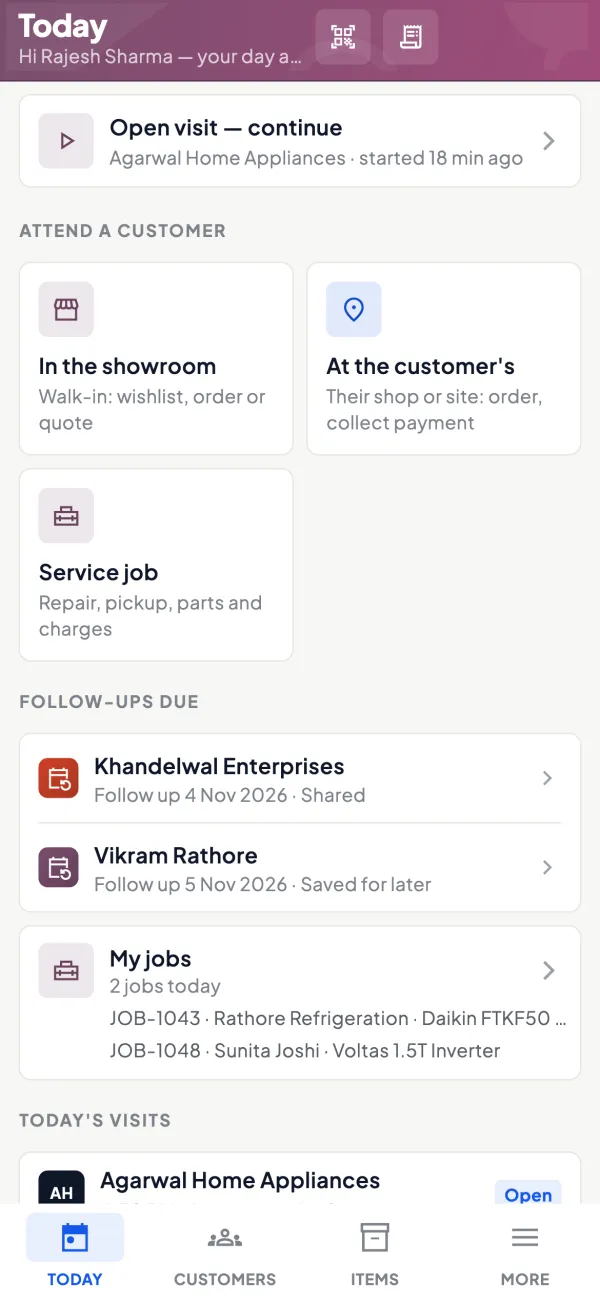
How it works. The salesperson opens the staff app's Today screen, which lists customers to attend, visits and orders, and records what was collected before leaving the shop.
- Recorded when money changes hands, not later
- Works for cash, cheque and UPI amounts alike
- Only the salesperson's own customers appear
In practiceArjun collects ₹18,750 by UPI from Bansal Kirana at 11 a.m. and records it from the Today screen before he walks out.
Know the bills before you knock
How it works. Bill-wise outstanding and ageing from Tally show which of the customer's bills are pending and how old they are, so the ask is specific.
- Ask for named bills, not 'something pending'
- Oldest bills first on the route
- Agree which bills a part payment covers
In practiceBefore visiting Mehta Hardware, the salesperson sees two September bills of ₹12,400 and ₹6,350 and asks for ₹18,750 against both.

Collections alongside the day's visits
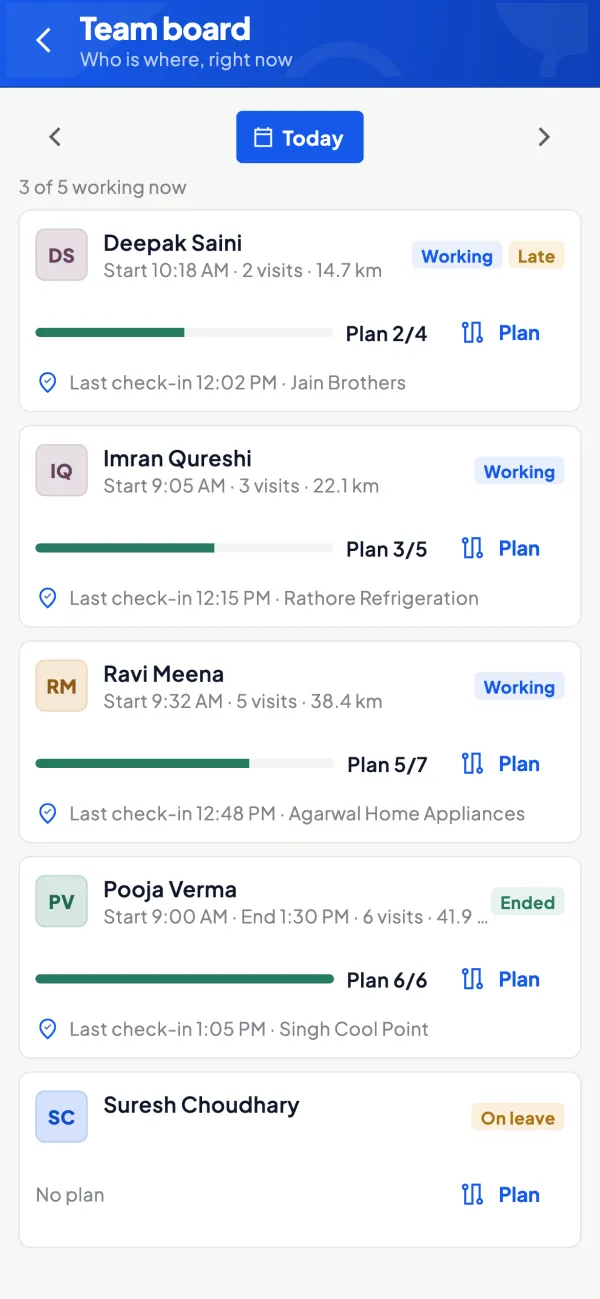
How it works. The owner sees the team's activity, visits and the collections recorded, so the evening review starts from facts.
- Who collected how much, today
- Promised dates noted for follow-up
- Cash handover matched to the record
In practiceBy 6 p.m. the owner sees ₹1,24,500 recorded by four salespeople, and a note that Patel Agencies promised ₹65,000 on Friday.
Receipts in Tally update the books
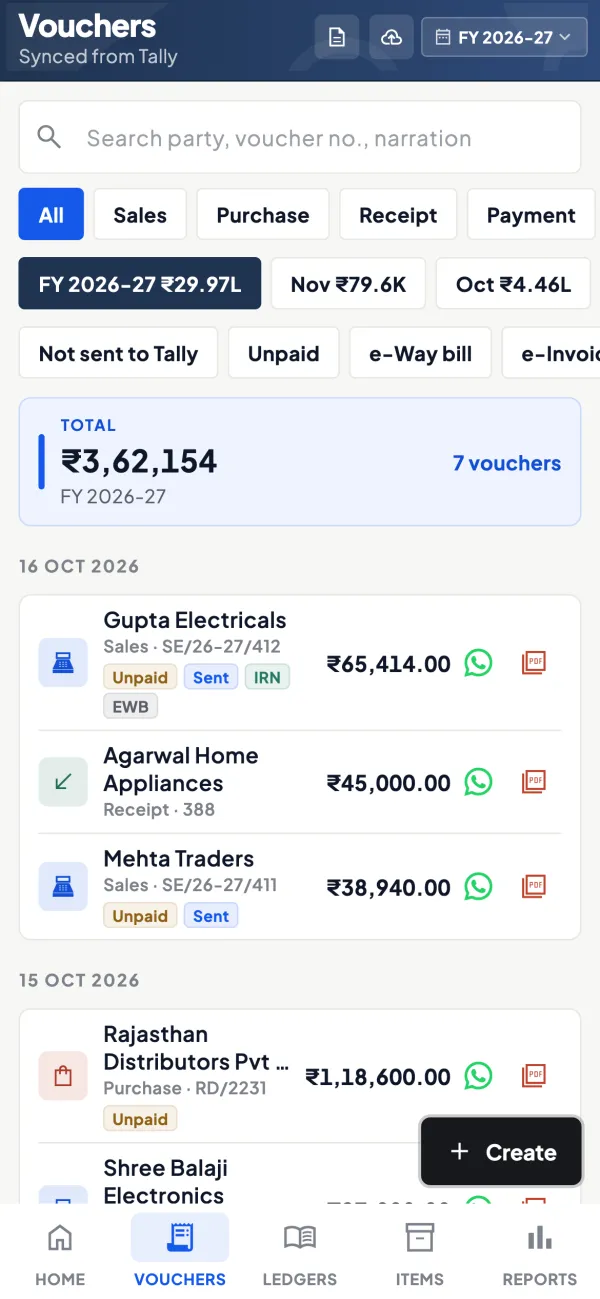
How it works. A recorded collection is not yet a receipt. The accountant enters the receipt in Tally against the right bills, or creates it from the app once writing is switched on.
- Outstanding updates after the receipt syncs
- Bill-wise adjustment keeps statements correct
- You decide who may post receipts
In practiceThe accountant books Shree Ganesh Stores' ₹42,300 cheque against its two oldest bills, and the next statement shows nothing pending.
Disputes settled with a statement
How it works. When a customer questions the balance, the office shares the party statement as a PDF in Tally's format or a Hindi हिसाब page on WhatsApp.
- The salesperson does not argue at the counter
- The customer ticks bills and payments himself
- Payment reminders follow a missed promise
In practiceRaj Traders says he paid ₹9,800 last month. The office sends his statement; he finds the payment was against a different bill and clears the old one.

Guide
Collections: the full guide
How it works day to day, who does what, and the points to watch.
The problem with collections on the road
In distribution, wholesale and dealer businesses, the salesperson is often the collector too. That saves a second trip, but it opens a gap: between the moment money changes hands and the moment it appears in Tally, there is only the salesperson's word and maybe a paper receipt book. The customer believes he has paid. The office believes he still owes. If the gap lasts a few days, the customer gets a reminder for money he already paid, and trust suffers on both sides.
Worse, a gap invites mistakes and occasionally misuse. A collection that is recorded at the moment it happens closes the gap. For the policy side, see credit control policy for distributors.
What the collections feature does
It lets a salesperson record what they collected from a customer, from the staff app's Today screen, which also lists customers to attend, visits and orders. The salesperson role sees items and their own customers, so the collector works only with his own parties. The owner can see the team's activity, including collections recorded.
The record is of what the salesperson collected. Your books stay in TallyPrime, and the receipt voucher in Tally is what changes the party's outstanding. Receipt vouchers can be created from the app when the owner has switched writing into Tally on; how and by whom that is done is your choice.
Who uses it
- Field salespeople who collect while booking orders.
- Dedicated collection staff who visit overdue parties.
- Owners who want to know the day's collections in the evening.
- Accountants who match collections to receipts in Tally.
A worked example
A salesperson has four collection calls today. This is how the day goes:
| Customer | Pending | Collected | How it went |
|---|---|---|---|
| Shree Ganesh Stores | ₹42,300 | ₹42,300 | Cheque |
| Bansal Kirana | ₹18,750 | ₹10,000 | UPI |
| Patel Agencies | ₹65,000 | ₹0 | Promised Friday |
| Raj Traders | ₹9,800 | ₹9,800 | Cash |
He records each amount at the shop. By 6 p.m. the owner sees ₹62,100 recorded across three customers, and the salesperson has told him about Patel Agencies' promise. When the salesperson reaches the office, the cash and cheque are counted against that figure, not against a story. The accountant enters receipts in Tally against the right bills, and the next statement each customer receives is correct.
Good collection habits
- Know the bills before you knock. "₹18,750 from two bills of September" gets paid more often than "something is pending".
- Agree the bills a part payment is against. It avoids disputes when the receipt is entered.
- Record on the spot, not on the way back.
- Hand over cash the same day and match it to what was recorded.
- Send disputes to the office. If the customer disputes a balance, share the party statement from the office instead of arguing in the shop.
Our payment reminder message templates help with polite follow-ups after a missed promise.
Setting it up
Collections sit inside the staff app, so the set-up is the same as for any salesperson. Invite the person with a link, give them the salesperson role and make sure their customers are assigned, so the Today screen shows the right parties. Agree in advance who enters receipts in Tally: some owners want the accountant to do every receipt after counting the cash, others let a trusted senior salesperson create receipt vouchers from the app once writing is switched on. Either works if it is clear. Finally, decide a daily cut-off, for example all cash handed over by 7 p.m., and check what was recorded against what was handed over every day for the first month. Once the habit settles, a weekly check is usually enough.
Fitting it with outstanding
Collections work best alongside the bill-wise receivables view. The salesperson sees which of his customers have bills pending and how old they are; the owner sees the whole list with ageing. Collection targets then come straight from the data: everything over 45 days on this week's route, for example. After receipts are entered in Tally and synced, the outstanding updates and next week's list is shorter.
What it does not do
- It does not collect money from customers or connect to payment apps or bank feeds; it records what a salesperson collected.
- Recording a collection is not the same as a receipt in Tally; the receipt voucher is what updates the books.
- It does not issue official receipts on its own or replace your cash handover process.
This page is general information for Indian businesses, not tax, legal or financial advice. Rules and rates change — check the official portals or your CA before acting.
Set-up
Start using collections in 4 steps
Works on top of your TallyPrime — nothing to migrate, no second set of books.
- 1
Install the Tally Connector so parties and bills sync from TallyPrime
- 2
Invite each collector with a link and the salesperson role
- 3
Assign customers so each Today screen shows the right parties
- 4
Agree who enters receipts in Tally and a daily cash handover cut-off
Buyer’s checklist
What to look for in collections software
Whatever you choose, check these before you commit.
- Collections recorded from the phone at the moment money changes hands
- Collector sees his own customers' pending bills, not the company's accounts
- Owner can see the day's recorded collections without waiting for the office
- A clear line between a recorded collection and a receipt in the books
- Receipts entered against specific bills, so outstanding stays bill-wise
- Party statements shared quickly on WhatsApp when a customer disputes a balance
- Records cash, cheque and UPI amounts alike, however the customer paid
- Fits your accounts in Tally instead of starting a separate cash book
Plans
Simple yearly plans
- 14-day free trial on your own books
- 3-year term saves up to 25%
- Premium modules (catalogue, field force, price lists, store…) priced extra
Start free trialGet the price for your business
Compare all plans- Growth₹3,000/year + GSTBooks, reports, outstanding and sharing
- Pro₹5,000/year + GSTEverything in Growth, plus entries into Tally
- Pro+₹7,000/year + GSTEverything in Pro, plus e-invoice and e-way bill
Why Cashflow OS
Why use collections in Cashflow OS
- Same-day pictureCollections are recorded at the shop, so the owner knows the day's figure by evening.
- Bills in handPending bills and ageing come from your Tally books, so every ask is specific.
- Your books stay in TallyThe receipt voucher in Tally is what changes the outstanding, nothing else.
- Roles that fit field workSalespeople see items and their own customers, not the company's accounts.
- One screen for the dayCustomers to attend, visits, orders and collections sit on the same Today screen.
- Receipts from the app if you wantOnce writing is on, receipts can go into Tally from the app; Tally checks each one.