Feature
Outstanding receivables
Cashflow OS shows what your customers owe, bill by bill, with ageing, from your TallyPrime books. It is the screen that tells you whom to call today, and it fits in your pocket.
- Bill-wise dues with ageing
- Straight from your Tally
- Statement on WhatsApp
- Salesmen see their own parties
Start free trialBook a free demo
Works with your TallyPrime14-day free trialJaipur team, call +91 70738 53555

Who it’s for
Who uses outstanding receivables
- Distributors and stockistsRetailers on 30 to 60 days' credit across many bills
- WholesalersDozens of small parties, each with a running account
- Building material suppliersBuilders and contractors who stretch old bills
- ManufacturersDealers with large balances and scheme adjustments
- OwnersDeciding whom to call and whom to stop supplying
- AccountantsPreparing the week's collection list
- Salesmen on the roadChecking a customer's dues before the visit
- Partners and lenders' meetingsAgeing exported to Excel or PDF
Pain → fix
The problems outstanding receivables solves
What goes wrong without it, and what changes with Cashflow OS.
- The problemOnly a closing balance, not which bill is stuck
₹1,00,000 due could be one fresh bill or five months of unpaid ones.
With Cashflow OSEvery pending bill with its date and ageOpen a party to see bill number, date, amount pending and days outstanding, from Tally's bill-wise details.
- The problemCalling whoever owes the most first
The biggest balance is often current, while a small old bill quietly goes bad.
With Cashflow OSTotals by age bucket, sorted by riskSee how receivables split by age and which parties have bills past your credit period.
- The problemCustomer disputes the balance on the phone
Without the ledger in hand, the call ends with "I'll check and call back".
With Cashflow OSShare the statement on WhatsApp, there and thenThe party's statement goes as a PDF in Tally's format or a Hindi हिसाब page.
Party ledger statements - The problemSalesman visits without knowing the dues
Another order is booked for a party who has not paid for three months.
With Cashflow OSSalesmen see their own customers' duesThe salesperson role shows only their customers, so dues are checked before the order is taken.
Staff app - The problemCash collected but not in Tally
The outstanding overstates and a customer gets a reminder for money already paid.
With Cashflow OSRecord the receipt from the appOnce writing is switched on, a receipt voucher goes into Tally against the right bills from the phone.
Collections - The problemDues report only when the accountant is free
Owners wait for a printout from the Tally PC before deciding anything.
With Cashflow OSExport the list to Excel or PDF anytimeReceivables and ageing export to Excel and PDF for the weekly review or the bank.
Reports in Excel and PDF
What it does
What you can do with outstanding receivables
Ageing at a glance
How it works. The receivables screen shows the total due and how it splits across age buckets, then party by party with the amount due and the oldest bill.
- Risk shown by age, not just by size
- Parties past your credit period stand out
- Matches Tally's bill-wise details after each sync
In practiceOn 1 November, Agarwal Builders shows ₹1,92,000 with the oldest bill at 51 days, so the owner calls before the next delivery.

Bill by bill inside each party
How it works. Open a party to see every pending bill: number, date, amount pending and days outstanding. Talk about the specific bill, not a vague total.
- Spot the one old bill a customer keeps skipping
- Short supply or rate differences come up early
- Same view in the phone app and the web app
In practiceSingh Hardware pays new bills but skips invoice 1187 for ₹22,500; the owner asks about it and a credit note for short supply settles it.

Statement on WhatsApp in seconds
How it works. From the party, share the statement as a PDF in Tally's format or a simple Hindi हिसाब page on WhatsApp, with a polite note asking for payment.
- Every bill and receipt in front of the customer
- Hindi page for shopkeepers who prefer it
- Payment reminders without opening Tally
In practiceBefore lunch on Monday, the accountant sends statements to 18 parties with bills over 45 days, and nine reply with payment dates by evening.
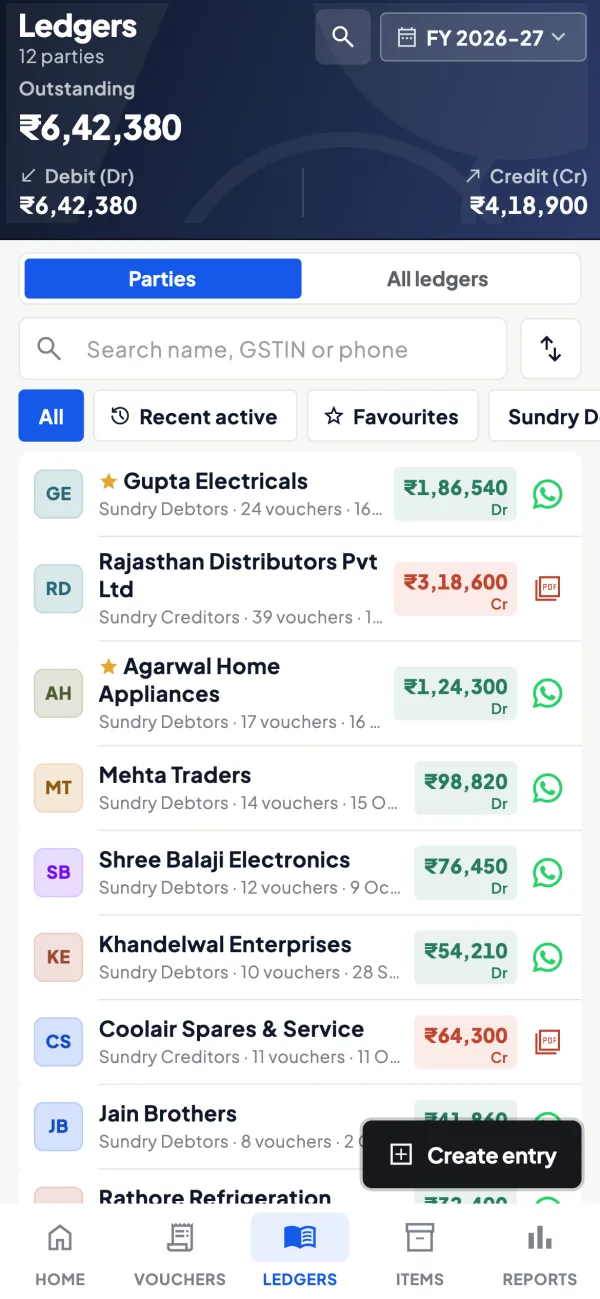
Each salesman's own list
How it works. Salespeople see their own customers' dues, not the company's accounts, so the week's visits start with what each customer owes.
- No more orders booked blind for slow payers
- Collections planned along with the route
- Owner's accounts stay private
In practiceSalesman Pradeep sees that three of his 22 parties have bills past 60 days and plans to visit them first on Tuesday.
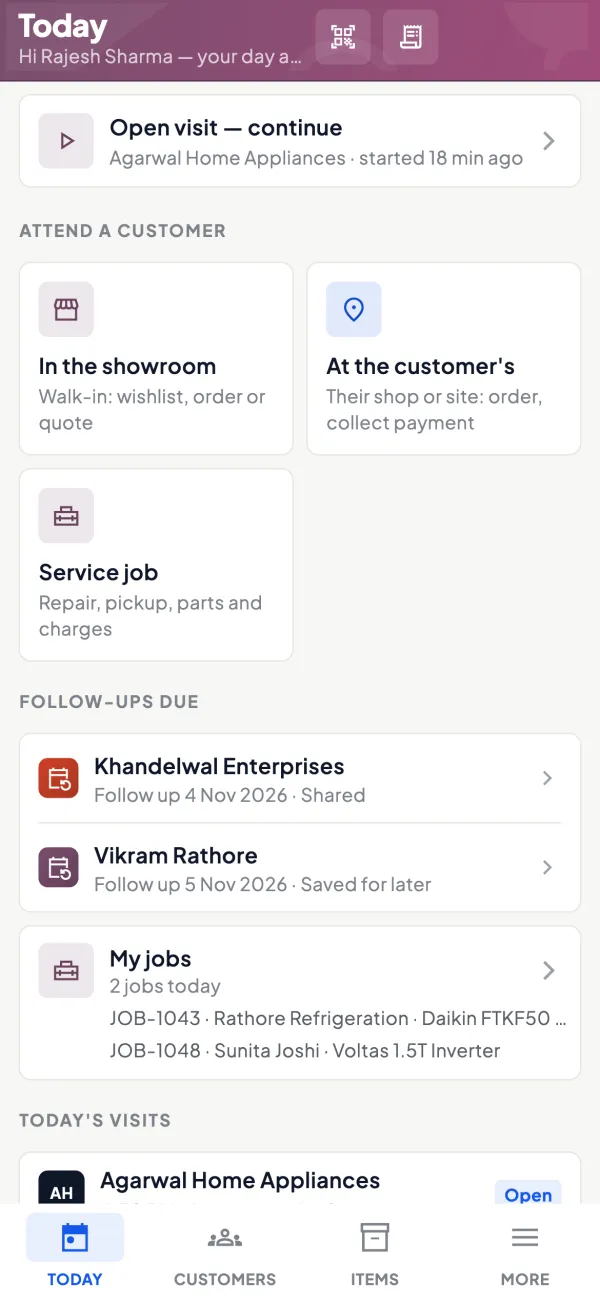
Guide
Outstanding receivables: the full guide
How it works day to day, who does what, and the points to watch.
What you see
- Total receivable and how it splits across age buckets.
- Party by party, the amount due and how old it is.
- Bill by bill within a party: bill number, date, amount pending and days outstanding.
- A direct path to the statement, as a PDF in Tally's format or a Hindi हिसाब page, shared on WhatsApp.
The data comes from Tally's bill-wise details through the connector, so it matches what Tally shows. The same view exists for payables, which shows what you owe suppliers.
Why ageing beats a single balance
Two customers each owe ₹1,00,000. One has a single bill from last week. The other has ₹20,000 from five months ago, ₹30,000 from three months ago and ₹50,000 from this month. The balance is the same; the risk is not. Ageing shows the second customer is paying new bills and leaving old ones, a classic early sign of trouble or of a dispute nobody has raised. Our guide on ageing analysis explains the buckets, and reducing outstanding receivables covers what to do next.
Who uses it
- Owners deciding whom to call and whom to stop supplying.
- Accountants preparing collection lists.
- Salespeople seeing their own customers' dues before a visit; the salesperson role shows only their customers.
- Partners and lenders' meetings, with reports exported to Excel or PDF.
A simple weekly collection routine
- Monday morning, open receivables and sort by age.
- List every party with a bill over your credit period, say 45 days.
- Share each one's statement on WhatsApp with a polite message.
- Give salespeople their list for the week's visits.
- On Friday, check which were paid and who needs a call from the owner.
A worked figure: if monthly sales are ₹25,00,000 and the average customer pays in 60 days, about ₹50,00,000 is outstanding. Bring that to 45 days and roughly ₹12,50,000 comes back into the business, without selling a rupee more. The MSME rule on paying micro and small suppliers within 45 days is a separate legal obligation on the buyer; see the MSME 45-day payment rule. This is general information, not tax or legal advice.
Reading the screen: a worked example
Suppose a building-material supplier gives 30 days of credit and the receivables screen shows this on 1 November:
| Party | Total due | Oldest bill | What it suggests |
|---|---|---|---|
| Mehta Constructions | ₹3,40,000 | 22 days | Large but current; no action |
| Singh Hardware | ₹68,500 | 74 days | Pays new bills, skips the old one; ask about a dispute |
| Agarwal Builders | ₹1,92,000 | 51 days | Slipping; call before the next delivery |
| Khan Traders | ₹14,200 | 130 days | Small but very old; settle or write off with your CA |
The biggest balance is the least worrying. Without ageing, most owners would call Mehta first because the number is largest, and leave the 130-day bill for another month. Ageing turns the list from "who owes most" into "where is the risk". When you open Singh Hardware, the bill-wise view shows which specific bill is stuck, so the conversation can start with that bill number instead of a vague request for payment. Often the answer is a short-supply or a rate difference that can be fixed with a credit note in a few minutes, after which the payment follows.
Tips for accurate outstanding
- Enable bill-wise details for debtor ledgers in Tally and settle receipts against bills, not on account.
- Use the same party ledger for a customer across bills; duplicates split the outstanding.
- Enter receipts the same day. If cash comes in but is not in Tally, the outstanding overstates and customers get the wrong reminder.
- Look at the cashflow forecast report alongside, to see when money is expected.
- Agree credit periods with customers in writing and keep them consistent; ageing is most useful when everyone knows what "overdue" means.
What it does not do
- It does not collect money or connect to bank feeds; it shows what Tally says is due.
- It does not send automatic reminders; you share statements when you choose.
- It does not make up for receipts that are not in Tally; the view is only as current as the books and the last sync.
This page is general information for Indian businesses, not tax, legal or financial advice. Rules and rates change — check the official portals or your CA before acting.
Set-up
Start using outstanding receivables in 4 steps
Works on top of your TallyPrime — nothing to migrate, no second set of books.
- 1
Install the Tally Connector on the PC where TallyPrime is open
- 2
Turn on bill-wise details for debtor ledgers in Tally if not already on
- 3
Sign in, scan the connector's QR and open Receivables
- 4
Invite salespeople with the salesperson role so they see their own parties
Buyer’s checklist
What to look for in outstanding receivables software
Whatever you choose, check these before you commit.
- Bill-wise outstanding, not just a closing balance per party
- Ageing by bucket, so old bills stand out from large current ones
- Figures taken from your accounting books, so they match the ledger
- Party statement shareable on WhatsApp straight from the dues screen
- Role-based access, so salesmen see only their own customers
- Receipts recorded quickly, so the list does not show money already paid
- Export to Excel and PDF for reviews, partners and lenders
- Honest about limits: it shows dues; it does not collect money for you
Plans
Simple yearly plans
- 14-day free trial on your own books
- 3-year term saves up to 25%
- Premium modules (catalogue, field force, price lists, store…) priced extra
Start free trialGet the price for your business
Compare all plans- Growth₹3,000/year + GSTBooks, reports, outstanding and sharing
- Pro₹5,000/year + GSTEverything in Growth, plus entries into Tally
- Pro+₹7,000/year + GSTEverything in Pro, plus e-invoice and e-way bill
Why Cashflow OS
Why use outstanding receivables in Cashflow OS
- From your Tally bill-wise detailsThe dues you see are the dues Tally shows, after each sync.
- Ageing that points to riskSee which bills are old, not just who owes the most.
- Statements in secondsPDF in Tally's format or a Hindi हिसाब page, shared on WhatsApp.
- Right view for each roleSalespeople see their own customers; the accounts stay with the owner.
- Receipts back into TallyRecord receipts from the phone once the owner switches writing on.
- 14-day free trialOpen your own receivables in minutes. Plans from ₹3,000 a year + GST.