Distributors
Cashflow OS for distributors
A distributor lives on three numbers: what was ordered today, what is lying in the godown and how much the market owes. Cashflow OS keeps all three on the phone, read straight from your TallyPrime books, for you and your salesmen.
- Beat orders straight to Tally
- Retailer dues on every phone
- Retailer rates fill themselves
- Stays in your Tally
Start free trialBook a free demo
Works with your TallyPrime14-day free trialJaipur team, call +91 70738 53555

Built for distributors
Who it’s for
- FMCG distributorsDaily beats to kirana and general stores
- Pharma distributorsChemists and nursing homes on tight credit
- Electrical distributorsRetailers, electricians and contractors
- Building materialsCement, steel and tiles to dealers and sites
- Paints and hardwareHardware shops and tinting dealers
- Beverages and dairyRoute sales with daily cash collection
- Mobile and electronicsHigh-value, fast-moving stock to retailers
- Agri inputsSeeds and fertiliser on seasonal credit
Pain → fix
The problems we fix
The everyday headaches of distributors, and what changes when the books are on every phone.
- The problemBeat orders written in a diary and typed again at night
The salesman's handwriting decides what gets billed, and the evening goes in retyping.
With Cashflow OSSalesmen book orders on the phone; they post to TallySales orders with lines and GST go into Tally through the connector once you switch writing on, after your approval if you want it.
See how it works - The problemSalesman doesn't know what the retailer still owes
He books a fresh order from a shop that is 60 days overdue, and the credit only grows.
With Cashflow OSBill-wise dues open on the salesman's phoneEach salesman sees pending bills and ageing for his own retailers before he walks in.
See how it works - The problemScheme and slab rates differ from salesman to salesman
One retailer gets the scheme rate, the next one does not, and both find out.
With Cashflow OSPrice lists by retailer type fill the rateSet types such as A, B and C with layered discount rules; the order picks up the rate you decided.
See how it works - The problemNo proof of which retailers were actually visited
The beat plan says twelve shops; the order book shows four and a story.
With Cashflow OSGPS check-in, notes and photos at each visitSalesmen check in at the outlet with their location, add notes and shelf photos, and the owner sees the visits.
See how it works - The problemRetailers wait a day for a ledger statement
By the time the accountant sends it, the payment conversation has gone cold.
With Cashflow OSStatement PDF or Hindi हिसाब page on WhatsAppShare the party statement in Tally's format or as a simple Hindi page, straight from the phone.
See how it works - The problemCompany claims and credit notes never tally
Scheme credit notes from the principal arrive late, and your ledger drifts from the company's statement.
With Cashflow OSCompany ledger on the phone, exported to ExcelExport the principal's ledger for the month, tick it against their statement and post the missing credit note from the app once writing is on.
See how it works
Features
How Cashflow OS works for distributors
Order booking on the beat
How it works. The salesman opens Today, works through the outlets on his route and books each order at the price-list rate. Orders go to Tally through the connector, after approval if you keep it on.
- No order book to retype in the evening
- Rates come from the price list, not memory
- Approval step for new salesmen if you want it
In practiceRavi covers the Malviya Nagar beat on Tuesdays. He books ₹14,600 for a kirana store at the B-type rate, the owner approves, and the sales order is in Tally before lunch.

Market outstanding, bill by bill
How it works. Bill-wise receivables with ageing come from your Tally books. The owner sees the whole market; each salesman sees only his own retailers.
- Oldest bills show first, so collection starts there
- Same figures as Tally, no separate register
- Works for the owner and the salesman alike
In practiceBefore taking a fresh order from a general store, the salesman sees ₹22,300 pending across three bills, the oldest 52 days old, and asks for ₹10,000 first.

Beat plans and visit records
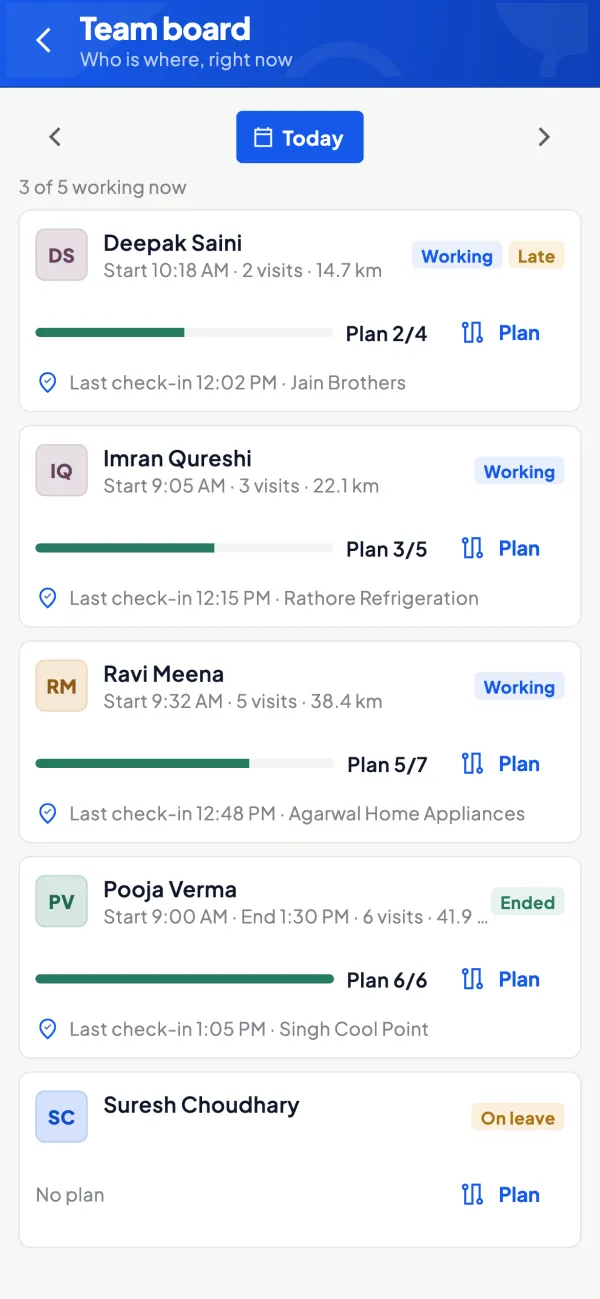
How it works. Mark retailer locations on the map, group them into areas and route plans, and let the app suggest visits. Each check-in records the salesman's location.
- Retailers who haven't been visited in weeks stand out
- Visit notes and photos instead of verbal reports
- A performance view of the whole team
In practiceA new beat for Sanganer is set up with 38 retailers over three days a week; after a month the owner can see which shops were skipped and why.
Statements and reminders on WhatsApp
How it works. Open any retailer's ledger with live balances and share the statement as a PDF in Tally's format, or as a Hindi हिसाब page the shopkeeper can read at a glance.
- Disputes settled with the bill list, not an argument
- English or Hindi, chosen per person
- Payment reminders sent from the same screen
In practiceA chemist says he owes ₹8,000, not ₹11,400. The office sends the statement on WhatsApp in a minute, and the missing ₹3,400 bill is right there with its date.

Sales and stock figures for the company review
How it works. Stock and item summaries, top customers and sales come from your Tally books and export to Excel or PDF for the principal's area manager.
- No need to sit at the Tally PC before the meeting
- Any month, quarter or custom date range
- Same numbers the accountant would pull from Tally
In practiceAhead of the monthly review with the ASM, the owner exports October's sales and the closing stock summary to Excel from the web app in a few minutes.

Know your trade
A guide for distributors
How the business works, where money gets stuck, and the GST points to watch.
How a distribution business actually runs
Most distributors buy from one or a few principal companies, hold stock in a godown and sell on credit to a few hundred retailers and sub-dealers. The day usually looks like this:
- Morning: salesmen leave on their beat, each covering an area or a set of shops on fixed days.
- Through the day: orders come in by phone, WhatsApp or a written order book. Payments are collected as cash, cheque or UPI.
- Evening: orders are punched into Tally, invoices are printed, goods are loaded for next-day delivery.
- Month-end: outstanding is chased, scheme claims are made to the company and the books are tidied for GST.
The weak point is the gap between the market and the Tally PC. Everything the salesman learns has to travel back to the office before it becomes a number anyone can use.
Where the money gets stuck
Distribution margins are thin, so credit control decides whether the year is good. A simple example: if you sell ₹30,00,000 a month and the market takes 45 days on average instead of the 30 you agreed, roughly an extra ₹15,00,000 is sitting with retailers instead of in your bank. That is working capital you are financing, often with a CC limit.
The fix is boring but effective: bill-wise outstanding, an ageing view and a salesman who knows the exact pending bills before he walks into the shop. Our guide on credit control for distributors covers the policy side; the tooling side is about putting the numbers where the conversation happens.
What Cashflow OS does for a distributor
Cashflow OS is a mobile and web app that works on top of TallyPrime. A small Windows connector on your Tally PC keeps a synced copy of the books, so the team sees the same figures Tally shows.
- Outstanding on the phone: bill-wise receivables with ageing, party by party. A salesman can see what a retailer owes before collecting.
- Statements on WhatsApp: send a party statement as a PDF in Tally's format, or a simple Hindi हिसाब page.
- Orders into Tally: salesmen can create sales orders with lines and GST from the field; once the owner switches writing on, the connector posts them into Tally, which validates each entry. Orders from frontline staff can be set to need approval first.
- Price lists: dealer types such as A, B and C with layered discount rules, so the rate a salesman uses is the rate you decided.
Running the field team
With the field force module switched on, you can mark dealer locations, set areas and route plans, and see recommended visits. Salesmen check in at a visit with their location, add notes and photos, and apply for leave in the app. The owner gets a performance view of the team.
The salesperson role matters here: a salesperson sees items and their own customers, not the company's accounts. You can give the whole team the app without opening your Balance Sheet to them. The staff app gives each salesperson a Today screen with customers to attend, visits, orders and collections, and they can record what they collected. For planning the beat itself, see sales beat planning.
A typical day with Tally and Cashflow OS
| Time | Who | What happens |
|---|---|---|
| 9:30 | Salesman | Opens Today, sees the route and customers to attend |
| 11:00 | Salesman | At a shop, checks pending bills, books an order at the dealer's price-list rate |
| 11:05 | Owner or admin | Approves the order if approval is on |
| 11:10 | Connector | Posts the sales order into Tally; a refused entry returns with Tally's reason |
| 18:00 | Owner | Checks today's sales, receipts and cash and bank on the Home screen |
Nothing here replaces Tally. Invoicing, GST and the final books stay in TallyPrime; Cashflow OS removes the retyping and the waiting.
Before you start
- Clean up party names and groups in Tally first. The app shows what Tally has, so duplicate ledgers stay duplicate.
- Use bill-wise details for debtors in Tally, or ageing will be thin. Our note on bill-wise details explains why.
- Decide who approves salesman orders and keep writing into Tally off until you have tested a few entries.
- Map each salesman to his customers so the salesperson view shows the right list.
This page is general information for Indian businesses, not tax, legal or financial advice. Rules and rates change — check the official portals or your CA before acting.
Set-up
Up and running in 4 steps
No new software to learn for your accountant — Tally stays as it is.
- 1
Install the Tally Connector on the PC where TallyPrime runs
- 2
Sign in to the app with your mobile number and scan the connector's QR
- 3
Assign retailers to salesmen and set retailer types in price lists
- 4
Invite salesmen with a link and keep order approval on at first
Buyer’s checklist
What to look for in software for distributors
Whatever you choose, check these before you commit.
- Orders from the beat reach Tally without anyone retyping them
- Salesmen see their own retailers' dues, not the company's accounts
- Retailer and scheme rates set in one place, not in each salesman's head
- Bill-wise outstanding with ageing, party by party
- Visit records with location, so the beat plan can be checked
- Statements a retailer can read on WhatsApp, in English or Hindi
- Works on your existing Tally books, not a second set of accounts
- An approval step before field orders become entries in the books
Plans
Simple yearly plans
- 14-day free trial on your own books
- 3-year term saves up to 25%
- Premium modules (catalogue, field force, price lists, store…) priced extra
Start free trialGet the price for your business
Compare all plans- Growth₹3,000/year + GSTBooks, reports, outstanding and sharing
- Pro₹5,000/year + GSTEverything in Growth, plus entries into Tally
- Pro+₹7,000/year + GSTEverything in Pro, plus e-invoice and e-way bill
Why Cashflow OS
Why distributors choose Cashflow OS
- Built on the Tally you already keepThe connector syncs your TallyPrime books; there is no new accounting software to learn.
- Salesmen see only their retailersThe salesperson role shows items and their own customers, never your margins or bank balances.
- Tally checks every orderEntries go through the connector and Tally validates each one; a refused entry comes back with Tally's reason.
- Rates you decide, applied every timePrice lists with retailer types and layered discounts fill the rate on each order.
- Hindi and EnglishEach salesman picks his own language for the app and reports.
- 14 days free on your own booksTry it on your real Tally data before you pay; switch on modules only when you need them.