Feature
Field force tracking
The field force module records what your salespeople actually do outside the office: which dealer they visited, when they checked in and from where, what they noted and photographed, and when they were on leave. The owner gets a performance view of the whole team, built on the same parties and items as your TallyPrime books.
- Check-in with GPS location
- Visit notes and photos
- Attendance and leave in app
- Team performance for owner
Start free trialBook a free demo
Works with your TallyPrime14-day free trialJaipur team, call +91 70738 53555

Who it’s for
Who uses field force tracking
- Distributors and dealersSalespeople covering retailers and sub-dealers
- ManufacturersSales teams visiting dealers and distributors
- Consumer goods distributorsDaily beats across many small shops
- Building material suppliersVisits to contractors, dealers and sites
- Medical and pharma distributorsChemist and clinic calls on fixed routes
- Service businessesTechnicians going out on calls
- Owners with teams in several townsManage the team without riding along
- Sales managersWeekly reviews with each salesperson from the record
Pain → fix
The problems field force tracking solves
What goes wrong without it, and what changes with Cashflow OS.
- The problem'I visited all twelve shops' — but did he?
A dealer says nobody has come for two weeks, and there is no record to settle it.
With Cashflow OSCheck-in records where the visit happenedWhen the salesperson checks in, the visit records the GPS location, against the dealer's marked place.
Staff app - The problemDealer addresses live only in the salesman's head
When he leaves or goes on leave, the replacement does not know where half the shops are.
With Cashflow OSDealer locations on a map, with areas and routesEach customer becomes a place on the ground, grouped into areas and route plans the team can follow.
Route planning - The problemNo idea what happened at the visit
Was the stock low, was there a complaint, did a competitor's scheme arrive? It is lost by evening.
With Cashflow OSNotes and photos saved on every visitShelf, display, a damaged carton or a signed order slip is photographed and noted against the customer.
- The problemVisits that never turn into orders
The order is noted on paper and typed in two days later, if at all.
With Cashflow OSBook the order during the visit, posted to TallySales orders with lines and GST are made from the visit and go into Tally, with approval if you set it.
Sales orders to Tally - The problemCollections and visits tracked in two places
Visits in one notebook, money in another, and neither reaches the office on time.
With Cashflow OSCollections recorded on the same Today screenThe salesperson's Today screen lists customers to attend, visits, orders and collections together.
Collections - The problemLeave asked for on a phone call, never recorded
At month-end nobody agrees on who was off on which day.
With Cashflow OSAttendance and leave in the appSalespeople mark attendance and apply for leave in the app, so absences are on record for the owner.
What it does
What you can do with field force tracking
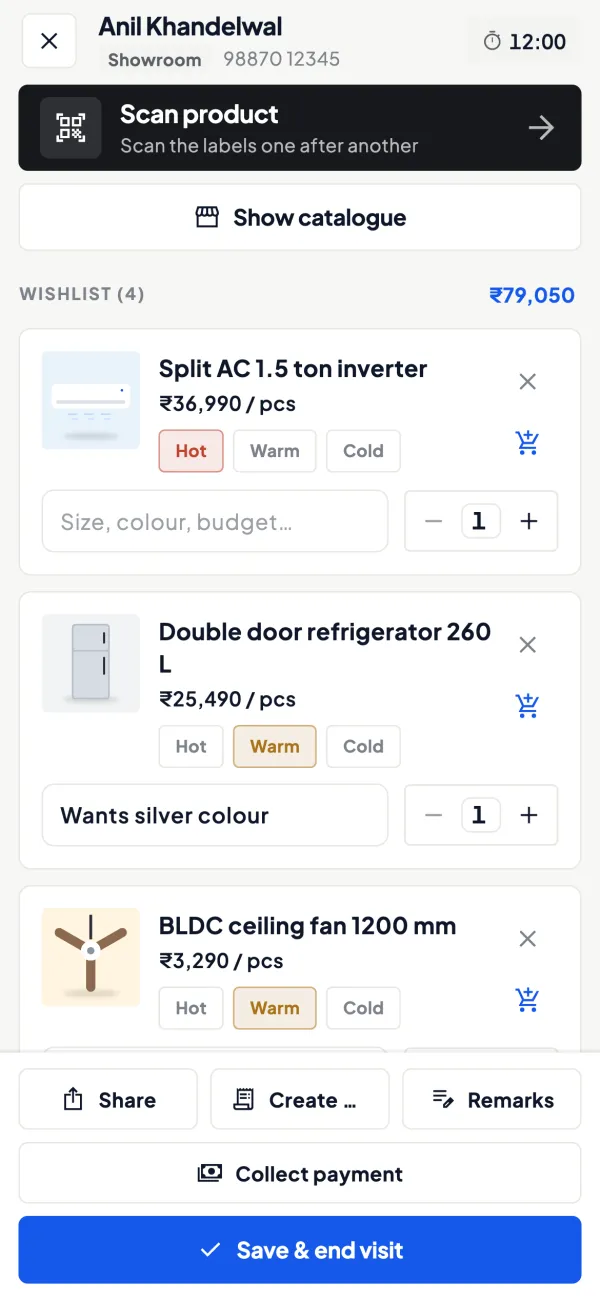
Visit check-in with location, notes and photos
How it works. At the dealer's shop the salesperson checks in; the visit records the GPS location, checked against a geofence around the dealer's marked place. Notes and photos go on the same visit.
- Location at check-in, not all-day tracking
- Photos as evidence: shelf, display, complaint
- Notes in an agreed format for every visit
In practiceSunita checks in at Laxmi Medical in Kota at 11:20 a.m., photographs the empty shelf of a fast-moving syrup and notes 'reorder 20 boxes, payment Friday'.
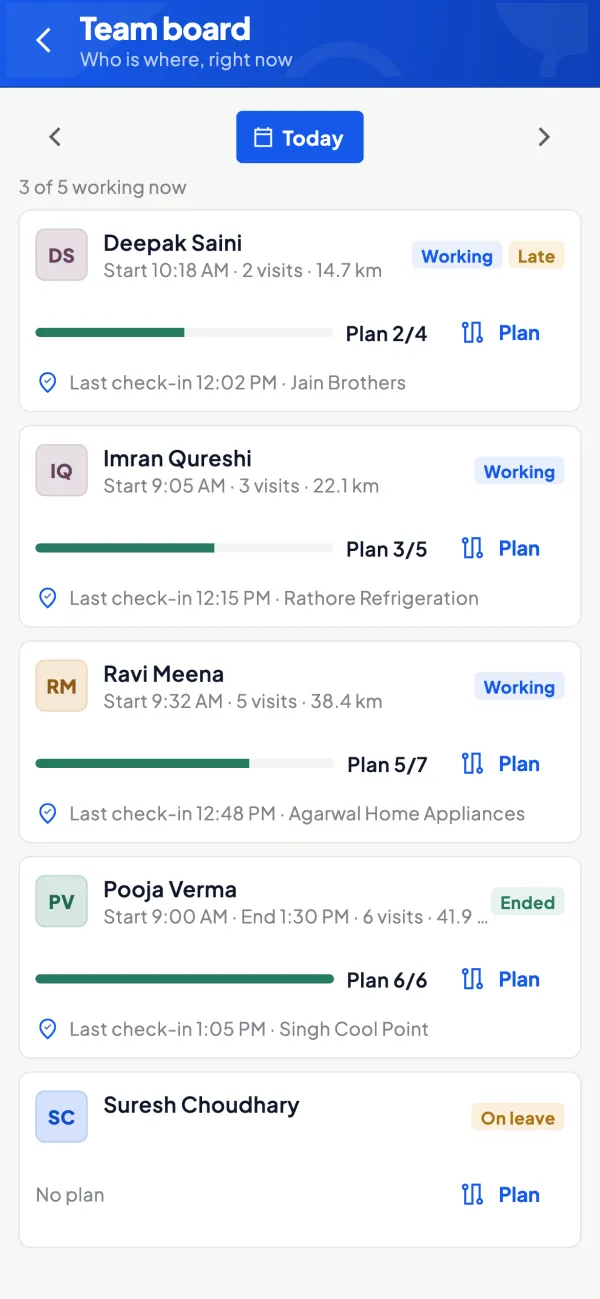
Visits and performance for the owner
How it works. The owner sees the team's visits and a performance view across salespeople, built on the same parties and items as your Tally books.
- Planned visits against actual check-ins
- Orders booked beside visits made
- Weekly reviews based on the record, not memory
In practiceIn one week Rakesh has 46 check-ins of 48 planned and Imran 31 of 48 but higher order value; the review asks why the smaller dealers on Imran's route were skipped.
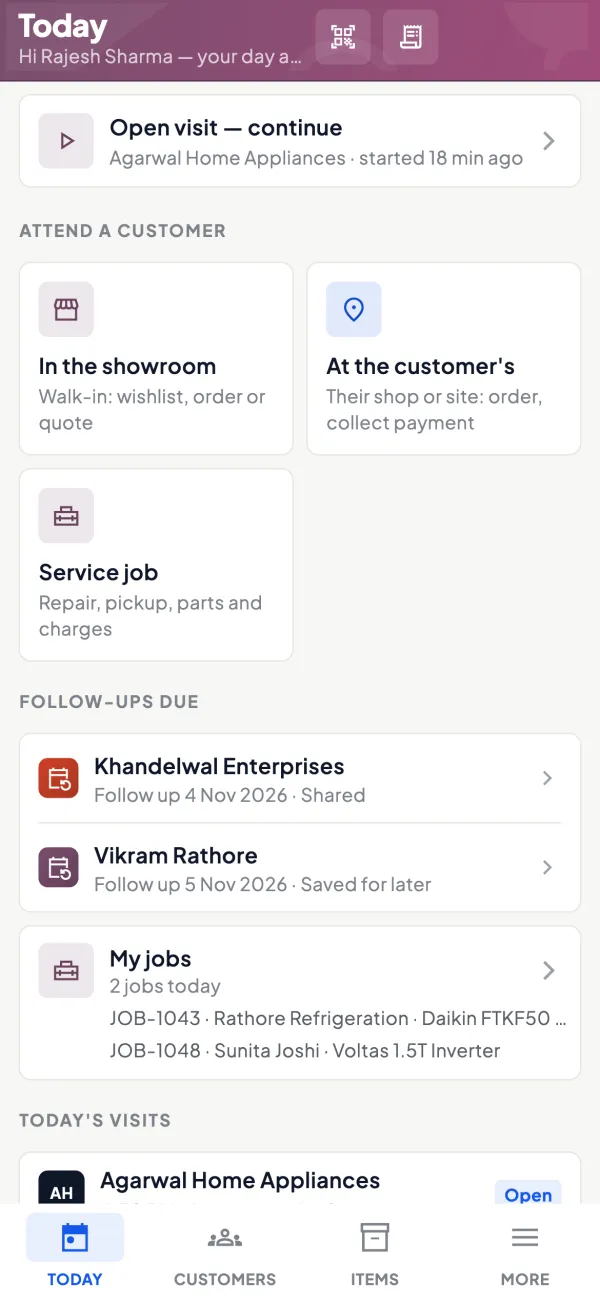
A Today screen for each salesperson
How it works. Each salesperson's day opens with customers to attend, recommended visits, orders and collections, from the areas and route plans you set.
- The day's route without a phone call
- Recommended visits so no dealer is forgotten
- Only their own customers, not your accounts
In practiceOn Tuesday Arif's Today screen lists 14 shops in the Sodala area, with two dealers flagged as recommended visits.
Orders from the visit into Tally
How it works. During the visit the salesperson books a sales order with lines and GST. If approval is on, it waits for the owner or admin, then goes into Tally.
- Orders the same day, not two days later
- Approval for frontline staff if you want it
- The visit and its order stay linked
In practiceAt Gupta Traders, Rakesh books 40 cartons worth ₹68,000; the owner approves it from his phone and it is a sales order in Tally before dispatch planning.

Guide
Field force tracking: the full guide
How it works day to day, who does what, and the points to watch.
The problem it solves
Every owner with a field team has had this conversation: "I visited all twelve shops yesterday", followed by a dealer saying nobody has come for two weeks. Without a record, the owner has to choose between trusting blindly and checking constantly, and neither is good for the team. A visit record settles the question quietly. The salesperson who works hard gets credit for it, and the owner stops spending evenings on the phone verifying routes. Our guide to managing a field sales team covers the people side; this page covers the tool.
What the module records
- Dealer locations, so each customer is a place on the ground and not just a name in Tally.
- Visit check-in with location: when a salesperson checks in, the visit records where they were.
- Visit notes and photos: stock on the shelf, a display, a damaged carton, a competitor's scheme poster, a signed order slip.
- Leave: salespeople apply for leave in the app, so absences are on record.
- Performance view for the owner across the team.
It sits alongside areas, route plans and recommended visits; see route planning for that side.
Location at check-in, not all-day tracking
It is worth being precise about what is recorded. The location is captured when a salesperson checks in at a visit. That is enough to answer the owner's real question, "did the visit happen at the dealer's place?", without following someone through their whole day. Many salespeople accept check-in records far more easily than continuous tracking, and it keeps the conversation about work done rather than about surveillance. Tell the team clearly, before you start, that the location is recorded at check-in and why.
It also helps to agree what counts as a visit. A check-in from the dealer's counter, a note on what was discussed and, where relevant, a photo of the shelf is a visit. A phone call from the road is not, even if it ends in an order. Agreeing this upfront avoids arguments later when you read the performance view together, and it means the numbers mean the same thing for every person on the team.
A worked example: reading a week of visits
| Salesperson | Planned visits | Check-ins | Orders booked | Order value |
|---|---|---|---|---|
| Rakesh | 48 | 46 | 21 | ₹6,80,000 |
| Imran | 48 | 31 | 18 | ₹7,10,000 |
| Sunita | 40 | 39 | 9 | ₹2,40,000 |
Each line tells a different story. Rakesh is disciplined and steady. Imran skips visits but converts well; perhaps he is calling ahead and only going where an order is likely, which may be fine, or may mean smaller dealers are being ignored. Sunita visits faithfully but books little; her notes and photos will show whether the problem is her area, her pitch or stock availability. None of this is visible from sales figures in Tally alone. The guide on measuring salesperson performance suggests fair ways to use such numbers.
Who uses it
- Distributors and dealers with salespeople covering retailers or sub-dealers.
- Manufacturers whose sales team visits dealers and distributors.
- Service businesses with technicians going out on calls.
- Owners who manage a team spread across towns and cannot ride along.
Salespeople use it through the staff app, whose Today screen shows customers to attend, visits, orders and collections.
Tips for a smooth rollout
- Mark dealer locations first, for the customers who matter most, before asking the team to check in.
- Make notes useful. Agree three or four things every note should cover: stock seen, order or no order, payment status, next step.
- Use photos as evidence, not decoration: shelf, display, complaint, signed document.
- Review weekly, in person. Go through the numbers with each salesperson; it builds trust in the record.
- Keep the salesperson role. It shows items and their own customers, not your accounts.
What it does not do
- It does not track salespeople continuously through the day; location is recorded at visit check-in.
- It does not calculate incentives or salaries.
- It does not replace a conversation: the record shows what happened, and the owner still has to manage the team.
- It is a module switched on per company, not part of the basic reading of Tally books.
This page is general information for Indian businesses, not tax, legal or financial advice. Rules and rates change — check the official portals or your CA before acting.
Set-up
Start using field force tracking in 4 steps
Works on top of your TallyPrime — nothing to migrate, no second set of books.
- 1
Switch on the field force module for the company
- 2
Mark dealer locations and set up areas and route plans
- 3
Invite salespeople with a link and the salesperson role
- 4
Tell the team location is recorded at check-in, then start visits
Buyer’s checklist
What to look for in field force tracking software
Whatever you choose, check these before you commit.
- Records location at visit check-in, not continuous all-day tracking
- Dealer locations on a map, from the same customer list as your books
- Visit notes and photos saved against the customer
- Areas and route plans the salesperson sees on the phone
- Attendance and leave recorded in the same app
- A performance view of visits and orders across the team
- Orders booked during a visit that can go into your accounting software
- Salespeople see their own customers, not the company's accounts
Plans
Simple yearly plans
- 14-day free trial on your own books
- 3-year term saves up to 25%
- Premium modules (catalogue, field force, price lists, store…) priced extra
Start free trialGet the price for your business
Compare all plans- Growth₹3,000/year + GSTBooks, reports, outstanding and sharing
- Pro₹5,000/year + GSTEverything in Growth, plus entries into Tally
- Pro+₹7,000/year + GSTEverything in Pro, plus e-invoice and e-way bill
Why Cashflow OS
Why use field force tracking in Cashflow OS
- Built on your Tally partiesDealers on the map are the same parties as in your TallyPrime books.
- Check-in, not surveillanceLocation is recorded when a visit is checked in, which most teams accept.
- Proof with photosNotes and photos on each visit show what the salesperson saw.
- Visit to order to TallyOrders booked on the visit go into Tally, with approval if you want it.
- Roles for field staffSalespeople see items and their own customers, not the company's accounts.
- One app for the dayVisits, orders and collections sit together on the Today screen.