Business software & ERP Business software
Field sales app checklist
Use this checklist when you evaluate a field sales app. Test each point with one of your own salespeople on a normal working day, not in the vendor's office.
- Distributors with salespeople
- FMCG and pharma companies
- Sales managers
- Owners choosing a sales app
- Manufacturers with dealer networks
On this page 12
How to use this checklist
Give the app to one salesperson for a full day on their real beat. Sit with them for the first two hours. Mark each point as works, works with effort, or fails. An app that fails on order booking or rates is not worth considering, however good the reports look. The guide on sales force automation explains the wider idea behind these apps.
The salesperson's day
- Does the app open on a clear list of today's visits or customers?
- Can the salesperson see each customer's last order and outstanding before entering the shop?
- Does check-in capture location quickly, without several screens?
- Can a visit be recorded even when no order is taken, with a reason?
- Are notes and photos easy to add?
- Can the salesperson add a new customer met on the route, pending approval?
- Does the app work in Hindi or the language your team prefers?
Order booking
- Is the item list searchable by name, brand and code, with photos?
- Do rates fill automatically for this customer's price list or dealer type?
- Is GST calculated correctly by item and the customer's state?
- Can the salesperson see stock before promising?
- Can a ten-line order be booked in under three minutes?
- Can the salesperson change a rate, and if so, does it need approval?
- Can a past order be repeated with edits?
Collections and credit
- Can cash, cheque and UPI collections be recorded against the customer?
- Does the office see collections the same day?
- Are orders from customers over their credit limit flagged or held?
- Can the salesperson share a statement with the customer on WhatsApp?
Owner and manager controls
- Can each salesperson see only their own customers, not the company's accounts?
- Is there an approval step for orders, discounts or new customers?
- Can the owner see visits, orders and collections per salesperson for any day?
- Are route plans or beats easy to set and change?
- Is leave recorded in the same app?
- Can the owner see who used the app and when?
Connection to the books
- Do approved orders reach your accounting software without retyping?
- Is outstanding in the app the same as in the books, and how fresh is it?
- Are items, parties and rates read from your books, or kept separately?
- Can you export all visit, order and collection data?
Practical points and scoring
- How does the app behave with weak mobile signal? Does a half-booked order survive?
- Does it run smoothly on the cheapest phone your team uses, without draining the battery?
Point 29 deserves real testing. Many beats include markets with poor signal. If an order is lost when the connection drops, salespeople will go back to the diary.
Weight the sections by what hurts you most. For most distributors, order booking and connection to the books carry the most weight, followed by collections. If two apps score close, choose the one your salesperson preferred after the test day; adoption decides success more than features.
Write the scores down and share them with the salesperson who tested. If they disagree with a mark, find out why; they may have found a workaround or a problem you missed. Ask the vendor to answer every fail in writing, with a date if they promise a fix.
How Cashflow OS fits the list
For businesses on TallyPrime, Cashflow OS covers many of these points: a staff app with a "Today" screen, visit check-in with location, notes and photos, route plans and recommended visits, sales orders with lines and GST using price lists, collections, approval for frontline orders, and posting to Tally. Salespeople see items and their own customers only, and the app works in English and Hindi. Test it against this list during the 14-day trial. See the staff app.
Avoid these
Common mistakes
- MistakeChoosing from the vendor's demo aloneDo this instead
Give the app to one salesperson for a full day on their real beat and mark each point works, works with effort or fails.
- MistakeJudging by reports instead of order bookingDo this instead
If booking or rates fail, reject the app however good the dashboards look.
- MistakeIgnoring weak-signal behaviourDo this instead
Ask exactly what happens without signal and test it in the markets on your beat.
- MistakeForgetting to remove access when someone leavesDo this instead
Remove app access the same day a salesperson leaves, especially on personal phones.
Keep handy
Checklist
Field sales app checklist — 8 checks. Tick them as you go.
In Cashflow OS
How Cashflow OS helps
Cashflow OS puts your TallyPrime books on every phone in the team. Where it fits this topic:
A Today screen for salespeople
The staff app shows customers to attend, visits, orders and collections; visits check in with GPS location, notes and photos, and route plans suggest who to visit.
See Staff app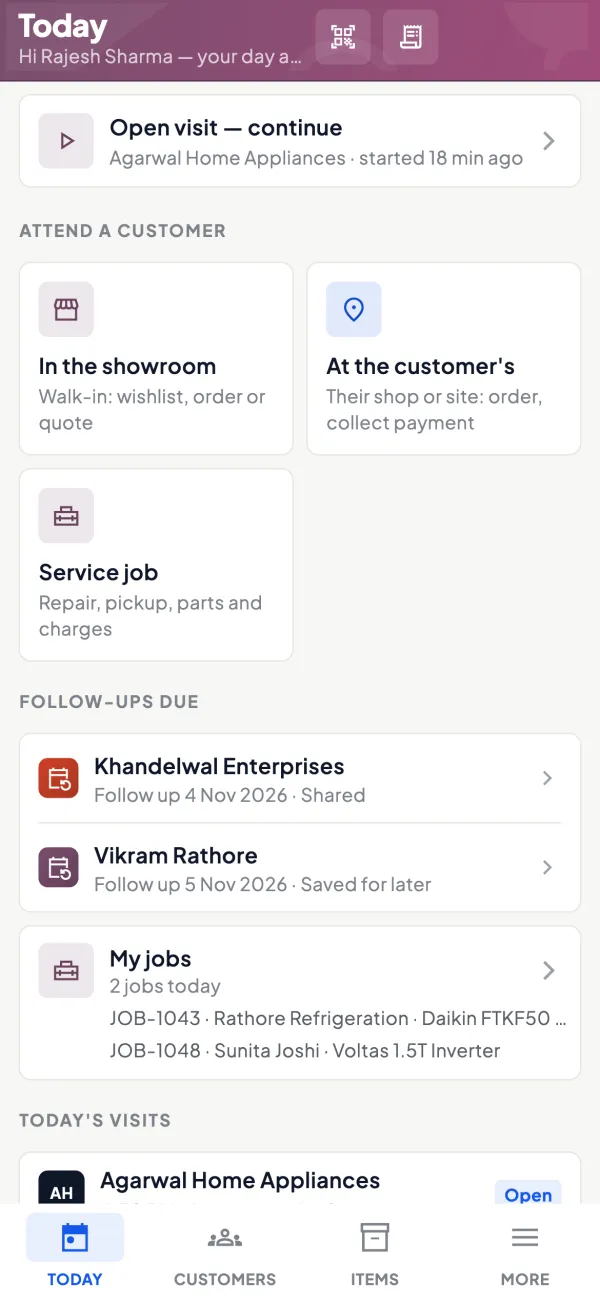
Orders with price lists, posted to Tally
Sales orders carry lines and GST with price list rates, can need approval for frontline staff, and post to Tally.
See Sales orders to Tally
Questions people ask
How many salespeople should test an app?
Should the app work without internet?
What does a field sales app cost to run beyond the subscription?
Should salespeople use their own phones?
Can one app serve both salespeople and the owner?
Is location tracking necessary?
How should I weight the checklist sections?
What if two apps score about the same?
This page is general information for Indian businesses, not tax, legal or financial advice. Rules and rates change — check the official portals or your CA before acting.