Feature
Sales orders to Tally
An order taken on paper or WhatsApp has to be typed into Tally again, and that is where mistakes and delays creep in. In Cashflow OS a sales order is made once, from a visit, a wishlist or the counter, with lines and GST, and posted into TallyPrime through the connector.
- Order once, no retyping
- Dealer rates fill themselves
- GST worked out per party
- Approval before Tally
Start free trialBook a free demo
Works with your TallyPrime14-day free trialJaipur team, call +91 70738 53555

Who it’s for
Who uses sales orders to Tally
- Distributors and wholesalersRetailer orders from the beat, posted the same day
- Manufacturers selling to dealersDealer orders against price lists and credit terms
- ShowroomsA customer's wishlist turned into an order when they decide
- Field salespeopleBook the order at the shop instead of in an order book
- Counter and phone-order staffRegular buyers' orders keyed in on the phone or web app
- Owners and sales managersApprove frontline orders with the party's dues in view
- Billing and dispatch teamsPending sales orders in Tally, ready to bill and pack
- Trade counters for contractorsSite material lists that become orders in one step
Pain → fix
The problems sales orders to Tally solves
What goes wrong without it, and what changes with Cashflow OS.
- The problemOrders retyped from a WhatsApp photo
Smudged order-book pages are keyed in late, and a 12 becomes a 21.
With Cashflow OSBook once on the phone, post it into TallyThe order is made once with lines and GST, and the connector posts it into TallyPrime as a sales order.
Create Tally vouchers from your phone - The problemSalesman quotes the wrong rate to a dealer
A B-type dealer gets the A-type discount, and the margin goes with it.
With Cashflow OSThe dealer's price list fills the rateWith price lists on, dealer types and layered discount rules fill the rate for that customer automatically.
Price lists - The problemOrders reach the office a day late
The godown only sees what was booked once the evening calls are done.
With Cashflow OSApproved orders go straight into TallyAs soon as an order is approved, the connector posts it, so pending orders in Tally show what was booked.
Staff app - The problemOrders booked for parties far past their credit
Goods go out to a dealer whose oldest bill is already four months old.
With Cashflow OSApprove with the party's dues on the same phoneFrontline orders can need approval, and bill-wise outstanding is one tap away for the approver.
Outstanding receivables - The problemShowroom shortlist re-entered as an order
The family agreed on the wishlist, and then someone types it again for billing.
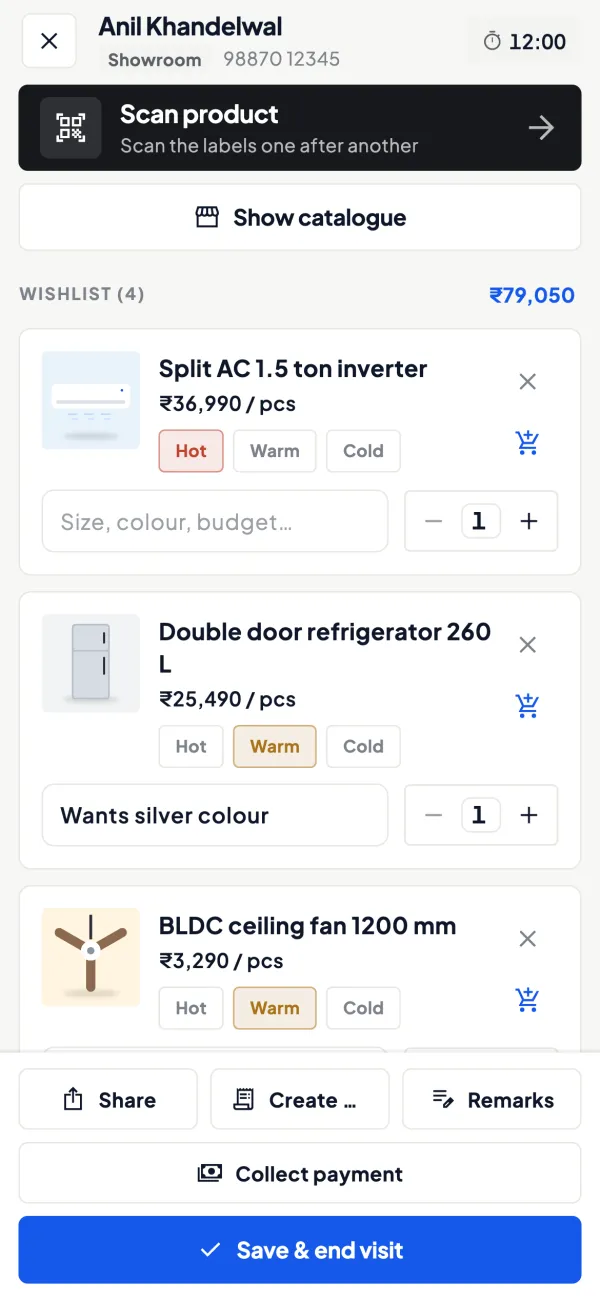
With Cashflow OSConvert the wishlist into the sales orderItems, quantities and notes from the wishlist become the order lines, with GST worked out.
Wishlists - The problemQuotation agreed, but the order is typed fresh
Rates and quantities from the quotation get changed on the way into Tally.
With Cashflow OSThe quotation converts into a sales orderA quotation from the documents module converts into a Tally sales order or straight into a sales invoice.
Quotations
What it does
What you can do with sales orders to Tally
Book the order with lines and GST
How it works. Pick the party, add items and quantities, and the rate comes from the customer's price list if one is set. GST is worked out from the item and the party's state, using HSN and rates from your Tally item masters.
- CGST and SGST or IGST chosen by the party's state
- Rates from the dealer's price list
- Items and HSN from your Tally masters
In practice20 units at ₹1,250 for a dealer in Rajasthan, with 18% GST, give ₹25,000 taxable plus CGST ₹2,250 and SGST ₹2,250: ₹29,500 in all.

Orders from a visit at the dealer's shop
How it works. In the field, the salesperson checks in at the dealer, sees what the dealer owes, and books the order during the visit. Notes for anything that is not part of the order stay on the visit.
- Dues checked before the order is taken
- Order and visit notes kept together
- No order book to carry back to the office
In practiceAt Verma Stores, Deepak sees ₹22,400 pending for 38 days, mentions it, and then books 12 lines worth ₹48,600 at the B-type rate.
Orders from an agreed quotation
How it works. Make a quotation with your letterhead, logo and bank details, share it as a PDF, and when the customer agrees, convert it into a Tally sales order or a sales invoice.
- The agreed rates carry into the order
- Choose a sales order or a direct invoice
- PDF on WhatsApp before anything is posted
In practiceA hospital accepts a quotation for 60 ceiling fans at ₹2,150 each. The office converts it into a sales order and the godown starts packing.

Approval, then Tally's own check
How it works. Orders from frontline staff can be set to need approval. The approver checks the party's bill-wise dues, approves, and the connector posts the order; Tally validates it and sends back its reason if it refuses.
- A senior eye on new parties and big quantities
- Bill-wise dues visible while approving
- Refused entries come back with Tally's reason
In practiceThe owner gets Deepak's ₹48,600 order on his phone, sees the dealer's dues are within 45 days, and approves it in under a minute.

Guide
Sales orders to Tally: the full guide
How it works day to day, who does what, and the points to watch.
Why sales orders are worth recording properly
A sales order is the promise between booking and billing. Distributors, manufacturers and showrooms use it to know what has been committed before stock is dispatched. When orders live on paper, three things go wrong: they are retyped with errors, they are retyped late, and nobody can see pending orders against stock. Tally has good sales order processing; see sales order processing in Tally. The missing piece is getting the order into Tally from where it is taken.
Where an order can start
- A field visit: the salesperson checks in at the dealer's shop and books the order there.
- A wishlist: in a showroom, the items a customer liked, with quantities and notes, become the order when the customer decides.
- A quotation: a quotation from the documents module converts into a sales order or a Tally sales invoice.
- Directly: from the counter or the office, on the phone or the web app.
In each case the order carries lines and GST and is posted to Tally as a sales order voucher.
Rates and GST on the order
If the price lists module is on, dealer types such as A, B and C with layered discount rules fill the rate for that customer, so the salesperson does not guess. GST is worked out from the item and the party's state. For example, 20 units at ₹1,250 for a dealer in your state, with 18% GST on the item, gives a taxable value of ₹25,000, CGST ₹2,250 and SGST ₹2,250, a total of ₹29,500. The same order for a dealer in another state shows IGST ₹4,500 instead. Rates and HSN come from your Tally item masters, so keep those correct. This is general information, not tax advice.
Approval for frontline orders
Orders from frontline staff can be set to need approval before they go to Tally. That gives the owner or a manager a moment to check a new customer, an unusual quantity or a dealer who is well past his credit period. A practical rule many owners use: approve automatically in your head anything routine, and look closely at orders from customers with bills over 60 days. Bill-wise outstanding is on the same phone, so the check takes seconds.
A worked example: from shop counter to Tally
| Step | Who | What happens |
|---|---|---|
| 1 | Salesperson | At Verma Stores, sees ₹22,400 pending from 38 days ago |
| 2 | Salesperson | Books 12 lines worth ₹48,600 before GST at the B-type rate |
| 3 | Owner | Gets it for approval, sees the dues are within terms, approves |
| 4 | Connector | Posts the sales order into Tally |
| 5 | Billing clerk | Sees the order in Tally and prepares dispatch and invoice |
If an item in the order did not exist in that Tally company, Tally would refuse the entry and the app would show Tally's reason, so it can be corrected and resent.
Tips
- Set up price lists before the first order. Wrong rates are the most common complaint about field orders.
- Map salespeople to their customers. The salesperson role sees items and their own customers.
- Keep approval on for the first few weeks.
- Check pending orders in Tally daily so that booked orders turn into dispatches. See sales order vs purchase order if your team mixes them up.
- Use visit notes for anything that does not belong in the order: a complaint, a competitor's scheme, a request.
- Agree a cut-off time. Orders approved before, say, 4 pm are dispatched next morning; later ones the day after. A clear rule stops salespeople promising what the godown cannot deliver.
A final point: once orders arrive in Tally the same hour they are taken, the pending sales orders report in Tally becomes a real picture of committed demand. Comparing it with stock each morning tells the purchase team what to reorder before an item runs out, instead of after a dealer complains.
What it does not do
- It does not post to Tally until the owner switches writing on, and only while the connector is running with Tally open.
- It does not bypass Tally's validation.
- It does not dispatch goods; billing and dispatch follow your usual process. An e-way bill, if needed, is made later against the Tally sales invoice.
This page is general information for Indian businesses, not tax, legal or financial advice. Rules and rates change — check the official portals or your CA before acting.
Set-up
Start using sales orders to Tally in 4 steps
Works on top of your TallyPrime — nothing to migrate, no second set of books.
- 1
Owner switches writing into Tally on for the company
- 2
Set up price lists and map each salesperson to their customers
- 3
Turn on approval for orders from frontline staff
- 4
Book the first few orders and check they arrive in Tally
Buyer’s checklist
What to look for in sales orders to Tally software
Whatever you choose, check these before you commit.
- Orders posted into Tally as sales orders, not kept in a separate system
- Rates that follow each dealer's price list or discount slab
- GST worked out from the item and the party's state
- An approval step for orders from new or frontline staff
- The customer's dues visible while the order is taken or approved
- Orders that can start from a visit, a quotation or a showroom shortlist
- Tally's own validation, with the reason shown if an entry is refused
- Salespeople limited to items and their own customers
Plans
Simple yearly plans
- 14-day free trial on your own books
- 3-year term saves up to 25%
- Premium modules (catalogue, field force, price lists, store…) priced extra
Start free trialGet the price for your business
Compare all plans- Growth₹3,000/year + GSTBooks, reports, outstanding and sharing
- Pro₹5,000/year + GSTEverything in Growth, plus entries into Tally
- Pro+₹7,000/year + GSTEverything in Pro, plus e-invoice and e-way bill
Why Cashflow OS
Why use sales orders to Tally in Cashflow OS
- Into your own TallyOrders land in TallyPrime as sales orders, where billing and dispatch already happen.
- Right rate for each dealerPrice lists with dealer types and layered discounts fill the rate automatically.
- GST worked outTax follows the item and the party's state, from your Tally masters.
- Approval when you want itFrontline orders can wait for an owner or manager before they reach Tally.
- Many starting pointsA field visit, a wishlist, a quotation or the counter all lead to the same order.
- Tally checks every entryNothing bypasses Tally's validation; a refused order comes back with the reason.