Feature
Wishlists
A wishlist is the shortlist a customer leaves with: the items they liked, how many, what they said about them, and how serious they seemed. Cashflow OS keeps it against the customer, sends it to them on WhatsApp, and turns it into a sales order in Tally when they are ready.
- A shortlist that goes home
- Hot, warm or cold interest
- Shared on WhatsApp
- One step to a Tally order
Start free trialBook a free demo
Works with your TallyPrime14-day free trialJaipur team, call +91 70738 53555

Who it’s for
Who uses wishlists
- Furniture showroomsSofa sets and dining tables shortlisted with the family
- Electronics and appliance storesA new flat's TV, ACs and fridge, bought after the loan
- Tile and sanitaryware showroomsDesigns per room, decided with the architect
- Lighting showroomsFittings for every room, listed before the final call
- Jewellery storesPieces shortlisted ahead of a wedding
- Distributors' salespeopleNew lines a retailer wants to try, noted on the visit
- Hardware trade countersFittings per floor for a contractor's site
- Institutional suppliersLists a school or office circulates before a purchase order
Pain → fix
The problems wishlists solves
What goes wrong without it, and what changes with Cashflow OS.
- The problemCustomer leaves with only a visiting card
By evening the family is comparing your showroom with two others from memory.
With Cashflow OSA WhatsApp shortlist with items and quantitiesThe wishlist reaches the customer's WhatsApp with the exact items, quantities and the names you gave them.
Item photos and display names - The problemNobody knows which buyers are serious
Every customer gets the same follow-up, so the ready ones get too little.
With Cashflow OSMark interest as hot, warm or coldAn interest level on each wishlist tells staff who to call within a day and who can wait.
Staff app - The problemNext visit, a new salesperson starts over
The shortlist lived in one person's phone, and that person is off today.
With Cashflow OSThe wishlist is kept against the customerAnyone who looks the customer up by mobile number later sees the same wishlist.
Showroom walk-ins - The problemThe agreed list is retyped as an order
Items or quantities change between the floor and the billing desk.
With Cashflow OSConvert the wishlist into a sales orderThe wishlist becomes a sales order with lines and GST, posted to Tally once writing is on.
Sales orders to Tally - The problemNotes like 'interested' that mean nothing
Two weeks later, nobody knows the colour, the budget or who decides.
With Cashflow OSNotes for colour, size, budget and who decidesEach wishlist carries notes in the customer's words, so the next conversation starts from facts.
- The problemBuyer wants a formal price before deciding
A chat message is not enough for an office or a builder to approve.
With Cashflow OSSend a branded quotation as a PDFMake a quotation from the documents module with your letterhead and bank details when a list is not enough.
Quotations
What it does
What you can do with wishlists
Items with photos and friendly names
How it works. Wishlists use your Tally items, with the photos and display names you have added, so the list makes sense to a customer reading it at home.
- Photos instead of item codes
- Display names beside the Tally name
- Same items, rates and GST as your Tally
In practiceInstead of 'AC-INV-15-5S', the Bansals see '1.5 ton inverter split AC, 5 star' with a photo in their WhatsApp.

Kept against the customer
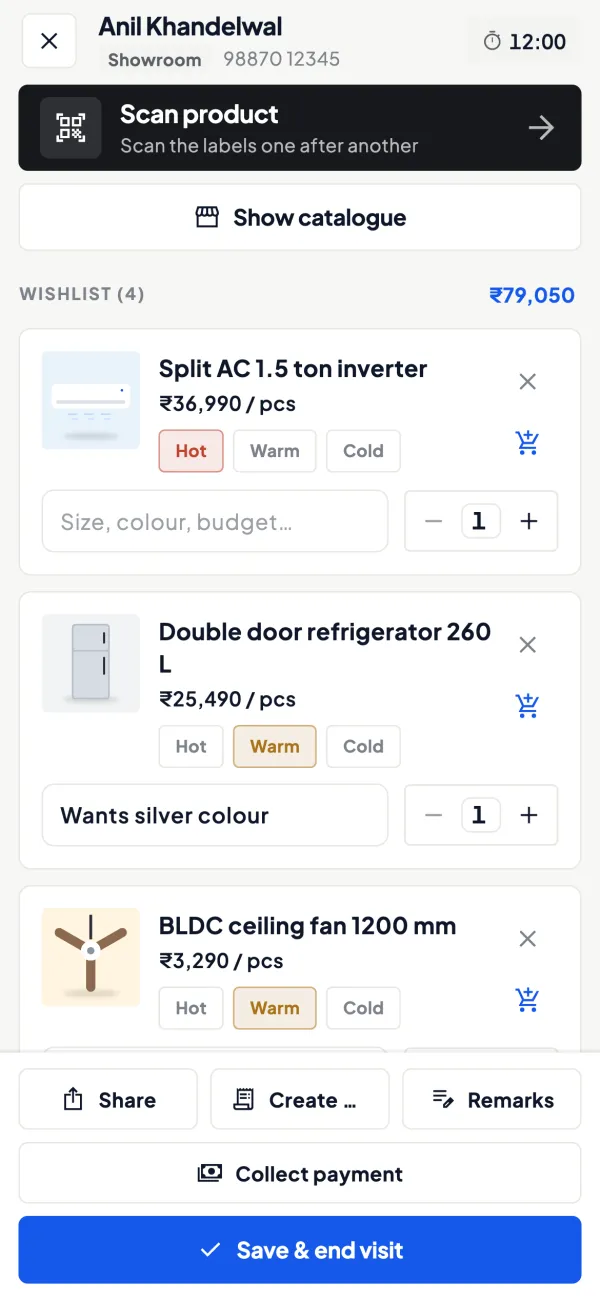
How it works. Look the customer up by mobile number or start a new visit, then add items with quantity, notes and an interest level. The wishlist stays with the customer for the next visit.
- Any staff member can pick it up
- Hot, warm or cold on every list
- Notes in the customer's own words
In practiceWishlist for the Bansals: 55-inch TV ₹58,000, two split ACs at ₹38,500, fridge ₹42,000. Note: 'possession on 15th, buying after loan'. Marked hot.
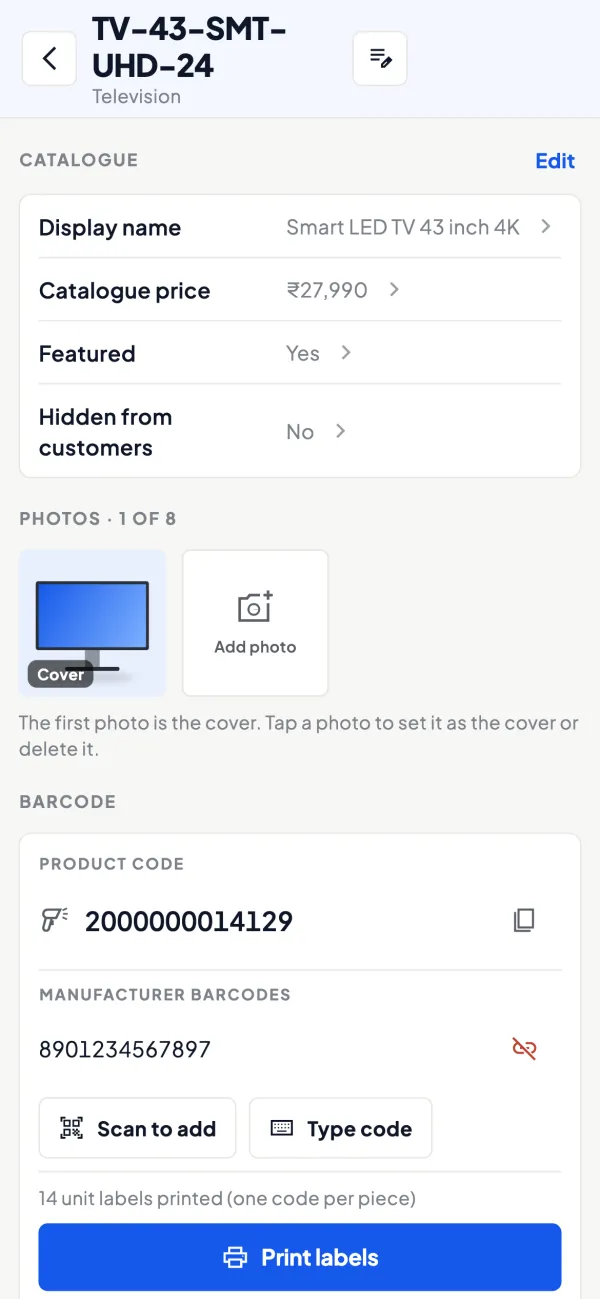
Add items by scanning the label
How it works. If items carry barcodes, staff scan them with the phone camera to add them to the wishlist. Everything else is found by search.
- Right model among look-alikes
- Quicker on a busy floor
- Works with labels you print yourself
In practiceIn a tile showroom, Sunita scans four wall designs off the display boards into the Rathores' bathroom wishlist.
Convert into a sales order
How it works. When the customer decides, change items or quantities if needed and convert the wishlist into a sales order with lines and GST. It is posted to Tally through the connector once the owner has switched writing on.
- No retyping between floor and billing
- GST from the items and the party's state
- Edits allowed right up to conversion
In practiceTen days later the loan comes through. The salesperson swaps the fridge model, converts the ₹1,77,000 wishlist into a sales order, and it reaches Tally.

Guide
Wishlists: the full guide
How it works day to day, who does what, and the points to watch.
Why a wishlist sells
Customers who leave a showroom or a dealer's counter without buying are not lost; most are deciding. What they carry away decides whether they come back. A visiting card is forgotten. A WhatsApp message with the exact items, photos, friendly names and quantities stays in the family group, gets discussed at dinner and gets forwarded to the person who controls the budget. The wishlist does the selling while the salesperson is with the next customer. Our guide on wishlist selling in showrooms goes deeper into the technique.
What a wishlist holds
- Items from your Tally item list, with photos and display names if you have added them.
- Quantity for each item.
- Notes: colour, size, finish, budget, who else needs to see it.
- Interest level: hot, warm or cold.
It is kept against the customer, so anyone who looks the customer up later sees it. When the customer is ready, the wishlist becomes a sales order with lines and GST, which is posted to Tally through the connector once the owner has switched writing on.
Using hot, warm and cold properly
| Level | What it should mean | Follow-up |
|---|---|---|
| Hot | Has chosen, waiting on money, a date or one person's approval | Call within a day or two |
| Warm | Shortlisted, still comparing | Message within the week, with something new: a photo, an alternative, stock confirmation |
| Cold | Browsing, early stage, or price far apart | Keep the record; contact only when there is a real reason |
The levels only help if staff use them honestly. Agree the definitions at a team meeting and check a few wishlists every week.
A worked example
A couple at an electronics store look at appliances for a new flat. The salesperson builds a wishlist: one 55-inch TV at ₹58,000, two 1.5-ton split ACs at ₹38,500 each, and a refrigerator at ₹42,000, totalling ₹1,77,000. Note: "Possession on 15th, will buy after loan disbursal". Marked hot. The wishlist goes to both of them on WhatsApp.
Ten days later the husband messages: "Loan done, please confirm AC installation date". The salesperson opens the wishlist, adjusts the fridge to a different model the wife preferred, and converts it into a sales order. The order goes to Tally with GST worked out from the items and the party's state. Nothing was retyped, and the order reflects exactly what was discussed.
Wishlists beyond the showroom floor
Wishlists are not only for families buying furniture. They work wherever a buyer shortlists now and decides later:
- Retailers trying new lines: a distributor's salesperson notes the six new products a shopkeeper is curious about, marks him warm, and shares the list so he can check with his customers.
- Contractors planning a site: a hardware counter records the fittings for each floor of a building, with quantities, and the contractor forwards the list to the builder for approval.
- Institutions: a school or office buying furniture or electronics needs a list to circulate internally before a purchase order is issued.
In each case the value is the same: the customer has a clean list from you, in their WhatsApp, with your name on it, and when the decision comes, the order is one conversion away instead of a fresh round of phone calls and retyping. If the buyer wants a formal document before deciding, make a quotation from the documents module instead and share it as a PDF.
Who uses it
- Showrooms of every kind, alongside walk-in records.
- Dealers and distributors whose salespeople note what a retailer wants to try.
- Trade counters where contractors shortlist material for a site.
Tips
- Add photos and display names to items before you rely on wishlists; a code like "AC-INV-15-5S" means nothing to a customer.
- Share before the customer leaves the counter, and confirm it arrived.
- Write notes you would want to read in two weeks. "Interested" is useless; "wants white, under ₹40,000, decides with father" is gold.
- Clean up old wishlists monthly so the hot list stays meaningful.
What it does not do
- It does not reserve stock in Tally; a wishlist is not a sales order until you convert it.
- It does not send automatic reminders to customers.
- It does not post anything to Tally until writing is switched on and the connector is running.
- It is part of the selling modules switched on per company.
This page is general information for Indian businesses, not tax, legal or financial advice. Rules and rates change — check the official portals or your CA before acting.
Set-up
Start using wishlists in 4 steps
Works on top of your TallyPrime — nothing to migrate, no second set of books.
- 1
Switch on the selling modules for the company
- 2
Add photos and display names to the items customers see
- 3
Agree with your team what hot, warm and cold mean
- 4
Share every wishlist on WhatsApp before the customer leaves
Buyer’s checklist
What to look for in wishlists software
Whatever you choose, check these before you commit.
- Wishlists kept against the customer, not in one salesperson's phone
- Quantity and notes on each item, not just a list of names
- An interest level the team can use to plan follow-ups
- Sharing the customer can open without installing an app
- Photos and friendly names, so the list makes sense at home
- Changes allowed until the customer decides
- Conversion into a sales order without retyping lines
- No stock blocked in the books until there is a real order
Plans
Simple yearly plans
- 14-day free trial on your own books
- 3-year term saves up to 25%
- Premium modules (catalogue, field force, price lists, store…) priced extra
Start free trialGet the price for your business
Compare all plans- Growth₹3,000/year + GSTBooks, reports, outstanding and sharing
- Pro₹5,000/year + GSTEverything in Growth, plus entries into Tally
- Pro+₹7,000/year + GSTEverything in Pro, plus e-invoice and e-way bill
Why Cashflow OS
Why use wishlists in Cashflow OS
- Built on your Tally itemsItems, rates and GST come from TallyPrime, with your own photos and display names.
- Sells while you are busyA clean list on the family's WhatsApp keeps the conversation going at home.
- One step to an orderA decided wishlist converts into a sales order with lines and GST.
- Anyone can pick it upThe list stays with the customer's mobile number, not one salesperson.
- Honest prioritiesHot, warm and cold tell the team where follow-up time is best spent.
- English or HindiEach salesperson uses the app in the language they are comfortable with.