
Running the business Showroom sales
Wishlist selling in showrooms
A wishlist is a saved list of the items a customer liked during a visit, with quantities and notes. It turns a vague "we'll think about it" into a concrete record you can share, follow up and convert into an order later.
- Tile and sanitaryware showrooms
- Furniture and lighting stores
- Appliance dealers
- Jewellers
- Showroom sales staff
On this page 12
Why wishlists work for considered purchases
Tiles, sanitaryware, furniture, lighting, appliances and jewellery are bought after several visits and family discussion. The customer forgets exact designs; your staff forget what was discussed. A wishlist keeps both sides on the same page:
- The customer gets photos, codes and rates to show at home.
- Your staff know exactly what to follow up on and when.
- When the customer returns, anyone at the counter can pick up where the last person left off.
What a good wishlist contains
| Field | Example |
|---|---|
| Customer | Anita Desai, 98XXXXXX21, Vastrapur |
| Items and quantity | Wall tile 300×600 ivory, 28 boxes; floor tile 600×600 grey, 40 boxes |
| Notes | Kitchen and two bathrooms; prefers matt; contractor visiting Saturday |
| Interest level | Warm |
| Need date | Mid-January |
| Attended by | Rahul |
Keep it short. If staff need more than a minute to create a wishlist, they will skip it on busy days, and the busy days are exactly when you most need the record.
Interest levels and what to do
- Hot: likely to buy within a week or two. Call within a day; offer to hold stock; send a quotation.
- Warm: serious but not urgent. Share the wishlist on WhatsApp; follow up weekly and near the need date.
- Cold: browsing. Share the wishlist; send new arrivals in the same style monthly.
Update the level after each contact. A cold lead who replies asking about delivery has just become hot.
From wishlist to order
- Customer confirms items; adjust quantities after site measurement.
- Convert the wishlist into a quotation or directly into a sales order with rates and GST.
- Take an advance and confirm the delivery date.
- Raise the invoice on dispatch.
Track two numbers each month: how many wishlists were created and how many became orders within 60 days. That ratio tells you whether the follow-up is working. For the follow-up calendar, see showroom customer follow-up.
Using wishlists beyond one customer
Wishlists also tell you about demand. Look across all of them once a month:
- Most-wished items that are often out of stock deserve higher reorder levels.
- Items wished for but rarely bought may be priced too high, or the photos or display oversell them.
- Need dates clustered in a period (wedding season, a new housing project) tell you when to stock up.
- Contractors and architects who appear on several wishlists are worth a relationship of their own.
Because wishlists record interest before the sale, they are an early signal that your sales figures will only show weeks later. See reorder levels and safety stock for turning demand into stock levels.
Common mistakes with wishlists
- Recording only the item, not the quantity or the room, so the follow-up cannot be specific.
- Leaving every wishlist as "warm" because nobody updates the interest level.
- Sharing a list with codes the customer cannot understand; use display names and photos.
- Not closing wishlists after a sale, so staff keep following up a customer who has already bought.
Wishlists in Cashflow OS
Cashflow OS has wishlists built into its showroom tools. Staff record items with quantity, notes and interest level (hot, warm or cold) against the customer's mobile number, share the wishlist on WhatsApp, and later create a sales order from it with lines and GST, posted to TallyPrime. Items come from Tally with photos and your own display names. See wishlists and item photos.
Avoid these
Common mistakes
- MistakeRecording only the item, not quantity or roomDo this instead
Note quantity, room and need date so the follow-up can be specific.
- MistakeEvery wishlist left as warmDo this instead
Update the interest level after each contact; a cold lead asking about delivery is now hot.
- MistakeSharing item codes customers cannot readDo this instead
Share display names and photos the customer and contractor can understand.
- MistakeWishlists not closed after a saleDo this instead
Close the wishlist when the customer buys or says no, so staff stop chasing.
Keep handy
Checklist
Wishlist selling in showrooms — 7 checks. Tick them as you go.
In Cashflow OS
How Cashflow OS helps
Cashflow OS puts your TallyPrime books on every phone in the team. Where it fits this topic:
Wishlists against the customer's number
Staff record items with quantity, notes and hot, warm or cold interest against the customer's mobile number and share the wishlist on WhatsApp.
See Wishlists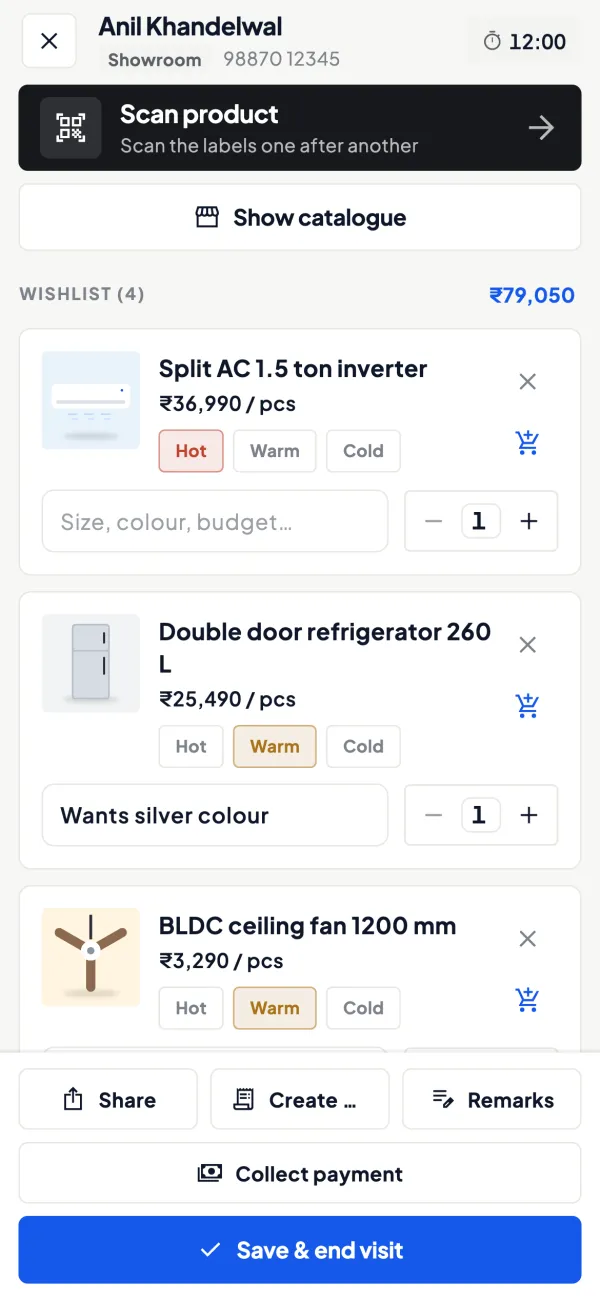
From wishlist to Tally order
Create a sales order from the wishlist with lines and GST, posted to TallyPrime; items show with photos and your own display names.
See Sales orders to Tally
Questions people ask
Is a wishlist the same as a quotation?
Should prices be shown on a shared wishlist?
How long should wishlists be kept?
Who should create the wishlist?
How do wishlists help with stock planning?
Should the contractor or architect get the wishlist?
Can a walk-in customer be looked up later?
What should a hot lead get?
This page is general information for Indian businesses, not tax, legal or financial advice. Rules and rates change — check the official portals or your CA before acting.


