
Running the business Showroom sales
Converting walk-in customers
Walk-in conversion improves when staff ask the right questions, show fewer but better-matched options, give a clear written quote, and follow up. Measure it as orders divided by walk-ins, and work on it every week.
- Showroom owners
- Retail shop owners
- Counter and floor staff
- Tile, sanitary and furniture showrooms
- Electronics and appliance stores
On this page 12
Measure it first
Conversion rate = orders ÷ walk-ins, over a week or a month.
If 240 customers walked in last month and 36 placed an order, conversion is 15%. Count orders within, say, 60 days of the visit, because many customers return later. You cannot count walk-ins if nobody records them, so recording the mobile number and requirement at every visit is the first step.
Why it matters: with an average order of ₹45,000, moving from 15% to 18% conversion on 240 walk-ins is about 7 more orders, around ₹3,15,000 more sales a month, without spending more on getting people through the door.
The first two minutes
- Greet within a minute, even if you are busy: "Namaste, I'll be with you in two minutes."
- Ask what brought them in before showing anything.
- Note their name and mobile early, naturally: "Let me note your number so I can send you photos and rates."
Questions that find the real need
- What is it for? (Which room, which use, new house or replacement?)
- When do you need it?
- What budget range do you have in mind?
- Who else is deciding? (Spouse, parents, contractor, architect?)
- What have you seen elsewhere that you liked or did not like?
The answers decide what to show. Showing 30 designs confuses; showing 4 that match the answers helps the customer decide.
Make the offer clear
- Give a written quotation with item, quantity, rate, GST, delivery and validity. A customer who walks out with a clear quote on WhatsApp is more likely to come back than one who has prices only in memory. See quotation format and best practices.
- Show the total including delivery and installation if relevant, so there are no surprises.
- If the decision-maker is not present, send photos and the quote to share with them.
Closing without pressure
- Ask directly: "Shall I book this for you?"
- Offer a small, real reason to decide now if you have one: stock held for a few days, a delivery slot, a running offer with an end date.
- Take a token advance to confirm the order and stock.
- If they are not ready, record the interest level and the next follow-up date before they leave.
Why customers leave without buying, and what to fix
| Reason | What to try |
|---|---|
| Just comparing prices | Quote clearly; follow up with value points, not just discounts |
| Decision-maker absent | Send photos and quote; invite them for a second visit |
| Not in stock | Give a firm delivery date; offer a close alternative |
| Not ready yet | Record need date; follow up near it |
| Poor attention at the counter | Staff schedule for peak hours; greet every walk-in |
Ask lost customers what made them choose elsewhere and note it. Patterns tell you what to fix. Our showroom follow-up guide has message templates.
Setting up the showroom floor for conversion
- Display complete solutions. A bathroom set-up with tiles, fittings and lighting helps the customer imagine the result better than separate racks.
- Price tags or quick codes. Customers who must ask for every price feel pressure and leave. Clear codes let staff find rates and stock quickly.
- A seating corner. Families decide together; a place to sit and look through options on a tablet or catalogue keeps them in the showroom longer.
- Stock information at hand. "Available today" or "10 days" should be answerable in seconds.
- Staff at peak hours. Weekends and evenings need more people on the floor; schedule leave and godown work for slower times.
Small changes here are cheap compared with advertising to bring more people in.
Tracking walk-ins with Cashflow OS
The Cashflow OS showroom module lets staff look up a customer by mobile number, see past visits and wishlists, and record what they liked with quantity, notes and interest level. Quotations go out as PDF on WhatsApp with your logo and details, and a wishlist or visit becomes a sales order posted to TallyPrime. See showroom walk-ins and quotations.
Avoid these
Common mistakes
- MistakeNot recording walk-ins who did not buyDo this instead
Note the mobile number and requirement of every visitor; you cannot measure or follow up what you did not record.
- MistakeShowing 30 designs to every customerDo this instead
Ask about use, timing, budget and who decides, then show four or five options that fit.
- MistakeQuoting prices only by word of mouthDo this instead
Send a written quote with item, quantity, rate, GST, delivery and validity on WhatsApp.
- MistakeUsing discounts as the only closing toolDo this instead
Make the total price, delivery and service clear first; keep discounts within set limits.
Keep handy
Checklist
Converting walk-in customers — 8 checks. Tick them as you go.
In Cashflow OS
How Cashflow OS helps
Cashflow OS puts your TallyPrime books on every phone in the team. Where it fits this topic:
Customer lookup by mobile number
Staff find a walk-in by mobile number, see past visits and wishlists, and record what they liked with quantity, notes and interest level.
See Showroom walk-ins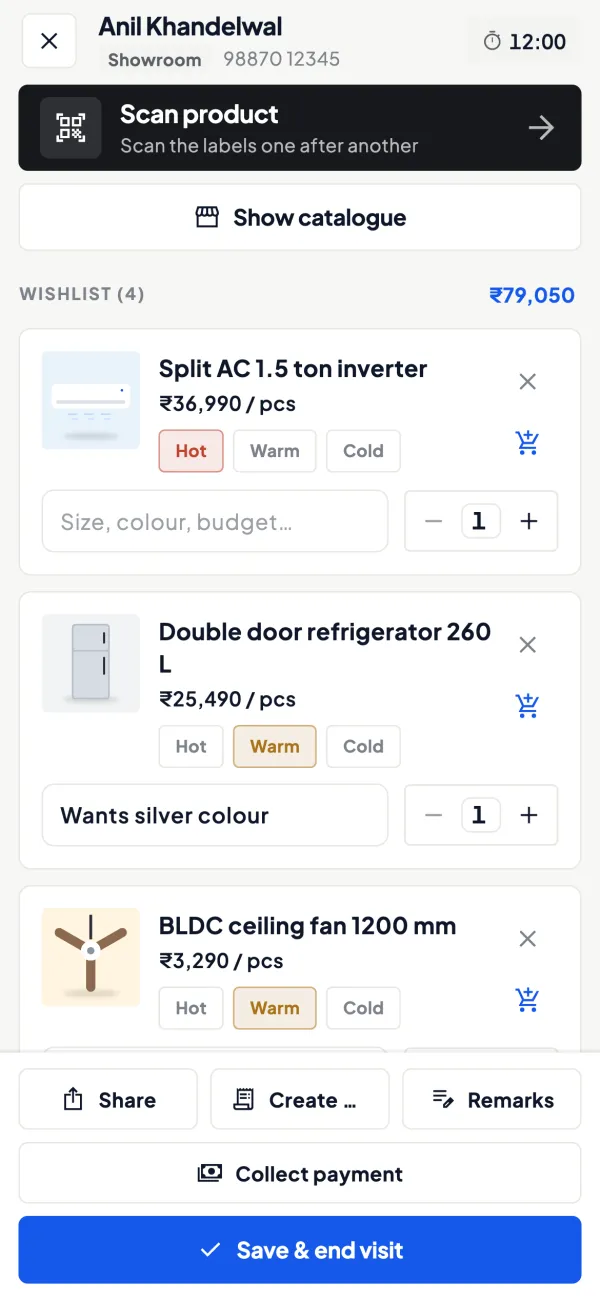
Quotes and orders from the floor
Send a quotation as a PDF on WhatsApp with your logo, and turn a wishlist or visit into a sales order posted to TallyPrime.
See Quotations
Questions people ask
What is a good conversion rate for a showroom?
Should I give a discount to close a walk-in?
How do I count walk-ins accurately?
Does a token advance really help conversion?
How long should I wait before following up a walk-in?
Should every salesperson have a conversion target?
What should a follow-up message say?
How do I win back customers who chose elsewhere?
This page is general information for Indian businesses, not tax, legal or financial advice. Rules and rates change — check the official portals or your CA before acting.


