Feature
GST reports from your Tally data
Cashflow OS prepares GSTR-1 and GSTR-3B views from the data in your TallyPrime books and lets you download the JSON for the GST portal. GSTR-1 tiles open into bill-wise and HSN-wise detail, so you can check before you file. Filing itself is done on the GST portal.
- GSTR-1 and GSTR-3B views
- JSON for the GST portal
- Bill-wise and HSN-wise detail
- Built from your Tally data
Start free trialBook a free demo
Works with your TallyPrime14-day free trialJaipur team, call +91 70738 53555

Who it’s for
Who uses GST reports
- In-house accountantsMonthly or quarterly returns prepared and checked
- CA firmsReviewing a client's data with the accountant role
- OwnersThe tax picture before the accountant files
- Traders and distributorsMany B2B bills, GSTINs and states checked before filing
- ManufacturersHSN-wise summaries across a long item list
- RetailersB2C sales reviewed tile by tile
- Businesses with several Tally companiesEach company's returns from one account
Pain → fix
The problems GST reports solves
What goes wrong without it, and what changes with Cashflow OS.
- The problemA B2B bill entered without the buyer's GSTIN
It falls into B2C, and the buyer cannot claim the credit.
With Cashflow OSTap the tile to see the bills behind each figureGSTR-1 tiles open into bill-wise detail, so a short count shows up before you file.
- The problemA wrong HSN on one item among hundreds
One odd code sits in the summary and nobody notices until a notice arrives.
With Cashflow OSHSN-wise summary that shows the odd codeOpen the HSN-wise view, spot the code nobody recognises, and fix the item in Tally.
- The problemCGST and SGST charged on an inter-state sale
The party's state was wrong, so the tax split was wrong on every bill.
With Cashflow OSGST worked out from the party's state on new entriesVouchers made from the app work out GST from the item and the party's state.
Create Tally vouchers from your phone - The problemThe accountant needs the Tally PC to prepare returns
Return work and billing fight over one desk in the first week of the month.
With Cashflow OSReview on the web app while billing continuesThe GST views read the synced data, so the review runs in a browser while Tally keeps billing.
Tally on the web - The problemThe CA asks for data every single month
Exports, emails and follow-ups before every due date.
With Cashflow OSInvite your CA with the accountant roleRoles are set per company, so your CA opens the GST views directly.
Team roles and access - The problemSeveral GSTINs in several Tally companies
Each return means opening a different company on a different PC.
With Cashflow OSSwitch company and review each returnSeveral Tally companies sit in one account, each with its own GSTR-1 and GSTR-3B views.
Multiple Tally companies in one account
What it does
What you can do with GST reports
GSTR-1 tiles that open into the bills
How it works. Pick the return period and the GSTR-1 view lays your Tally data out by section. Tap a tile to see the bills behind the figure.
- Counts checked against the sales register
- Missing GSTINs found before filing
- Credit notes checked for the right month
In practiceFor October, the B2B tile shows 212 bills against 215 sales to registered buyers; three bills lack the GSTIN, and the ledgers are corrected in Tally.

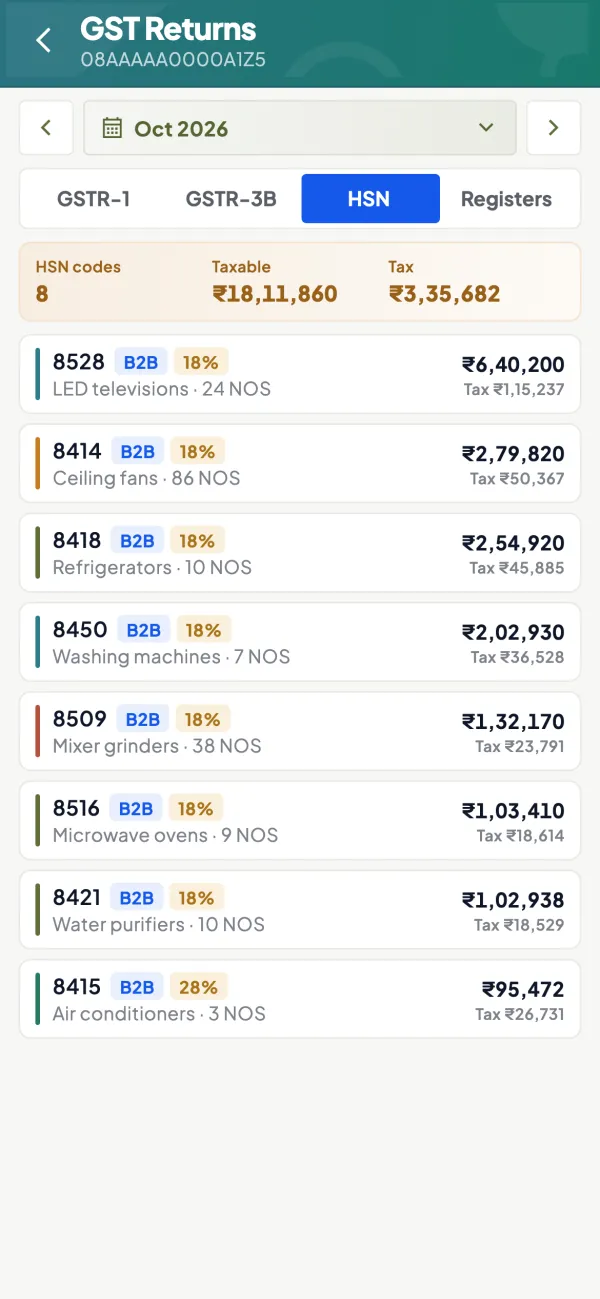
HSN-wise summary
How it works. The HSN-wise view groups outward supplies by HSN from your stock items, so a wrong or missing code is easy to spot.
- Only as good as your item masters
- Odd codes stand out in a short list
- Fix in Tally, check again after sync
In practiceAn electrical trader finds one cable item under a code nobody recognises, corrects the HSN on the item in Tally and reopens the view.
GSTR-3B view and JSON download
How it works. A GSTR-3B view of outward tax, inward supplies and tax figures is prepared from the same data, and the JSON downloads for upload on the GST portal.
- GSTR-1 and GSTR-3B from the same books
- JSON ready to upload on the portal
- Filing stays on the GST portal
In practiceAfter corrections sync on 8 November, the accountant downloads October's GSTR-1 JSON, uploads it on the portal and moves on to GSTR-3B.

Fix in Tally, then check again
How it works. Corrections go into Tally itself, in the party or item master or the voucher, so the books and the return stay the same.
- The annual return later agrees with your books
- No figures edited only on the portal
- Party GSTIN and state visible on the ledger
In practicePatel Electricals' GSTIN was missing on the ledger. It is added in Tally, the connector syncs, and the bill moves from B2C to B2B in the view.

E-invoice and e-way bill on plans that include them
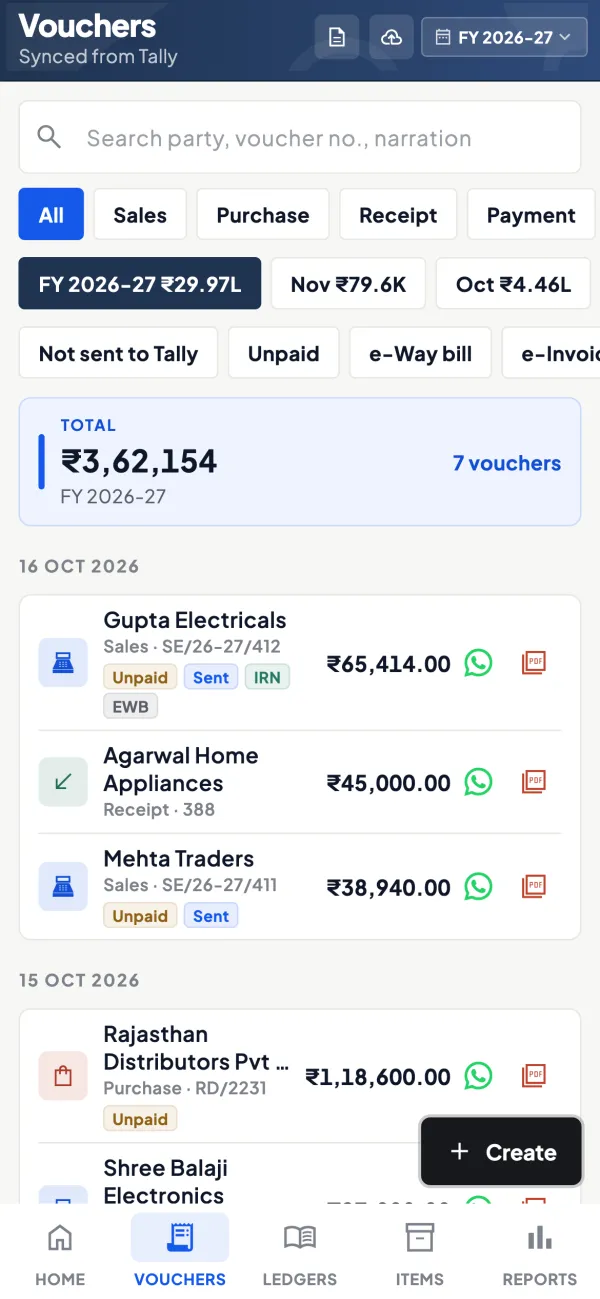
How it works. On Pro+, generate the IRN and e-way bill for a synced Tally sales voucher through a GST Suvidha Provider with your own API login; they are written back onto the voucher.
- IRN, QR and e-way bill number back in Tally
- Part-B vehicle details updated
- An IRN already made in Tally is shown, not remade
In practiceA ₹3,40,000 inter-state invoice to a buyer in Indore gets its IRN and e-way bill from the phone, and both numbers appear on the voucher in Tally.
Guide
GST reports: the full guide
How it works day to day, who does what, and the points to watch.
What the GST views show
Every month or quarter, a regular GST taxpayer reports outward supplies in GSTR-1 and pays tax through GSTR-3B. Both are built from the same invoices, credit notes and purchase entries that already sit in Tally. Cashflow OS reads that synced data and lays it out in the shape of the returns:
- GSTR-1: tiles for the sections of the return, each opening into the bills behind it and the HSN-wise summary.
- GSTR-3B: a view of outward tax, inward supplies and tax figures prepared from the Tally data.
- JSON download for uploading to the GST portal.
For background on the returns themselves, see what is GSTR-1 and GSTR-1 vs GSTR-3B. This is general information, not tax advice; rules, forms and due dates can change by notification, so check gst.gov.in.
Why a review step matters
Most GST trouble starts small: a B2B invoice entered without the buyer's GSTIN, so it falls into B2C and the buyer cannot claim credit; a wrong HSN on one item; a credit note in the wrong month; a party's state set wrongly, so CGST and SGST were charged instead of IGST. These are easy to fix in Tally before filing and tiresome to fix after. Being able to tap a tile and see the bills behind the number makes the review fast enough that it actually happens. Our list of common GSTR-1 errors is a good checklist.
A worked example of a pre-filing check
An electrical goods trader's accountant opens the GSTR-1 view for October on the 6th of November:
| Check | What she finds | Action |
|---|---|---|
| B2B tile, bill count | 212 bills, but the sales register shows 215 to registered buyers | Three bills lack the party's GSTIN; correct the ledgers in Tally |
| HSN-wise summary | One cable item under a code nobody recognises | Fix the item's HSN in Tally |
| Credit notes | A ₹14,600 return from September booked on 2 October | Confirm it belongs to October's return |
After the corrections are made in Tally and synced, she reopens the view, the counts agree, and she downloads the JSON. The whole check took under an hour, on the web app, while the billing clerk kept using Tally.
Where GST views fit in your monthly cycle
A sensible monthly GST cycle for a business on TallyPrime has four stages. First, all sales, purchases, credit notes and debit notes for the month are entered in Tally, ideally by the first few days of the next month. Second, someone reviews the GSTR-1 view tile by tile, opening the bill-wise and HSN-wise detail wherever a figure looks odd. Third, corrections are made in Tally itself, so the books and the return stay the same. Fourth, after the connector has synced the corrections, the JSON is downloaded and uploaded on the portal, followed by GSTR-3B. Keeping the correction in Tally, rather than editing figures on the portal only, means next year's annual return and any later query will agree with your books.
Who uses it
- In-house accountants preparing the monthly or quarterly return.
- CA firms reviewing a client's data after being invited with the accountant role.
- Owners who want to see the tax picture before the accountant files.
Tips for clean GST data
- Keep party GSTINs and states correct in Tally. GST is worked out from the item and the party's state when vouchers are made from the app, and wrong masters produce wrong tax.
- Keep HSN codes on stock items. The HSN-wise view is only as good as the item masters.
- Enter credit and debit notes in the right period.
- Review a few days before the due date, not on the due date, so there is time to correct in Tally.
- Reconcile purchase data separately with what suppliers have reported; see reconciling GSTR-2B with the purchase register.
What it does not do
- It does not file returns. You upload the JSON and file on the GST portal.
- The GST views prepare figures and JSON only; e-invoices (IRN) and e-way bills are a separate feature, on plans that include them.
- It does not give tax advice or decide how a transaction should be treated; it reflects what is in Tally.
- Its figures depend on Tally being complete and the connector having synced the latest entries.
This page is general information for Indian businesses, not tax, legal or financial advice. Rules and rates change — check the official portals or your CA before acting.
Set-up
Start using GST reports in 4 steps
Works on top of your TallyPrime — nothing to migrate, no second set of books.
- 1
Install the Tally Connector so sales, purchases and notes sync
- 2
Check party GSTINs, states and item HSN codes in Tally
- 3
Open GST, pick the period and review the GSTR-1 tiles
- 4
Correct in Tally, let it sync, then download JSON and file on the portal
Buyer’s checklist
What to look for in GST reports software
Whatever you choose, check these before you commit.
- Built from the books you keep, so the return agrees with your accounts
- A section-wise GSTR-1 view that opens into the bills behind each figure
- An HSN-wise summary to catch wrong or missing codes
- A GSTR-3B view prepared from the same data
- JSON download for upload on the GST portal
- Works in a browser, so the review does not block the billing PC
- Access for your CA through a role, without sharing a Tally login
- Clear that filing happens on the GST portal, not inside the app
Plans
Simple yearly plans
- 14-day free trial on your own books
- 3-year term saves up to 25%
- Premium modules (catalogue, field force, price lists, store…) priced extra
Start free trialGet the price for your business
Compare all plans- Growth₹3,000/year + GSTBooks, reports, outstanding and sharing
- Pro₹5,000/year + GSTEverything in Growth, plus entries into Tally
- Pro+₹7,000/year + GSTEverything in Pro, plus e-invoice and e-way bill
Why Cashflow OS
Why use GST reports in Cashflow OS
- From your Tally dataThe GST views read the same invoices, notes and purchases that sit in Tally.
- Open any tileBill-wise and HSN-wise detail behind each GSTR-1 figure.
- JSON for the portalDownload and upload on the GST portal; filing stays with you.
- Review anywherePhone or web app, while the billing clerk keeps using Tally.
- CA access by roleInvite your CA with the accountant role for that company.
- E-invoice and e-way billOn Pro+, IRN and e-way bill for synced sales vouchers, written back to Tally.