GST GST returns
What is GSTR-1?
GSTR-1 is the return in which a registered business reports every sale it made in a month or quarter. Your buyers get their input tax credit from what you upload here, so a late or wrong GSTR-1 hurts them as much as you.
- GST-registered traders
- Distributors and wholesalers
- Manufacturers
- Accountants filing returns
- Businesses with several GSTINs

On this page 11
Who has to file GSTR-1
Every normal taxpayer registered under GST files GSTR-1, including those with nil sales for the period. A few categories file different returns instead:
- Composition dealers file CMP-08 every quarter and GSTR-4 once a year, not GSTR-1. See how the composition scheme works.
- Input service distributors, non-resident taxable persons, and those deducting or collecting tax at source (TDS/TCS) have their own forms.
If you hold more than one GSTIN, for example one in Rajasthan and one in Gujarat, each GSTIN files its own GSTR-1.
What goes into GSTR-1, table by table
The form is split by the kind of buyer and the kind of document. The tables you will use most:
| Table | What it holds |
|---|---|
| 4 (B2B) | Invoice-wise sales to registered buyers, with the buyer's GSTIN |
| 5 (B2CL) | Large inter-state invoices to unregistered buyers, invoice-wise |
| 6 | Exports, and supplies to SEZ units and deemed exports |
| 7 (B2CS) | All other sales to unregistered buyers, summarised by state and rate |
| 8 | Nil-rated, exempt and non-GST outward supplies |
| 9 / 9B | Amendments to earlier invoices, and credit and debit notes |
| 11 | Advances received and adjusted (mainly relevant for services) |
| 12 / 13 | HSN-wise summary of all sales, and a summary of documents issued |
The split between tables 4, 5 and 7 trips up many people; B2B vs B2C invoices in GSTR-1 walks through it with examples.
Monthly or quarterly: when it is due
The general rule is:
- Monthly filers: by the 11th of the following month. October sales are due by 11 November.
- Quarterly filers under QRMP (aggregate turnover up to ₹5 crore who opt in): by the 13th of the month after the quarter. The October–December quarter is due by 13 January. In the first two months of the quarter they may upload B2B invoices through the optional Invoice Furnishing Facility.
Due dates are sometimes extended by notification, so confirm the current date on gst.gov.in. Late fees and other consequences are covered in GSTR-1 due dates and late fee.
A worked example: one month of sales
Sharma Traders, Jaipur (Rajasthan), sells hardware. In October it issued these sales invoices:
- 12 invoices to registered dealers in Rajasthan, taxable value ₹6,40,000 at 18%: CGST ₹57,600 + SGST ₹57,600. These go invoice by invoice into Table 4.
- 2 invoices to a registered dealer in Gujarat, taxable value ₹1,10,000 at 18%: IGST ₹19,800. Also Table 4, with place of supply 24-Gujarat.
- Counter sales to walk-in customers in Jaipur, ₹2,30,000 taxable. These are summarised in Table 7 as one line: Rajasthan, 18%, ₹2,30,000.
- One credit note of ₹20,000 taxable to a Rajasthan dealer for goods returned. This goes in Table 9B against that dealer's GSTIN.
Every one of these lines also feeds the HSN summary in Table 12, and the invoice and credit note number ranges go into Table 13.
How to file GSTR-1, step by step
- Close the month's billing: make sure every sales invoice, credit note and debit note is entered in your books.
- Check party GSTINs and states. A wrong GSTIN sends your buyer's credit to someone else; a wrong state turns CGST/SGST into IGST.
- Check HSN codes and units on every item. See the HSN summary in GSTR-1.
- Export the data from your accounting software as a JSON file, or enter it directly on the GST portal under Returns Dashboard.
- Upload the JSON through the portal's offline tool route, fix any errors it reports, and check the summary totals against your sales register.
- Generate the summary, preview it, and file with DSC or EVC (OTP).
Once filed, a GSTR-1 cannot be edited. Mistakes are corrected through amendment tables in a later return, or through GSTR-1A before the GSTR-3B of the same period is filed, where the portal allows it.
Common mistakes
- Reporting a sale to a registered buyer as B2C because the GSTIN was missing on the invoice. The buyer loses credit and will chase you.
- Putting the same invoice in two periods after a date change.
- Leaving out credit notes, so GSTR-1 shows more tax than GSTR-3B.
- Rounding differences between invoice totals and the tax worked out line by line.
- Filing nil when there were sales, or forgetting the return in a month with no sales at all.
This is general information, not tax advice. Confirm current forms and dates on gst.gov.in or with your CA.
Preparing GSTR-1 from Tally with Cashflow OS
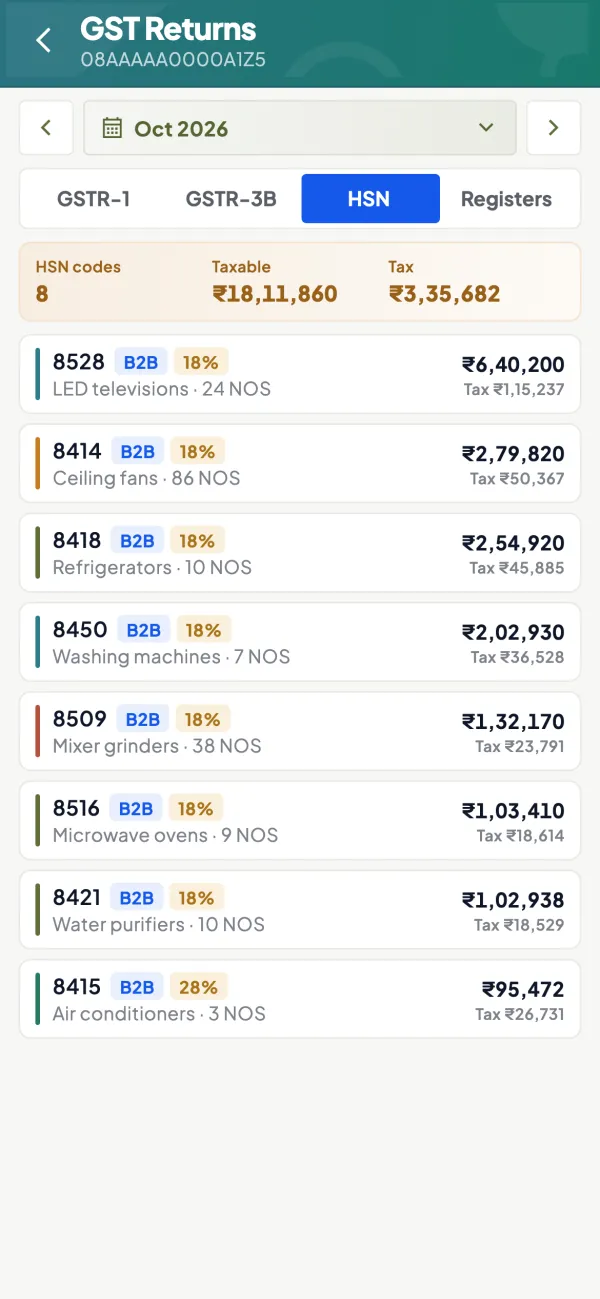
If your books are in TallyPrime, Cashflow OS shows a GSTR-1 view prepared from the synced Tally data, on the phone or the web. Each tile, such as B2B or HSN, opens the bill-wise and HSN-wise detail behind it, so you can spot a missing GSTIN or a wrong state before filing. You can download the JSON and upload it on the GST portal yourself; Cashflow OS does not file the return for you.
Avoid these
Common mistakes
- MistakeA B2B sale reported as B2C because the GSTIN was missingDo this instead
Check every registered buyer's GSTIN on the invoice before filing; otherwise the buyer loses credit.
- MistakeCredit notes left out of GSTR-1Do this instead
Report credit notes in the right table so GSTR-1 and GSTR-3B agree.
- MistakeSkipping the return in a month with no salesDo this instead
File a nil GSTR-1 for any period with no outward supplies; it can be done by SMS.
- MistakeWrong state on the party masterDo this instead
Check party states before filing; a wrong state turns CGST and SGST into IGST.
Keep handy
Checklist
What is GSTR-1 — 7 checks. Tick them as you go.
In Cashflow OS
How Cashflow OS helps
Cashflow OS puts your TallyPrime books on every phone in the team. Where it fits this topic:
GSTR-1 view from your Tally books
Cashflow OS prepares a GSTR-1 view from the synced data; tiles such as B2B and HSN open bill-wise and HSN-wise detail so errors show before filing.
See GST reports from your Tally data
JSON for the portal
Download the JSON and upload it on the GST portal yourself; Cashflow OS does not file the return.
Questions people ask
Do I have to file GSTR-1 if I had no sales?
Can I revise a filed GSTR-1?
Does GSTR-1 involve paying tax?
What happens if my buyer cannot see my invoice?
Which table holds sales to registered buyers?
Does each GSTIN file its own GSTR-1?
What is the Invoice Furnishing Facility?
Is there a late fee for GSTR-1?
This page is general information for Indian businesses, not tax, legal or financial advice. Rules and rates change — check the official portals or your CA before acting.