GST GST returns
HSN summary in GSTR-1 (Table 12)
Table 12 of GSTR-1 summarises all your sales for the period by HSN or SAC code, with quantity, unit, taxable value and tax. It must add up to the rest of the return, and the portal now checks it closely.
- GST-registered traders
- Accountants filing GSTR-1
- Manufacturers with many items
- Distributors selling B2B and B2C
- Service businesses using SAC
On this page 12
What Table 12 contains
For each HSN or SAC code you sold in the period, and for each rate under that code, you report one line:
- HSN/SAC code, chosen from the portal's list
- Unit Quantity Code (UQC), such as NOS, KGS, MTR, BOX, PCS
- Total quantity
- Total taxable value
- Rate of tax
- IGST, CGST, SGST/UTGST and cess amounts
Table 12 is split into separate tabs for B2B and B2C supplies. B2B lines come from sales to registered buyers; B2C lines from everything else. For codes and digits, see HSN and SAC codes explained.
Digits and validations
The general rule is a minimum of 4 digits if your aggregate turnover was up to ₹5 crore in the previous year and 6 digits above that. The portal has added validations in phases: codes are chosen from a drop-down rather than typed, and values are checked against other tables. Requirements have been tightened more than once, so check the latest advisory on gst.gov.in before the filing season.
A worked example
A Chennai electrical goods trader's October sales:
| HSN | Type | UQC | Qty | Taxable value | Tax |
|---|---|---|---|---|---|
| 8536 | B2B | NOS | 4,000 | ₹3,20,000 | ₹57,600 |
| 8536 | B2C | NOS | 600 | ₹54,000 | ₹9,720 |
| 8544 | B2B | MTR | 12,000 | ₹4,80,000 | ₹86,400 |
| 9987 | B2C | OTH | 0 | ₹25,000 | ₹4,500 |
All at 18%. The B2B rows should agree with the invoices in Table 4 (and exports or SEZ supplies, if any); the B2C rows with Tables 5 and 7. The total taxable value, ₹8,79,000, should equal sales across the return after credit and debit notes. The repair service under SAC 9987 has no meaningful quantity, so the quantity is reported as zero with UQC "OTH" (others), as is common for services.
How credit notes affect the summary
Credit and debit notes are reported in Table 9B, but their effect must also flow into the HSN summary. If the trader above issued a credit note for ₹20,000 of item 8536 returned by a dealer, the B2B line for 8536 drops to ₹3,00,000 taxable and ₹54,000 tax, and the quantity drops by the returned units. Forgetting to net credit notes is one of the most common reasons Table 12 does not tie with the rest of the return. See credit and debit notes in GST.
Getting the unit right
UQC is a fixed list. Your item master may say "Pcs", "Nos", "Box of 10" or "Kg"; each must map to a valid UQC. Mapping rules of thumb:
- Pieces, numbers, units: NOS or PCS, but pick one consistently.
- Weight: KGS, or GMS for small items, or QTL and TON for bulk.
- Length: MTR. Area: SQM or SQF. Volume: LTR or MLT.
- Boxes, bags, bottles: BOX, BAG, BTL where the stock is counted that way.
If your item uses alternate units, report in one unit for the whole line. Mixing boxes and pieces in one code's quantity makes the figure meaningless.
Preparing the summary from your books
- Make sure every stock item and every service ledger has an HSN or SAC code and a valid unit in the master.
- Run a sales register grouped by HSN for the period, including credit and debit notes.
- Split it by buyer type: registered (B2B) and unregistered (B2C).
- Check that total taxable value and tax equal the totals of your sales tables in GSTR-1.
- Generate the JSON from your accounting software, or enter lines on the portal, and read the portal's validation messages carefully before filing.
Doing the first step once, properly, removes most of the monthly pain.
Common errors and fixes
- Totals do not match other tables: usually missing credit notes, or advances, or nil-rated sales left out of the HSN summary.
- Invalid code: 8-digit codes padded with zeros, or a code not on the portal's list.
- Same code, two rates: correct where a code genuinely has items at two rates, but often a sign of a wrong rate on some invoices.
- Services with quantities taken from a dummy unit, such as "1 job" per invoice. Not wrong, but be consistent.
- B2B and B2C swapped because a registered buyer's GSTIN was missing on invoices.
This is general information, not tax advice.
Checking the HSN summary with Cashflow OS
In Cashflow OS, the GSTR-1 view prepared from your TallyPrime data has an HSN tile that opens the HSN-wise detail: code, quantity, value and tax. You can see an item with no code or an odd unit before filing day, fix the stock item in Tally, and download the JSON for the portal. Filing is still done on the GST portal.
Avoid these
Common mistakes
- MistakeLeaving credit notes out of the HSN summaryDo this instead
Net returns and credit notes into each HSN line's quantity, value and tax so Table 12 ties with the rest of the return.
- MistakeMixing boxes and pieces in one line's quantityDo this instead
Report each HSN line in one UQC. Convert alternate units first so the quantity means something.
- MistakeCodes padded with zeros or not on the listDo this instead
Pick codes from the portal's list. A code padded with zeros or missing from the list fails validation.
- MistakeMissing buyer GSTINs pushing B2B sales into B2CDo this instead
Check that registered buyers' GSTINs are on the invoices before filing, so lines land in the right tab.
Keep handy
Checklist
HSN summary in GSTR-1 (Table 12) — 7 checks. Tick them as you go.
In Cashflow OS
How Cashflow OS helps
Cashflow OS puts your TallyPrime books on every phone in the team. Where it fits this topic:
Open the HSN tile before filing day
The GSTR-1 view from your TallyPrime data has an HSN tile showing code, quantity, value and tax, so you can catch an item with no code or an odd unit early.
See GST reports from your Tally data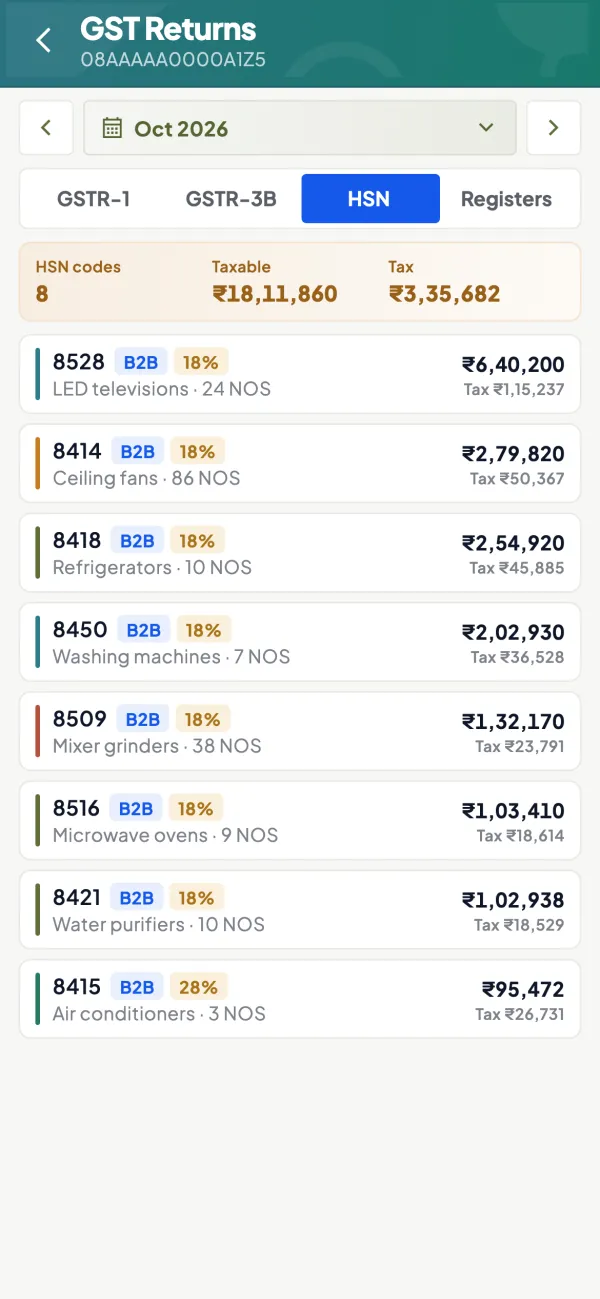
JSON for the portal
Download the GSTR-1 JSON prepared from your Tally data and upload it on the GST portal, where filing is done. Fix the item master first if a line looks wrong.

Questions people ask
Is the HSN summary required in a nil GSTR-1?
Do I report quantity for services?
Should exempt and nil-rated sales appear in Table 12?
Do quarterly filers report the HSN summary?
What UQC should I use for services?
Why does the portal reject my HSN summary?
Can one HSN code appear on two lines?
Is the HSN summary the same as the documents issued table?
This page is general information for Indian businesses, not tax, legal or financial advice. Rules and rates change — check the official portals or your CA before acting.