GST GST basics
HSN and SAC codes explained
HSN codes classify goods and SAC codes classify services. Your turnover decides how many digits you must print on invoices, and the code you pick decides the GST rate, so getting it right matters.
- Traders setting up item masters
- Manufacturers
- Service and repair businesses
- Accountants preparing GSTR-1
- Billing staff
On this page 12
What the codes are
HSN stands for Harmonised System of Nomenclature, an international system for classifying goods used by customs worldwide. India uses it, extended to 8 digits, in the customs tariff and in GST.
SAC stands for Services Accounting Code. It is India's own classification for services under GST. SAC codes start with 99 and have 6 digits.
How an HSN code is built
Each pair of digits narrows the description. Take ceramic floor tiles as an example of the structure:
| Level | Digits | What it identifies |
|---|---|---|
| Chapter | 2 | Chapter 69: ceramic products |
| Heading | 4 | 6907: ceramic flags and paving, hearth or wall tiles |
| Sub-heading | 6 | A further split, for example by water absorption |
| Tariff item | 8 | India-specific detail within the sub-heading |
Services work similarly: 9954 is construction services, 9965 is goods transport services, 9987 covers maintenance and repair services, and so on to 6 digits.
How many digits you must show
The general rule, set by notification:
- Aggregate turnover up to ₹5 crore in the previous year: 4-digit HSN on B2B tax invoices; optional on B2C invoices.
- Aggregate turnover above ₹5 crore: 6-digit HSN on all tax invoices.
- For certain notified chemicals, 8 digits are required.
The same digit rules apply to the HSN summary in GSTR-1, which now has its own validations. Confirm current requirements on cbic-gst.gov.in. Using more digits than required is allowed and often wiser, because it removes doubt about the rate.
The code decides the rate
GST rates are notified against HSN headings and SAC codes. Two items that look similar can carry different rates because they fall under different headings, and a rate notified for a 4-digit heading can have exceptions at 6 or 8 digits. Rates were rationalised in 2025 into fewer slabs, which changed the rate on many items, so recheck old item masters.
Example of why it matters. A trader billed ₹20,00,000 of an item at 5% when the correct heading carried 18%. The short-paid tax is 13% of ₹20,00,000 = ₹2,60,000, plus interest, and it usually cannot be recovered from customers months later. The classification question, not the arithmetic, is where the money is lost.
How to find the right code
- Start with what the item is made of and what it does. The customs tariff chapters are organised that way.
- Use the HSN search on the GST portal (Search HSN/SAC) to find the heading.
- Check the rate schedule on cbic-gst.gov.in for that heading, including any condition or exception.
- Look at what your supplier prints. It is a useful clue, not proof; suppliers make mistakes too.
- For high-value or doubtful items, ask your CA. For real doubt, an advance ruling from the state authority is available.
- Record the code in your item master once, so every invoice picks it up.
Goods and services on the same bill
Many businesses sell both. A service centre that repairs an air conditioner supplies a compressor (goods, HSN) and labour (service, SAC). An installer of CCTV cameras sells cameras and charges for installation. Whether these are taxed separately or as one supply depends on whether the supply is composite, with one principal supply, or mixed, and on how it is priced and billed.
In practice: show parts and labour on separate lines, each with its own code and rate, unless your CA has advised that the whole bill is one composite supply. A bill with a single line "AC repair ₹6,500" and one code invites questions about which rate applies.
Common mistakes
- Using one HSN for a whole product range, such as all "electrical goods" under one code, when items fall in different chapters.
- Copying the supplier's code without checking it.
- Typing 4 digits in a 6-digit field with zeros added at the end ("85160000"), which is not a valid code.
- Using an HSN code for a service, or a SAC code for goods, for example on repair bills that include both parts and labour.
- Not updating item masters after a rate change. See handling a GST rate change in billing.
This is general information, not tax advice.
HSN in Tally and Cashflow OS
In TallyPrime the HSN/SAC and rate are usually set on the stock item, the stock group, or the ledger. Cashflow OS reads those from the synced data. When you create a sales voucher from the phone, GST is worked out from the item and the party's state, and the GSTR-1 view groups sales HSN-wise so you can spot items with a missing or odd code.
Avoid these
Common mistakes
- MistakeOne HSN code for a whole product rangeDo this instead
Classify each item on its own; items that look alike can fall in different chapters and carry different rates.
- MistakeCopying the supplier's code without checkingDo this instead
Use it as a clue, then confirm the heading with the portal's HSN search and the rate schedule on cbic-gst.gov.in.
- MistakePadding a 4-digit code with zerosDo this instead
A code like 85160000 is not valid. Use the actual code from the list, with at least the digits your turnover requires.
- MistakeNot updating item masters after a rate changeDo this instead
After any rate notification, review the code and rate on every affected item so new invoices carry the correct tax.
Keep handy
Checklist
HSN and SAC codes explained — 7 checks. Tick them as you go.
In Cashflow OS
How Cashflow OS helps
Cashflow OS puts your TallyPrime books on every phone in the team. Where it fits this topic:
HSN-wise view of your sales
The GSTR-1 view prepared from your Tally data has an HSN tile showing code, quantity, value and tax, so items with a missing or odd code stand out before filing.
See GST reports from your Tally data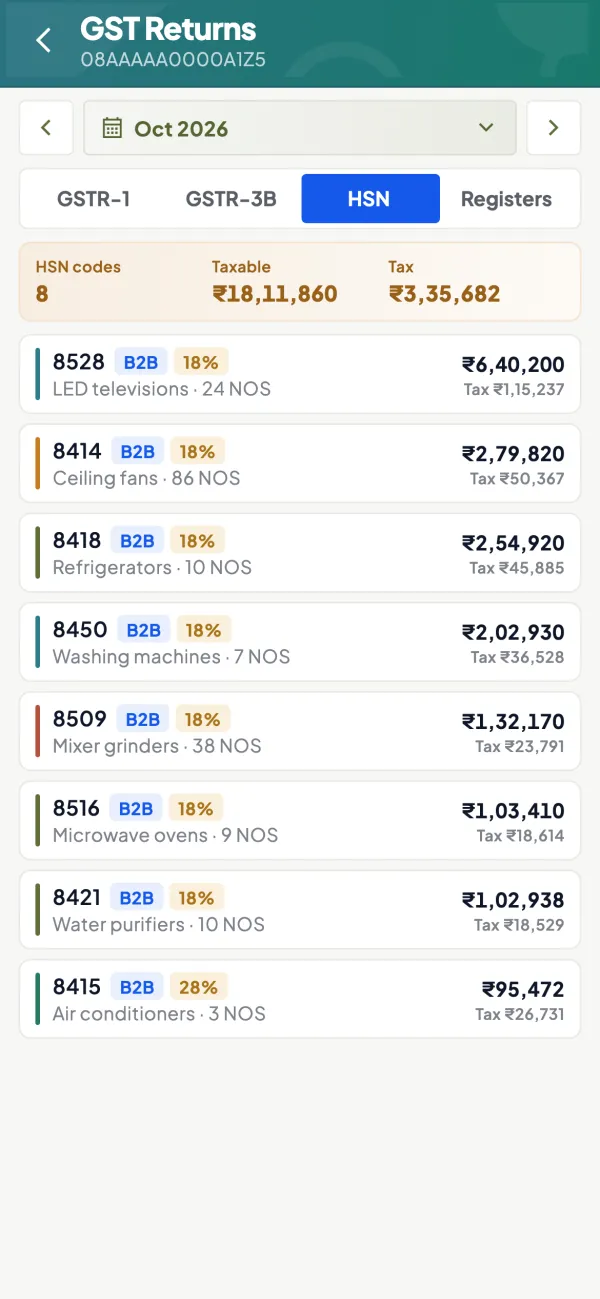
GST worked out from the item
When a sales voucher is created from the phone, GST comes from the item's rate in Tally and the party's state, so a correct item master carries through to every bill.
See Create Tally vouchers from your phone
Questions people ask
Is HSN required on B2C invoices?
Where do I search for an HSN code?
What is the SAC code for repair services?
Can an item have two HSN codes?
Is SAC reported the same way as HSN?
What happens if I use the wrong HSN code?
Should I use more digits than required?
Where is the HSN code set in TallyPrime?
This page is general information for Indian businesses, not tax, legal or financial advice. Rules and rates change — check the official portals or your CA before acting.