CA firms
Cashflow OS for chartered accountants
Most of a CA firm's clients keep their books in TallyPrime on a PC in their own office. When a client invites you into Cashflow OS with the accountant role, you can read their synced Tally data on your phone or the web app, check reports and GST views, and send statements, without asking for a backup or a remote session.
- Client data without backups
- GSTR-1 checked bill by bill
- Accountant role per client
- Free Pro plan for your firm
Start free trialBook a free demo
Works with your TallyPrime14-day free trialJaipur team, call +91 70738 53555

Built for chartered accountants
Who it’s for
- Audit-focused CA firmsStatutory and tax audits of MSME clients
- GST and return-filing practicesMonthly GSTR-1 and GSTR-3B for many clients
- Tax consultantsIncome tax, TDS and advance tax work
- Accounting outsourcing firmsBooks kept for clients in their Tally
- Virtual CFO practicesMonthly MIS, cashflow and bank limits
- Small-town CA practicesTrader clients, often more at ease in Hindi
- Group accountantsOne person handling a family's several firms
Pain → fix
The problems we fix
The everyday headaches of chartered accountants, and what changes when the books are on every phone.
- The problemWaiting days for a client's Tally backup
The backup is out of date the day after it arrives.
With Cashflow OSClient's synced Tally data, on inviteThe client invites you with the accountant role, and you read their synced books on phone or web.
See how it works - The problemRemote session only when the client's PC is free
The client's accountant needs the PC, so your review waits till evening.
With Cashflow OSWeb app that works while the client uses TallyRead the synced copy on app.cashflowos.in without taking over the client's screen.
See how it works - The problemGSTR-1 errors found on the due date
A missing GSTIN or wrong HSN leaves no time for the client to correct Tally.
With Cashflow OSGSTR-1 tiles open bill-wise and HSN-wiseReview GSTR-1 and GSTR-3B views from Tally data days ahead, then download the JSON for the portal.
See how it works - The problemAudit schedules start from scratch each year
Ledgers, ageing and trial balance are pulled again for every audit and bank file.
With Cashflow OSTrial Balance, ledgers and ageing in Excel or PDFExport reports for any financial year or a custom range as a starting point for working papers.
See how it works - The problemClients call the firm for basic statements
A party statement or a P&L for a loan file takes a junior's afternoon.
With Cashflow OSClients share statements from their own phoneParty statements as a PDF in Tally's format or a Hindi हिसाब page, sent by the client on WhatsApp.
See how it works - The problemRecommending software earns the firm nothing
You set clients up and do the hand-holding, and the relationship ends there.
With Cashflow OSPartner program: 20% first year, 15% on renewalsClients who sign up through your partner link or code earn your firm commission, and your own firm gets a free Pro plan.
Features
How Cashflow OS works for chartered accountants
GSTR-1 and GSTR-3B review before filing
How it works. Cashflow OS prepares GSTR-1 and GSTR-3B views from the client's Tally data, with a JSON download for the GST portal. Filing is done on the portal.
- Review a few days before the due date, not on it
- Send the client a correction list for Tally
- JSON ready once corrections are in
In practiceOn the 5th, a junior opens a Bhilwara textile client's GSTR-1 and finds two B2B invoices without a GSTIN; the client corrects them in Tally the same day.

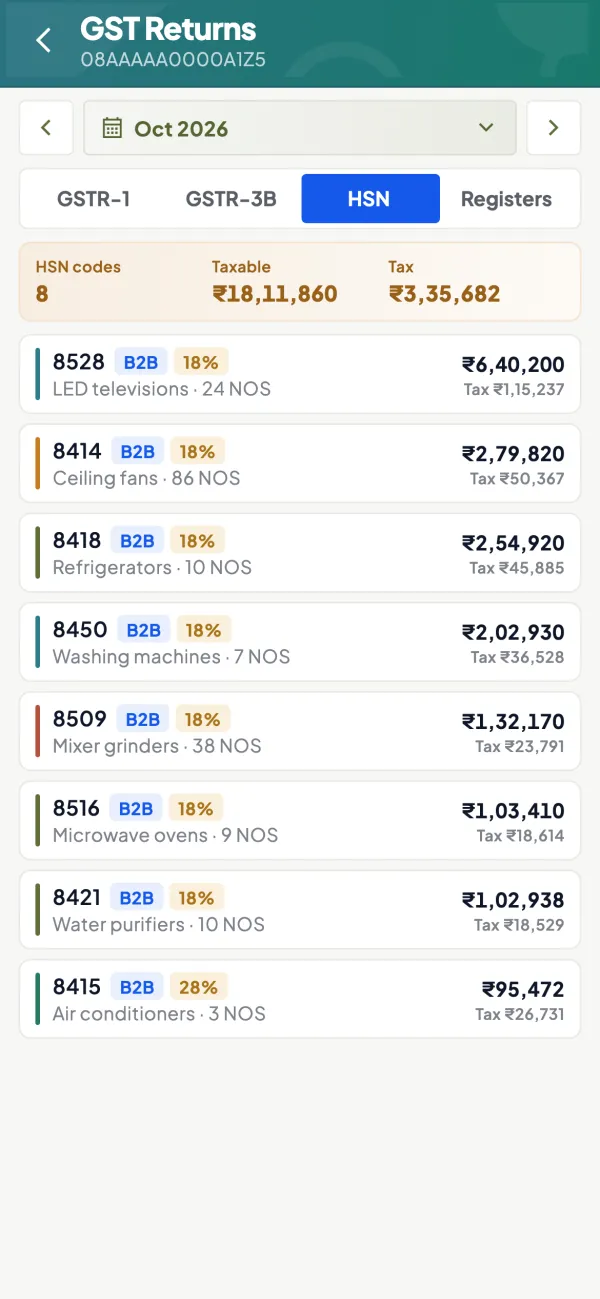
HSN-wise detail where errors hide
How it works. GSTR-1 tiles open into bill-wise and HSN-wise detail, so a wrong HSN or a credit note in the wrong month stands out.
- Spot wrong HSN codes by value
- Trace a figure back to the bill
- Fewer amendments in later returns
In practiceAn HSN line for a hardware client shows ₹3,40,000 under a code the client doesn't deal in; it traces back to one item master in Tally.
Reports for audit and bank files
How it works. Profit & Loss and Balance Sheet that match Tally, Trial Balance, Day Book, cash and bank book and ledger reports, for any year, exported to Excel or PDF.
- Comparatives across financial years
- Exports as a start for working papers
- Ready for bank limit renewals
In practiceFor a client's bank limit renewal, the firm exports three years of P&L and Balance Sheet as PDF without visiting the client's office.

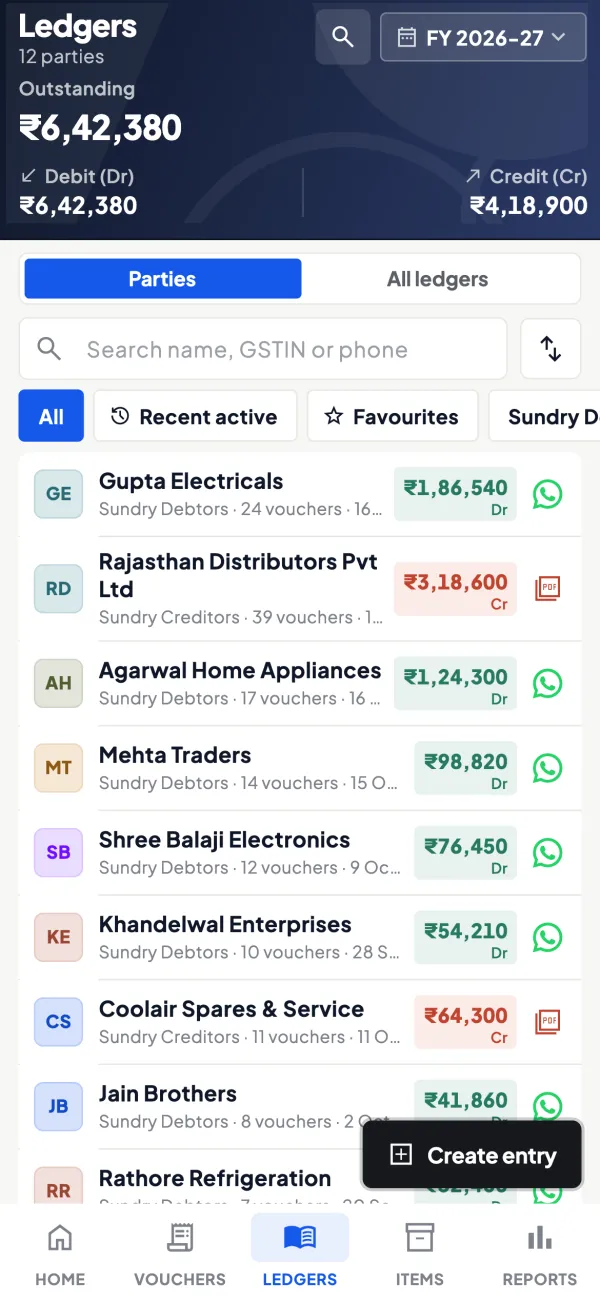
Ledgers and ageing on any date
How it works. Ledgers with live balances and bill-wise receivables and payables with ageing, for confirmations and debtor reviews.
- Pick parties for balance confirmations
- Spot long-overdue debtors before audit
- Custom ranges spanning several years
In practiceBefore a tax audit, the firm lists debtors over 180 days for a Jodhpur distributor and asks the client about recovery of ₹7,80,000.
Know your trade
A guide for chartered accountants
How the business works, where money gets stuck, and the GST points to watch.
How a CA firm works with Tally clients today
A typical practice handles dozens of MSME clients. The client's own accountant or the owner keeps the books in TallyPrime. The CA firm reviews them for GST returns, TDS, advance tax, the annual accounts and audit. Getting at the data is the slow part:
- The client emails or sends a backup, which is out of date the day after.
- A junior visits the client's office, which takes half a day.
- Someone takes a remote session into the client's PC, but only when the client is not using it.
Each method works, but none of them gives the firm a quick look at a client's position on a Tuesday afternoon.
What the accountant role gives you
Cashflow OS is a mobile and web app that reads a synced copy of TallyPrime companies through a small connector on the client's Tally PC. The client, as owner, invites people with a link and gives each a role per company: owner, admin, accountant, staff or salesperson. A CA or a firm's staff member is invited with the accountant role.
Once invited, you can see the client's books as synced from Tally:
- Profit & Loss, Balance Sheet, Trial Balance, Day Book, cash and bank book and ledger reports.
- Any financial year, or a custom date range spanning several years.
- Bill-wise receivables and payables with ageing.
- Expenses, stock and item summaries.
- Excel and PDF export of the reports.
Several Tally companies can sit in one account, and you switch between them, so a client's group of firms, or several clients who have invited you, are reached from the same login.
GST review before filing
Cashflow OS prepares GSTR-1 and GSTR-3B views from the client's Tally data and offers a JSON download for the GST portal. GSTR-1 tiles open into bill-wise and HSN-wise detail, which is where most errors hide: a B2B invoice without a GSTIN, a wrong HSN, a credit note in the wrong month. Reviewing this on the web app a few days before the due date leaves time for the client to correct entries in Tally. Filing itself is done on the GST portal. For the review routine, see preparing GSTR-1 from Tally and common GSTR-1 errors. This is general information, not tax advice.
Statements and reports for clients
Clients often ask their CA for things that are, in fact, simple reports: a party statement for a dispute, a Profit & Loss for a loan file, a ledger for a supplier reconciliation. Party statements can be shared as a PDF in Tally's format or a simple Hindi हिसाब page on WhatsApp, and reports export to Excel or PDF. Many owners can do this themselves from the app once they know where to look, which frees the firm for the work that needs a professional.
Correcting entries, carefully
Writing into Tally from Cashflow OS is off until the owner switches it on for that company. If the client chooses to switch it on, users with the right access can create and alter vouchers such as journals, credit notes and debit notes from the phone or web. Each entry goes through the connector and Tally validates it; a refused entry returns with Tally's reason. Many firms will prefer to keep their own access read-only and send correction notes to the client's accountant. That decision rests with the client and the firm, not the software.
A suggested monthly routine for a practice
- By the 5th: open each GST client's GSTR-1 view for the previous month, check B2B bills and HSN detail.
- Send the client a short list of corrections to make in Tally.
- Recheck after corrections, download the JSON and file on the portal.
- Mid-month: glance at receivables ageing and cash and bank for clients with bank limits.
- Quarter-end: export Profit & Loss and Balance Sheet for advance tax discussions.
Due dates for returns can change by notification; confirm on gst.gov.in. For the client side of this relationship, our guide on giving your accountant access safely is worth sharing with clients.
This page is general information for Indian businesses, not tax, legal or financial advice. Rules and rates change — check the official portals or your CA before acting.
Set-up
Up and running in 4 steps
No new software to learn for your accountant — Tally stays as it is.
- 1
Ask the client to install the Tally Connector on their Tally PC
- 2
The client signs in with a mobile number and scans the connector's QR
- 3
The client invites you with a link and the accountant role
- 4
Apply at /partners/ for partner income and your firm's free Pro plan
Buyer’s checklist
What to look for in software for chartered accountants
Whatever you choose, check these before you commit.
- Read access to client books without backups or remote sessions
- Figures that match Tally's own P&L, Balance Sheet and Trial Balance
- GSTR-1 detail by bill and HSN, with a JSON file for the portal
- Access per client and per role, granted by the client
- Writing into client books off unless the client switches it on
- Any financial year, and custom date ranges across years
- Excel and PDF exports for working papers and bank files
- No change to the client's Tally or to how their accountant works
Plans
Simple yearly plans
- 14-day free trial on your own books
- 3-year term saves up to 25%
- Premium modules (catalogue, field force, price lists, store…) priced extra
Start free trialGet the price for your business
Compare all plans- Growth₹3,000/year + GSTBooks, reports, outstanding and sharing
- Pro₹5,000/year + GSTEverything in Growth, plus entries into Tally
- Pro+₹7,000/year + GSTEverything in Pro, plus e-invoice and e-way bill
Why Cashflow OS
Why chartered accountants choose Cashflow OS
- Clients keep TallyNo migration and no new accounting software; their TallyPrime books stay the books of record.
- Read-only unless the client decidesWriting into Tally is off until the owner switches it on, and Tally validates every entry.
- GST review with detailGSTR-1 and GSTR-3B views with bill-wise and HSN-wise detail and a JSON download.
- Recurring partner income20% of the first year and 15% on every renewal for clients who join through you (2026 launch terms; may change for new sign-ups).
- A free Pro plan for your firmUse Cashflow OS on your own firm's Tally books as a partner.
- Partner dashboard and setup helpTrack clicks, sign-ups and commission at app.cashflowos.in/partner; our Jaipur team helps your clients set up in Hindi or English.