GST Tally and GST
How to prepare GSTR-1 from Tally
TallyPrime builds GSTR-1 from your sales, credit notes and debit notes. Your job is to make sure every voucher is included correctly, fix the ones Tally flags, export the file and check the totals before uploading it on the GST portal.
- GST-registered traders using Tally
- Accountants and Tally operators
- Distributors and wholesalers
- Manufacturers
- CAs reviewing client returns

On this page 11
Before the month ends: get the masters right
Most GSTR-1 problems in Tally start in the masters, not in the return:
- Company: GST details enabled with the correct GSTIN, state and registration type.
- Party ledgers: GSTIN/UIN, registration type and state filled in. A missing GSTIN turns a B2B sale into B2C.
- Stock items or groups: HSN code, taxability and GST rate, with an applicable-from date where rates changed.
- Sales ledgers and tax ledgers: correct GST classification; separate IGST, CGST and SGST output ledgers.
- Freight and packing ledgers set to be included in assessable value where they are charged on sales.
Open the GSTR-1 report
In TallyPrime, GST reports are under Display More Reports, then GST Reports (menu names vary slightly between releases). Open GSTR-1 and set the period to the return month.
The report summarises vouchers into groups such as:
- Included in return: vouchers with complete GST information.
- Not relevant for this return: vouchers that do not affect GSTR-1, such as purchases or receipts.
- Incomplete or mismatched information: vouchers Tally cannot place with confidence. Older releases call these uncertain transactions.
The return section shows the familiar tables: B2B, B2C large, B2C small, credit and debit notes (registered and unregistered), exports, nil-rated and exempt, advances, HSN summary and document summary.
Resolve every flagged voucher
Drill into the incomplete or mismatched group. Typical reasons and fixes:
| Tally flag (typical) | Fix |
|---|---|
| Party GSTIN missing or invalid | Update the party ledger; the voucher refreshes |
| HSN or rate not specified | Set HSN and rate in the item or group |
| Place of supply mismatch | Correct the party state or the voucher's place of supply |
| Tax amount differs from calculated | Check manual overrides and rounding on the voucher |
| Credit note without original invoice details | Add the original invoice number and date |
Resolve until the flagged count is zero, or you have consciously accepted the few that remain. Never export with unknown items in that group.
Cross-check the totals
- Compare total taxable value in GSTR-1 with the sales register for the month, after credit notes.
- Compare output tax with the balances of output IGST, CGST and SGST ledgers.
- Check that the HSN summary totals agree with the invoice tables; see HSN summary in GSTR-1.
- Check the document summary: invoice series, from and to numbers, cancelled count.
- Look for B2C large invoices: inter-state sales to unregistered buyers above the limit; see B2C large invoices.
Example. Sales register: ₹24,60,000. Credit notes: ₹60,000. GSTR-1 net taxable value should be ₹24,00,000. If it shows ₹23,75,000, look for ₹25,000 in vouchers marked not relevant or excluded, usually a sales voucher posted to a ledger without GST classification.
Export and upload
From the GSTR-1 report, use Export and choose the JSON format for the GST portal (an Excel format for the offline tool is also available in many releases). Newer TallyPrime releases also offer a connected option to upload to the portal from within Tally; check what your release supports. Then upload and review as described in GSTR-1 JSON upload.
After filing
- Do not alter or delete vouchers of a filed period without recording why; the books will drift from the return.
- If something was wrong, correct it through an amendment in a later period; see GSTR-1 amendments.
- Keep the exported file and the filed summary with the month's records.
This is general information, not tax advice.
Reviewing the same data in Cashflow OS
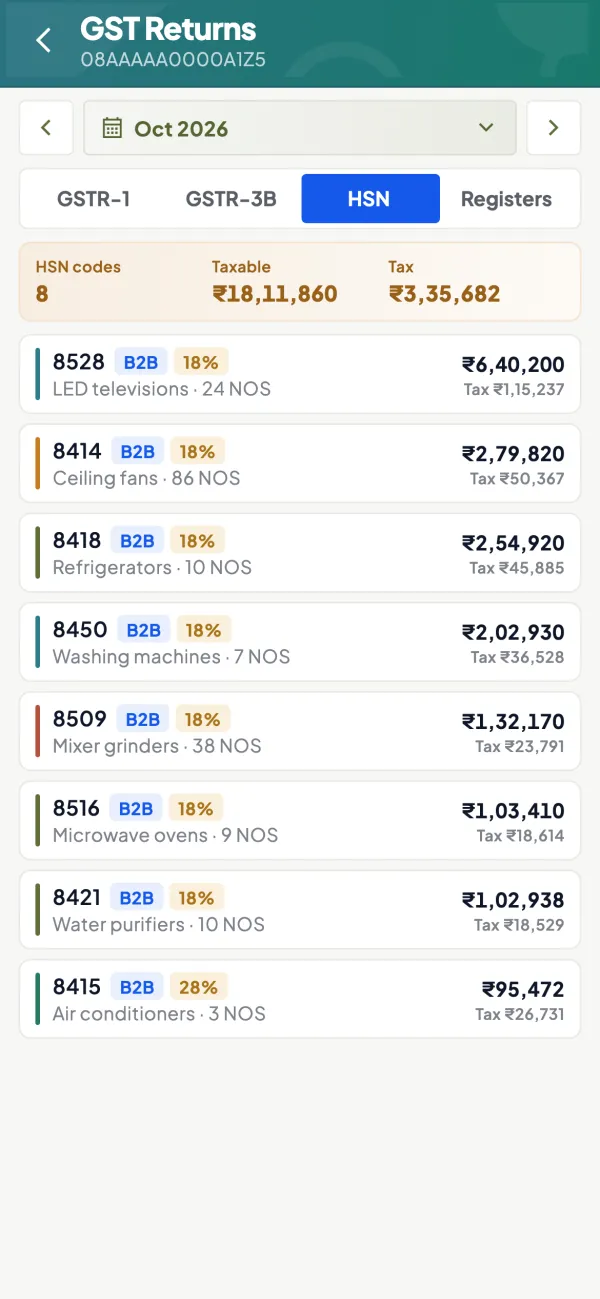
Cashflow OS syncs your vouchers from TallyPrime and prepares a GSTR-1 view for the period. Each tile opens bill-wise detail, so the owner or a second person can check GSTINs, values and tax on the phone or on the web without sitting at the Tally PC; an HSN-wise view shows rate and quantity totals. A JSON file for the GST portal can be downloaded from the same screen. Fixes are made in Tally, and the next sync shows them. Filing is done on the GST portal.
Avoid these
Common mistakes
- MistakeB2B parties saved without a GSTINDo this instead
Fill GSTIN, registration type and state in every party ledger; a missing GSTIN moves a B2B sale into B2C.
- MistakeExporting with flagged vouchers left unresolvedDo this instead
Drill into the incomplete or mismatched group and fix each voucher until none remain that you have not consciously accepted.
- MistakeFixing errors only on the GST portalDo this instead
Correct the voucher or master in Tally first, then export again, so the books and the return stay the same.
- MistakeAltering vouchers of a filed period without a recordDo this instead
Leave filed periods alone, correct through an amendment in a later return and note why any change was made.
Keep handy
Checklist
How to prepare GSTR-1 from Tally — 8 checks. Tick them as you go.
In Cashflow OS
How Cashflow OS helps
Cashflow OS puts your TallyPrime books on every phone in the team. Where it fits this topic:
A second check of GSTR-1 on phone or web
Cashflow OS prepares a GSTR-1 view from your synced Tally vouchers; each tile opens bill-wise detail so GSTINs, values and tax can be checked away from the Tally PC.
See GST reports from your Tally data
HSN-wise totals and JSON download
An HSN-wise view shows rate and quantity totals, and the JSON for the portal can be downloaded. Fixes are made in Tally, and filing is done on the GST portal.
Questions people ask
Where is GSTR-1 in TallyPrime?
What are uncertain transactions in Tally GSTR-1?
Can I upload GSTR-1 directly from Tally?
Should I fix errors in the return or in Tally?
Why does my B2B sale show as B2C in Tally's GSTR-1?
Why doesn't my GSTR-1 total match the sales register?
When is GSTR-1 due?
What is the document summary in GSTR-1?
This page is general information for Indian businesses, not tax, legal or financial advice. Rules and rates change — check the official portals or your CA before acting.