GST GST returns
GSTR-1 amendments: correcting a filed return
A filed GSTR-1 cannot be revised. Mistakes are fixed in amendment tables of a later GSTR-1, or, for the same month before GSTR-3B is filed, through the optional GSTR-1A.
- GST-registered businesses
- Accountants filing GSTR-1
- Tax practitioners
- Distributors with many B2B bills
- Businesses fixing buyer complaints
On this page 12
Two ways to correct
| GSTR-1A | Amendment in a later GSTR-1 | |
|---|---|---|
| When | After filing GSTR-1, before filing GSTR-3B of the same period | In any later period, within the time limit |
| What | Add missed records or amend records of the same period | Amend records reported in an earlier period |
| Effect on GSTR-3B | Flows into the same month's GSTR-3B | Changes liability in the later month |
| Effect on buyer | Buyer sees the change in their GSTR-2B | Buyer sees the change in their later GSTR-2B |
GSTR-1A was introduced in 2024. The portal has also moved to lock the auto-populated liability in GSTR-3B, so corrections increasingly have to be made in GSTR-1 or GSTR-1A rather than by editing GSTR-3B. Check the current position on gst.gov.in.
Which table fixes what
| Original entry | Amendment table |
|---|---|
| B2B invoices, B2C large invoices, exports | Table 9A |
| Credit and debit notes (registered and unregistered) | Table 9C |
| B2C small (consolidated) supplies | Table 10 |
| Advances received or adjusted | Table 11 amendment section |
For each amended record you enter the original invoice number and date, then the corrected details. B2C small supplies are amended by state and rate, not invoice by invoice. Where the tables are explained, see B2B vs B2C invoices in GSTR-1.
Worked examples
Wrong GSTIN. In June you reported a ₹1,00,000 + ₹18,000 IGST invoice under the wrong buyer GSTIN. In July's GSTR-1, Table 9A, enter the original invoice and correct the GSTIN. The wrong buyer's ITC disappears and the right buyer receives it. Your total liability does not change.
Value understated. An invoice was reported at ₹50,000 instead of ₹55,000 at 18%. Amend it to ₹55,000. The extra tax of ₹900 becomes payable in the month of amendment, with interest from the original due date.
Invoice should not have been reported. If an invoice was cancelled before supply but was reported, amend its value to zero, or issue a credit note if the supply actually took place. Do not report the same document twice.
Time limit
Under Section 37(3), errors for a financial year can be rectified only until 30 November of the following year, or the date the annual return is filed, whichever is earlier. After that, the GSTR-1 data for that year is closed for amendment, though you can still pay tax you missed through DRC-03. Credit notes have a similar time limit; see credit notes and debit notes in GST.
Checklist before you amend
- Confirm the error from the original GSTR-1 on the portal, not just from the books.
- Correct the voucher in your books first so books and return stay in step.
- Note the original invoice number and date exactly as reported; the amendment refers to them.
- Work out any extra tax and interest, and keep cash ready for that month's GSTR-3B.
- Tell the buyer when a GSTIN, value or rate changes, so their ITC claim matches.
- Keep a register of amendments: period, invoice, field changed, reason.
Amendment or credit note?
- Use an amendment when the reporting was wrong: wrong GSTIN, typing error in value, wrong rate, wrong place of supply, B2C reported as B2B.
- Use a credit or debit note when the transaction changed after the invoice: goods returned, price revised, discount given.
Mixing them up is a frequent cause of mismatches between books and returns.
Common mistakes
- Correcting the voucher in Tally and assuming the return is fixed. The books and the portal are separate.
- Reporting the corrected invoice as a fresh B2B entry, which doubles the liability.
- Missing the 30 November cut-off for the previous year.
- Not informing the buyer, who then reconciles against a figure that has changed.
This is general information, not tax advice.
Tracking corrections with Cashflow OS
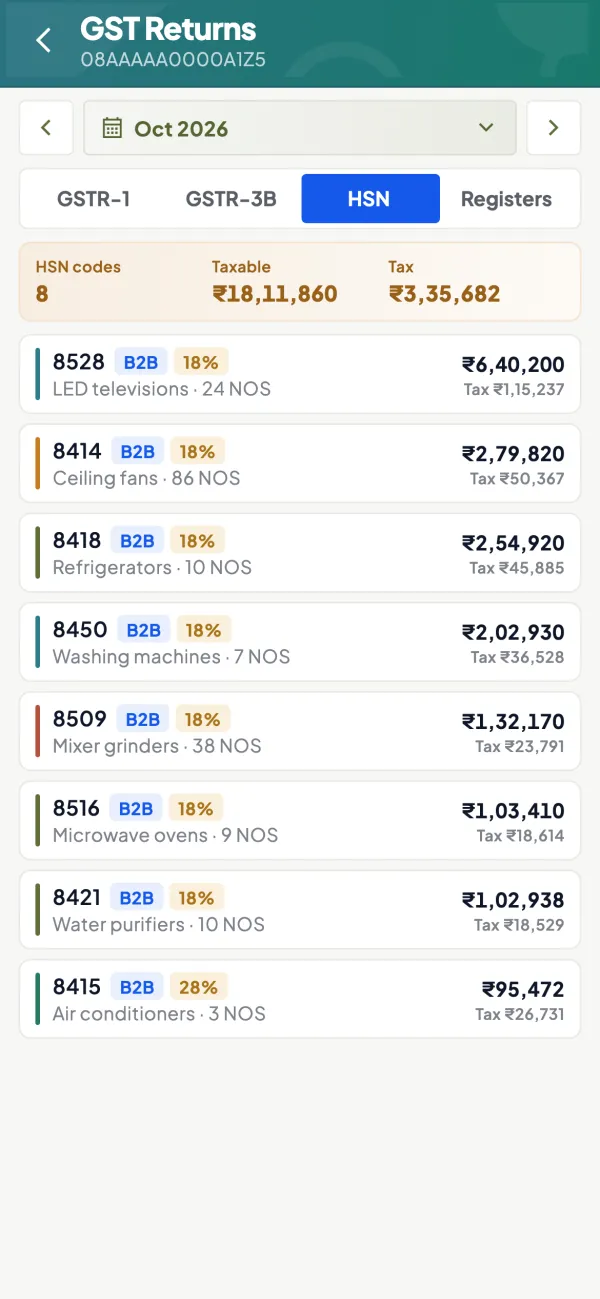
When you alter an invoice in TallyPrime, Cashflow OS picks up the change on the next sync, so the GSTR-1 view for that period shows the current books. Compare it with what you filed to list the invoices that need an amendment. Bill-wise detail makes it quick to check GSTIN and value for each one. The amendment itself is made on the GST portal.
Avoid these
Common mistakes
- MistakeFixing the voucher in Tally and assuming the return is fixedDo this instead
Correct the books, then make the amendment on the portal; the books and the return are separate.
- MistakeReporting the corrected invoice as a fresh B2B entryDo this instead
Use Table 9A with the original invoice number and date, so the liability is not doubled.
- MistakeMissing the 30 November cut-offDo this instead
Review last year's corrections in October so they go through regular returns in time.
- MistakeNot telling the buyer about a changed GSTIN or valueDo this instead
Inform the buyer in writing so their ITC claim matches the amended figure.
Keep handy
Checklist
GSTR-1 amendments: correcting a filed return — 7 checks. Tick them as you go.
In Cashflow OS
How Cashflow OS helps
Cashflow OS puts your TallyPrime books on every phone in the team. Where it fits this topic:
Compare current books with what you filed
When an invoice is altered in TallyPrime, Cashflow OS picks up the change on the next sync, so the GSTR-1 view shows the current books to compare with the filed return.
See GST reports from your Tally data
Bill-wise check of GSTIN and value
GSTR-1 tiles open bill-wise detail, which makes it quick to check the GSTIN and value of each invoice that needs an amendment. The amendment is made on the GST portal.
Questions people ask
Can I revise GSTR-1 after filing?
What is GSTR-1A?
Till when can I amend GSTR-1 for a year?
Can I change the buyer's GSTIN in an amendment?
Which table amends a B2B invoice?
How are B2C small supplies amended?
Is interest payable when an amendment increases tax?
What if I find an error after the amendment deadline?
This page is general information for Indian businesses, not tax, legal or financial advice. Rules and rates change — check the official portals or your CA before acting.