Showrooms
Cashflow OS for showrooms
In a showroom most customers do not buy on the first visit. They look, compare, go home and discuss. Cashflow OS lets your staff record each walk-in against a mobile number, note what the customer liked, and turn that into a sales order in Tally when they come back.
- Every walk-in on record
- Wishlists shared on WhatsApp
- Quotes that look like you
- Orders straight to Tally
Start free trialBook a free demo
Works with your TallyPrime14-day free trialJaipur team, call +91 70738 53555

Built for showrooms
Who it’s for
- Furniture showroomsFamilies visiting two or three times
- Tiles and sanitarywareContractors, architects and site quantities
- Electronics and appliancesModel comparisons and finance questions
- Lighting and fansBuilders, electricians and home buyers
- Modular kitchensMeasurements, quotations and long decisions
- Jewellery showroomsRepeat families and occasion buying
- Two-wheeler and EV showroomsTest rides, quotations and follow-ups
- Furnishing and curtainsFabric choices, measurements and fitting
Pain → fix
The problems we fix
The everyday headaches of showrooms, and what changes when the books are on every phone.
- The problemWalk-ins leave and nobody follows up
The family said they'd come back on Sunday; nobody called on Saturday.
With Cashflow OSVisit logged against the customer's mobileStaff type the mobile number first, and the visit is tied to the customer for follow-up.
See how it works - The problemSalesman forgets what the customer liked
On the second visit, a different salesman starts from zero.
With Cashflow OSWishlist with quantity, notes and interest levelAdd items with quantity and notes, mark hot, warm or cold, and anyone can pick it up next time.
See how it works - The problemCustomer can't remember which pieces he saw
Tally codes on a hand-written slip mean nothing at home.
With Cashflow OSItem photos and display names customers knowKeep a friendly display name and photos beside the Tally name, and share them on WhatsApp.
See how it works - The problemQuotations written by hand on letterhead
Builders and loan files need a proper quote, and it takes an hour.
With Cashflow OSBranded quotation PDF in minutesQuotations with your logo, colours, signature and UPI details, shared on WhatsApp or email.
See how it works - The problemArchitect and fitter referrals never tracked
Nobody knows who brought which customer, so commissions become arguments.
With Cashflow OSReferrer and commission recorded per customerNote who referred the customer, such as a fitter or architect, and the commission earned.
- The problemAgreed order typed again into Tally
Rates and quantities change between the showroom floor and the billing desk.
With Cashflow OSWishlist or quote becomes a Tally sales orderConvert the visit, wishlist or quotation into a sales order with lines and GST, posted through the connector.
See how it works
Features
How Cashflow OS works for showrooms
Wishlists built from your Tally items
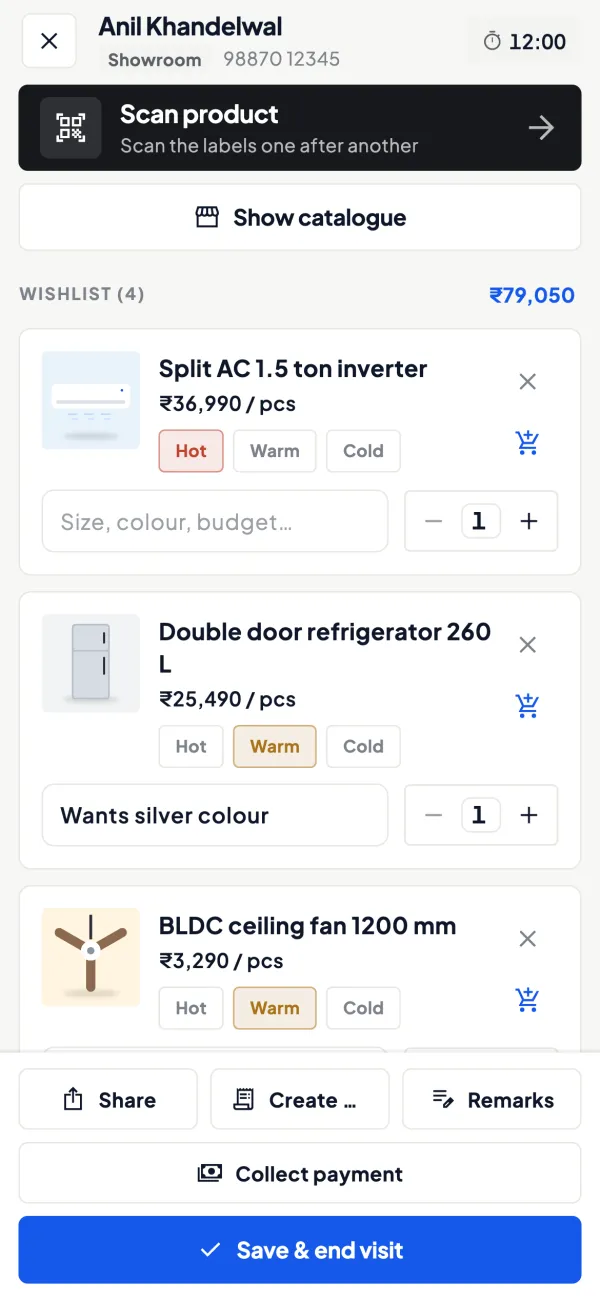
How it works. Look the customer up by mobile number, see past visits, and add items to a wishlist with quantity, notes and interest level.
- Any salesperson can continue the conversation
- Hot, warm and cold lists for follow-up calls
- Shared on WhatsApp before the family leaves
In practiceThe Agarwal family shortlists a 3+1+1 sofa set and a centre table worth ₹1,45,000 in Jaipur; the wishlist goes to their phone with photos before they reach the car.

Quotations that look like your showroom
How it works. Make a quotation with your logo, colours, letterhead, signature, and bank and UPI details; share it as a PDF and convert it later into a sales order or Tally invoice.
- Ready for a builder or a loan file
- No retyping when the customer agrees
- Same look on every document
In practiceA customer needs a quotation for 1,100 sq ft of vitrified tiles for a home loan; the PDF goes on WhatsApp in ten minutes.

Display names and photos
How it works. Keep Tally's store-room name and add a name customers understand, photos, brands and custom fields such as size, finish or warranty.
- 'Ivory matt tile, 2x4 ft' instead of a code
- Same items feed the online catalogue link
- Tally stock groups work as categories
In practiceTL-GVT-600x1200-MATT-IVR shows to customers as 'Ivory matt tile, 2x4 feet' with three room photos.

Scan a tag, add it to the wishlist
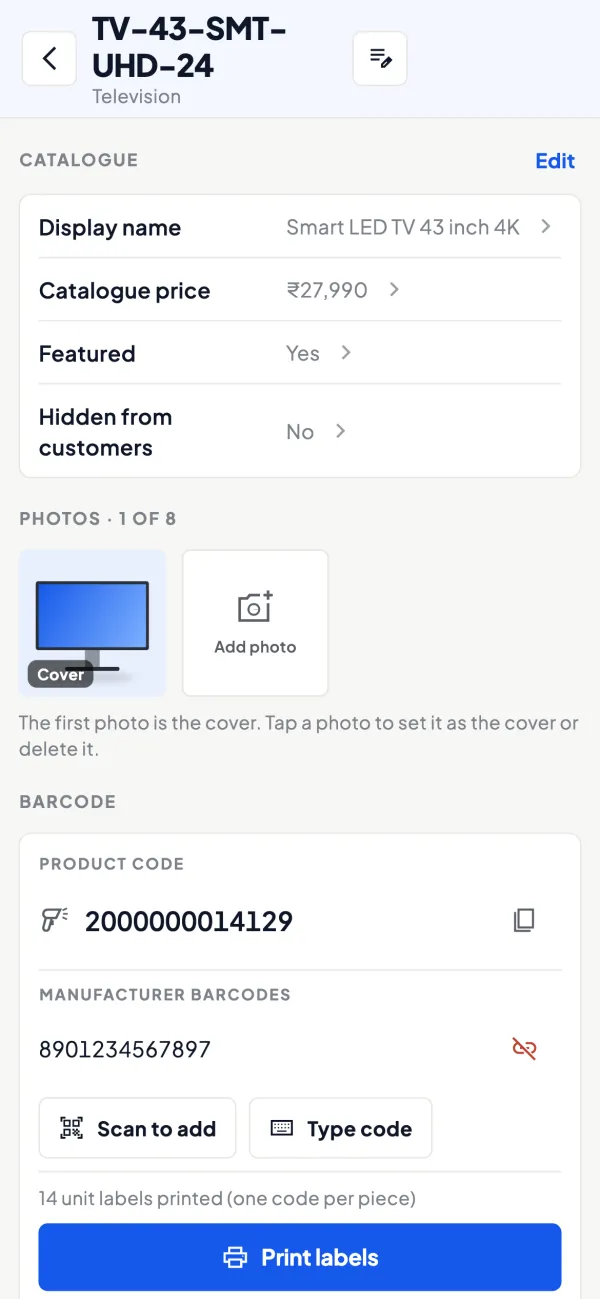
How it works. Label display pieces with barcodes and scan them with the phone camera to add them to a wishlist in a large showroom.
- Faster than searching by name
- Right model and finish every time
- Labels printed on thermal or A4
In practiceIn a 6,000 sq ft lighting showroom, staff scan the tags on eight chandeliers as the family walks round.
From wishlist to Tally order
How it works. When the customer decides, a sales order is made from the wishlist or visit with lines and GST and posted to Tally through the connector; frontline orders can need approval.
- Agreed quantities reach billing unchanged
- Owner approval on big discounts
- Tally validates every order
In practiceOn their third visit, the family confirms the sofa set; the salesman converts the wishlist into a ₹1,38,000 order and the owner approves the discount.

Know your trade
A guide for showrooms
How the business works, where money gets stuck, and the GST points to watch.
How a showroom sale really happens
Showrooms selling furniture, tiles, sanitaryware, electronics, lighting or kitchens share a pattern. A family walks in, spends 30 to 60 minutes with a salesperson, shortlists a few pieces and asks for a price. Often they come back two or three times, sometimes with a contractor or an architect, before an order is placed. The sale might be worth ₹40,000 or ₹4,00,000, and it depends on the salesperson remembering the conversation.
Most showrooms bill in TallyPrime, but the visit itself lives in the salesperson's memory or a register. When that salesperson is on leave, or leaves the job, the customer's history leaves too.
What goes wrong without a record
- No follow-up: the customer said "we will come back on Sunday" and nobody called on Saturday.
- Repeat explanations: on the second visit a different salesperson starts from zero.
- Price confusion: the customer remembers a number the salesperson does not.
- No measurement: the owner knows footfall was high but not how many visits became orders. Our guide on converting walk-in customers covers how to measure this.
Walk-ins and wishlists in Cashflow OS
With the showroom module switched on for your company:
- Look up by mobile number. When a customer arrives, the salesperson types the number and sees past visits and wishlists.
- Build a wishlist. Add items with quantity and notes, and mark the customer's interest as hot, warm or cold. Barcodes can be scanned with the phone camera if your items are labelled.
- Share on WhatsApp. Send the wishlist to the customer so the family can discuss it at home with photos and names in front of them.
- Convert to a sales order. When they decide, a sales order is made from the wishlist or visit with lines and GST, and posted to Tally through the connector once writing is switched on.
Quotations that look like your showroom
Many showroom customers ask for a written quotation, often for a builder or for a loan. The documents module makes quotations with your logo, colours, letterhead, signature, and bank and UPI details, shared as a PDF on WhatsApp or by email. When the customer agrees, the quotation can be converted into a sales order or a Tally sales invoice, so nothing is typed twice. See quotation format and best practices for what a good showroom quote should include.
Showing items the way customers know them
Tally item names are written for the store room: "TL-GVT-600x1200-MATT-IVR". Customers know it as "Ivory matt tile, 2x4 feet". Cashflow OS lets you keep a display name and photos for each item without changing the Tally name, and use Tally stock groups as categories. Brands and custom fields such as finish, size or warranty can be added too. The same item data feeds the online catalogue link if you want customers to browse from home, with enquiries coming to you on WhatsApp.
A weekly routine for the showroom owner
- Go through the week's wishlists marked hot and check that each customer has had a call.
- See which salesperson's visits turned into orders; the performance view helps if you also run outdoor sales.
- Check receivables for customers who took delivery on part payment.
- Review stock of the items that appear most in wishlists, so the best sellers are not out of stock when the customer returns.
The guide on showroom customer follow-up has a simple calling schedule.
What to capture at each visit
A wishlist is only as useful as what goes into it. A short checklist for showroom staff keeps the records consistent:
- Mobile number first, before anything else, so the visit is tied to a customer and not lost.
- Every item shown seriously, with quantity. Four pieces of a sofa set or 120 tiles for a room matter more than a single item.
- A note in the customer's words: "wants darker shade", "budget around ₹1,50,000", "will bring contractor on Sunday".
- An honest interest level. Hot means likely to buy within days, warm means comparing, cold means just looking. If everything is marked hot, the follow-up list stops meaning anything.
Sharing the wishlist on WhatsApp before the customer leaves the showroom also does a quiet job: the customer now has your showroom's name and the items in his phone, not a competitor's visiting card.
Access and control
Showroom staff can be given the salesperson role, which shows items and their own customers but not the company's accounts. Orders from frontline staff can be set to need approval before they reach Tally. Writing into Tally stays off until the owner switches it on, and the owner can see the team's activity in the app.
This page is general information for Indian businesses, not tax, legal or financial advice. Rules and rates change — check the official portals or your CA before acting.
Set-up
Up and running in 4 steps
No new software to learn for your accountant — Tally stays as it is.
- 1
Install the Tally Connector on the PC where TallyPrime runs
- 2
Sign in to the app with your mobile number and scan the connector's QR
- 3
Add display names and photos for your best-selling items
- 4
Switch on showroom walk-ins; invite staff as salespersons
Buyer’s checklist
What to look for in software for showrooms
Whatever you choose, check these before you commit.
- Every walk-in tied to a mobile number, so follow-up is possible
- Notes and interest level that any salesperson can pick up
- Items shown with photos and names customers understand
- Quotations on your letterhead that turn into orders without retyping
- A record of architects, fitters and others who refer customers
- Staff access that hides margins and accounts
- Orders that reach your accounting software with the agreed rates
- Something to send the customer home with, not just a visiting card
Plans
Simple yearly plans
- 14-day free trial on your own books
- 3-year term saves up to 25%
- Premium modules (catalogue, field force, price lists, store…) priced extra
Start free trialGet the price for your business
Compare all plans- Growth₹3,000/year + GSTBooks, reports, outstanding and sharing
- Pro₹5,000/year + GSTEverything in Growth, plus entries into Tally
- Pro+₹7,000/year + GSTEverything in Pro, plus e-invoice and e-way bill
Why Cashflow OS
Why showrooms choose Cashflow OS
- Built around the second visitVisits and wishlists stay with the customer's mobile number, not the salesperson's memory.
- Your Tally items, made presentablePhotos and display names on top of Tally items, with no change to Tally.
- Quotes in minutesBranded quotations that convert into a sales order or Tally invoice.
- Referrals trackedRecord who referred a customer and the commission earned.
- Owner stays in controlFrontline orders can need approval, and the owner sees the team's activity.
- 14-day free trialTry walk-ins and wishlists on your own Tally items first.