Retailers
Cashflow OS for retailers
A retail shop owner wants to know three things at the end of the day: how much was sold, how much came in as cash and UPI, and who still owes money. Cashflow OS shows these from your TallyPrime books on your phone, whether you are at the counter or at home.
- Day's sales on your phone
- Udhaar out of the diary
- Barcode labels for any item
- Your shop online, from Tally
Start free trialBook a free demo
Works with your TallyPrime14-day free trialJaipur team, call +91 70738 53555
Built for retailers
Who it’s for
- Kirana and general storesCash and UPI at the counter, regulars on credit
- Garment and footwear shopsSizes, colours and seasonal stock
- Mobile and electronics storesSerial numbers and high-value items
- Hardware and paint shopsPlumbers and painters on running credit
- ChemistsCounter sales and monthly accounts for regulars
- Stationery and gift shopsMany small items, school-season rush
- Optical storesFrames, lenses and customer orders
- Home décor and kitchenwareDisplay items customers want to see first
Pain → fix
The problems we fix
The everyday headaches of retailers, and what changes when the books are on every phone.
- The problemToday's sales known only after closing
Someone has to run the Day Book on the shop PC before you know how the day went.
With Cashflow OSSales, cash and bank for today on HomeToday's sales, receipts and payments against the period before, from your Tally books, on your phone.
See how it works - The problemUdhaar split between Tally and a diary
The two never agree, and the customer remembers the smaller number.
With Cashflow OSEvery credit customer's balance on the phoneOpen the regular's ledger with its bills and share the statement on WhatsApp in English or Hindi.
See how it works - The problemBilling slows down on items with no barcode
The counter searches by name while the queue grows.
With Cashflow OSPrint barcode labels from your Tally itemsLabels per item or per piece on a thermal printer or A4, scanned with the phone camera.
See how it works - The problemSupplier dues remembered only when they call
A missed due date costs you the supplier's goodwill and next season's terms.
With Cashflow OSPayables by bill, with ageingSee which supplier bills fall due this week before placing new orders.
See how it works - The problemCustomers ask on WhatsApp what you have in stock
Sending photos one by one takes the whole afternoon.
With Cashflow OSCatalogue link with photos, no app neededShare one link; customers browse your items and send enquiries on WhatsApp.
See how it works - The problemNo way to sell to customers who don't walk in
Regulars who moved across town quietly start buying elsewhere.
With Cashflow OSAn online store built from your Tally itemsA hosted shop at shop.cashflowos.in with guest checkout, paid through your own gateway or cash on delivery.
See how it works
Features
How Cashflow OS works for retailers
The day's position on your phone
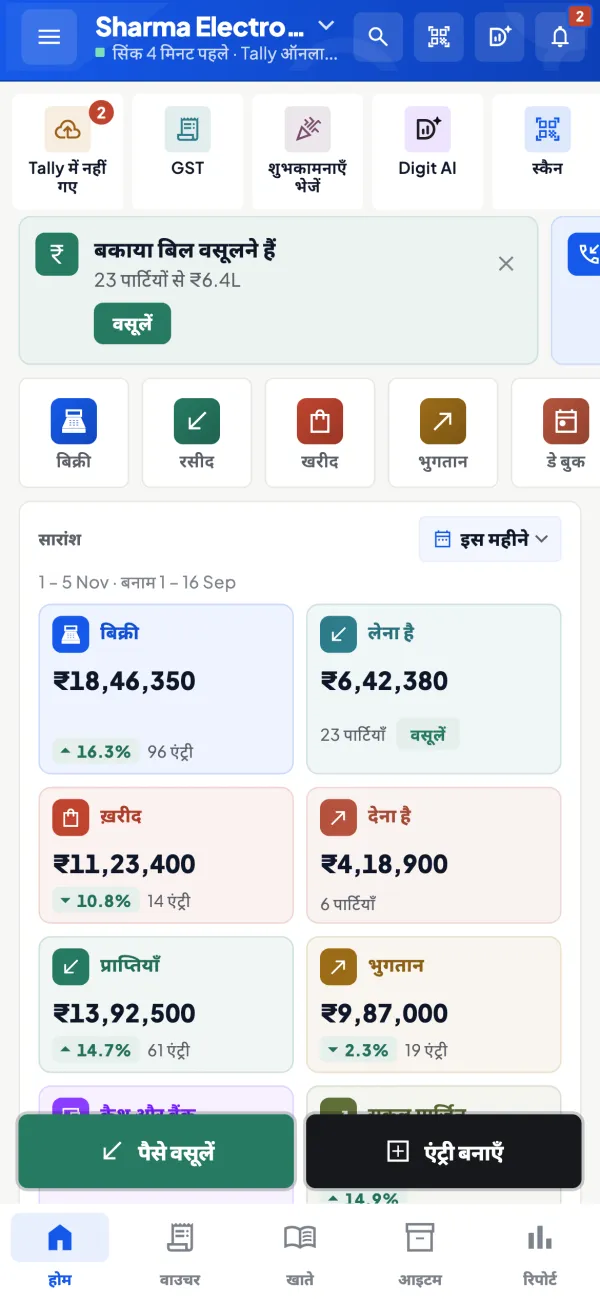
How it works. Home shows sales, purchases, receipts, payments, cash and bank for today, this month or the year, against the period before.
- Check the day from home after closing
- Evening summary arrives as a notification
- Alerts when bills are changed or deleted
In practiceAt 9:30 pm the owner of a Lucknow garment shop sees ₹68,400 in sales, ₹52,000 in UPI and cash, and one bill deleted at the counter.

Udhaar with the bills behind it
How it works. Each regular's ledger shows the bills and payments that make up the balance, synced from Tally. Share it as a PDF or a Hindi हिसाब page.
- No notebook to reconcile at month-end
- The customer sees dates and amounts, not a total
- Payment reminders on WhatsApp
In practiceA regular bought ₹3,200, ₹1,850 and ₹4,600 this month and paid ₹5,000. The statement shows ₹4,650 due against three dated bills.

Barcodes and labels for faster billing
How it works. Print labels per item or per piece on a thermal printer or A4, and scan them with the phone camera.
- Faster counter work in the rush hour
- Fewer wrong items on the bill
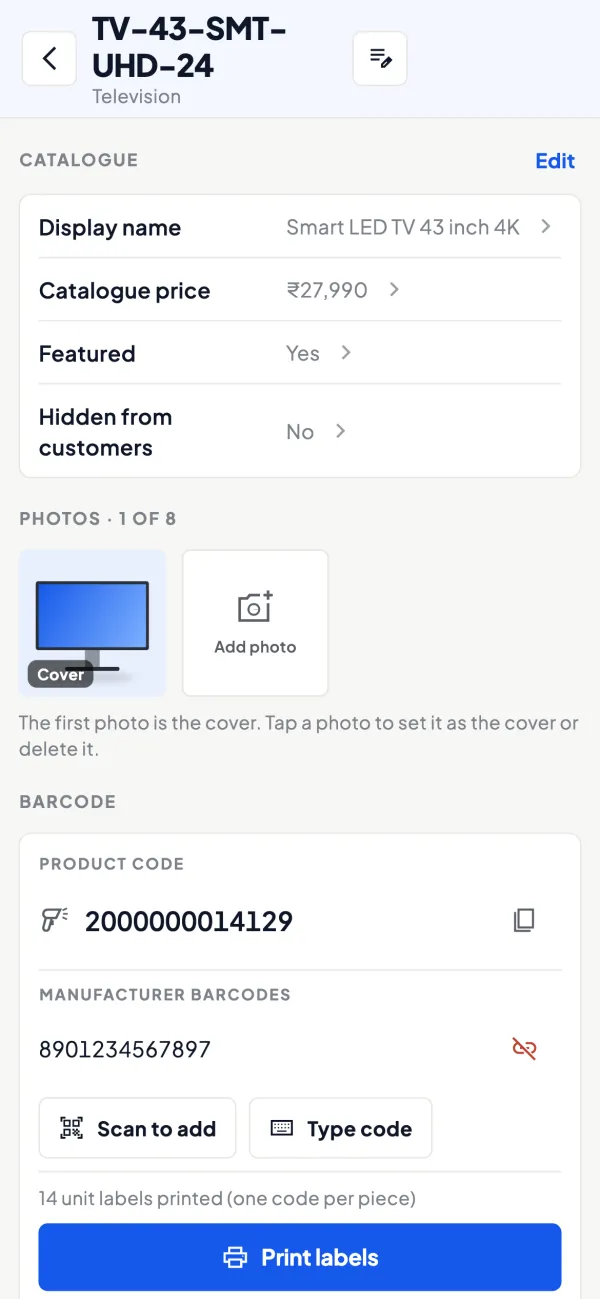
- Works for items without a maker's barcode
In practiceA footwear shop labels 600 pairs in each size before the Diwali rush, so the counter scans instead of searching.
Photos and names customers understand
How it works. Add photos and your own display name beside the Tally name. The same items feed the catalogue link and the online store.
- Customers browse at home before they come in
- Enquiries arrive on WhatsApp
- Hide items or show 'price on request' in the store
In practiceA kitchenware shop shares its catalogue link in the building's WhatsApp group; three families come in asking for the same pressure cooker.

In Hindi for the family
How it works. The app and reports work in English and Hindi; each person picks their own language.
- Family members read the same numbers comfortably
- Hindi हिसाब statements for customers
- Staff choose their own language
In practiceThe owner reads reports in English, while his father checks the day's sales in Hindi on his own phone.
Know your trade
A guide for retailers
How the business works, where money gets stuck, and the GST points to watch.
How a retail shop runs on Tally
Most retail shops that use TallyPrime bill at the counter, keep stock item-wise and sell mostly for cash or UPI, with a smaller group of regular customers on credit. Purchases come from a handful of wholesalers or distributors, often on 15 to 45 days of credit.
The owner's routine is familiar: open the shop, watch the counter, check the cash at night, pay suppliers when bills fall due and restock what is running low. Larger shops add a second counter, a few staff and sometimes a second branch.
Where retail owners lose time and money
- Not knowing the day's position until someone runs the Day Book on the Tally PC.
- Udhaar in two places: partly in Tally, partly in a notebook. The two never agree.
- Supplier dues remembered only when the supplier calls.
- Slow-moving stock that ties up cash on the shelf. See inventory turnover and dead stock for how to spot it.
What Cashflow OS gives a retailer
Cashflow OS runs on top of TallyPrime through a small Windows connector on the shop PC. You get:
- Home screen: sales, purchases, receipts, payments, cash and bank for today, this month or the year, against the period before.
- Party ledgers and statements: the regular customer's balance, shared as a PDF or a Hindi हिसाब page on WhatsApp.
- Payables: bill-wise outstanding to suppliers with ageing, so you can plan payments.
- Reports: Day Book, cash and bank book, stock summaries, expenses and Profit & Loss, exportable to Excel and PDF.
Selling tools a shop can switch on
Add-ons are switched on per company, so a shop uses only what it needs:
- Barcodes and labels: a barcode per item or per piece, printed on a thermal printer or A4, and scanned with the phone camera.
- Item photos and display names: show customers a friendly name instead of Tally's internal code.
- Online catalogue: a link customers can browse without installing anything; enquiries come to you on WhatsApp.
- Online store: a hosted shop at shop.cashflowos.in built from your Tally items, with guest checkout. Payment goes through your own payment gateway, or cash on delivery or agreed terms. Our guide on online stores for local retailers discusses when this is worth it.
A simple evening routine
- Open Home and compare today's sales with the same period before.
- Check cash and bank balances against what is physically in the drawer.
- Open receivables and send statements to two or three regular customers who are overdue.
- Look at payables due this week so supplier cheques are ready.
- Glance at stock summaries for fast-moving items before placing tomorrow's order.
Five minutes on the phone replaces the half hour at the Tally PC after closing.
Handling regular customers on credit
Most shops have a short list of regulars who settle weekly or monthly: offices, nearby businesses, families who have bought from you for years. The trouble starts when their balances live partly in Tally and partly in a notebook at the counter. The fix is to put every credit sale against the customer's ledger in Tally and stop the notebook.
Once that is done, each customer's balance is visible on the phone with the bills that make it up. When a customer asks what he owes, you open his ledger and share the statement on WhatsApp in his language: the PDF in Tally's format or the Hindi हिसाब page. A small worked case: a regular buys ₹3,200, ₹1,850 and ₹4,600 over a month and pays ₹5,000 in between. The statement shows ₹4,650 still due against the three bills, with dates, and there is nothing to argue about.
For the supply side, check which supplier bills fall due in the coming week before you place new orders. Paying on time is often what earns you better rates or a longer credit period next season.
Keeping the shop's books safe
Tally stays the books of record. Writing into Tally from the app is off until the owner switches it on for the company, and staff can be given limited roles. The app can be locked with fingerprint, face or PIN, and the owner can see what the team has been doing in the app.
This page is general information for Indian businesses, not tax, legal or financial advice. Rules and rates change — check the official portals or your CA before acting.
Set-up
Up and running in 4 steps
No new software to learn for your accountant — Tally stays as it is.
- 1
Install the Tally Connector on the PC where TallyPrime runs
- 2
Sign in to the app with your mobile number and scan the connector's QR
- 3
Put every credit sale on the customer's ledger in Tally
- 4
Switch on only the modules you need: barcodes, catalogue, store
Buyer’s checklist
What to look for in software for retailers
Whatever you choose, check these before you commit.
- The day's sales, cash and bank visible on the phone, not just the shop PC
- Credit customers' balances with the bills behind them
- Statements customers can read, in English or Hindi
- Barcode labels you can print yourself, for any item
- Supplier dues with dates, so payments are planned
- An easy way to show items to customers who aren't in the shop
- Staff access that hides profit and bank balances
- Works with the Tally billing you already do
Plans
Simple yearly plans
- 14-day free trial on your own books
- 3-year term saves up to 25%
- Premium modules (catalogue, field force, price lists, store…) priced extra
Start free trialGet the price for your business
Compare all plans- Growth₹3,000/year + GSTBooks, reports, outstanding and sharing
- Pro₹5,000/year + GSTEverything in Growth, plus entries into Tally
- Pro+₹7,000/year + GSTEverything in Pro, plus e-invoice and e-way bill
Why Cashflow OS
Why retailers choose Cashflow OS
- Your Tally billing stays as it isCashflow OS reads the books through the connector; you don't change how the counter bills.
- Five minutes instead of half an hourThe evening check happens on your phone, not at the shop PC.
- Udhaar that adds upEvery regular's balance with its bills, shared on WhatsApp.
- Selling beyond the counterCatalogue link and an online store from the same Tally items.
- English and HindiEach person in the shop picks their language.
- 14-day free trialTry it on your own shop's books before choosing a plan.