Running the business Inventory
Inventory turnover and dead stock
Inventory turnover tells you how many times a year your stock is sold and replaced. Dead stock is what has stopped moving altogether. Both are cash sitting on shelves, and both are easier to fix item by item than in total.
- Distributors and wholesalers
- Retailers and showrooms
- Purchase managers
- Owners funding stock on CC
- Hardware and sanitaryware traders

On this page 12
The formulas
- Inventory turnover = cost of goods sold ÷ average stock (at cost)
- Days of stock = 365 ÷ inventory turnover, or average stock ÷ cost of goods sold × 365
- Average stock = (opening stock + closing stock) ÷ 2, or better, the average of month-end stock values
Use cost values on both sides. Comparing stock at cost with sales at selling price makes turnover look better than it is.
Worked example
A hardware wholesaler has cost of goods sold of ₹3,60,00,000 for the year. Opening stock was ₹55,00,000 and closing stock ₹65,00,000.
- Average stock = (55,00,000 + 65,00,000) ÷ 2 = ₹60,00,000
- Turnover = 3,60,00,000 ÷ 60,00,000 = 6 times a year
- Days of stock = 365 ÷ 6 ≈ 61 days
If the same business ran at 45 days of stock, average stock would be about ₹44,40,000 (3,60,00,000 ÷ 365 × 45), freeing around ₹15,60,000 of cash.
Look item by item
A healthy total can hide problems. Run turnover or days of stock for each item or stock group and sort them:
| Item | Stock (cost) | Sold in last 90 days (cost) | Days of stock |
|---|---|---|---|
| PVC pipe 1 inch | ₹1,20,000 | ₹3,60,000 | 30 |
| CP tap model X | ₹2,40,000 | ₹1,20,000 | 180 |
| Old-design basin | ₹1,80,000 | ₹0 | No sale |
Days of stock here = stock ÷ 90-day sales × 90. The pipe is fine. The tap has six months of stock. The basin is dead.
Define slow and dead stock
Agree simple rules, for example:
- Slow-moving: more than 120 days of stock, or no sale in 60 days.
- Dead: no sale in 180 days.
Pick limits that suit your trade. Seasonal goods (fans, heaters, festive items) need judging against their season, not the whole year; see festive season stock planning.
How to clear dead stock
- Stop reordering it. Obvious, but often missed when reorders are on autopilot.
- Offer it to your best dealers first, at a special rate or bundled with fast items.
- Return or exchange with the supplier, if your terms allow.
- Move it to a branch where it sells better.
- Sell at cost or below to a liquidator. Cash today beats a shrinking value on the shelf.
- Write off damaged or obsolete stock with your CA's advice. Under GST, input tax credit on goods written off, lost or destroyed is generally not allowed and may need to be reversed; see blocked input tax credit. This is general information, not tax advice.
Preventing it next time
- Set reorder levels from actual sales, not from supplier pressure.
- Buy new or trial items in small quantities until they prove themselves.
- Review a slow-moving list every month with the purchase team.
- Be wary of supplier schemes that need large quantities for a small extra discount.
A monthly stock review in 20 minutes
- Export the item-wise stock and sales for the last 90 days.
- Calculate days of stock for each item and sort from highest to lowest.
- Mark items above your slow-moving limit and any with no sale.
- For each marked item, decide one action: stop reorder, push to dealers, return, transfer, or clear.
- Note the total value of marked items and compare with last month.
The total value of slow and dead stock is a single number worth watching every month, just like overdue receivables. When it falls, cash is being released.
Stock reports with Tally and Cashflow OS
Cashflow OS syncs stock and item summaries from TallyPrime, so you can check quantities and values on your phone and the web, for any period. Export them to Excel to work out days of stock by item, and use the Profit & Loss for cost of goods sold. Tally stays the record of stock; Cashflow OS is a faster way to look at it. See financial reports.
Avoid these
Common mistakes
- MistakeMeasuring turnover with sales at selling priceDo this instead
Use cost of goods sold against stock at cost, so both sides are on the same basis.
- MistakeLooking only at the total turnover figureDo this instead
Work out days of stock for each item or group; the total can look fine while some items have not moved in months.
- MistakeLetting reorders run on autopilotDo this instead
Stop reordering items above your slow-moving limit, and set reorder levels from actual sales, not supplier pressure.
- MistakeJudging seasonal goods against the whole yearDo this instead
Judge fans, heaters and festive items against their own season before calling them slow or dead.
Keep handy
Checklist
Inventory turnover and dead stock — 7 checks. Tick them as you go.
In Cashflow OS
How Cashflow OS helps
Cashflow OS puts your TallyPrime books on every phone in the team. Where it fits this topic:
Stock and item summaries on demand
Stock and item summaries sync from TallyPrime, so you can check quantities and values for any period on phone or web. Tally stays the record of stock.
See Financial reports from Tally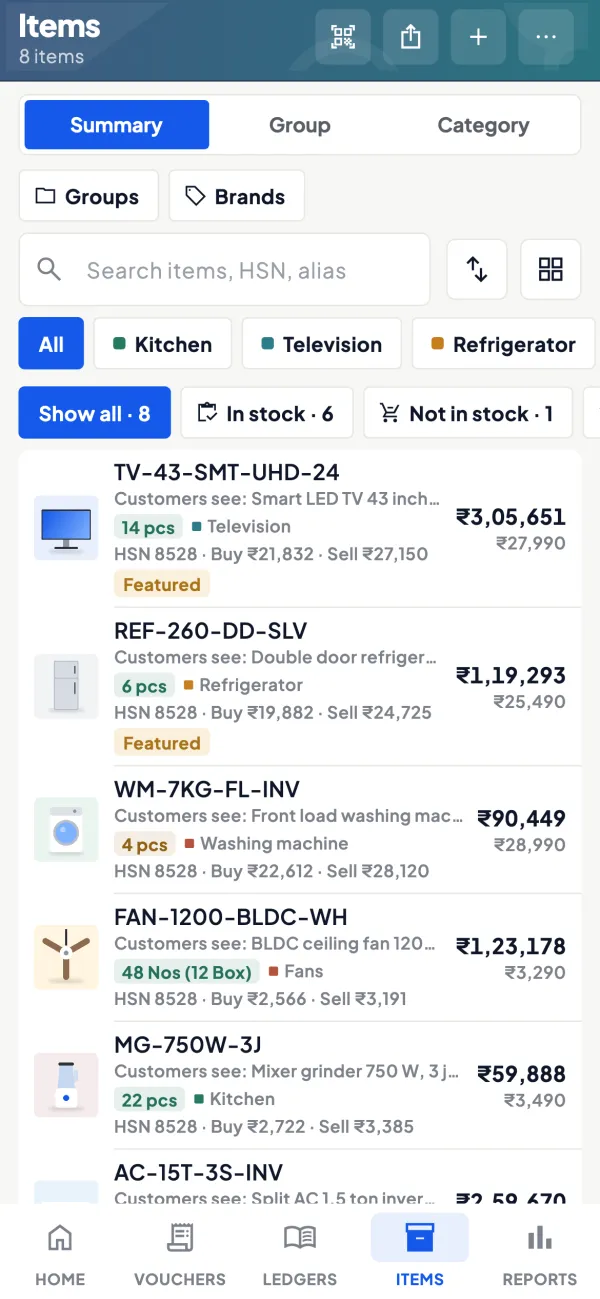
Export for the monthly review
Export stock and sales to Excel to work out days of stock by item, and take cost of goods sold from the synced Profit & Loss.
See Reports in Excel and PDF
Questions people ask
What is a good inventory turnover ratio?
Is high turnover always good?
Should dead stock be valued at cost in the books?
Should I measure turnover in value or quantity?
What is the difference between slow-moving and dead stock?
How do I work out days of stock for one item?
Can I return dead stock to the supplier?
Does buying in bulk always save money?
This page is general information for Indian businesses, not tax, legal or financial advice. Rules and rates change — check the official portals or your CA before acting.