Business software & ERP Business software
Inventory management software: the basics
Inventory software keeps a running count of every item you hold, where it is, what it cost and how fast it moves. Done well, it tells you what to reorder, what is stuck, and whether the stock in the books is the stock on the shelf.
- Distributors and wholesalers
- Retailers with many items
- Hardware and electrical traders
- Pharma and FMCG businesses
- Businesses with several godowns
On this page 12
Start with a clean item master
Everything else depends on the item list. A messy master, with "Fevicol 1kg", "FEVICOL 1 KG" and "Fevicol-1kg" as three items, makes every report wrong. Before buying or switching software, fix the master:
- One item, one name. Decide a naming pattern, such as Brand + Product + Size + Colour, and stick to it.
- Group items by how you analyse them: brand, product type, or both.
- HSN code and GST rate on every item, checked once by your accountant.
- Units that match how you buy and sell (see below).
- Remove dead items that have had no movement and no stock for over a year, or mark them inactive.
Units, alternate units and packs
A tile dealer buys in boxes and sells in boxes or square feet. A hardware wholesaler buys screws in cartons of 50 packets and sells packets. Inventory software must convert between these without manual maths, otherwise stock goes wrong every time a carton is opened. Define the base unit (the smallest unit you sell) and the conversion for each item. The guide on alternate units in Tally shows how this works in practice.
Locations: godowns, shops and vans
If stock sits in more than one place, track it by location. A distributor with a main godown, a counter and two delivery vans has four locations. Transfers between them are recorded as movements, not as sales and purchases, so total stock does not change but each location's balance does. Without this, the counter keeps saying "it's in the godown" and the godown says "we sent it to the counter". See godowns and multi-location stock.
Batches, expiry and serial numbers
Not every business needs these, but those who do need them badly:
- Batches and expiry: pharma, food, agri-inputs, paints and adhesives with shelf life. You need to sell oldest first and see what expires in the next 60 days.
- Serial numbers: electronics, appliances, mobiles, solar inverters, where warranty is tied to a specific unit.
- Per-piece barcodes: when each piece is unique or must be traced, such as jewellery or high-value appliances.
If your trade does not need them, do not switch them on. Every extra field slows down billing.
Valuation and why it matters at year end
Closing stock value goes straight into your profit. If you hold ₹42 lakh of stock and it is valued wrongly by 5%, profit is off by ₹2.1 lakh. Software values stock by a method such as weighted average or FIFO; agree the method with your CA and do not change it casually. Physical counts at least once a year, and for fast-moving items more often, keep the book figure honest. The stock audit checklist explains how to run a count.
Reports that actually get used
| Report | Use it to |
|---|---|
| Stock summary by group | See total holding by brand or category |
| Item movement | Check inward, outward and closing for one item over a period |
| Fast and slow movers | Decide what to reorder and what to push or discount |
| Items below reorder level | Prepare purchase orders |
| Ageing of stock | Find stock lying unsold for 90, 180, 365 days |
| Location-wise stock | Plan transfers between godowns and counters |
Checklist when choosing inventory software
- Does stock update the moment a bill or delivery is made, or only later?
- Can it handle your units, locations and, if needed, batches or serials?
- Do sales staff see available stock before promising delivery?
- Is inventory part of the accounting system, or separate? Separate means reconciliation work every month.
- Can you print barcodes and labels from the same item master?
Stock visibility with Tally and Cashflow OS
If you keep inventory in TallyPrime, Cashflow OS shows stock and item summaries from the synced data on the phone and web, so salespeople and the owner can check before promising. Items can carry photos, display names, brands and custom fields, using Tally stock groups as categories. Barcodes and labels can be printed per item or per piece and scanned with a phone camera, and stock journals can be posted to Tally once writing is switched on. See barcodes and labels.
Avoid these
Common mistakes
- MistakeThe same item entered under three spellingsDo this instead
Pick a naming pattern such as Brand + Product + Size + Colour, merge duplicates, and stick to it.
- MistakeBuying in cartons and selling in pieces with no conversionDo this instead
Set the base unit and the conversion on each item, so stock stays right when a carton is opened.
- MistakeRecording godown transfers as sales and purchasesDo this instead
Record them as stock movements between locations, so total stock is unchanged and each location's balance is right.
- MistakeSwitching on batches and serials for every itemDo this instead
Use them only for items with expiry or warranty tracking; elsewhere they slow billing without benefit.
Keep handy
Checklist
Inventory management software: the basics — 8 checks. Tick them as you go.
In Cashflow OS
How Cashflow OS helps
Cashflow OS puts your TallyPrime books on every phone in the team. Where it fits this topic:
Stock on the phone before you promise
Stock and item summaries sync from TallyPrime, so salespeople and the owner can check quantities on phone or web, with item photos and your own display names.
See Item photos and display names
Barcodes and labels from the same items
Print labels per item or per piece on thermal or A4 printers and scan with the phone camera; stock journals can be posted to Tally once writing back is on.
See Barcodes and labels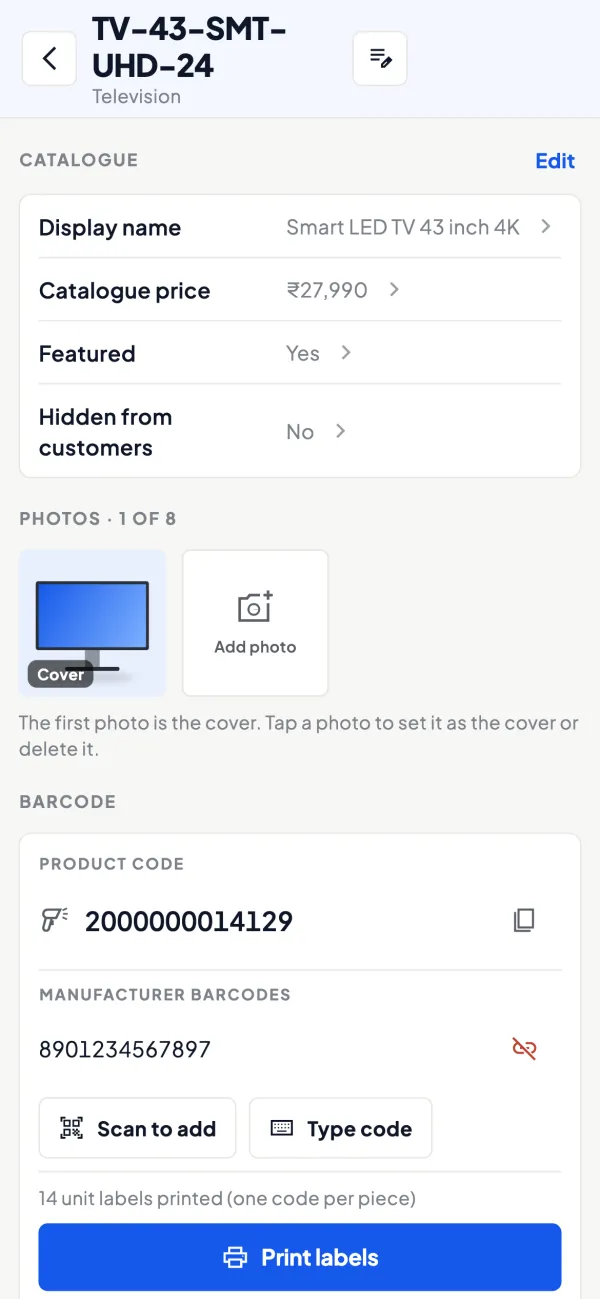
Questions people ask
Should inventory be separate from accounting software?
How often should I count stock?
What is a reorder level?
Do I need batch tracking?
What is the difference between FIFO and weighted average?
How do I handle stock in a delivery van?
How do I start if my current stock figures are wrong?
What is the difference between stock ageing and item movement?
This page is general information for Indian businesses, not tax, legal or financial advice. Rules and rates change — check the official portals or your CA before acting.