
Business software & ERP Business software
Setting up a barcode system for a small business
A barcode system lets staff identify an item by scanning instead of searching or typing. For a small business, it needs three things: a code on every item, a printer for labels, and software that finds the item when the code is scanned.
- Hardware and electrical shops
- Retail stores and showrooms
- Jewellers
- Godowns and distributors
- Shops with many similar items
On this page 12
What barcodes fix
- Wrong items on bills. "Switch 6A white" vs "Switch 6A ivory" mistakes disappear.
- Slow billing. A twelve-line bill takes seconds to scan instead of minutes to search.
- Stock counts. Scanning shelves during a stock audit is faster and more accurate than writing.
- Training time. New staff do not need to memorise item names or codes.
Barcodes do not fix a messy item master. If the same product exists three times in your software, scanning just picks one of the three. Clean the master first; the inventory software basics guide explains how.
Manufacturer codes or your own codes?
Many packaged products already carry a manufacturer's barcode. You can scan and link that code to your item. That works well for FMCG, packaged hardware and electronics. But many items in Indian trade have no code or an unreliable one: loose items, tiles, fabric, locally made goods, and items where one maker code covers several of your variants. For these you print your own labels.
A practical mix: use the manufacturer code where it exists and is unique, and your own code for everything else. Your software should accept more than one code per item if needed.
Per item or per piece?
| Approach | Label carries | Suits |
|---|---|---|
| Per item | The same code on every piece of that item | Hardware, FMCG, stationery, most retail |
| Per piece | A unique code on each individual piece | Jewellery, high-value appliances, items with serial numbers or individual weights |
Per-piece labelling lets you know exactly which piece was sold, at the cost of printing a label for every unit received.
Hardware you need
- Label printer: a thermal printer is the usual choice for small labels on items and shelves. Direct thermal labels fade over time; thermal transfer with a ribbon lasts longer, which matters for stock that sits for months.
- A4 sheet labels: if you label in batches and already have a laser printer, sticker sheets work for low volumes.
- Scanner: a USB or wireless scanner at the billing counter. For stock-taking and field work, a phone camera can scan, which avoids buying extra devices.
- Labels: choose a size that fits your smallest product, and test adhesion on your packaging. Labels that fall off cost more than they save.
What to print on the label
Keep it readable. A typical retail label carries the barcode, a short item name, size or colour, and the price or MRP if you want it visible. For per-piece labels, add the weight or serial number. Avoid cramming: a scanner reads the bars, but your staff read the text when the scanner fails.
Rolling it out in a shop or godown
- Clean the item master and give every item a code.
- Label new stock as it arrives; that becomes the habit.
- Label existing stock section by section, slowest-moving last.
- Put a shelf label with the barcode on each bin, so items without a tag can still be scanned from the shelf.
- Do a scanned stock count once everything is labelled; it gives a clean starting balance.
Expect two to four weeks for a shop with 2,000–3,000 items, done alongside normal work.
A worked example: hardware shop
A hardware shop in a tier-2 city carries about 2,400 items and bills 150 times a day. Before barcodes, each bill took around four minutes because staff searched names like "hinge 4 inch SS" among dozens of near-identical entries. The owner labels the 600 fastest-moving items first, using maker codes where packets have them and own labels for loose items. Shelf labels go on every bin. Within a month, routine bills take noticeably less time, and the monthly count of the top 600 items takes one evening with a phone scanner instead of a full Sunday.
The lesson: you do not need to label everything before you start. Label what moves, and the rest follows as stock is received.
Common mistakes
- Printing codes from a different system than the one used for billing, so scans find nothing.
- Using the same code for two variants because "they cost the same".
- Cheap labels that peel off in the heat or humidity of a godown.
- Not training staff on what to do when a label will not scan: search by name, then fix the label.
Barcodes with Tally items
With Cashflow OS, barcodes and labels come from your Tally items, so codes and billing use the same master. Labels can be printed per item or per piece, on thermal printers or A4 sheets, and staff can scan with the phone camera to find an item, add it to an order or check stock. It is a module switched on per company. See barcodes and labels.
Avoid these
Common mistakes
- MistakePrinting codes from a different system than billingDo this instead
Generate labels from the same item master your billing uses, so every scan finds the item.
- MistakeUsing one code for two variants because they cost the sameDo this instead
Give each variant its own code so stock and sales stay correct by size, colour or shade.
- MistakeBuying cheap labels that peel off in the godownDo this instead
Test adhesion on your packaging; use thermal transfer labels for stock that sits for months.
- MistakeStarting before cleaning duplicate itemsDo this instead
Merge duplicate items first; scanning cannot fix a product that exists three times in the master.
Keep handy
Checklist
Setting up a barcode system for a small business — 8 checks. Tick them as you go.
In Cashflow OS
How Cashflow OS helps
Cashflow OS puts your TallyPrime books on every phone in the team. Where it fits this topic:
Labels from your Tally items
Barcodes and labels come from your Tally items, printed per item or per piece on thermal printers or A4 sheets. It is a module switched on per company.
See Barcodes and labels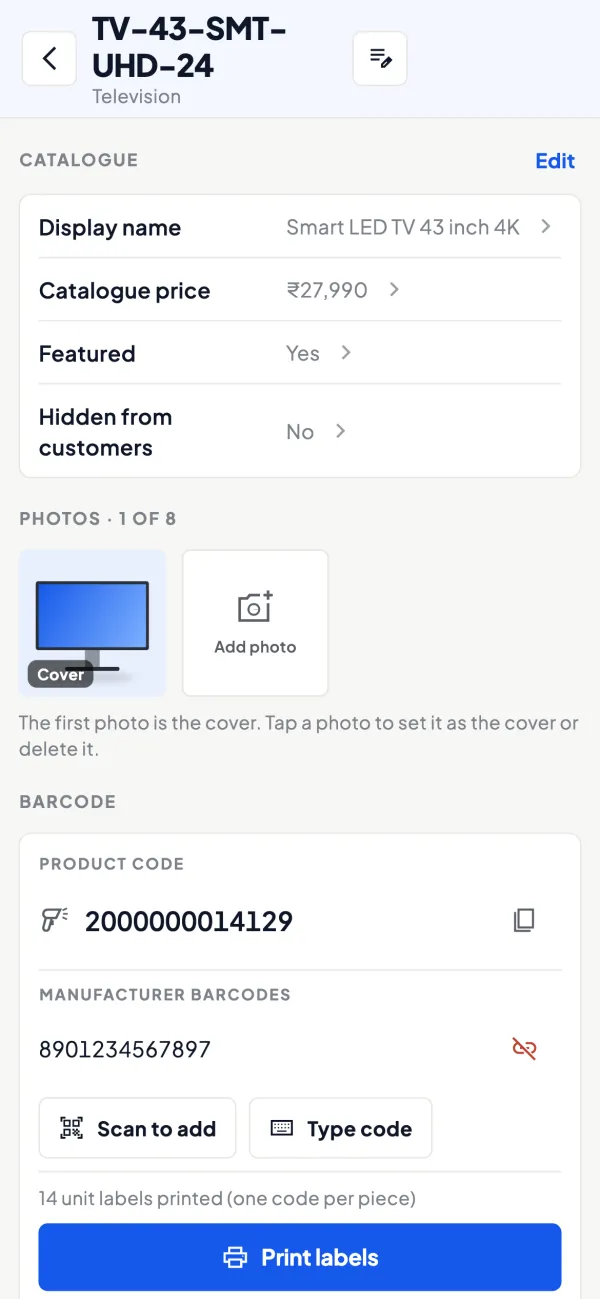
Scan with the phone camera
Staff can scan with the phone camera to find an item and see its photo and details, without buying extra scanners for stock work.
See Item photos and display names
Questions people ask
Do I need a GS1 barcode?
Can a phone replace a barcode scanner?
Should the price be on the label?
What should be printed on a barcode label?
Thermal or A4 labels?
How long does it take to barcode a shop?
Can one item have more than one barcode?
Do barcodes help with stock counts?
This page is general information for Indian businesses, not tax, legal or financial advice. Rules and rates change — check the official portals or your CA before acting.



