Business software & ERP Business software
Billing software vs accounting software
Billing software makes invoices quickly at the counter. Accounting software turns every bill, payment and expense into ledgers, GST data and financial statements. Shops often need fast billing; every business needs proper accounts.
- Retail shop owners
- Distributors and wholesalers
- Service and repair businesses
- Manufacturers
- Accountants handling two systems
On this page 11
What each one does
| Job | Billing software | Accounting software |
|---|---|---|
| Print a GST invoice fast | Main strength | Yes, but usually slower at a busy counter |
| Barcode scanning at counter | Common | Sometimes |
| Party ledgers and outstanding | Basic or none | Full, bill-wise |
| Purchases, expenses, bank | Limited | Full |
| GST returns data | Sales side only | Sales and purchase, with input tax credit |
| P&L, balance sheet, trial balance | No | Yes |
The trouble with two separate systems
A common pattern in Indian retail: the counter uses a billing app, and once a week or month the accountant copies totals into the accounting software. It looks efficient until something goes wrong.
- Totals hide detail. If only daily totals move to accounts, you cannot see which credit customer owes which bill.
- Stock splits in two. The billing app reduces stock at the counter; purchases go into the accounting software; neither has the true balance.
- GST mismatches. A cancelled or edited bill in one system and not the other creates a difference between your GSTR-1 and your books.
- Double work. Someone spends hours every week moving data, and errors creep in with every copy.
A ₹40 lakh-a-year shop can easily find a ₹30,000 gap between the two systems at year end and spend days finding it.
Which one do you need?
- Walk-in retail, high bill count, mostly cash or UPI: fast billing matters, but it must feed proper accounts item by item, not just as totals.
- Distributors and wholesalers on credit: accounting with bill-wise outstanding comes first; billing speed is less important than knowing who owes what.
- Service and repair businesses: you need job tracking and invoices that land in accounts with the service charges and parts used.
- Manufacturers: accounting with inventory and stock journals; billing is a small part.
What to check in billing features
Whichever route you take, the billing side should meet a few basic standards. Test these during a demo with your own items and parties, not the vendor's sample data.
- Invoice fields: GSTIN of both parties, place of supply, HSN codes, taxable value, tax rate and amount per line, and a proper serial number per financial year.
- Bill of supply and cash memo: if you sell exempt goods or are under composition, the system must print the right document, not a tax invoice.
- Credit notes for returns: linked to the original invoice, with tax reversed correctly.
- Discounts: item-level and bill-level discounts shown clearly, with tax calculated on the discounted value where the discount is on the invoice.
- Units: sell in pieces while buying in boxes without manual conversions.
- Speed: time a ten-line bill with barcode scanning. At a busy counter, every extra screen costs sales.
If any of these fail, the accountant will fix them later by hand, which is exactly the cost you were trying to avoid.
What a weekly reconciliation looks like
If two systems stay for now, a short weekly check prevents a year-end surprise. Every Monday, compare for the previous week: the number of bills in each system, total taxable value, total GST, total credit sales, and the closing stock of your 20 fastest-moving items. Write the differences in a register with the reason. Most gaps come from three causes: a bill cancelled in one system only, an item created twice with slightly different names, or a return entered at the counter but not in accounts. Fixing them weekly takes minutes; fixing them in March takes days.
If you must run both, set rules
- Decide which system is the books of record. It should be the accounting software.
- Move every invoice, not daily totals, with party, items, quantities and tax.
- Keep one item master. New items are created in one place and copied, never typed twice.
- Reconcile weekly: number of bills, total taxable value, total tax, stock of your top 20 items.
- Never edit or cancel a bill in only one system.
One system with a fast front end
The cleaner answer is one set of books with a quicker way to enter into it. If your accounts are in TallyPrime, Cashflow OS lets staff create sales invoices, sales orders and other vouchers from a phone or the web, and they are posted into Tally through the connector once the owner switches writing on. GST is worked out from the item and the party's state, Tally validates the entry, and there is no second database to reconcile. The trade-off is discussed in Cashflow OS vs a separate billing app. For bill formats, see tax invoice format under GST.
Avoid these
Common mistakes
- MistakeMoving only daily totals from billing to accountsDo this instead
Move every invoice with party, items, quantities and tax, so you can see which customer owes which bill.
- MistakeCancelling or editing a bill in only one systemDo this instead
Make the change in both systems the same day, or your GSTR-1 and books will disagree.
- MistakeCreating items separately in both systemsDo this instead
Keep one item master; create new items in one place and copy them, never type them twice.
- MistakeTesting software only with the vendor's sample dataDo this instead
Run the demo with your own items and parties, and time a ten-line bill.
Keep handy
Checklist
Billing software vs accounting software — 8 checks. Tick them as you go.
In Cashflow OS
How Cashflow OS helps
Cashflow OS puts your TallyPrime books on every phone in the team. Where it fits this topic:
Sales bills straight into Tally
Staff create sales invoices, sales orders and other vouchers from the phone or web, posted into Tally once writing is switched on; Tally validates each entry.
See Create Tally vouchers from your phone
Barcodes from the same item master
Labels come from your Tally items, and staff scan with the phone camera to find an item or add it to an order, so there is no second item list.
See Barcodes and labels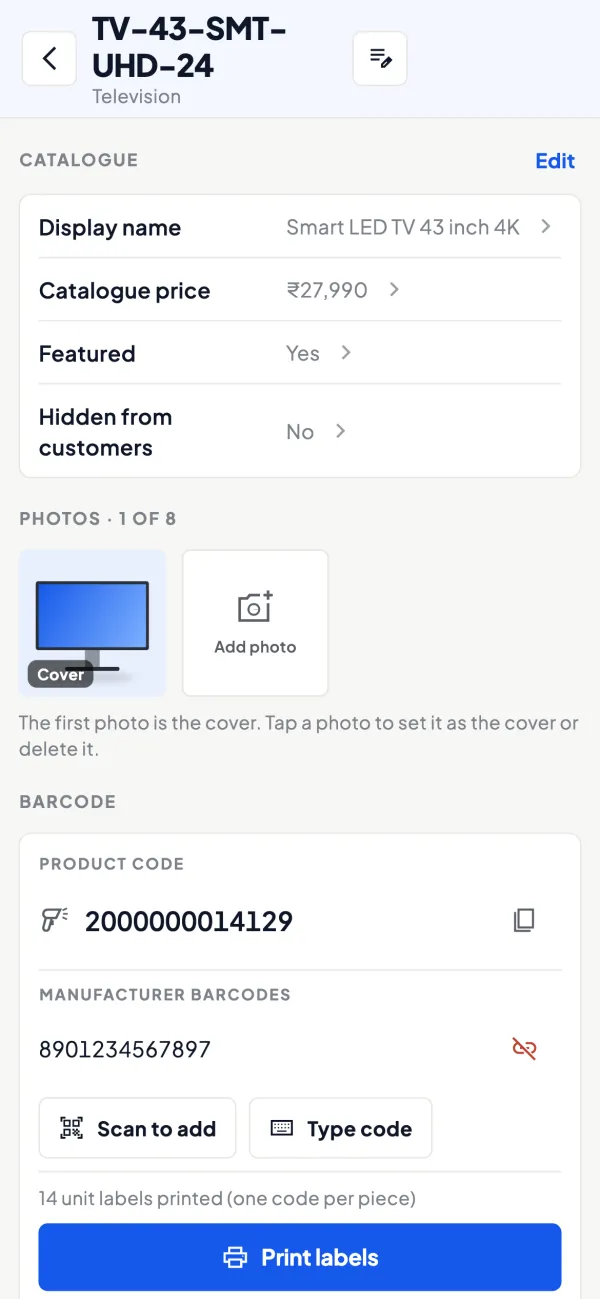
Questions people ask
Can billing software file GST returns?
Is a separate billing app cheaper?
Can I bill from a phone?
Do I need accounting software if my CA does my books?
What causes most gaps between billing and accounting software?
Which should be the books of record?
What should a weekly reconciliation compare?
Does a distributor need fast counter billing?
This page is general information for Indian businesses, not tax, legal or financial advice. Rules and rates change — check the official portals or your CA before acting.