Business software & ERP Business software
ERP vs accounting software
Accounting software records the money side of the business for the accountant. ERP tries to run the whole business, from purchase to delivery, for every department. Most small businesses need the first done well and only parts of the second.
- Owners comparing ERP and accounting
- Traders and distributors
- Manufacturers
- Accountants and CAs
- Growing multi-branch businesses
On this page 11
The short version
| Accounting software | ERP | |
|---|---|---|
| Main users | Accountant, owner, CA | Every department |
| Core job | Ledgers, vouchers, GST, financial statements | Purchase, stock, sales, production, accounts, HR in one system |
| Typical setup | Days | Weeks to months |
| Process change | Little | Often significant |
| Cost | Lower, predictable | Higher, with implementation and customisation |
| Risk if it goes wrong | Low; easy to fix entries | High; affects daily operations |
Where the line has blurred
The old picture of accounting software as a digital cash book is out of date. Good accounting packages used in India now handle inventory with godowns and batches, sales and purchase orders, delivery notes, price levels, cost centres and GST returns data. For a single-location trader, that already covers most of what an ERP would do.
What accounting software usually does not do well is work outside the office: a salesperson taking an order at a dealer's shop, a showroom executive noting a walk-in's interest, a delivery boy confirming drop-off, or the owner checking outstanding from home. That gap is where people start looking at ERP, even though the gap is about access, not about the accounting itself.
A worked example
Consider a paint distributor with ₹8 crore turnover, one godown, six salespeople and 400 dealers.
- With accounting software only: salespeople phone or WhatsApp orders to the office; a billing clerk types them in; dealers call to ask their balance; the owner asks for an outstanding list each Monday.
- With a full ERP: everything flows in one system, but the business pays for modules it rarely uses (production, HR), spends months on setup, and the accountant has to learn a new ledger structure.
- With accounting software plus connected apps: salespeople book orders on a phone app that writes into the books, dealers get statements on WhatsApp, and the owner sees outstanding live. The accounting stays where the CA knows it.
For this distributor, the third option fixes the actual problems at a fraction of the change.
What changes for your staff
Software differences matter less than people differences. With accounting software, only the accounts team changes how they work. With ERP, the godown keeper must confirm receipts in the system, salespeople must book orders in it, and purchase must raise orders before buying. If any one group keeps using paper, the data stops matching and trust in the system drops quickly.
Before choosing ERP, ask each department head whether they will actually enter data every day. If the honest answer from the godown or the field team is "not really", a smaller tool they will use beats a big one they will avoid. Training budgets should be planned per department, not as one session for everyone.
When a real ERP is the better choice
- You manufacture with multi-level bills of material and need production planning.
- You run many branches or plants that must share stock and transfer pricing.
- Several departments each have dozens of users with formal approval chains.
- Your customers or auditors require detailed process controls that your current system cannot show.
Even then, phase it. Start with the modules tied to your biggest losses, and keep the accounting stable while other modules settle in.
How to decide in one afternoon
- List your top five daily frustrations with how work is done.
- For each, write whether it is about recording (books wrong, reports late) or about reach (people outside the office cannot see or enter data).
- Recording problems are usually fixed by using your accounting software properly and training staff.
- Reach problems are fixed by mobile and web tools connected to the books.
- Only if many problems are about cross-department planning does ERP clearly win.
If you are still unsure, the guide on signs you have outgrown spreadsheets helps you judge how much structure you need.
Tally plus Cashflow OS as the middle path
Cashflow OS sits in that third option. It works on top of TallyPrime through a connector on the Tally PC. The owner and team see ledgers, bill-wise outstanding, GST views and reports on the phone or at app.cashflowos.in. When the owner switches on writing for a company, sales orders, invoices, receipts and other vouchers can be created from the app, and Tally checks each entry before it is saved. Tally remains the books of record. Details are on the create vouchers from phone page.
Avoid these
Common mistakes
- MistakeChoosing ERP to fix an access problemDo this instead
If people outside the office cannot see or enter data, mobile and web tools linked to your books may be enough.
- MistakeAssuming every department will enter data dailyDo this instead
Ask each department head honestly; if the godown or field team will not, pick a smaller tool they will use.
- MistakeNot using features you already haveDo this instead
Check that you use bill-wise outstanding, godowns and order processing in your current software before buying more.
- MistakeChanging the accounting system without the CADo this instead
Involve your CA early, because a new ledger structure affects audits and GST returns.
Keep handy
Checklist
ERP vs accounting software — 7 checks. Tick them as you go.
In Cashflow OS
How Cashflow OS helps
Cashflow OS puts your TallyPrime books on every phone in the team. Where it fits this topic:
Books on the phone for the owner
Ledgers, bill-wise outstanding, GST views and reports from TallyPrime are visible on the phone or at app.cashflowos.in.
See Tally on mobile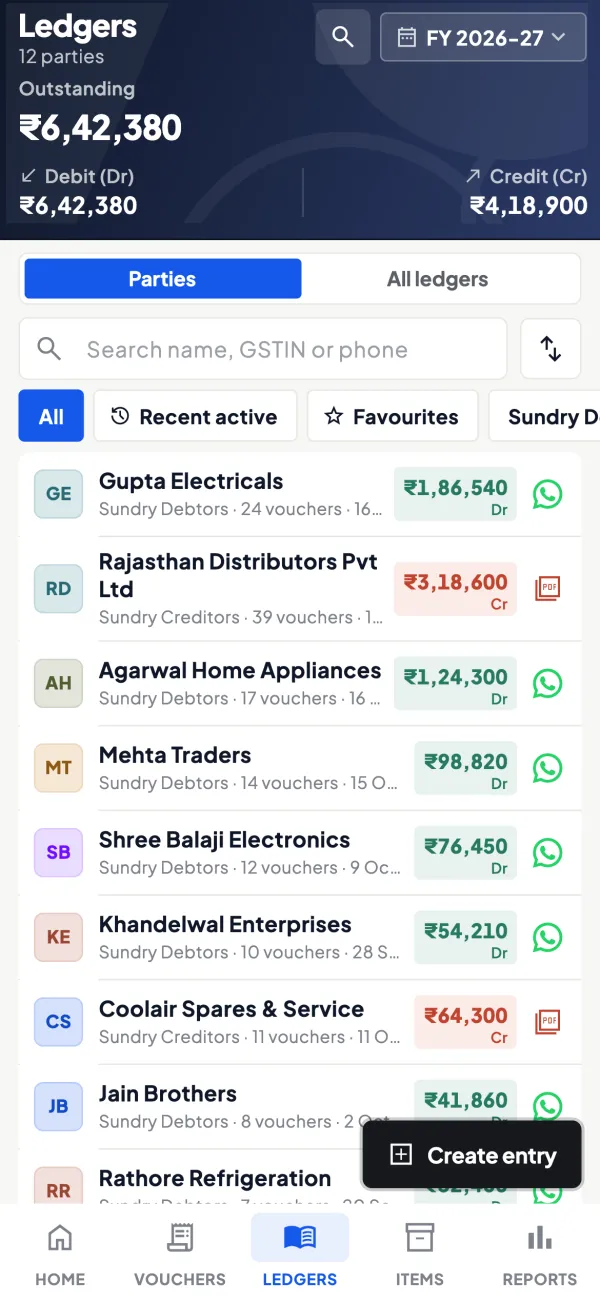
Entries from the app, checked by Tally
When the owner switches on writing, sales orders, invoices, receipts and other vouchers can be created from the app, and Tally validates each one.
See Create Tally vouchers from your phone
Questions people ask
Can accounting software handle inventory?
Is ERP only for large companies?
Will my CA work with an ERP?
Can accounting software handle multiple godowns?
Is ERP worth it for a trading business?
What is a reach problem?
Does ERP replace the accountant?
How do I test a choice before committing?
This page is general information for Indian businesses, not tax, legal or financial advice. Rules and rates change — check the official portals or your CA before acting.