Business software & ERP Business software
ERP for small businesses in India
Most small Indian businesses do not need a big ERP. They need their sales, stock, orders and accounts to agree, and to be visible to the owner without phone calls.
- Traders and distributors
- Small manufacturers
- Showrooms and dealers
- Owners comparing software
- Accountants advising on systems
On this page 11
Start from your workflow, not from the brochure
Write down how one order moves through your business today, from the customer asking for a rate to the money reaching your bank. For a typical sanitaryware dealer it looks like this:
- Customer or plumber asks for a rate on the phone or at the counter.
- Staff checks stock, often by calling the godown.
- A quotation is written or typed and sent on WhatsApp.
- Order is confirmed, material is packed and sent with a challan.
- The bill is entered in the accounting software later in the day.
- Payment comes in parts; someone follows up for the balance.
Mark every step where information is written twice or where someone waits for an answer. Those marks are your real requirements. Anything a vendor shows you that does not touch those marks is optional.
What Indian MSMEs usually need first
- GST-ready accounting with correct invoices, credit and debit notes and returns data.
- Bill-wise outstanding so you know which invoices each party still owes and how old they are.
- Stock by item and location, with units that match how you buy and sell (boxes, pieces, kg).
- Party-wise rates for dealers, retailers and walk-in customers.
- Orders captured where they happen: the counter, the shop floor, the dealer's shop.
- Owner visibility on the phone: today's sales, collections, cash and bank.
- Hindi or regional language screens for staff who are not comfortable in English.
Production planning, payroll and advanced analytics come later for most traders.
Common mistakes small businesses make
- Buying for the business you hope to be in five years. You pay for and maintain modules nobody uses.
- Moving dirty data. Duplicate parties and inconsistent item names make the new system as confusing as the old one.
- Letting the vendor design your process. They know the software, not your trade.
- No single owner inside the business. Without one person accountable, the project drifts after the first month.
- Skipping the pilot. Going live for everyone on the same day leaves no one who knows the new way well enough to help others.
Three routes, compared
| Route | Good when | Watch out for |
|---|---|---|
| Full ERP suite | Several branches, manufacturing, 50+ users, a dedicated IT person | High setup cost, long implementation, staff resistance |
| Accounting software alone | Small team, one location, owner sits in the office | Orders and field work stay on paper or in chats |
| Accounting software plus connected apps | Books are already in good shape; the gaps are mobility, orders and selling | Check that the apps write into your books instead of becoming a second set |
A realistic budget and timeline
Instead of a single number, budget by line item: licences or subscriptions per user, implementation days, data migration, training, hardware or cloud fees, and annual support. Ask every vendor to price these separately; the quotes are then comparable.
On timing, avoid going live in the weeks before Diwali, at financial year end in March, or during your own peak season. A good plan for a 10–30 person business is:
- Two to three weeks cleaning masters: merge duplicate parties, fix GSTINs, standardise item names and units.
- A pilot with one team or branch for a few weeks.
- Full rollout from the start of a month, so the old and new systems are easy to reconcile.
Questions to ask before you sign
- Can I export all my data in a standard format at any time, without paying extra?
- Who owns the data if I stop paying, and how long is it kept?
- Which of my current reports will I lose, and what replaces them?
- How are GST changes delivered, and is that included in support?
- Can a salesperson see only their own customers, not the company's accounts?
- What happens on a day the internet is down?
The guide to choosing accounting software has a longer checklist you can reuse for ERP vendors.
If your books are already in Tally
If TallyPrime already holds clean books and your CA works with it, moving everything to a new ERP may create more risk than it removes. Cashflow OS takes the other approach: Tally stays the books of record, and a connector on the Tally PC syncs your companies to a mobile and web app. Owners see sales, outstanding and reports; salespeople get item lists, price lists, orders and visits; and when the owner switches on writing, orders and vouchers go into Tally, which validates each one. See how distributors use it and how team roles work.
Avoid these
Common mistakes
- MistakeBuying for the business you hope to be in five yearsDo this instead
Buy for the gaps you have today; add modules when a real need appears.
- MistakeMoving duplicate parties and items into a new systemDo this instead
Spend two to three weeks merging duplicates, fixing GSTINs and standardising item names before migration.
- MistakeLetting the vendor design your processDo this instead
Agree your own order-to-payment process first and ask the vendor to show how the software fits it.
- MistakeGoing live for everyone on the same dayDo this instead
Pilot with one team or branch for a few weeks so a few people know the new way well before rollout.
Keep handy
Checklist
ERP for small businesses in India — 8 checks. Tick them as you go.
In Cashflow OS
How Cashflow OS helps
Cashflow OS puts your TallyPrime books on every phone in the team. Where it fits this topic:
Keep Tally as the books, add reach
The connector syncs your Tally companies to a phone and web app, so the owner sees sales, outstanding and reports without a new accounting system.
See Tally on mobile
Roles for each person
Owner, admin, accountant, staff and salesperson roles per company; a salesperson sees items and their own customers, not the company's accounts.
See Team roles and access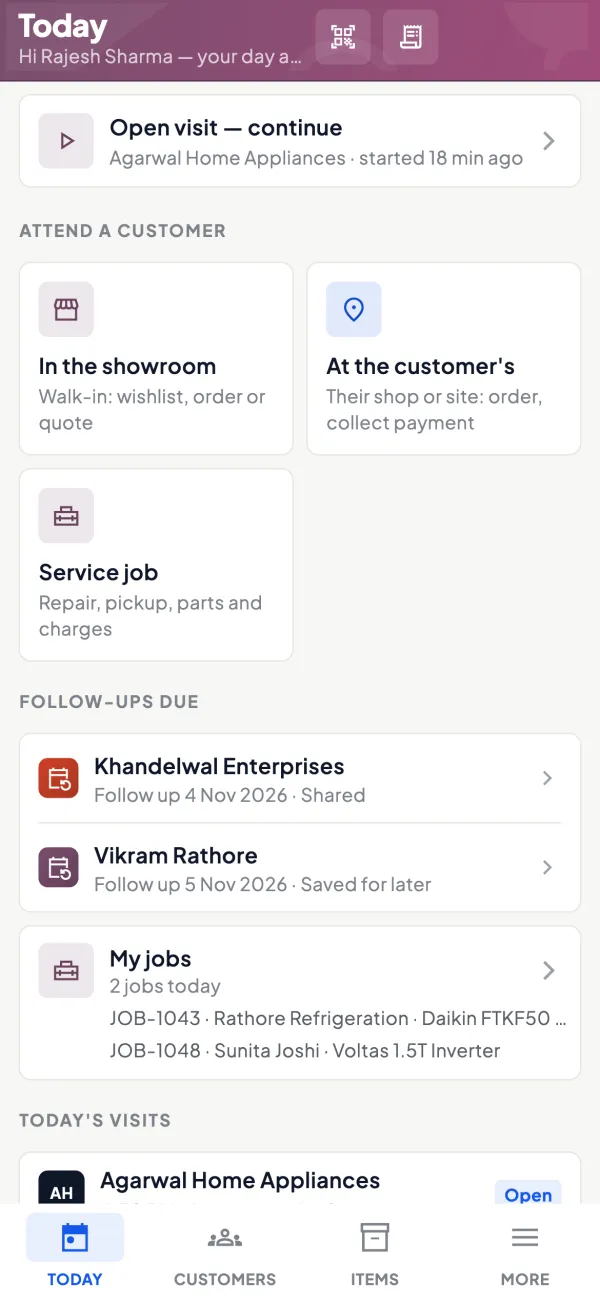
Questions people ask
What is the cheapest way to get ERP features?
Is cloud ERP safe for a small business?
Should my CA be involved in choosing ERP?
How long does ERP setup take for a small business?
Do I need an IT person to run an ERP?
When is the wrong time to change systems?
What should I ask about data ownership?
Can I add an ERP module later instead of all at once?
This page is general information for Indian businesses, not tax, legal or financial advice. Rules and rates change — check the official portals or your CA before acting.