Business software & ERP Business software
Switching business software: a checklist
Most software switches fail on data and people, not on the software. Pick a quiet start date, clean your masters, agree opening balances to the rupee, run both systems briefly, and keep the old data readable.
- Owners changing software
- Accountants and CAs
- Growing trading businesses
- Businesses leaving spreadsheets
- Office and billing teams
On this page 12
Before you decide: is a switch really needed?
Write down what is wrong with the current setup. If the issues are untrained staff or messy masters, a new system will inherit them. If the issues are about reach, such as the owner or field team not seeing data, you may be able to add a connected tool instead of replacing the books. The guide on choosing accounting software helps separate these. Switch only when the current system genuinely cannot do what you need.
Pick the right start date
- Best: 1 April, the start of a financial year. Opening balances come straight from the audited closing.
- Good: the first day of a quarter or month, after the GST return for the previous period is prepared from the old system.
- Avoid: festival season, your own peak months, the weeks before a GST return or audit, and mid-month.
Clean and move masters
- Export parties, items, ledgers and groups from the old system.
- Merge duplicates, correct GSTINs and state codes, fill missing phone numbers.
- Standardise item names, units, HSN codes and GST rates.
- Decide your new grouping (ledger groups, stock groups) before importing, not after.
- Import, then spot-check 20 parties and 20 items against the old system.
Opening balances, to the rupee
The single most important check: the new system's opening trial balance must match the old system's closing trial balance on the switch date. Then go deeper:
- Bill-wise outstanding: enter each pending bill with its number, date and amount, not just the party total. Otherwise ageing and collections start wrong.
- Stock: quantity and value per item and location, matching the closing stock figure.
- Bank: balance as per books, plus a list of uncleared cheques for reconciliation.
- Advances and on-account amounts for parties.
Get your CA to sign off the opening trial balance before going further.
Run in parallel, briefly
For two to four weeks, enter transactions in both systems, or at least key ones, and compare daily totals: sales, receipts, stock of top items, party balances for the top 20 customers. Differences reveal setup mistakes while they are still small. Then stop the old system on a fixed date and make it read-only. Running in parallel for months creates confusion and double work.
The first month after go-live
Expect a dip. Entries take longer, someone will find a report they used to rely on is missing, and at least one customer statement will look different. Plan for it:
- Hold a 15-minute check every evening in the first week: what went wrong today, what is unclear.
- Keep a running list of issues with an owner and a date for each.
- At the end of the first month, reconcile the trial balance, bank, top customer balances and stock of top items, exactly as you did during parallel running.
- Prepare the first GST return data early, so any setup mistakes in tax rates or place of supply show up with time to fix.
Only when the first month closes cleanly should you consider the switch complete.
Train by role, not in one big session
- Billing staff: invoices, returns, the documents they make daily.
- Accountant: vouchers, adjustments, reports, GST data.
- Salespeople: orders, customer balances, the phone app.
- Owner: the dashboard and the five reports they will check weekly.
Give each group a one-page cheat sheet in the language they prefer, and name a go-to person for questions in the first month.
Keep the old data readable
You will need old records for GST notices, audits, income-tax assessments and customer disputes for years. Keep a final backup of the old system, the software or a way to open it, and exported reports (trial balance, ledgers, GST registers) for each year in PDF and Excel. Check how long the old vendor keeps your data after you stop paying. See how long to keep records.
A switch that is not a switch
If your books are in TallyPrime and the main complaint is access, consider whether adding a connected app avoids the switch. Cashflow OS installs as a connector on the Tally PC; you sign in with your mobile number, scan the QR the connector shows, and invite your team by link. Tally stays the books of record, so there are no opening balances to move. See Tally sync vs moving to cloud accounting.
Avoid these
Common mistakes
- MistakeSwitching mid-month or in peak seasonDo this instead
Pick 1 April or the first day of a quarter or month, away from festivals, audits and return due dates.
- MistakeMoving party totals instead of pending billsDo this instead
Carry over each pending bill with number, date and amount, so ageing and collections start right.
- MistakeRunning both systems for monthsDo this instead
Run in parallel for two to four weeks, compare daily totals, then stop the old system on a fixed date.
- MistakeLosing access to the old dataDo this instead
Keep a final backup, a way to open it, and yearly reports in PDF and Excel for notices and audits.
Keep handy
Checklist
Switching business software: a checklist — 8 checks. Tick them as you go.
In Cashflow OS
How Cashflow OS helps
Cashflow OS puts your TallyPrime books on every phone in the team. Where it fits this topic:
Add reach without moving the books
If your books are in TallyPrime and the problem is access, the connector keeps Tally as the books of record and shows the data on phone and web.
See Tally on mobile
Bring the team in by link
Sign in with a mobile number, scan the QR the connector shows, and invite your team by link with a role for each person.
See Team roles and access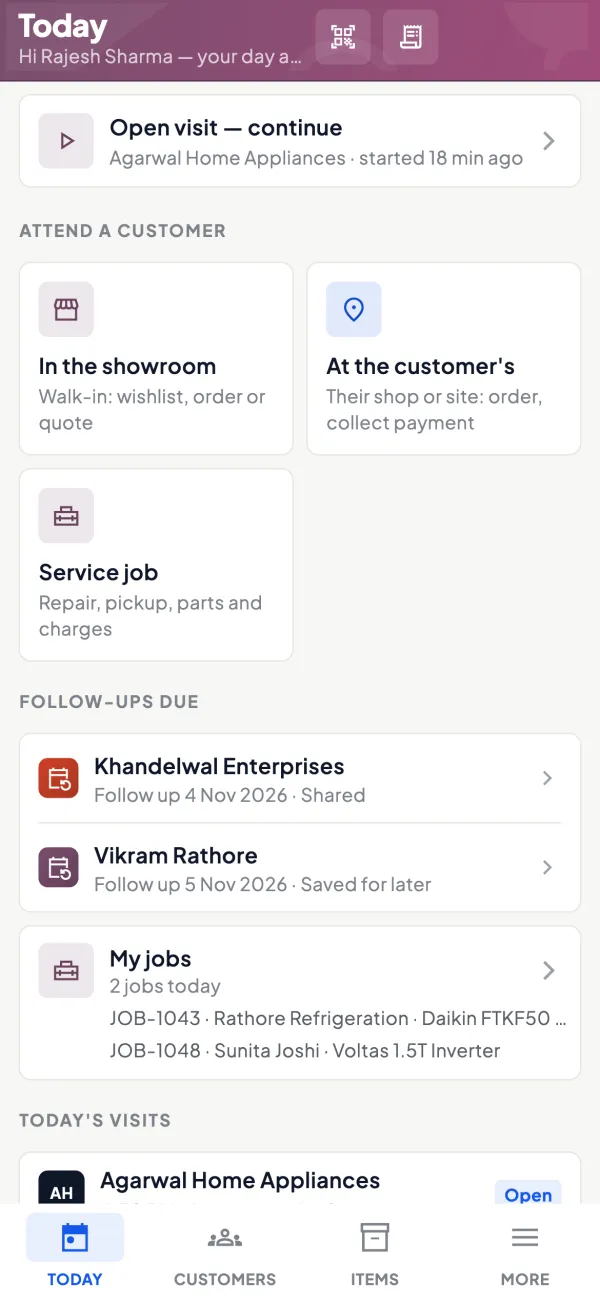
Questions people ask
How long does switching accounting software take?
Can I move old years' transactions to the new system?
Should I tell customers we are changing software?
What is the biggest risk in switching?
Do I need my CA's help to switch?
Which reports should I compare after go-live?
Can I keep using the old software for old years?
Should invoice numbering change when I switch?
This page is general information for Indian businesses, not tax, legal or financial advice. Rules and rates change — check the official portals or your CA before acting.