Business software & ERP Business software
Backing up your accounting data
A backup is only real if you can restore it. Keep at least three copies of your books, on two kinds of storage, with one copy outside the office, and test a restore every quarter.
- Businesses with books on one PC
- Accountants
- Owners
- Multi-company Tally users
- Offices without an IT person
On this page 12
Why this deserves an hour of your time
Years of vouchers, party balances, GST data and stock records usually sit on one computer in the accounts room. That computer can fail, be stolen, catch a virus, be damaged by a power surge or simply have its disk wear out. Businesses often discover their last backup is months old only on the day they need it. Re-entering even three months of vouchers for a mid-sized trader can take weeks, and some details, such as bill-wise adjustments, may never be rebuilt exactly.
Tax law also expects you to keep books and records for several years; the guide on how long to keep records explains the periods. Losing data does not remove that duty.
The 3-2-1 rule, in plain terms
- 3 copies: the live data plus two backups.
- 2 kinds of storage: for example, an external drive and online storage.
- 1 copy away from the office: fire, flood or theft should not take every copy at once.
For a small office, that can be as simple as: live data on the accounts PC, a daily copy to an external drive, and a weekly copy to an online storage account or a drive that the owner takes home.
A routine that fits a busy office
| When | What | Who |
|---|---|---|
| Every working day, at closing | Back up the accounting data to the external drive | Accountant |
| Every week | Copy the latest backup to online storage or an off-site drive | Accountant, checked by owner |
| Every month end | Keep a dated monthly backup that is never overwritten | Accountant |
| Every quarter | Restore a backup on another PC and open the company | Owner or IT person |
| Year end and before any upgrade | Full backup, kept permanently | Accountant |
Name backups with the date, such as 2026-11-05, so the latest is obvious. Keep the daily drive unplugged when not in use.
Ransomware and why an unplugged copy matters
Ransomware encrypts files on a computer and any drive connected to it, then demands payment. If your only backup drive is permanently plugged into the accounts PC, it will be encrypted too. Keeping at least one copy disconnected or in online storage with version history means you can restore without paying. Basic precautions help as well: keep Windows and antivirus updated, do not use the accounts PC for personal browsing or downloads, and do not open attachments from unknown senders on it.
Test the restore, not just the backup
A backup file that cannot be opened is worthless. Once a quarter:
- Copy a recent backup to a different computer.
- Restore it using your accounting software's restore option.
- Open the company and check the trial balance and one party ledger against the live data for the same date.
- Write the result in a register: date, backup used, who checked, OK or problem.
The first test often reveals surprises: a backup folder that stopped updating, a password nobody remembers, or a backup that excludes one company.
Do synced and cloud copies count as backups?
Partly. A synced copy in a mobile or web app gives you access to figures if the office PC is down, which is valuable. But it is usually not a full backup of your accounting data file that you can restore into the accounting software. Keep proper backups of the books themselves regardless of any sync. Similarly, cloud accounting providers back up their servers, but check whether you can export your own complete copy, and do so periodically. See security of accounting data for related risks.
Make one person responsible
Backups fail when everyone assumes someone else is doing them. Name one person, usually the senior accountant, and have the owner check the register once a month. If that person leaves, handing over the backup routine should be part of their exit checklist, along with passwords and access.
Where Cashflow OS fits
Cashflow OS keeps a synced copy of the Tally companies the connector reads, so the owner can still see ledgers, outstanding and reports on the phone or web if the office PC is off for a day. It does not replace backing up your Tally data; Tally remains the books of record, and you should keep following a backup routine like the one above. See Tally on web.
Avoid these
Common mistakes
- MistakeKeeping the only backup drive plugged into the accounts PCDo this instead
Unplug the daily drive after use and keep another copy online or off-site, so ransomware or theft cannot take every copy.
- MistakeNever testing whether a backup restoresDo this instead
Each quarter, restore a backup on another PC and check the trial balance and one ledger against the live data.
- MistakeTreating a synced app copy as the backupDo this instead
A synced copy helps you see figures when the PC is down, but it is not a restorable backup of the books. Keep proper backups.
- MistakeAssuming someone else takes the backupDo this instead
Name one person, keep a register, have the owner check it monthly, and hand over the routine when that person leaves.
Keep handy
Checklist
Backing up your accounting data — 8 checks. Tick them as you go.
In Cashflow OS
How Cashflow OS helps
Cashflow OS puts your TallyPrime books on every phone in the team. Where it fits this topic:
Figures on phone and web if the PC is down
A synced copy of your Tally companies lets the owner see ledgers, outstanding and reports for a day the office PC is off. It does not replace backing up Tally.
See Tally on the web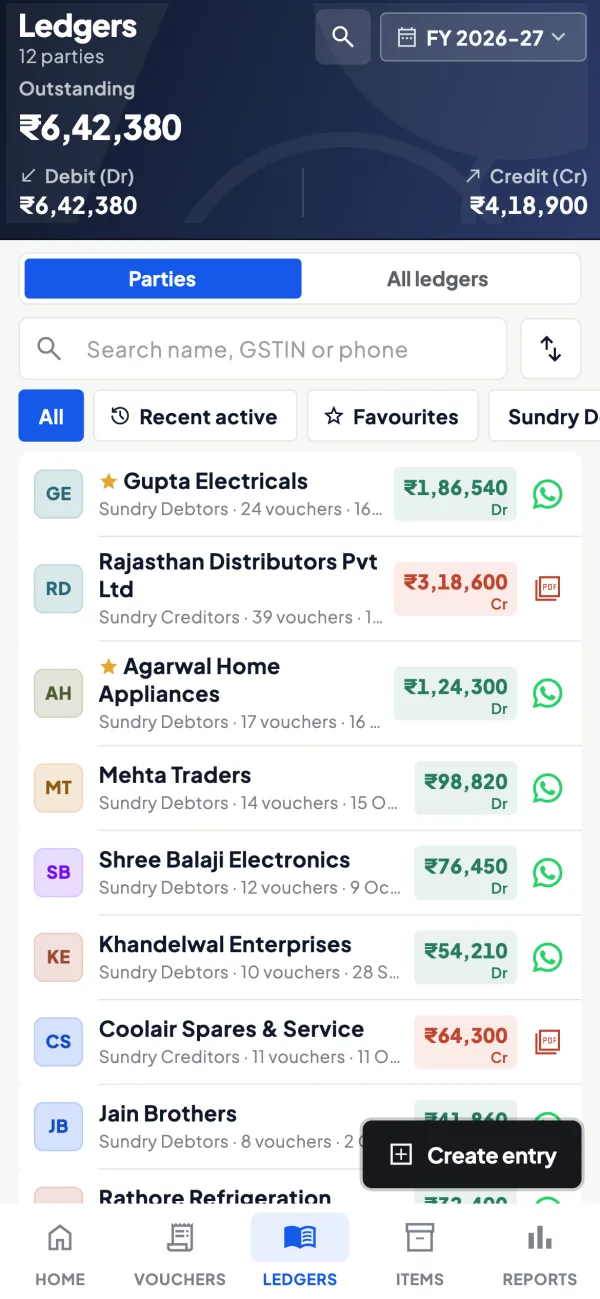
Alerts when vouchers are changed or deleted
Owners get a push notification when vouchers are added, changed or deleted in Tally, so unexpected changes are noticed early.
See Tally on mobile
Questions people ask
How often should I back up accounting data?
Is an external hard disk enough?
Can I store backups on my phone?
What should I do if my accounting PC crashes?
What is the 3-2-1 backup rule?
How do I check a backup actually works?
Does a cloud accounting provider's backup cover me?
How long should I keep old backups?
This page is general information for Indian businesses, not tax, legal or financial advice. Rules and rates change — check the official portals or your CA before acting.