Tally how-tos TallyPrime
A GST returns workflow with Tally
Most GST problems start weeks before the due date, in how invoices were entered. A steady monthly workflow, with checks at entry, before GSTR-1, during purchase reconciliation and before GSTR-3B, keeps returns accurate and on time.
- GST-registered businesses
- Accountants using Tally
- Owners approving tax payments
- Billing staff
- Monthly and QRMP filers

On this page 12
The monthly rhythm
| When | Task |
|---|---|
| Daily | Enter sales and purchases with correct GSTIN, place of supply, HSN and rates |
| Weekly | Review exceptions: invoices with missing or wrong GST details |
| Before GSTR-1 due date | Check GSTR-1 data in Tally, fix errors, export JSON, upload and file on the portal |
| After GSTR-2B is available | Reconcile purchases with GSTR-2B; follow up missing supplier invoices |
| Before GSTR-3B due date | Prepare liability and eligible credit, pay tax, file GSTR-3B |
Due dates depend on your turnover, whether you are in the QRMP scheme, and your state, and can be changed by notification. Check gst.gov.in or your CA. This is general information, not tax advice.
Step 1: get entries right at source
- Party masters: correct GSTIN, state and registration type for every party. A wrong state code turns IGST into CGST and SGST or the other way round. See place of supply for goods.
- Item masters: HSN code and GST rate on each stock item, confirmed by your accountant.
- Voucher types: credit notes for returns, not negative sales; debit notes for purchase returns.
- Unregistered and B2C sales: state of the buyer where relevant, so B2C summaries are right.
Step 2: check GSTR-1 data in Tally
TallyPrime prepares GSTR-1 data from your vouchers and flags transactions with incomplete or mismatched details. Before exporting:
- Resolve every flagged or uncertain transaction; do not export with exceptions pending.
- Check the B2B section: every registered buyer's GSTIN is valid and the invoice values look right.
- Check the HSN summary for missing codes or odd quantities; see HSN summary in GSTR-1.
- Check credit and debit notes are linked to the right original invoices.
- Compare total taxable value with the sales register for the month.
Then export the JSON, upload it on the GST portal, review the summary there, and file.
Step 3: reconcile purchases with GSTR-2B
Input tax credit generally depends on suppliers reporting your invoices, which you see in GSTR-2B. Compare your purchase register with GSTR-2B each month:
- In books, not in 2B: the supplier has not reported, or reported with a wrong GSTIN. Follow up before claiming.
- In 2B, not in books: a bill not yet entered, or not your purchase. Investigate.
- Value or date differences: correct your entry or ask the supplier to amend.
The detailed method is in reconciling GSTR-2B with the purchase register.
Step 4: prepare and file GSTR-3B
- Take output tax from the filed GSTR-1 data and add anything not reported there, such as tax on advances where applicable.
- Take input tax credit as supported by your reconciliation, excluding blocked or ineligible credit.
- Check reverse charge liability, if any.
- Compare Tally's GSTR-3B figures with what the portal pre-fills; explain any difference before filing.
- Pay the net tax through the portal and file.
Who does what in a small team
| Person | Responsibility |
|---|---|
| Billing staff | Correct party, items and rates on every invoice |
| Accountant | Masters, exceptions, GSTR-1 data, 2B reconciliation, GSTR-3B preparation |
| Owner | Reviews summaries, approves tax payment, ensures funds are available |
| CA | Advice on unusual transactions, annual return, notices |
Write these down. Many late filings happen because each person assumed another had it in hand. A shared checklist with a tick and a date for each step each month removes that doubt. The GST compliance calendar helps plan the dates.
Common mistakes that cause notices
- Invoices entered after GSTR-1 is filed, then forgotten in the next month's return.
- Wrong place of supply on inter-state sales.
- Claiming credit on bills suppliers never reported.
- Editing vouchers of a month whose returns are already filed, so books and returns no longer match.
- Different turnover in GSTR-1 and GSTR-3B without an explanation.
Lock filed periods against casual edits and record any genuine correction through the right amendment route.
GST views from Tally data with Cashflow OS
Cashflow OS prepares GSTR-1 and GSTR-3B views from your synced Tally data, with JSON download for the GST portal, and GSTR-1 tiles that open bill-wise and HSN-wise detail, so the owner or accountant can review figures on the phone or web before filing. Filing itself is done on the GST portal. Cashflow OS does not file returns and does not give tax advice; e-invoices and e-way bills can be generated from it on plans that include them. See GST reports.
Avoid these
Common mistakes
- MistakeWrong state on party mastersDo this instead
Check GSTIN, state and registration type for every party, so IGST or CGST and SGST come out right.
- MistakeExporting GSTR-1 with exceptions pendingDo this instead
Resolve every flagged or uncertain transaction in Tally before exporting the JSON.
- MistakeClaiming credit on bills suppliers never reportedDo this instead
Reconcile the purchase register with GSTR-2B and follow up missing invoices before claiming.
- MistakeEditing vouchers of a month already filedDo this instead
Lock filed periods and make corrections through amendments or credit and debit notes.
Keep handy
Checklist
A GST returns workflow with Tally — 8 checks. Tick them as you go.
In Cashflow OS
How Cashflow OS helps
Cashflow OS puts your TallyPrime books on every phone in the team. Where it fits this topic:
GSTR-1 detail before filing
GSTR-1 tiles prepared from Tally data open bill-wise and HSN-wise detail on phone or web, with JSON download for the portal.
See GST reports from your Tally data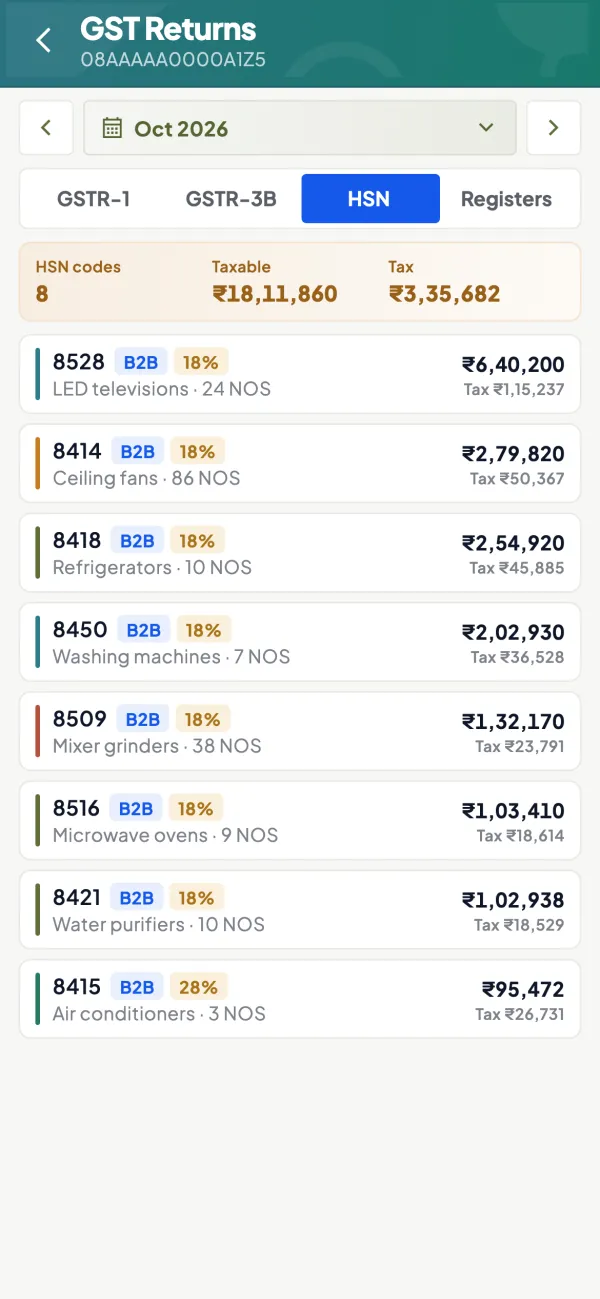
GSTR-3B view for the owner
The GSTR-3B view lets the owner check the month's figures before approving the tax payment; filing itself is done on the GST portal.

Questions people ask
Can I file GST returns directly from Tally?
Why does GSTR-3B pre-filled data differ from my books?
How early should GSTR-1 work start?
Should I edit invoices after filing GSTR-1?
What is the QRMP scheme?
Who should approve the GST payment?
What if a supplier has not reported my invoice?
Should the CA see the data before every filing?
This page is general information for Indian businesses, not tax, legal or financial advice. Rules and rates change — check the official portals or your CA before acting.