Feature
Multiple Tally companies in one account
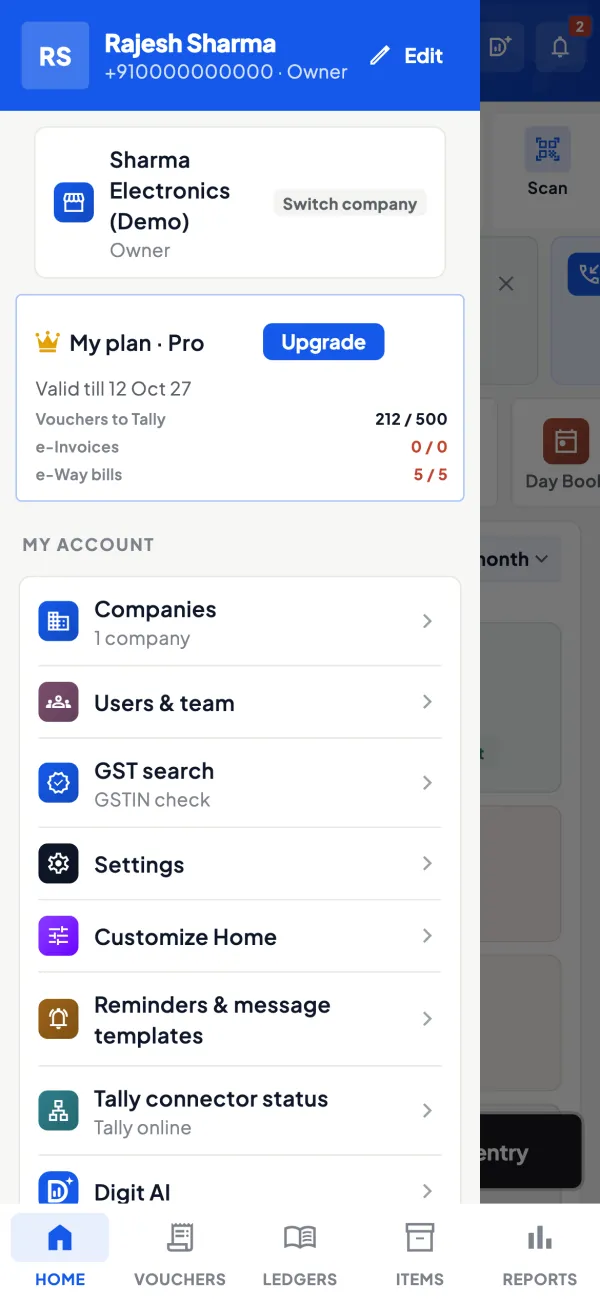
Many Indian businesses run more than one company in Tally: a proprietorship and a partnership, a trading firm and a manufacturing unit, a branch in another state. Cashflow OS keeps several Tally companies in one account and lets you switch between them, each with its own team and settings.
- All your Tally firms, one login
- Switch firms in one tap
- Team and roles per company
- Each GSTIN kept apart
Start free trialBook a free demo
Works with your TallyPrime14-day free trialJaipur team, call +91 70738 53555

Who it’s for
Who uses multi-company
- Family businessesFirms in the names of father, sons and partners
- Multi-branch businessesA Tally company per branch or per state GSTIN
- Traders with a manufacturing unitTrading firm and factory kept as separate books
- Distributors with a retail counterWholesale and retail run as two companies
- CAs and accountantsInvited into several clients' companies, one at a time
- Group companiesA proprietorship, a partnership and a private limited
- Owners who travelCheck every firm's day from the phone, wherever they are
- Businesses with old-year companiesPast years kept as separate Tally companies
Pain → fix
The problems multi-company solves
What goes wrong without it, and what changes with Cashflow OS.
- The problemA different login for every firm
Passwords and phones get mixed up, and someone always ends up in the wrong company.
With Cashflow OSOne account, every linked company in a pickerEach Tally company you link appears in the same account; switch from the company picker without signing in again.
- The problemStaff see books of firms they do not work in
One shared login means the counter boy can open the partnership's accounts too.
With Cashflow OSInvite people per company, with a role eachOwner, admin, accountant, staff or salesperson is set per company, so each person sees only the firms and screens their job needs.
Team roles and access - The problemChecking every firm means a trip to the Tally PC
The owner waits for the accountant to open each company and read out the numbers.
With Cashflow OSEach firm's sales, cash and dues on the phoneHome, ledgers, outstanding and reports come from each company's synced Tally data, one company at a time.
Tally on mobile - The problemGST of one firm mixed into another
Two GSTINs, one register on paper, and a sale lands in the wrong return.
With Cashflow OSGST views and JSON per company, per GSTINGSTR-1 and GSTR-3B views are prepared from each company's own data, so returns never mix.
GST reports from your Tally data - The problemA new firm gets everything switched on at once
The new unit's screens fill up with modules and write access it does not need yet.
With Cashflow OSWriting and modules switched on per companyWriting into Tally stays off until the owner turns it on for that company, and add-on modules are chosen per company too.
Create Tally vouchers from your phone - The problemComparing firms means retyping figures
Every month someone copies numbers from three Tally companies into one sheet.
With Cashflow OSSame date range, export each firm to ExcelPick the same period in each company and export Profit & Loss or outstanding to Excel or PDF to put side by side.
Reports in Excel and PDF
What it does
What you can do with multi-company
Every Tally company in one picker
How it works. The connector reads the companies open in TallyPrime on that PC, and each linked company shows in your account. Tap the company name to switch; the screens reload with that firm's data.
- No separate login or phone for each firm
- Company names come from Tally, so the picker reads clearly
- Works the same on the phone app and the web app
In practiceRamesh Agarwal opens the app at 9 pm: Agarwal Traders sold ₹3,85,000 today, and one tap later Agarwal Polymers shows ₹1,20,000 in receipts.

A team and roles for each company
How it works. Invite people with a link, company by company, and give each a role: owner, admin, accountant, staff or salesperson. Someone invited to one firm does not see the others.
- The CA can be invited only to the firm they audit
- Salespeople see items and their own customers only
- The owner sees every company in one place
In practiceIn a family group, the retail counter staff use only Sharma Electricals, while four salespeople book orders only in Sharma Distributors.
Each firm's dues and ledgers apart
How it works. Bill-wise receivables, payables and party ledgers are shown per company, from that company's Tally books, so a party that buys from two firms has two separate balances.
- No confusion over which firm a bill belongs to
- Statements carry the right firm's ledger
- Ageing per company shows which firm is stretched
In practiceGupta Hardware owes ₹1,40,000 to the trading firm and ₹35,000 to the fabrication unit; each statement goes out from its own company.

GST views per GSTIN
How it works. Open a company, then its GSTR-1 and GSTR-3B views, prepared from that company's Tally data, with that company's JSON for the portal. Filing is still done on the GST portal for each registration.
- A branch in another state reviewed on its own
- Bill-wise and HSN-wise detail behind each tile
- No sale of one firm appears in another's return
In practiceA Jaipur firm and its Ahmedabad branch have two GSTINs; the accountant downloads two separate GSTR-1 JSON files from the two companies.

Reports for any firm and any year
How it works. Profit & Loss, Balance Sheet, Day Book and the other reports work per company, for any financial year or a custom range, and export to Excel or PDF.
- Same period exported from each firm for comparison
- Loan and audit files made per company
- Old-year Tally companies opened like any other
In practiceFor a bank renewal, the owner exports two years' Balance Sheet for each of three companies and sends the PDFs to the branch manager.

Guide
Multi-company: the full guide
How it works day to day, who does what, and the points to watch.
Why businesses end up with several companies
Few owners plan for it. A business starts as a proprietorship, adds a partnership for a new product line, opens a branch in another state that needs its own GST registration, and later sets up a private limited company. Sometimes each financial year was kept as a separate Tally company in the past. Each set of books is legitimate and separate, but the owner thinks about them together. See managing multiple companies in Tally for the different ways to structure this.
How it works in Cashflow OS
The connector on the Tally PC reads the companies open in TallyPrime and keeps a synced copy of each. In the app or web app, every linked company appears in your account and you switch between them. Each company keeps its own:
- ledgers, items, outstanding and reports;
- GST views and JSON, since each GSTIN files separately;
- team and roles: owner, admin, accountant, staff, salesperson;
- setting for writing into Tally, which is off until the owner switches it on;
- add-on modules, which are switched on per company.
A worked example: one family, three companies
| Company | Who works in it | Writing into Tally | Modules |
|---|---|---|---|
| Sharma Electricals (proprietorship, retail) | Owner, counter staff, accountant | On, for receipts and sales | Barcodes, showroom walk-ins |
| Sharma Distributors (partnership) | Partners, accountant, four salespeople | On, sales orders need approval | Field force, price lists |
| Sharma Lighting Pvt Ltd (new unit) | Owner and CA | Off for now | None yet |
The owner sees all three. The counter staff see only the retail company. The salespeople see items and their own customers in the distribution company and nothing of the other two. The CA, invited with the accountant role, sees the new unit's books for review. Nobody needed a separate login per company, and nobody sees more than their job requires.
Who benefits most
- Family businesses with firms in several names. See family business succession and books.
- Multi-branch businesses with a Tally company per branch or per state; see our page for multi-branch businesses.
- CAs and accountants who are invited into several companies and switch between them.
Separate books, separate GST
Each Tally company usually maps to its own GSTIN, and that is exactly how the GST views work in Cashflow OS: you open the company, then its GSTR-1 and GSTR-3B views, prepared from that company's data, with that company's JSON for the portal. There is no risk of a sale in one firm appearing in another firm's return, because the data never mixes. For a business with a branch in another state, the branch company's return is reviewed on its own. Filing is done on the GST portal for each registration. This is general information, not tax advice.
The same separation helps at year-end. Each firm's CA can be invited only to the firm they audit, and reports for any financial year, or custom ranges across years, can be exported per company for loan files and audits.
Tips
- Name companies clearly in Tally, with the firm and branch name, so the picker is unambiguous on a small screen.
- Keep the companies open in Tally on the PC where the connector runs, or their data will not stay current.
- Invite people per company, not to everything by default.
- Keep ledger and item names consistent across companies if you plan to combine exported reports in Excel.
- Turn modules on only where they are used, so each company's screens stay simple.
Comparing companies side by side
Because each company is a separate set of books, Cashflow OS shows them separately. To compare, pick the same date range in each, export Profit & Loss or outstanding to Excel, and put them side by side. A useful pair of numbers for each firm is monthly sales and receivables outstanding: a firm selling ₹30,00,000 a month with ₹60,00,000 outstanding is carrying about two months of sales on credit, while one selling ₹20,00,000 with ₹20,00,000 outstanding carries one. The second firm turns sales into cash twice as fast, even though it is smaller.
What it does not do
- It does not merge companies into one consolidated set of accounts; each Tally company stays separate.
- It does not move data between companies; inter-company entries are still made in each company's books.
- A company's data stays current only while it is open in Tally with the connector running.
This page is general information for Indian businesses, not tax, legal or financial advice. Rules and rates change — check the official portals or your CA before acting.
Set-up
Start using multi-company in 4 steps
Works on top of your TallyPrime — nothing to migrate, no second set of books.
- 1
Open all your companies in TallyPrime on the PC where the connector runs
- 2
Sign in with your mobile number and scan the connector's QR to link them
- 3
Pick a company from the picker and check its home screen and ledgers
- 4
Invite each company's team separately, with the right role in each
Buyer’s checklist
What to look for in multi-company software
Whatever you choose, check these before you commit.
- Several Tally companies in one account, without a separate login for each
- Roles set per company, so people see only the firms they work in
- Each company's data kept apart, with no mixing of ledgers or bills
- GST views and JSON per company, matching each GSTIN
- Writing into Tally switched on or off per company, not for all at once
- Reports for any financial year and custom ranges, exportable per company
- Works with the Tally companies you already keep, not a new set of books
- Clear about limits, such as no consolidated accounts across companies
Plans
Simple yearly plans
- 14-day free trial on your own books
- 3-year term saves up to 25%
- Premium modules (catalogue, field force, price lists, store…) priced extra
Start free trialGet the price for your business
Compare all plans- Growth₹3,000/year + GSTBooks, reports, outstanding and sharing
- Pro₹5,000/year + GSTEverything in Growth, plus entries into Tally
- Pro+₹7,000/year + GSTEverything in Pro, plus e-invoice and e-way bill
Why Cashflow OS
Why use multi-company in Cashflow OS
- One account for every firmAll the Tally companies you link sit in one account, one tap apart.
- Access that follows the jobRoles are per company, so the CA, the counter and the salesmen each see their part.
- Books stay separateLedgers, outstanding, reports and GST are shown per company, just as in Tally.
- Owner decides where to writeWriting into Tally is off until the owner switches it on, company by company.
- Works on phone and webSwitch companies on the phone app or the web app, signed in by QR.
- 14-day free trialLink your own companies and try it before you pay. Plans start at ₹3,000 a year + GST.