Tally how-tos TallyPrime
Managing multiple companies in Tally
Many Indian business families run several firms: a proprietorship, a partnership, a private limited company, sometimes one per state GSTIN. In TallyPrime each is usually a separate company, and the work is in keeping them organised, accessible and backed up.
- Family business groups
- Owners with several firms
- Businesses with GSTINs in many states
- Accountants handling many companies
- Partners in more than one firm

On this page 12
When to create a separate company
- Different legal entities: a proprietorship and a partnership, or two companies, always need separate books.
- Different GSTINs of the same entity: a business registered in two states has a GSTIN in each. Many keep a separate Tally company per GSTIN to keep returns clean; others manage both in one with careful setup. Ask your CA which suits you.
- Branches under one GSTIN: usually one company, with godowns and cost centres for branches, unless branch accounts are run independently.
Loading and switching companies
TallyPrime can have more than one company loaded at the same time. You select or load companies from the company list and switch the active company when entering vouchers or viewing reports. Simple habits prevent the most common mistake, entering a voucher in the wrong company:
- Give each company a clear, distinct name, such as "Gupta Traders (RJ)" and "Gupta Traders (GJ)".
- Check the company name at the top before saving any voucher.
- Load only the companies you need for the day's work.
Seeing them together
Owners want one view across companies: total sales, total outstanding, cash and bank across all firms. Tally supports group companies, which combine member companies for consolidated reports. Note that consolidation adds figures together; inter-company sales and balances, such as one firm selling to another, need to be understood or eliminated when reading the combined numbers. For many owners, a simple side-by-side view per company is more useful than a consolidated total.
Inter-company transactions
When Firm A sells to Firm B in the same family, the sale is recorded in A's books and the purchase in B's. Both entries must match: same invoice number, date, value and GST. Mismatches show up in GSTR-2B for Firm B. Practical rules:
- Firm A raises the invoice first; Firm B enters the purchase from that invoice, not from memory.
- Reconcile inter-company balances monthly: A's receivable from B should equal B's payable to A.
- Settle balances through bank, not by journal adjustments, unless your CA advises otherwise.
Access and roles across companies
An accountant may work on all companies; a billing clerk only on one; a partner should see only their firm. Set users per company. The user roles guide has a sample matrix. When a staff member leaves, remove their access in every company, not just the one they worked in most.
Masters that should match across companies
When the same customers and items appear in several companies, small differences in names cause confusion in reports and in the owner's head. Agree on one naming pattern and use it everywhere: if a dealer is "Sharma Electricals, Ajmer" in one company, it should not be "Sharma Elect. AJM" in another. The same applies to item names, units and HSN codes. When a party's GSTIN, address or phone changes, update it in every company where it exists. A short monthly check of the top 50 parties across companies keeps the masters aligned.
Also keep ledger groups consistent. If one company records freight under Indirect Expenses and another under Direct Expenses, combined or side-by-side views will mislead.
Data folders and backups
Each Tally company has its own data folder. Make sure your backup routine covers all of them; a common gap is a newer company created in a different data path that the backup never picked up. Restore-test at least one company every quarter. See backing up accounting data.
Year-end across several companies
With several companies, year-end work multiplies. Keep a simple tracker with one row per company and columns for each step: stock count, bank reconciliation, party confirmations, depreciation, GST reconciliation, CA review, audit. Start with the company with the earliest filing deadline. The year-end closing checklist lists the steps.
Several companies in Cashflow OS
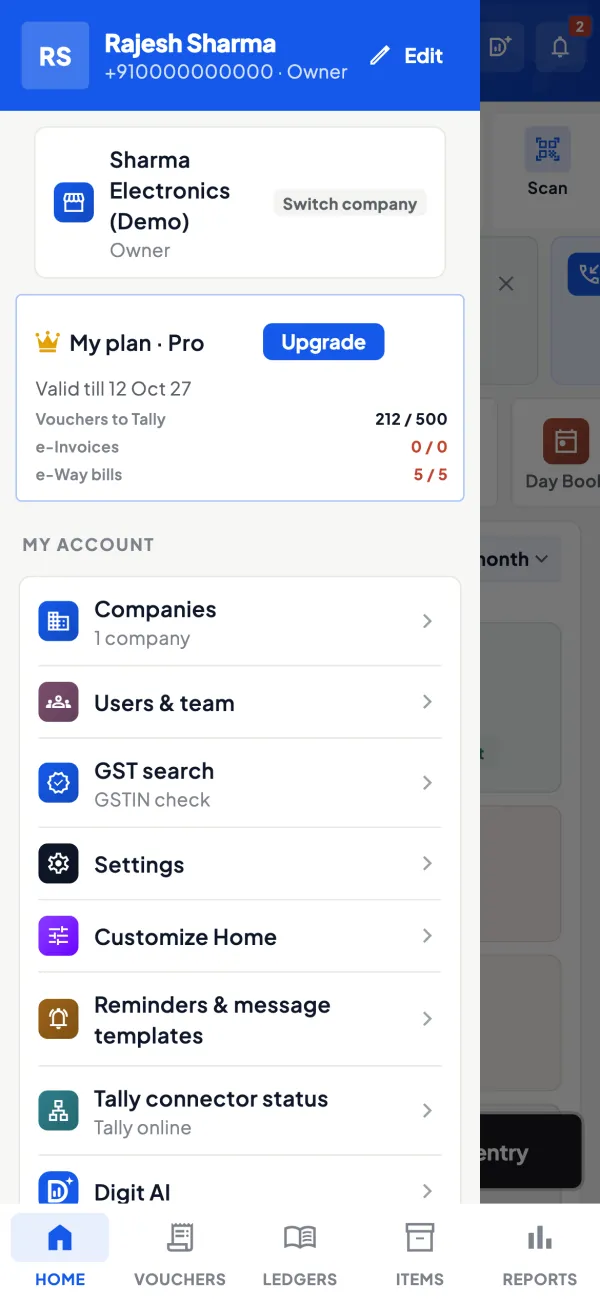
Cashflow OS lets you add several Tally companies to one account and switch between them on the phone or web. Each company has its own roles, so an accountant can have access to all while a salesperson sees only one. Writing into Tally is switched on per company. The connector reads the companies open in Tally on the connector PC. See multi-company.
Avoid these
Common mistakes
- MistakeEntering a voucher in the wrong companyDo this instead
Use distinct names, load only the companies you need, and check the name at the top before every save.
- MistakeInter-company entries made from memoryDo this instead
The buying firm enters the purchase from the selling firm's actual invoice, and both reconcile the balance monthly.
- MistakeBackups missing a newer company's data pathDo this instead
List every company's data folder, include all of them in the backup, and restore-test one each quarter.
- MistakeA former employee keeping access to other companiesDo this instead
Remove access in every company the person could reach, not just the one they used most.
Keep handy
Checklist
Managing multiple companies in Tally — 7 checks. Tick them as you go.
In Cashflow OS
How Cashflow OS helps
Cashflow OS puts your TallyPrime books on every phone in the team. Where it fits this topic:
All your companies in one app
Add several Tally companies to one account and switch between them on phone or web. The connector reads the companies open in Tally on the connector PC.
See Multiple Tally companies in one account
Access set per company
Each company has its own roles, so an accountant can reach all of them while a salesperson sees only one; writing into Tally is switched on per company.
See Team roles and access
Questions people ask
Can one Tally licence handle many companies?
Should I keep one company per financial year?
Can one person enter vouchers in two companies at once?
How do I avoid entering a voucher in the wrong company?
What is a group company in Tally?
Should related firms use the same names for masters?
Does each company file its own GST returns?
Can I see all companies' outstanding together?
This page is general information for Indian businesses, not tax, legal or financial advice. Rules and rates change — check the official portals or your CA before acting.