Feature
Staff app
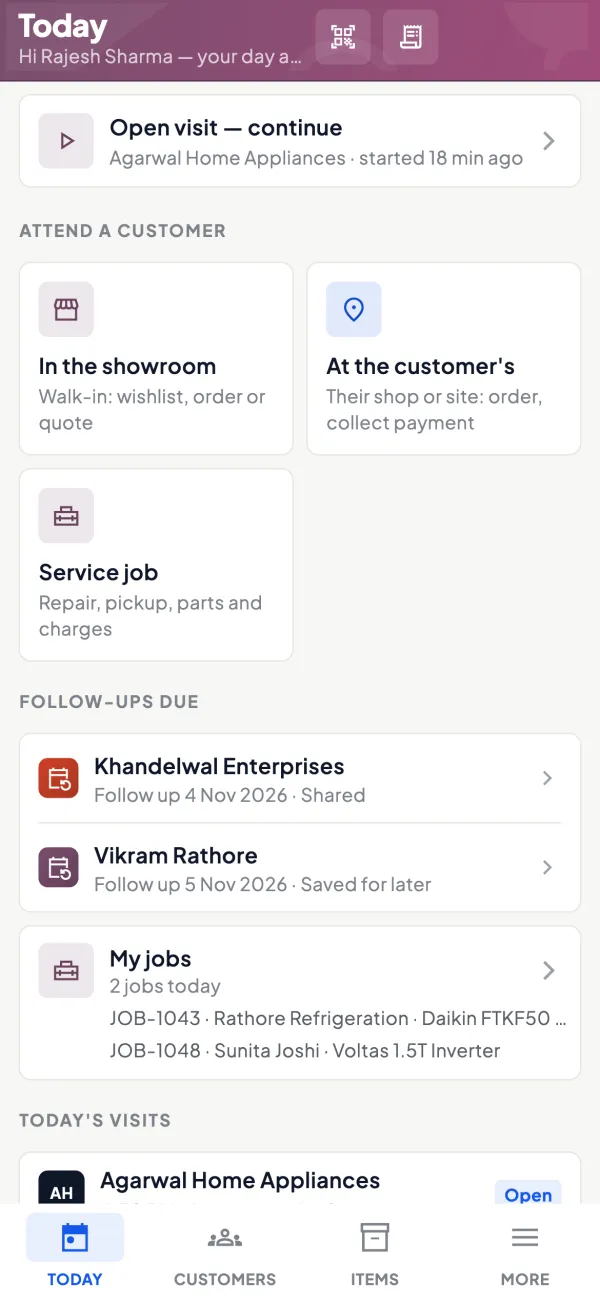
Salespeople do not need the Balance Sheet. They need to know whom to see today, what those customers owe, what to offer and how to book the order. The Cashflow OS staff app opens on a Today screen with exactly that: customers to attend, visits, orders and collections.
- Today's work on one screen
- Own customers only
- Orders with GST, no retyping
- Collections on record
Start free trialBook a free demo
Works with your TallyPrime14-day free trialJaipur team, call +91 70738 53555

Who it’s for
Who uses staff app
- Outdoor salespeopleRetailers, dealers or contractors covered on a beat
- Showroom floor staffWalk-in customers and wishlist follow-ups
- Counter staffPhone orders from regular buyers, booked with GST
- Collection staffParty visits for payment, recorded the same day
- Sales managersOrders to approve and a team's visits to review
- Distributors and manufacturersDealer networks served by a small field team
- Owners of small sales teamsFacts on visits, orders and collections without calling around
Pain → fix
The problems staff app solves
What goes wrong without it, and what changes with Cashflow OS.
- The problemSalesmen can see margins and bank balances
Handing out the full accounts app shows staff far more than their job needs.
With Cashflow OSSalesperson role: items and own customers onlyThe staff view shows items and the salesperson's own customers, not the company's accounts.
Team roles and access - The problemThe day is planned on WhatsApp and a diary
Messages get buried, and nobody knows who was supposed to see whom.
With Cashflow OSToday lists whom to see and callCustomers to attend, visits, orders and collections sit on one first screen, guided by route plans if field force is on.
Route planning - The problemOrders photographed from an order book
The office retypes them from a blurry photo, and quantities go wrong.
With Cashflow OSBook sales orders with lines and GSTOrders are made once in the app and posted into Tally through the connector after any approval.
Sales orders to Tally - The problemCash collected, but the office hears late
A ₹12,000 collection sits in a salesman's pocket for three days before anyone knows.
With Cashflow OSRecord each collection against the partyWhat the salesperson collected is recorded at the time, so the owner sees it that day.
Collections - The problemRates quoted from memory
Two salesmen quote the same dealer two different prices in one week.
With Cashflow OSPrice lists fill each dealer's rateWith price lists on, dealer types and layered discount rules fill the rate when an order is made.
Price lists - The problemNo record of which shops were visited
When targets are missed, the discussion runs on guesses and excuses.
With Cashflow OSVisit check-in with notes and photosWith field force on, visits record the location at check-in, along with notes and photos.
Field force tracking
What it does
What you can do with staff app
Today: customers to attend
How it works. The staff app opens on Today, with customers to attend, visits, orders and collections. With field force on, route plans and recommended visits shape the list.
- The day's work before the first chai
- Own customers only, nothing else
- Recommended visits for who is due
In practiceAt 9:30 Pradeep's Today screen shows 11 shops in the Lalbagh area, two of them flagged because nobody has visited for three weeks.
Visits with notes and photos
How it works. At the customer's shop, the salesperson checks in and adds notes and photos: stock on the shelf, a complaint, a request, a competitor's scheme.
- Location recorded at check-in
- Notes the office can act on
- Photos of displays and empty shelves
In practicePradeep notes that Sharma Traders wants a credit note for 6 damaged cartons and photographs them for the office.
Orders with lines and GST
How it works. Orders are sales orders with lines and GST. Rates come from the price list if it is on; orders from frontline staff can wait for approval before the connector posts them into Tally.
- The dealer's rate filled automatically
- GST from the item and the party's state
- Approval before anything reaches Tally
In practicePradeep books 24 cartons at ₹1,150 for a B-type dealer, ₹27,600 before GST. The owner approves it from his phone.

Dues and collections
How it works. The salesperson sees bill-wise dues for their own customers, so they ask for the right amount, and records what was collected against the party.
- Ask for the right bill, not a round figure
- Collections recorded the same day
- Owner sees what came in from each route
In practiceBefore leaving Sharma Traders, Pradeep sees a ₹14,200 bill at 47 days and records the ₹10,000 cheque handed over.

Items with photos to show
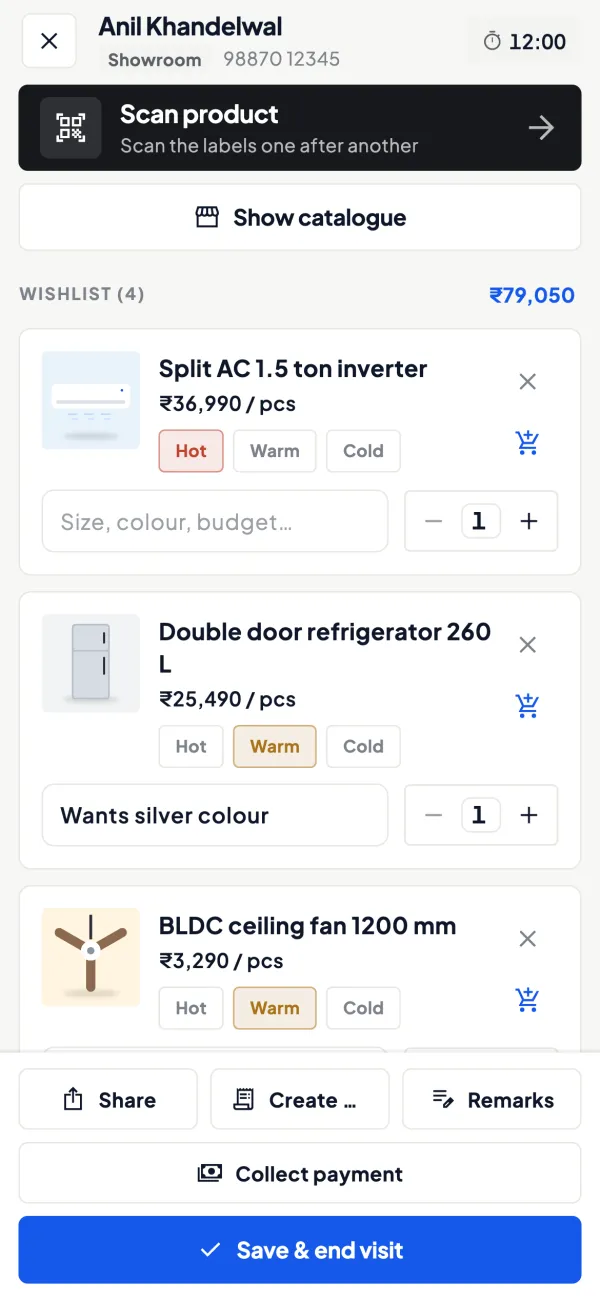
How it works. Items come from Tally with photos and friendly display names, so a salesperson can show the range on the phone without carrying a printed catalogue.
- New lines shown on the phone
- Friendly names instead of Tally codes
- Stock checked before promising delivery
In practiceA retailer asks about the new range of LED panels. Pradeep shows photos of all six sizes and books two of them.

Guide
Staff app: the full guide
How it works day to day, who does what, and the points to watch.
Why a separate view for staff
Giving a salesperson the full accounts app causes two problems. They see things they should not, such as margins, bank balances and other salespeople's customers. And they get lost in screens built for an accountant. The usual workaround, a WhatsApp group and a paper diary, loses orders and leaves no record of visits.
The staff app solves both. It is the same Cashflow OS app, but the salesperson role sees items and their own customers, not the company's accounts, and the first screen is built around the day's work rather than around reports.
What is on the Today screen
| Section | What the salesperson uses it for |
|---|---|
| Customers to attend | Who to see or call today |
| Visits | Check in at a customer, add notes and photos |
| Orders | Book a sales order with lines and GST |
| Collections | Record what was collected from a customer |
With the field force module also on, visits record the location at check-in, route plans and recommended visits guide the day, and leave requests go through the app. With price lists on, the rate for each customer type fills automatically when an order is made.
Who it is for
- Outdoor salespeople covering retailers, dealers or contractors on a beat.
- Showroom staff who attend walk-in customers and follow up on wishlists.
- Counter staff who take phone orders from regular buyers.
- Collection staff who visit parties for payment.
For the owner's side of running such a team, see managing a field sales team and the field sales app checklist.
Orders and approval
Orders taken in the staff app are sales orders with lines and GST. Orders from frontline staff can be set to need approval, so the owner or an admin sees each one before it goes further. Once approved, and once the owner has switched writing into Tally on for the company, the order is posted into Tally through the connector, and Tally validates it.
A worked case: a salesperson books 24 cartons of an item at ₹1,150 per carton for a B-type dealer, ₹27,600 before GST. Approval is on. The owner sees the order, checks that the dealer's oldest bill is within limit, approves, and the order reaches Tally as a sales order. The salesperson did not type it twice, and nobody at the office retyped it from a photo of an order book.
What the owner sees
At the end of the day, the owner wants three answers: did the team go where it was supposed to, what did it sell, and what did it bring back. The owner can see the team's activity in the app: visits made, orders booked, collections recorded. With field force on there is also a performance view for the team. This is not about watching every minute; it is about having facts when you discuss targets, incentives or a customer complaint. Our guide on measuring salesperson performance suggests which numbers to look at.
Tips for a smooth rollout
- Assign customers before day one. An empty Today screen kills enthusiasm.
- Set up price lists first, so the first orders carry the right rates.
- Keep approval on for the first few weeks, then decide whether to relax it.
- Let each person pick their language. The app works in English and Hindi.
- Lock the app with fingerprint, face or PIN on phones that travel.
- Explain location at check-in to the team openly, so it is not seen as spying.
What it does not do
- It does not show salespeople the company's accounts; the salesperson role is limited to items and their own customers.
- It does not post anything into Tally unless the owner has switched writing on and the connector is running.
- Recording a collection does not by itself move money; it is a record of what the salesperson collected.
- It does not calculate salaries or incentives.
This page is general information for Indian businesses, not tax, legal or financial advice. Rules and rates change — check the official portals or your CA before acting.
Set-up
Start using staff app in 4 steps
Works on top of your TallyPrime — nothing to migrate, no second set of books.
- 1
Invite each salesperson with a link and give them the salesperson role
- 2
Assign their customers so the Today screen is not empty
- 3
Set up price lists and order approval before day one
- 4
Let each person pick English or Hindi and lock the app
Buyer’s checklist
What to look for in staff app software
Whatever you choose, check these before you commit.
- A first screen built around the day's work, not around reports
- Each salesperson sees only their own customers
- No view of the company's accounts, margins or bank balances
- Orders with GST and the right dealer rate, ready for the office
- Approval for frontline orders before they reach the books
- Collections recorded against the party the same day
- Works in the language the salesperson is comfortable with
- The owner can see visits, orders and collections without calling around
Plans
Simple yearly plans
- 14-day free trial on your own books
- 3-year term saves up to 25%
- Premium modules (catalogue, field force, price lists, store…) priced extra
Start free trialGet the price for your business
Compare all plans- Growth₹3,000/year + GSTBooks, reports, outstanding and sharing
- Pro₹5,000/year + GSTEverything in Growth, plus entries into Tally
- Pro+₹7,000/year + GSTEverything in Pro, plus e-invoice and e-way bill
Why Cashflow OS
Why use staff app in Cashflow OS
- Same app, the right viewNo separate download: the salesperson role turns Cashflow OS into the staff app.
- Orders straight to TallyOrders go through the connector after approval, and Tally validates each one.
- Right rate every timePrice lists fill the rate for each dealer type, so nobody guesses.
- Facts for the ownerVisits, orders and collections in one view, plus a performance view with field force.
- English or HindiEach salesperson picks the language they read most easily.
- Locked on the roadFingerprint, face or PIN lock for phones that travel with the team.