Field sales
Cashflow OS for field sales teams
A field salesperson is most useful in front of the customer and least useful filling registers. Cashflow OS gives your team a Today screen with customers to attend, visits, orders and collections, on top of your TallyPrime items and parties, while the owner sees where the team went and what came of it.
- A Today screen for every rep
- GPS check-in at each visit
- Orders go into Tally
- Reps see only their customers
Start free trialBook a free demo
Works with your TallyPrime14-day free trialJaipur team, call +91 70738 53555

Built for field sales teams
Who it’s for
- FMCG and food sales teamsDaily beats to kirana and general stores
- Pharma distributor salesmenChemist calls with dues and orders
- Building material sales officersDealer, contractor and site visits
- Electrical and hardware repsRetailers and electricians on fixed days
- Agri input field staffVillage retailers through the season
- B2B and industrial salesFactory visits, quotations and follow-ups
- Collection staffDues-led visits, amounts recorded same day
Pain → fix
The problems we fix
The everyday headaches of field sales teams, and what changes when the books are on every phone.
- The problemOrders on paper, retyped at the office
Every order is written once by the rep and again by the billing clerk.
With Cashflow OSOrders on the phone, posted into TallyReps book sales orders with lines and GST; after approval, the connector posts them into Tally.
See how it works - The problemRep walks in without knowing the dues
He takes a new order from a shop that hasn't paid for two months.
With Cashflow OSPending bills open before the visitThe rep sees his customer's bill-wise dues and ageing on the phone before he talks about a new order.
See how it works - The problemVisits claimed, never proved
The day's report says ten shops; nobody can say which ones.
With Cashflow OSCheck-in records the location at each visitVisits are logged with GPS location against the customer's mapped spot, with notes and photos.
See how it works - The problemBeat planned in the rep's head
Good customers get missed for weeks; easy ones get visited every day.
With Cashflow OSAreas, route plans and recommended visitsMap customers, group them into areas and routes, and let the app suggest who is due a visit.
See how it works - The problemCash collected reaches the office days later
The owner learns about a collection when the cash or cheque finally arrives.
With Cashflow OSCollections recorded in the app the same dayThe rep records what he collected at the shop, so the office sees it at once.
See how it works - The problemReps can see more of the books than they should
Sharing Tally access means sharing margins, bank balances and every party.
With Cashflow OSSalesperson role: items and own customers onlyGive the whole team the app without opening your accounts to them.
See how it works
Features
How Cashflow OS works for field sales teams
A Today screen built for the rep
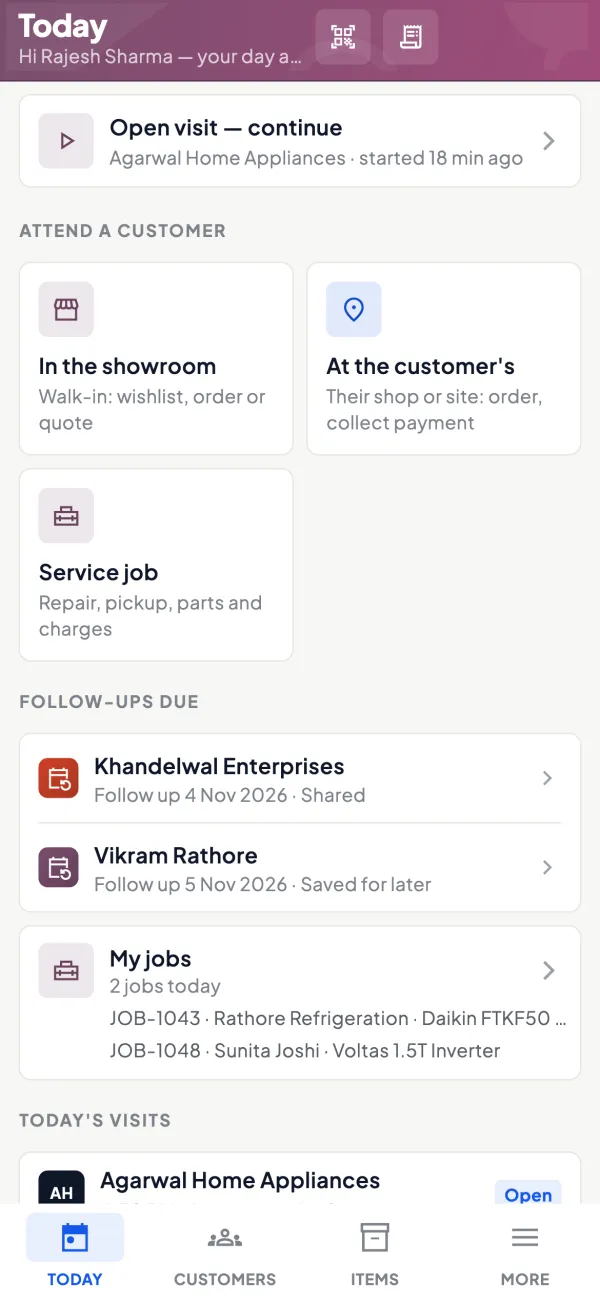
How it works. Each salesperson opens the app on Today: customers to attend, visits, orders and collections for the day.
- One screen instead of a register and a diary
- Leave requests go through the app too
- Each rep picks English or Hindi
In practiceSunil starts his Tuesday in Jodhpur with 14 customers to attend, two follow-ups from last week and ₹46,000 of dues to collect on his route.
Check-in, notes and photos at every visit
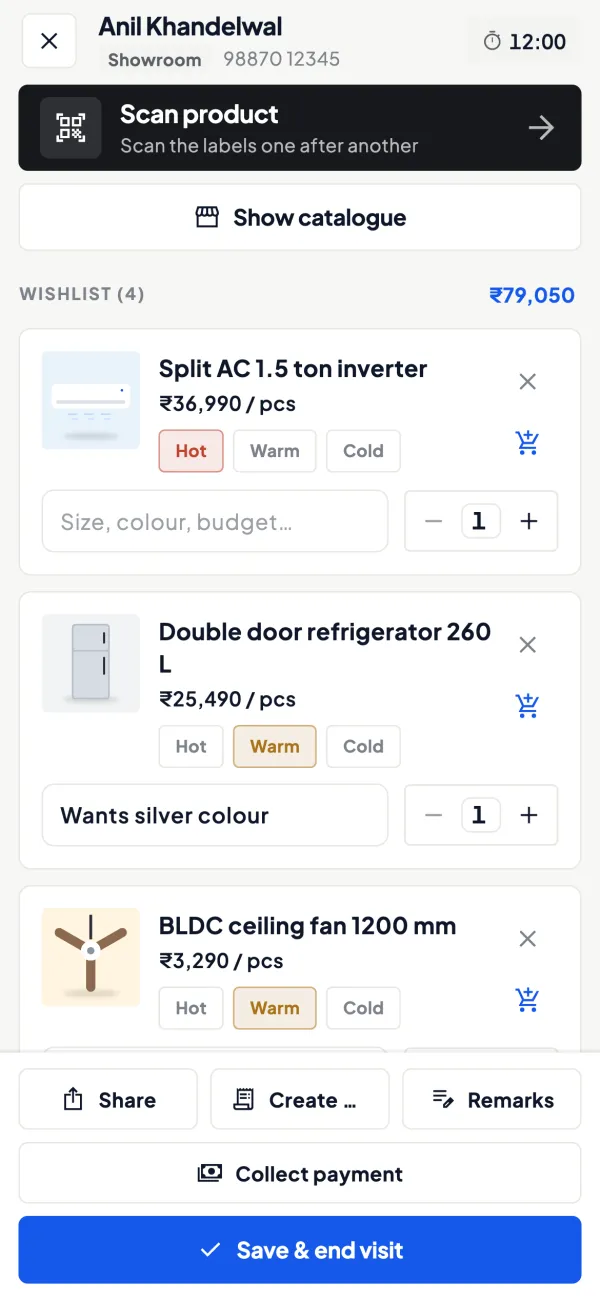
How it works. At the customer, the rep checks in; the visit records his location. He adds notes and photos, for example a shelf display or a damaged-goods complaint.
- A visit record, not a verbal report
- Photos of displays and complaints kept with the visit
- Visits logged away from the shop stand out
In practiceA rep photographs a rival's display at a Bikaner retailer and notes the counter is asking for a scheme; the owner sees it that evening.
Routes, areas and recommended visits
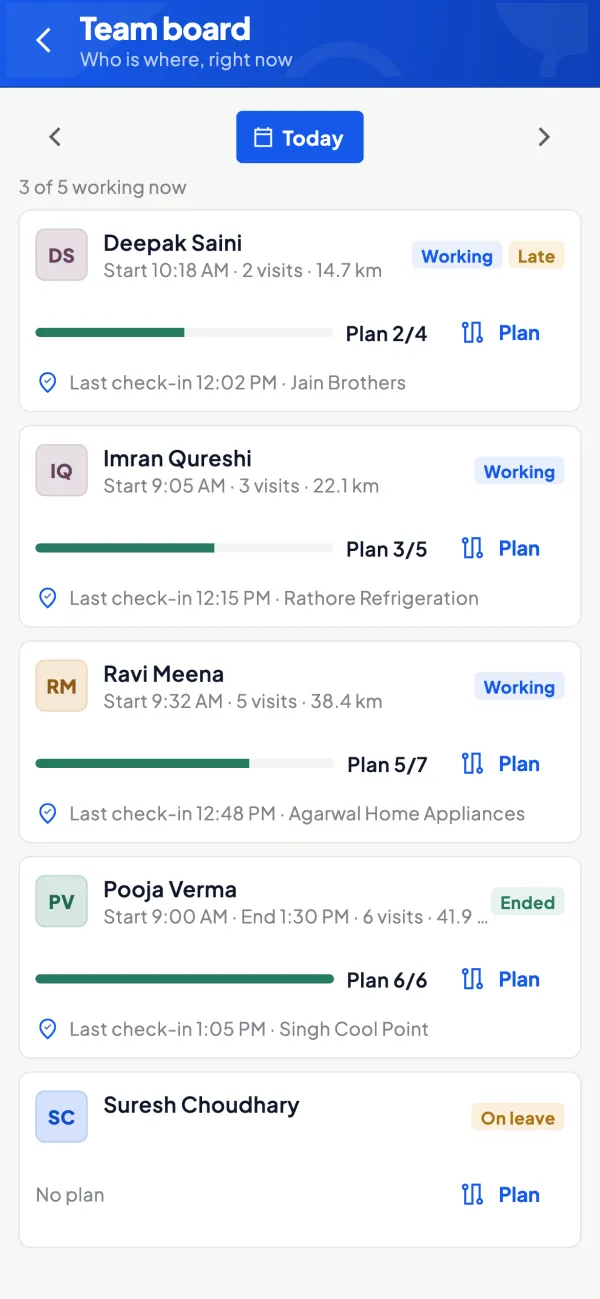
How it works. Mark dealer locations, define areas and build route plans. The app suggests recommended visits; the owner gets a performance view of the team.
- Important customers aren't left out for weeks
- Compare reps on the same kind of territory
- Plans that survive a rep going on leave
In practiceThe owner splits the Ajmer market into four areas and two route plans; after a month, recommended visits show 11 shops nobody had called on.
Orders at the price-list rate
How it works. Orders are taken with lines and GST at the rate the price list gives that customer type. Frontline orders can need approval before they go to Tally.
- No rate negotiation by phone with the office
- Tally validates each order it receives
- Approval kept on for new reps
In practiceA rep books 25 cartons for a B-type retailer; the rate fills in, the owner approves from his phone and the order is in Tally within minutes.

Dues before the doorbell
How it works. Bill-wise outstanding with ageing for the rep's own customers, synced from Tally.
- Asks for exact bills, not 'something pending'
- Statements sent from the office on WhatsApp
- Collections recorded against the visit day
In practiceBefore walking in, the rep sees ₹18,400 from 12 September and ₹9,750 from 3 October, and asks for both by date.

Know your trade
A guide for field sales teams
How the business works, where money gets stuck, and the GST points to watch.
What field sales looks like in Indian MSMEs
Field teams range from two salespeople covering a city to thirty spread across a state. They visit retailers, dealers, contractors, institutions or farmers, depending on the trade. A good visit does four things: takes an order, collects money, solves a complaint and learns something about the market. A wasted visit does none and still costs fuel and a day's salary.
The owner's questions are always the same: where did they go, what did they bring back, and who is doing well? Without a record, the answers are guesses. Our guide to managing a field sales team covers targets and routines; this page covers the tools.
The salesperson's day in the app
The staff app opens on a Today screen built for salespeople: customers to attend, visits, orders and collections. From there:
- Check the route plan and recommended visits for the day.
- At the customer, check in; the visit records the location.
- Look at the customer's pending bills before talking about a new order.
- Take a sales order with lines and GST, at the rate the price list gives that customer type.
- Record any amount collected.
- Add visit notes and photos, for example a shelf display or a damaged-goods complaint.
Leave requests go through the app too, so the owner knows who is out on which day.
What the salesperson can and cannot see
The salesperson role sees items and their own customers, not the company's accounts. That is deliberate: a salesperson needs a customer's dues and the rate to quote, not the Balance Sheet or other salespeople's parties. Orders from frontline staff can be set to need approval before they go to Tally. Once approved, and once the owner has switched writing into Tally on, orders are posted into Tally through the connector; Tally validates each one.
Routes, areas and visit planning
With the field force module, you mark dealer locations, define areas and build route plans. The app suggests recommended visits so that important customers are not left out for weeks. A simple rule of thumb that many owners use: customers who buy every week need a weekly visit, those who buy monthly need a fortnightly one, and a customer who has not ordered for twice his usual gap needs a visit before he quietly moves to someone else. See sales beat planning for building the beat itself.
Measuring the team without micromanaging
The owner gets a performance view of the team, alongside visit records and the team's activity in the app. Useful measures:
| Measure | What it tells you |
|---|---|
| Visits per day | Effort and route discipline |
| Orders per visit | Selling skill and customer fit |
| Collections against dues | Whether credit is being managed in the field |
| New customers added | Market expansion |
Compare people on the same territory type; a city route and a rural route are not the same job. Our guide on measuring salesperson performance goes further.
Collections in the field
In many trades the salesperson is also the collector. That is efficient, but it needs discipline. Before he walks in, the salesperson should know exactly which bills are pending: "₹18,400 from 12 September and ₹9,750 from 3 October" gets paid more often than "sir, something is pending". After collecting, he records what he collected in the app, so the owner sees it the same day instead of when the cash or cheque reaches the office.
Two habits help. First, agree which bills a payment is against at the time of collection; it avoids disputes later when the receipt is entered in Tally. Second, if a customer disputes a balance, send him the party statement on WhatsApp from the office the same day, in English or as the Hindi हिसाब page, rather than letting the salesperson argue on the spot. The guide on payment reminder message templates has wording you can reuse.
Rolling it out
- Clean up customer ledgers in Tally and assign customers to salespeople first.
- Set up price lists before the first order, so rates are right from day one.
- Start with visits and orders; add routes once the team is used to checking in.
- Keep approval on for the first few weeks.
- Explain to the team that location is recorded at check-in, and why.
This page is general information for Indian businesses, not tax, legal or financial advice. Rules and rates change — check the official portals or your CA before acting.
Set-up
Up and running in 4 steps
No new software to learn for your accountant — Tally stays as it is.
- 1
Install the Tally Connector on the PC where TallyPrime runs
- 2
Sign in to the app with your mobile number and scan the connector's QR
- 3
Assign customers to reps and map their locations
- 4
Invite reps with a link as salespersons; keep order approval on
Buyer’s checklist
What to look for in software for field sales teams
Whatever you choose, check these before you commit.
- A simple daily screen the rep actually opens: customers, visits, orders
- Visit check-in with location, notes and photos
- Route plans and suggestions for customers who are due a visit
- Orders that reach your accounting books without retyping
- Each rep sees his own customers and their dues, nothing more
- Collections recorded in the field the same day
- A performance view the owner can read in minutes
- Works in the language your reps are comfortable with
Plans
Simple yearly plans
- 14-day free trial on your own books
- 3-year term saves up to 25%
- Premium modules (catalogue, field force, price lists, store…) priced extra
Start free trialGet the price for your business
Compare all plans- Growth₹3,000/year + GSTBooks, reports, outstanding and sharing
- Pro₹5,000/year + GSTEverything in Growth, plus entries into Tally
- Pro+₹7,000/year + GSTEverything in Pro, plus e-invoice and e-way bill
Why Cashflow OS
Why field sales teams choose Cashflow OS
- Runs on your Tally items and partiesNo separate customer list to keep; what the rep sees comes from your TallyPrime books.
- Built for the rep, not the officeToday, visits, orders and collections on one screen.
- Proof of visits without guessworkCheck-in records the location; notes and photos sit with each visit.
- Orders checked by TallyApproved orders post through the connector, and Tally validates each entry.
- Your accounts stay privateThe salesperson role never shows the company's accounts or other reps' customers.
- Three languagesEnglish and Hindi, chosen by each person.