Invoices & documents Orders
Sales order vs purchase order
A purchase order is issued by the buyer to say what they want to buy. A sales order is created by the seller to record what they have agreed to supply. They often describe the same deal from two sides of the table.
- Distributors and wholesalers
- Retailers buying on credit
- Manufacturers
- Purchase and billing staff
- Accountants

On this page 12
The two documents in one picture
Suppose a retailer in Nagpur orders paint from a distributor. The retailer writes a purchase order and sends it. The distributor accepts it and books a sales order in their own system. The retailer's PO and the distributor's sales order should match line for line.
| Point | Purchase order | Sales order |
|---|---|---|
| Issued by | Buyer | Seller |
| Sent to | Supplier | Stays internal; confirmation may go to buyer |
| Purpose | Authorise a purchase | Commit stock and plan dispatch |
| Leads to | Goods receipt, purchase bill | Delivery, tax invoice |
| Tracks | Pending to receive | Pending to deliver |
| GST impact | None by itself | None by itself |
Neither is a GST document
Orders create no tax liability and no input tax credit. GST starts with the tax invoice at the time of supply, or with a receipt voucher if an advance for services is received. That is why an order can be changed freely until goods move, while an invoice can only be corrected with a credit note or debit note.
This is general information, not tax advice.
Worked example: one order, three dispatches
The Nagpur retailer orders 300 litres of emulsion and 100 litres of primer. The distributor's sales order SO/25-26/0233 shows:
| Date | Dispatched | Invoice | Balance on SO |
|---|---|---|---|
| 4 Nov | 150 L emulsion, 100 L primer | INV/0611, ₹58,400 + GST | 150 L emulsion |
| 9 Nov | 100 L emulsion | INV/0648, ₹27,000 + GST | 50 L emulsion |
| 14 Nov | 50 L emulsion | INV/0690, ₹13,500 + GST | Nil, order closed |
On the retailer's side, the purchase order shows the same three receipts against it. If the distributor's balance says 50 litres pending while the retailer's PO says nothing pending, someone has a wrong entry, and it is cheaper to find it now than at the year-end ledger confirmation.
Why sales orders matter for distributors
- Stock commitment: stock on hand minus stock on open sales orders is what you can actually sell today.
- Short supply: a list of pending order lines shows what to buy from the company next.
- Field orders: salespeople booking orders at shops create sales orders, and the office bills them after checking credit and stock.
- Approval: an order from a party over their credit limit can be held before it becomes an invoice. See setting credit limits for customers.
Why purchase orders matter for buyers
- They stop unauthorised buying by staff.
- They give a reference to match against the supplier's bill.
- Open POs show what stock is on the way, so you do not order twice.
A ready format is in purchase order format.
Where orders go wrong
- Rates differ between PO and invoice. The buyer's PO says ₹270 a litre; the seller's price list was revised to ₹285 last week. Decide which rate applies before dispatch, not when the payment comes short.
- Orders booked twice. A salesperson books the order in the field and the shop also phones it in. Ask for the buyer's PO number or a single order reference to catch duplicates.
- Old pending orders. A sales order pending for three months is rarely still wanted. Call the buyer and close it, or it will distort your stock and purchase planning.
- Wrong party. Similar names, such as Sharma Traders and Sharma Trading Co., get mixed up. Pick parties by GSTIN or mobile number, not by name alone.
Habits that keep orders clean
- Write the buyer's PO number on your sales order and invoice.
- Close short-supplied lines that will not be sent, instead of leaving them pending for months.
- Review pending sales orders daily and pending purchase orders weekly.
- Keep one order per buyer per day where possible; ten tiny orders from one shop make dispatch messy.
Doing this with Tally and Cashflow OS
TallyPrime supports order processing with sales order and purchase order vouchers and tracks pending quantities against them. With Cashflow OS, sales orders taken by salespeople in the field, from a showroom wishlist or a quotation, are posted to Tally through the connector, with GST worked out from the item and the party's state. Orders from frontline staff can need owner approval first. Purchase orders can be created from the phone too. See sales orders to Tally.
Avoid these
Common mistakes
- MistakeRates on the PO and the invoice do not matchDo this instead
Agree which rate applies before dispatch, and update the order if the price list has changed.
- MistakeThe same order booked twiceDo this instead
Ask for the buyer's PO number or one order reference, and check for it before booking a new order.
- MistakeSales orders left pending for monthsDo this instead
Review pending orders daily, call the buyer about old lines, and close short-supplied lines that will not be sent.
- MistakePicking the wrong party with a similar nameDo this instead
Select parties by GSTIN or mobile number, not by name alone.
Keep handy
Checklist
Sales order vs purchase order — 7 checks. Tick them as you go.
In Cashflow OS
How Cashflow OS helps
Cashflow OS puts your TallyPrime books on every phone in the team. Where it fits this topic:
Field and showroom orders into Tally
Sales orders taken in the field, from a wishlist or from a quotation are posted to Tally through the connector, with GST worked out from the item and the party's state.
See Sales orders to Tally
Purchase orders from the phone
Make a purchase order with your logo and details, share it as a PDF, and create it in Tally once writing is switched on.
See Purchase orders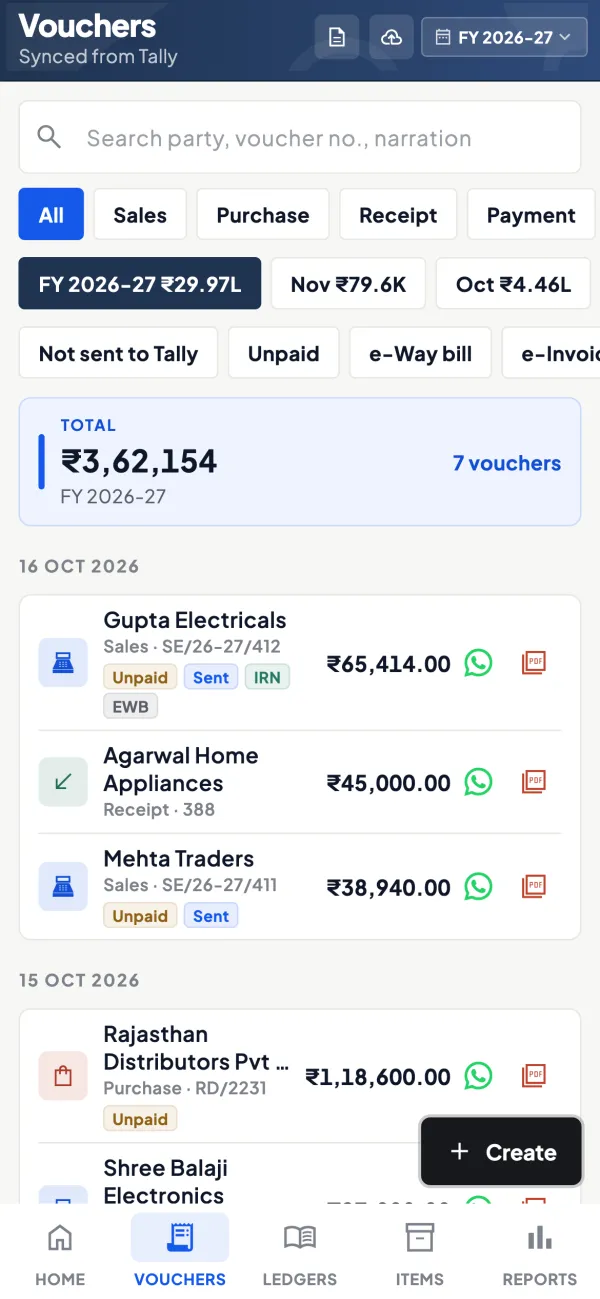
Questions people ask
Is a sales order the same as an order confirmation?
Do I need both documents?
Can an order be cancelled?
Should orders carry GST?
Does a purchase order need GSTINs on it?
What is an open purchase order?
Can one invoice cover several sales orders?
Who should approve purchase orders?
This page is general information for Indian businesses, not tax, legal or financial advice. Rules and rates change — check the official portals or your CA before acting.