Tally how-tos TallyPrime
The Tally Day Book, explained
The Day Book in Tally lists every voucher entered for a date or period, in order: sales, purchases, receipts, payments, journals and more. It is the quickest way to see what was recorded today and to catch mistakes before they spread.
- Business owners
- Accountants
- Office managers
- Auditors and CAs
- Partners reviewing the books

On this page 12
What it shows
Each row is one voucher: date, party or ledger, voucher type, voucher number and amount. By default it shows the current date; you can change the period to see a week, a month or any range. From any row you can open the voucher to see its full detail. A short definition is in the Day Book glossary entry.
Why owners should look at it
Monthly reports tell you the result; the Day Book shows how you got there. A daily look lets you:
- Confirm that yesterday's sales and receipts were all entered.
- Spot unusual payments, large discounts, or entries to unfamiliar parties.
- Catch wrong voucher types (a receipt entered as a journal) while it is easy to fix.
- See whether billing is done on the same day or piling up.
A five-minute daily review
- Open the Day Book for yesterday.
- Count sales vouchers and compare with the bill book or the counter's count.
- Scan receipts: are the amounts you expected from customers there?
- Read every payment above a limit you set, say ₹25,000.
- Look at journals, credit notes and deletions or alterations, if your setup shows them; these are where most errors and misuse hide.
- Note questions and ask the accountant the same morning.
After a few weeks, this becomes a quick habit, and staff become more careful knowing it happens.
Make month end easier
On the last working day of each month, run the Day Book for the whole month filtered by voucher type, and check the count and total for sales, purchases, receipts and payments against your other records. Then look for vouchers dated in the month but entered after it closed; late entries can move figures between GST periods. Ten minutes here saves hours during the month-end close.
Filtering and changing the view
The Day Book can be narrowed to a voucher type, such as only payments or only credit notes, and its period changed to any range. Useful views:
| View | Use |
|---|---|
| Only payments, this week | Review cash going out |
| Only credit notes, this month | Check returns and discounts given |
| Only journals, this month | Review adjustments before month end |
| All vouchers, last day of the month | Catch back-dated or late entries |
Day Book vs ledger vs cash book
- Day Book: all vouchers, all ledgers, in date order. Best for "what happened today".
- Ledger: all entries for one account, such as one customer or rent. Best for "what happened with this party".
- Cash and bank book: only cash or bank movements. Best for "where did the money go".
Use them together: the Day Book flags something unusual, the ledger shows its history.
Common things the Day Book reveals
- Sales entered days late, often in a bunch at month end, which can push them into the wrong GST period.
- Receipts entered without bill allocation, which later shows up as wrong outstanding; see bill-wise details.
- Duplicate entries of the same purchase bill.
- Round-figure journals with vague narrations, which deserve a question.
- Cash payments that should have gone through the bank.
Worked example: catching a problem early
The owner of a lubricants distributor checks Tuesday's Day Book on Wednesday morning. Sales vouchers: 46, matching the bill book. Receipts: 11, but the ₹1,20,000 promised by a large workshop customer is missing. Payments: one of ₹48,000 to a transporter, about twice the usual. Credit notes: two, one of ₹9,500 to a dealer with the narration "rate diff".
Three questions go to the accountant before 10 a.m. The workshop's payment turns out to be in the bank but not yet entered; it is entered with the right bill references. The transporter payment covered two months' bills, which is fine. The credit note was given by a salesperson without approval, which leads to a new rule: rate-difference credit notes above ₹5,000 need the owner's approval. None of these would have stood out in a monthly P&L.
Day Book on the phone
The Day Book is only useful if the owner looks at it, and many owners are not at the office PC every morning. Cashflow OS shows the Day Book from your synced Tally data on the phone and web, alongside cash and bank books, with Excel and PDF export. The home screen also shows today's sales, purchases, receipts, payments, cash and bank against the period before, so unusual days stand out. See financial reports.
Avoid these
Common mistakes
- MistakeReviewing only the monthly P&LDo this instead
Look at the Day Book daily; small problems show there long before they reach the monthly result.
- MistakeSkipping journals and credit notesDo this instead
Read journals, credit notes and large payments every day; that is where errors and misuse hide.
- MistakeStaff reviewing their own entriesDo this instead
Have the owner or a senior person who did not make the entries do the review.
- MistakeFixing mistakes in an exported copyDo this instead
Use exports for analysis only, and correct errors in Tally itself.
Keep handy
Checklist
The Tally Day Book, explained — 8 checks. Tick them as you go.
In Cashflow OS
How Cashflow OS helps
Cashflow OS puts your TallyPrime books on every phone in the team. Where it fits this topic:
Day Book on the phone
The Day Book, cash book and bank book from synced Tally data open on phone and web, with Excel and PDF export.
See Financial reports from Tally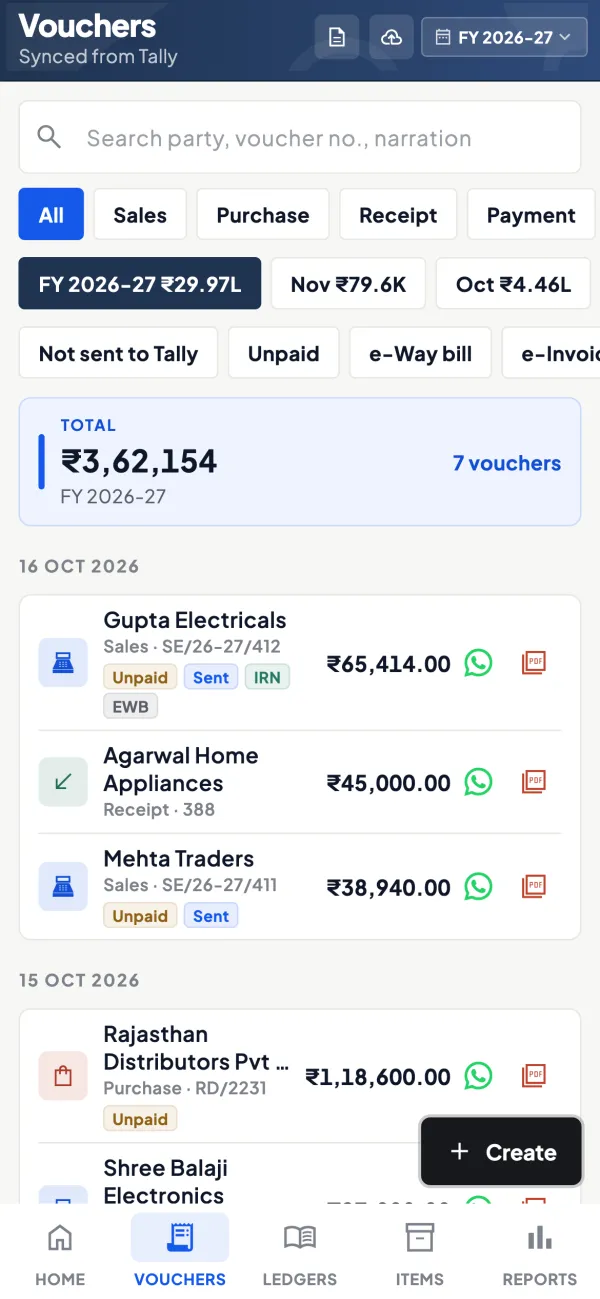
Today against the period before
The home screen shows today's sales, purchases, receipts, payments, cash and bank against the period before, so unusual days stand out.
See Tally on mobile
Questions people ask
Can I see the Day Book for a past month?
Does the Day Book show deleted vouchers?
Can I export the Day Book to Excel?
Who should review the Day Book?
Is the Day Book the same as a journal?
Can I see all entries for one party?
How do I spot back-dated entries?
What if I miss a few days of review?
This page is general information for Indian businesses, not tax, legal or financial advice. Rules and rates change — check the official portals or your CA before acting.