
Feature
AI assistant
Cashflow OS has an AI assistant inside the app that you can ask questions about your books in plain words. It answers from the data synced from your TallyPrime company. It is a quicker way to find a number, not an accountant or a tax adviser.
- Ask your books in plain words
- Answers from your Tally data
- Read-only, never posts entries
- Tap through to check the figure
Start free trialBook a free demo
Works with your TallyPrime14-day free trialJaipur team, call +91 70738 53555

Who it’s for
Who uses AI assistant
- OwnersA quick figure without knowing which report holds it
- Partners and family membersAsk how the month is going without learning accounts screens
- AccountantsA balance or a total while still on the call with a party
- DistributorsWhich retailers owe for more than 60 days, before the route
- Wholesalers and tradersTop customers and month-on-month sales comparisons
- Showroom ownersThis season's sales against the same season last year
- ManufacturersWhat is owed to suppliers this week, and what came in
Pain → fix
The problems AI assistant solves
What goes wrong without it, and what changes with Cashflow OS.
- The problemI don't know which Tally report has the answer
The number is in the books, but finding it means the right report, the right period and the right filter.
With Cashflow OSAsk in plain words, get the figure from synced dataType the question the way you would ask your accountant; Digit answers from the data synced from your TallyPrime company.
Financial reports from Tally - The problemWaiting for the accountant to send one balance
A simple 'how much does Gupta owe?' turns into a phone call, a wait and a screenshot.
With Cashflow OSAsk for a party's balance and oldest bill yourselfAsk about one party, then open that party's ledger in the app to see every bill behind the answer.
Party ledger statements - The problemOld dues buried in a long outstanding list
The total looks fine while a few parties quietly cross 60 and 90 days.
With Cashflow OSAsk which parties owe for more than 60 daysGet the names first, then open the bill-wise outstanding with ageing to plan who to call.
Outstanding receivables - The problemNot sure what is due to suppliers this week
Supplier payments come up together and the bank balance gets a surprise.
With Cashflow OSAsk what you owe suppliers and check the payablesThe answer comes from the payables in your Tally books, so you can line up payments before the week starts.
Payables tracking - The problemPartners who never open an accounts screen
They ask how the business is doing, but menus, reports and filters put them off.
With Cashflow OSA question box instead of menus and filtersPartners ask about sales or expenses in everyday words and can open the matching report, which reads in English or Hindi.
Hindi and English - The problemWorried an AI might change the books
Owners are rightly careful about anything that could touch the entries in Tally.
With Cashflow OSRead-only: it answers questions, it never posts entriesEntries are made only through the app's voucher screens, and only after the owner switches writing into Tally on.
Create Tally vouchers from your phone
What it does
What you can do with AI assistant
Ask the way you would ask your accountant
How it works. Open Digit inside the company you are in, type a question about sales, dues, expenses or a party, and read the answer drawn from the synced Tally data.
- No need to know which report holds the figure
- Name the period and the party for sharper answers
- Ask a follow-up to narrow the date range
In practiceOn a call with a supplier, Mohit asks 'What did we buy from Shiv Plast this financial year?' and has the figure before the call ends.

Dues and collections questions
How it works. Ask who owes you, for how long and how much, then open the bill-wise outstanding to see the bills and their age.
- Names first, bill-by-bill detail one tap away
- Ageing helps decide who to call first
- Same synced figures the outstanding screen shows
In practiceAsked 'Which parties owe us for more than 60 days?', the answer lists eight retailers; the owner opens the outstanding screen and sees ₹3,40,000 across them, bill by bill.

Check any answer in the ledger
How it works. Treat the answer as a pointer. For anything that matters, open the party's ledger or the matching report, which shows the same data from Tally.
- A habit that catches a misread question or period
- The ledger is the final word, not the chat
- Share the party statement once the figure is confirmed
In practiceDigit says Rathi Traders paid ₹82,000 in October. His ledger for 1 to 31 October shows receipts of ₹50,000 and ₹32,000, so the figure holds before you call him.

Comparisons and expenses
How it works. Ask how this month compares with the same month last year, or what went on transport this quarter, and then open the report for the full picture.
- Period comparisons without setting up two reports
- Expense heads exactly as they are posted in Tally
- Export the matching report to Excel or PDF
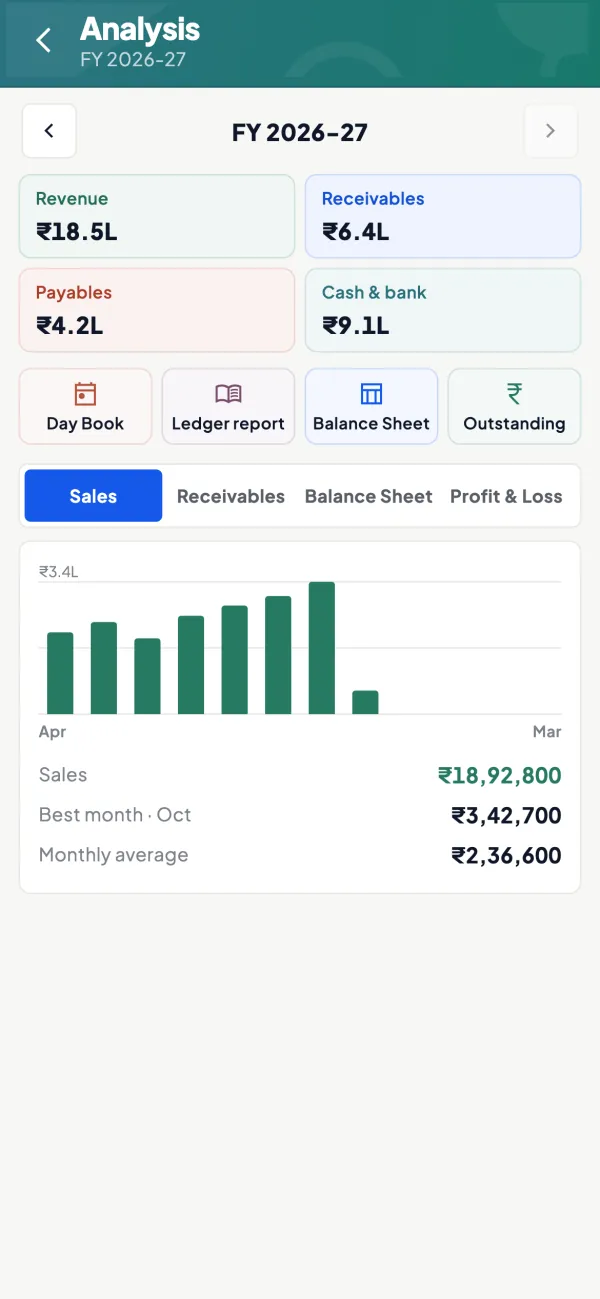
In practiceA partner asks which month sold best this year. The answer is October, and the analysis screen shows ₹3,42,700 for it against a monthly average of ₹2,36,600.
Guide
AI assistant: the full guide
How it works day to day, who does what, and the points to watch.
What it is for
Most questions an owner asks of the books are simple, but finding the answer means knowing which report to open and which filters to set. "How much did we sell to Sharma Traders this year?" "Which customers have bills older than 60 days?" "What were our expenses on freight last quarter?" The assistant lets you ask the question the way you would ask your accountant, and it looks for the answer in the data synced from Tally.
For the bigger picture of what AI can and cannot do in accounts, our guide on what an AI accounting assistant can do is a good starting point.
Good questions to ask
| Type | Example question |
|---|---|
| Sales | Who were our top five customers last month? |
| Receivables | Which parties owe us for more than 60 days? |
| Payables | What do we owe suppliers this week? |
| Expenses | How much did we spend on transport this quarter? |
| Comparisons | Were this month's sales higher than the same month last year? |
| A party | What is Gupta Agencies' balance and its oldest bill? |
Questions about facts in the books work best. Be specific about the period and the party where you can.
Always check the number
AI tools can misread a question or pick the wrong period. Treat the assistant's answer as a pointer and confirm anything important in the matching report or ledger in the app, which shows the same synced Tally data. A worked case: you ask "How much did Verma Stores pay us in October?" and get ₹1,45,000. Before you call Verma about a shortfall, open his ledger for 1 to 31 October and see the receipts. If the ledger shows ₹1,45,000 in two receipts of ₹95,000 and ₹50,000, you are on solid ground. If it differs, trust the ledger. Our note on the risks of AI in finance explains why this habit matters.
Questions it cannot answer well
Some questions sound like book questions but are really judgement calls: "Should I give this customer more credit?", "Is my margin good for this trade?", "How much tax will I save if I buy a vehicle?" The assistant can give you the facts that feed such decisions, such as the customer's payment history or this year's gross profit, but the decision is yours, and anything involving tax should go to your CA. Similarly, it cannot answer questions about things that never went into Tally: an unrecorded cash sale, a verbal promise from a buyer, or stock lying at a job worker that was not entered. When an answer looks odd, the first suspect is usually the books, not the assistant.
Who finds it useful
- Owners who know what they want to know but not which Tally report holds it.
- Partners and family members who are not used to accounts screens.
- Accountants who want a quick figure while on a call.
Its answers are only as current as the synced data, so keep the connector running and Tally up to date for current answers.
Where it saves the most time is in the in-between moments: on a call with a supplier, in a meeting with the bank, or at a family dinner when a partner asks how the month is going. Instead of opening three reports and setting filters, you ask, read the answer, and if the number matters, tap through to the report to confirm it.
Tips for useful answers
- Name the period: "this financial year", "October 2026", "last quarter".
- Use party and ledger names as they are in Tally. The assistant searches the synced data, so the closer you are to Tally's names, the better.
- Ask one thing at a time. Two simple questions beat one complicated one.
- Keep the books tidy. If expenses are posted to a general ledger instead of the right head, no assistant can split them for you.
For the data side, see AI with Tally data.
What it does not do
- It does not file GST returns or any other return.
- It does not give tax, legal or investment advice. For decisions on tax, speak to your CA.
- It is for asking questions, not for making entries; vouchers are made through the app's own screens.
- It answers from the synced data only; it does not know about transactions that are not in Tally or not yet synced.
- It can be wrong. Confirm important figures in the reports.
This page is general information for Indian businesses, not tax, legal or financial advice. Rules and rates change — check the official portals or your CA before acting.
Set-up
Start using AI assistant in 4 steps
Works on top of your TallyPrime — nothing to migrate, no second set of books.
- 1
Install the Tally Connector on the PC where TallyPrime is open
- 2
Sign in to the app with your mobile number and scan the connector's QR
- 3
Open the assistant inside the company you want to ask about
- 4
Ask with a period and party name, then check the figure in the report
Buyer’s checklist
What to look for in AI assistant software
Whatever you choose, check these before you commit.
- Answers come from your own books, not from general internet knowledge
- Read-only by design, so a question can never change an entry
- Every answer can be checked against a report or ledger in the same app
- Understands periods such as 'last quarter' or 'this financial year'
- Works with party and ledger names exactly as they are in your accounts
- Clear about what it will not do: file returns or give tax advice
- Runs on data kept in sync with the books your accountant maintains
- Answers for one company at a time when you run several
Plans
Simple yearly plans
- 14-day free trial on your own books
- 3-year term saves up to 25%
- Premium modules (catalogue, field force, price lists, store…) priced extra
Start free trialGet the price for your business
Compare all plans- Growth₹3,000/year + GSTBooks, reports, outstanding and sharing
- Pro₹5,000/year + GSTEverything in Growth, plus entries into Tally
- Pro+₹7,000/year + GSTEverything in Pro, plus e-invoice and e-way bill
Why Cashflow OS
Why use AI assistant in Cashflow OS
- Answers from your TallyDigit reads the data synced from your TallyPrime company, not guesses or averages.
- Never touches the booksIt is read-only. Entries go through the voucher screens, and only when writing is switched on.
- Easy to verifyThe same synced data sits in the app's reports and ledgers, one tap away.
- Plain questionsNo report names, filters or accounting terms needed to get a figure.
- Honest limitsIt does not file returns or give tax advice; those decisions stay with you and your CA.
- 14-day free trialAsk it about your own company's books before you pay anything.

