Using AI with your Tally data
To use AI with TallyPrime books you either export data to an AI tool by hand or use an app that keeps a synced copy of your Tally data and lets you ask questions of it; either way, the answers are only as good as the books and the controls around them.
- Businesses on TallyPrime
- Owners who want quick answers
- Accountants
- CAs with Tally clients
- Multi-company groups

On this page 12
Why Tally data is a good base for AI
TallyPrime already holds a structured record of the business: ledgers in groups, vouchers with dates and parties, bill-wise references, stock items in groups with HSN, godowns and cost centres. That structure is exactly what an AI assistant needs to answer questions like “which dealers in the north route have bills overdue over 60 days?”. The work is in getting the data to the AI safely and keeping it current.
Option 1: export and paste
You export a report from TallyPrime to Excel or PDF, then give it to an AI tool with a question.
- Good for: one-off analysis, such as a year's sales by item for a planning meeting.
- Drawbacks: the data is a snapshot that goes stale; exports can be large; and you are sending business data to whichever tool you paste into. Check its data settings first.
- Tips: export only what the question needs; remove columns such as phone numbers; state the period and company in the prompt; check totals against the Tally report.
Option 2: a synced connection
A connector on the Tally PC reads the open companies and keeps a copy up to date in an app, where an assistant can answer questions from the synced data.
- Good for: everyday questions from the owner and team, on the phone, without exports.
- Drawbacks: answers are only as current as the last sync; the Tally PC and connector need to be running; and you are trusting the app provider with your data, so ask how it is stored and who can see it.
- Tips: set user roles so staff see only what they need, and check a few answers against Tally reports in the first weeks.
See how Tally data sync works and Tally on mobile: how it works.
Fix these in Tally first
| Issue in Tally | What goes wrong in AI answers |
|---|---|
| Receipts posted on account, not against bills | Ageing and overdue lists are wrong |
| Duplicate party ledgers | A customer's sales and dues split in two |
| Parties in the wrong group | Debtors or creditors totals are off |
| Missing GSTIN or state on parties | GST and state-wise answers are wrong |
| Items without stock groups | Category-wise sales are incomplete |
| Entries pending for days | Every answer is out of date |
Our guide on preparing business data for AI has a fuller checklist.
Questions that work well on Tally data
- “Which customers owe more than ₹1,00,000, and what is the oldest unpaid bill for each?”
- “Sales by stock group for April to October 2026 compared with the same months of 2025.”
- “Which suppliers' bills are due in the next seven days?”
- “What did we spend on freight and transport in each month this year?”
- “Which items have closing stock but no sales in the last 90 days?”
- “Cash and bank balances across all companies today.”
Questions that span several financial years or companies need the tool to handle both; say clearly which companies and dates you mean.
What not to ask
- “File my GSTR-1.” Filing is done on the GST portal.
- “Is this purchase eligible for ITC?” That is a tax judgement for you and your CA.
- “Change this entry” through a general AI tool. Changes to the books should go through Tally's own validation.
This is general information, not tax advice.
Access and safety
- Give the full books only to owner, admin and accountant roles.
- Salespeople usually need items and their own customers, not company accounts.
- Keep writing back into Tally switched off until you are comfortable, and limit who can do it.
- Use app lock on phones that carry business data.
Doing this with Cashflow OS
Cashflow OS follows the synced-connection approach. A small Windows connector on the Tally PC keeps a copy of your open Tally companies in the app, and the AI assistant answers questions from that synced data on phone and web. Tally stays the books of record. Roles decide who sees what, writing back into Tally is off until the owner switches it on, and the app can be locked with fingerprint, face or PIN. The assistant does not file returns or give tax advice.
Avoid these
Common mistakes
- MistakePasting full Tally exports with phone numbers into AI toolsDo this instead
Export only what the question needs, remove columns such as phone numbers, and check the tool's data settings first.
- MistakeNot stating the company and period in the questionDo this instead
Name the companies and dates clearly, especially for questions that span several financial years or companies.
- MistakeChanging entries through a general AI toolDo this instead
Changes to the books should go through Tally's own validation, with permission you control.
- MistakeTrusting answers in the first weeks without checksDo this instead
Check a few answers against Tally reports, and check that the last sync is recent.
Keep handy
Checklist
Using AI with your Tally data — 8 checks. Tick them as you go.
In Cashflow OS
How Cashflow OS helps
Cashflow OS puts your TallyPrime books on every phone in the team. Where it fits this topic:
An assistant on your synced Tally data
A connector on the Tally PC keeps a copy of your open companies, and the AI assistant answers questions from it on phone and web. It does not file returns or give tax advice.
See AI assistant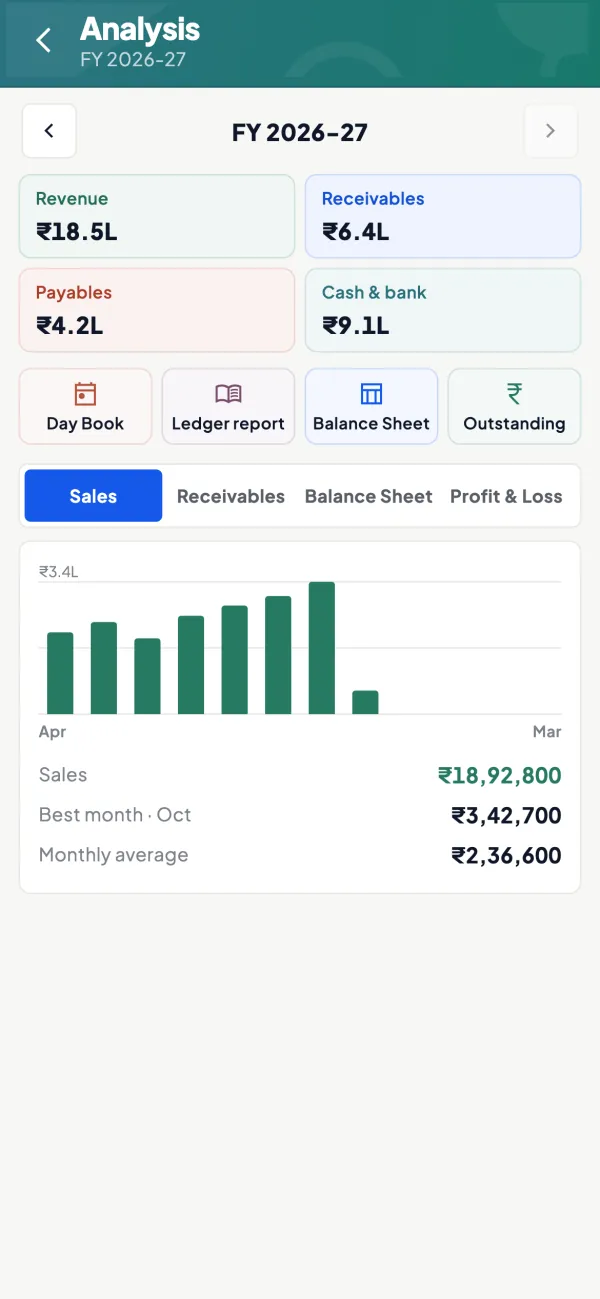
Roles, app lock and writing switched off
Roles decide who sees what, writing back into Tally stays off until the owner switches it on, and the app locks with fingerprint, face or PIN.
See Team roles and access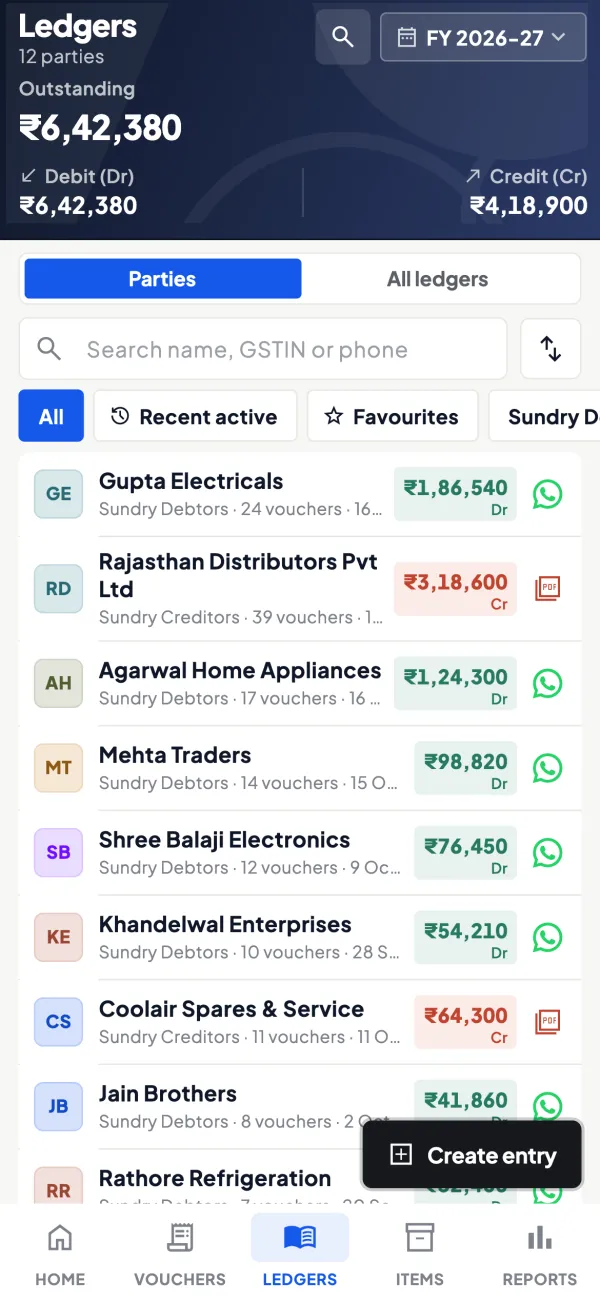
Questions people ask
Does AI need direct access to my Tally PC?
Will AI change my Tally data?
Can AI answer across multiple Tally companies?
How current are AI answers on synced Tally data?
Is it better to export Tally data or use a synced app for AI?
What should I ask the app provider about my data?
Can AI tell me whether a purchase is eligible for ITC?
Why are AI answers on my Tally data wrong?
This page is general information for Indian businesses, not tax, legal or financial advice. Rules and rates change — check the official portals or your CA before acting.