Feature
Hindi and English
Not everyone in an Indian business reads accounts in English. Cashflow OS works in English and Hindi, the app and the reports, and each person picks their own. Party statements can be shared as a simple Hindi हिसाब page that a shopkeeper reads at a glance.
- Hindi or English, per person
- Reports in your language
- Hindi हिसाब page for parties
- Same figures for everyone
Start free trialBook a free demo
Works with your TallyPrime14-day free trialJaipur team, call +91 70738 53555

Who it’s for
Who uses Hindi and English
- Family business ownersThe elder owner reads the business in Hindi
- The next generation in the businessEnglish on the same company's books
- AccountantsTally's English terms, unchanged
- Counter and field staffFaster on daily screens in Hindi
- Wholesalers with small retailersStatements as a Hindi हिसाब page
- Building material dealersContractors and masons who read Hindi
- Agri-input dealersFarmers checking their उधार at a glance
- Distributors in smaller townsRetailers ticking entries against their notebook
Pain → fix
The problems Hindi and English solves
What goes wrong without it, and what changes with Cashflow OS.
- The problemThe elder partner won't read English reports
He waits for someone to explain the figures, and some questions never get asked.
With Cashflow OSEach person picks Hindi or EnglishThe app and the reports follow each person's choice, on the same company's books.
Financial reports from Tally - The problemRetailers call to ask 'kitna baaki hai?'
The first week of every month goes on the phone reading out balances.
With Cashflow OSSend the Hindi हिसाब page on WhatsAppThe statement shows what was taken, what was paid and what is left, in plain Hindi.
Party ledger statements - The problemStaff are slow on English screens
Counter and field staff hesitate over menus and labels they half understand.
With Cashflow OSHindi screens, labels and menusStaff use the app in Hindi while the accountant keeps English.
Staff app - The problemTwo languages, two sets of numbers?
Owners worry that a translated report might not match the books.
With Cashflow OSThe same synced Tally figures in both languagesOnly the language changes; the figures come from the same synced copy of your Tally.
Tally on mobile - The problemBuyers with an accounts team want a formal statement
A simple Hindi page suits a kirana shop, not a company's accounts department.
With Cashflow OSTally-format PDF for them, हिसाब for othersPick the statement that suits each party when you share it.
Reports in Excel and PDF - The problemReminders that customers do not trust
A statement he cannot read is one he has to take on faith, so payment waits.
With Cashflow OSStatements customers can read and tick offWith each bill and payment in his own language, the talk moves to when he will pay.
Outstanding receivables
What it does
What you can do with Hindi and English
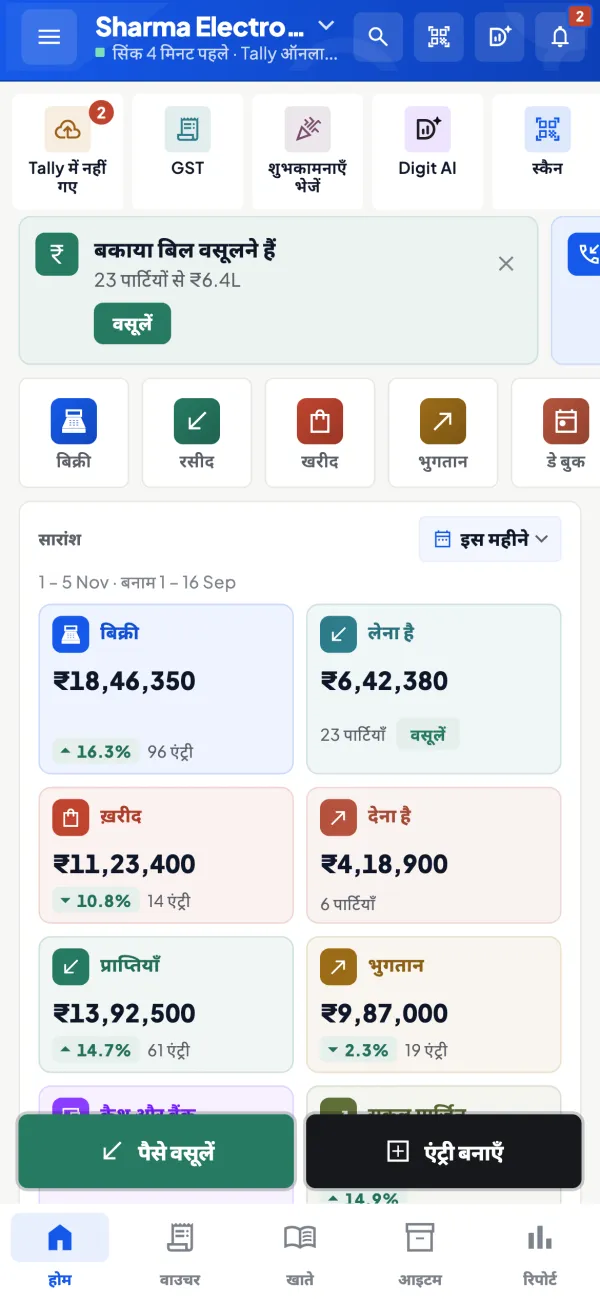
Hindi screens for those who want them
How it works. In the app's settings each person picks Hindi or English. Screens, labels, menus and reports follow that choice for that person only.
- The owner in Hindi, the accountant in English
- No setting forced on the whole team
- Change it again from settings any time
In practiceRamesh ji opens Home in Hindi each morning and reads the day's sales and receipts, while his son checks the same company in English.
The हिसाब page for small parties
How it works. When you share a party statement, choose the PDF in Tally's format or a simple Hindi हिसाब page, and send it on WhatsApp.
- What was taken, paid and left, in plain Hindi
- Each bill and payment with its date
- Fewer calls asking for the balance
In practiceA kirana retailer in Sikar gets his हिसाब: ₹46,200 in goods, ₹30,000 paid, ₹16,200 बकाया, and replies that he will send the balance on Monday.

Reports in each person's language
How it works. Profit & Loss, Balance Sheet, Day Book and the other reports appear in the language the reader has chosen, with the same figures.
- Partners read P&L without a translator
- More informed questions about expenses
- Same export to Excel or PDF
In practiceThe elder partner reads the quarter's Profit & Loss in Hindi and asks why freight went up by ₹38,000, a question nobody had raised.

English for the accountant, nothing changed in Tally
How it works. The accountant keeps working in English with Tally's terms. Ledger and item names appear as they are stored in Tally, in every language.
- Tally itself is not changed
- Party and item names stay as entered
- One set of books for the whole family
In practiceThe accountant reviews outstanding in English on the web app while the counter staff record visits in Hindi on their phones.

Guide
Hindi and English: the full guide
How it works day to day, who does what, and the points to watch.
Why language matters in the books
In a typical family business, the elder owner thinks in Hindi, the son reads English comfortably, the accountant is used to Tally's English terms and the counter staff are most at home in Hindi. Customers range from a corporate buyer who wants a formal statement to a village retailer who wants to know, simply, लेना है or देना है. Forcing everyone into one language means some of them stop looking at the numbers. That is the opposite of what you want.
What is available in Hindi
- The app: screens, labels and menus.
- Reports: each user sees reports in their chosen language.
- Party statements: a simple Hindi हिसाब page, besides the PDF in Tally's format.
The choice is per person. The owner can use Hindi while the accountant uses English on the same company's books, and both see the same figures. The website, for its part, is available in English and Hindi.
Common terms, side by side
| English | Common Hindi usage |
|---|---|
| Receivable / to receive | लेना है |
| Payable / to pay | देना है |
| Statement of account | हिसाब |
| Credit (sale on credit) | उधार |
| Party ledger | खाता |
| Outstanding | बकाया |
These are everyday trade words, not a formal glossary, and the exact labels in the app may differ. If you want the English terms explained, our glossary covers ledger and outstanding.
A worked example: the हिसाब page in practice
A kirana wholesaler in a district town sends statements to about 150 retailers every month. For years he sent Tally's English ledger as a PDF. Many retailers did not read it; they called to ask the balance instead, and the accountant spent the first week of every month on the phone. When he switched to the Hindi हिसाब page for the small retailers, the message they received showed, in plain Hindi, what was taken, what was paid and what is left: say, ₹46,200 in goods, ₹30,000 paid, ₹16,200 बकाया. Calls asking "kitna baaki hai?" drop because the answer is already on the phone. Larger buyers with their own accountants still get the Tally-format PDF. For message wording, see payment reminder message templates.
Language and trust in collections
There is a practical reason language affects money. A statement the customer cannot read is a statement he has to trust, and people do not like paying on trust. When a retailer sees, in his own language, the date of each bill and each payment, the conversation moves from "are you sure?" to "I will send the balance on Monday". That is especially true in smaller towns where buyers keep their own हिसाब in a notebook and want to tick your entries against theirs.
The same applies inside the business. An elder partner who reads the Profit & Loss in Hindi is far more likely to ask the right question about a jump in expenses than one who has to wait for someone to explain an English report. Giving each person the language they are comfortable in is less about convenience and more about getting more eyes, and more informed eyes, on the books. For other ways to bring a traditional business onto digital records gently, see moving from paper to digital orders.
Who uses it
- Owners and family members who prefer to read the business in Hindi.
- Counter and field staff who work faster in Hindi.
- Businesses whose customers are small shopkeepers, contractors or farmers, who read a Hindi हिसाब page far more readily than an English ledger.
Tips
- Let each person choose. Do not set a single language for the whole team.
- Keep party and item names readable. Names come from Tally as they are stored there; an item called "LED-9W-CW-B22" is just as cryptic in Hindi. Display names for items can be set for selling tools.
- Match the statement to the reader. Hindi हिसाब for small parties, Tally-format PDF for buyers with an accounts department.
What it does not do
- It does not translate the names of your ledgers or items in Tally; those appear as you entered them.
- It does not change the language inside TallyPrime itself.
- Languages other than English and Hindi are not offered in the app.
This page is general information for Indian businesses, not tax, legal or financial advice. Rules and rates change — check the official portals or your CA before acting.
Set-up
Start using Hindi and English in 4 steps
Works on top of your TallyPrime — nothing to migrate, no second set of books.
- 1
Install the Tally Connector and sign in with your mobile number
- 2
Each person opens settings and picks English or Hindi
- 3
Invite family and staff with a link; each sets their own language
- 4
When sharing a statement, choose the हिसाब page or the Tally-format PDF
Buyer’s checklist
What to look for in Hindi and English software
Whatever you choose, check these before you commit.
- Language chosen per person, not one setting for the whole business
- Reports, not just menus, available in Hindi
- Same figures whichever language a person uses
- A simple Hindi statement for small parties, beside the formal PDF
- Statements shared on WhatsApp, where most customers already are
- Ledger and item names kept exactly as they are in your books
- Everyday trade words a shopkeeper understands, not only textbook terms
- Accountants keep working in English with nothing changed in Tally
Plans
Simple yearly plans
- 14-day free trial on your own books
- 3-year term saves up to 25%
- Premium modules (catalogue, field force, price lists, store…) priced extra
Start free trialGet the price for your business
Compare all plans- Growth₹3,000/year + GSTBooks, reports, outstanding and sharing
- Pro₹5,000/year + GSTEverything in Growth, plus entries into Tally
- Pro+₹7,000/year + GSTEverything in Pro, plus e-invoice and e-way bill
Why Cashflow OS
Why use Hindi and English in Cashflow OS
- Per person choiceThe owner, the accountant and the counter each pick their own language.
- Hindi हिसाब pageSmall parties get a statement they can read at a glance.
- Same booksEvery language reads the same synced copy of your Tally.
- Nothing changes in TallyTallyPrime and your ledger and item names stay as they are.
- WhatsApp sharingSend statements and reminders where customers already are.
- 14-day free trialLet the family try it in their own language before you pay.