Electronics
Electronics and appliance dealers: schemes, finance and service
An appliance showroom earns on the sale, but its money is decided by brand schemes, finance payouts and after-sales service. Here is how the trade works, where cash gets stuck, and how to run it from TallyPrime on your phone.
- Walk-ins followed up on WhatsApp
- Repair jobs closed and billed
- Brand and finance dues on phone
- Works on top of your Tally
Start free trialBook a free demo
Works with your TallyPrime14-day free trialJaipur team, call +91 70738 53555
Built for electronics and appliance dealers
Who it’s for
- Multi-brand appliance showroomsFive to fifteen brands, each with its own schemes
- Single-brand dealersOne brand's models, targets and display support
- AC and cooling dealersSummer peaks, installation, stands and AMC jobs
- TV and home entertainment storesFestive buying, demos and wall-mount installations
- Kitchen and small appliance storesMixers, chimneys and gift buying in wedding months
- Sub-dealers in nearby townsBuying from a regional dealer on credit
- Appliance service desksOut-of-warranty repairs, parts and service charges
- Regional distributorsSupplying dealers across a district on credit
Pain → fix
The problems we fix
The everyday headaches of electronics and appliance dealers, and what changes when the books are on every phone.
- The problemCustomer compared three TVs and never came back
Nobody wrote down the name, the models or the price discussed, so there was no follow-up.
With Cashflow OSFind the walk-in by mobile number, with past visitsShowroom walk-ins record each visit against the customer's number, so any staff member can pick up the thread.
See how it works - The problemShortlisted models forgotten by the next visit
The family returns for the refrigerator they liked and the salesman who served them is on leave.
With Cashflow OSWishlist with models, notes and hot, warm or coldWishlists keep quantity, notes and interest level, and can be shared with the customer on WhatsApp.
See how it works - The problemInstallation and repair jobs written in a register
Small jobs like stands, gas top-ups and repairs are done but billed late or never.
With Cashflow OSService job with parts and charges, closed and billedCreate the job, dispatch the technician, add parts and service charges, then close it and make the invoice.
See how it works - The problemBrand payables checked only at the counter PC
The brand's payment date arrives and the owner is at a dealer meet, not at the Tally PC.
With Cashflow OSPayables and receivables by party on the phoneBill-wise payables to brands and distributors, and dues from customers and finance companies, synced from Tally.
See how it works - The problemModel photos hunted for in someone's gallery
A customer on the phone asks for the 55-inch model and staff scroll through hundreds of pictures.
With Cashflow OSItem photos and a catalogue link to shareAdd photos and your own display names to Tally items, and send a catalogue link customers can browse without the app.
See how it works - The problemBills changed at the counter, seen at month-end
Discounts and deleted bills surface only when the accountant closes the month.
With Cashflow OSAlert when a voucher is added, changed or deletedOwners get a push notification for voucher changes in Tally, plus an evening summary of the day.
See how it works
Features
How Cashflow OS works for electronics and appliance dealers
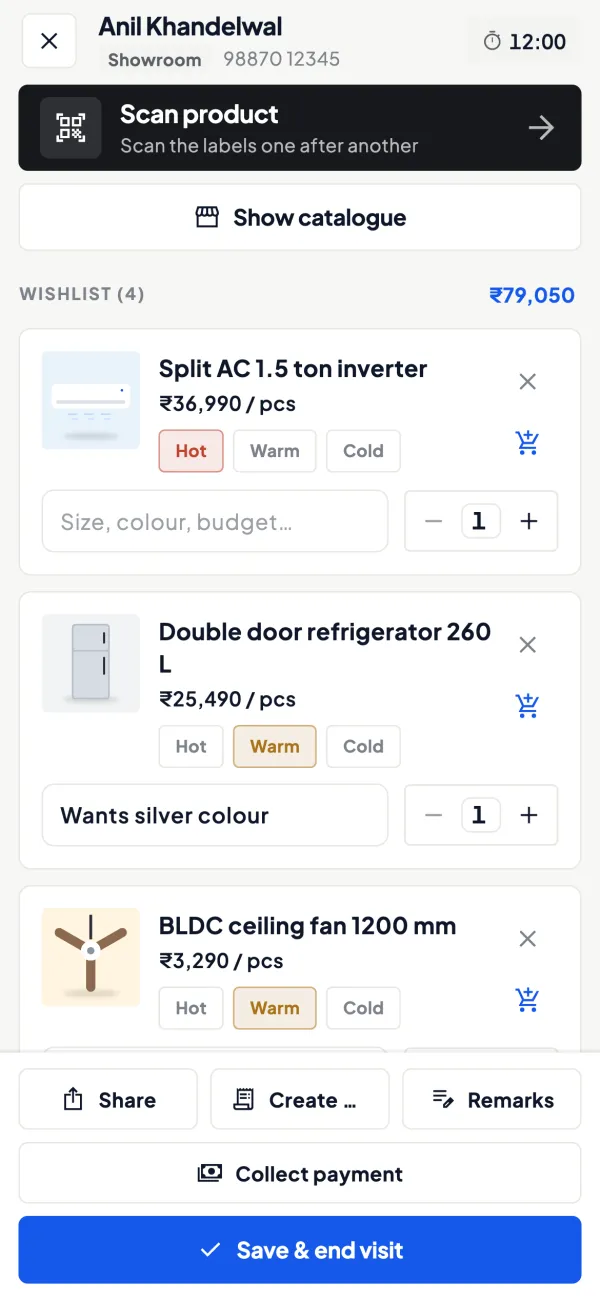
Walk-ins remembered by mobile number
How it works. Staff look up a customer by mobile number and see past visits and wishlists before they say hello. The visit is noted with what was shown and how keen the customer is.
- Any salesman can continue another's conversation
- Hot, warm and cold leads for follow-up
- Shortlist shared on WhatsApp the same evening
In practiceMrs. Kapoor asked about two 1.5-ton inverter ACs last Sunday; on Thursday her number brings up both models and the note that she wanted installation before 15 April.
Installation and repair jobs to invoice
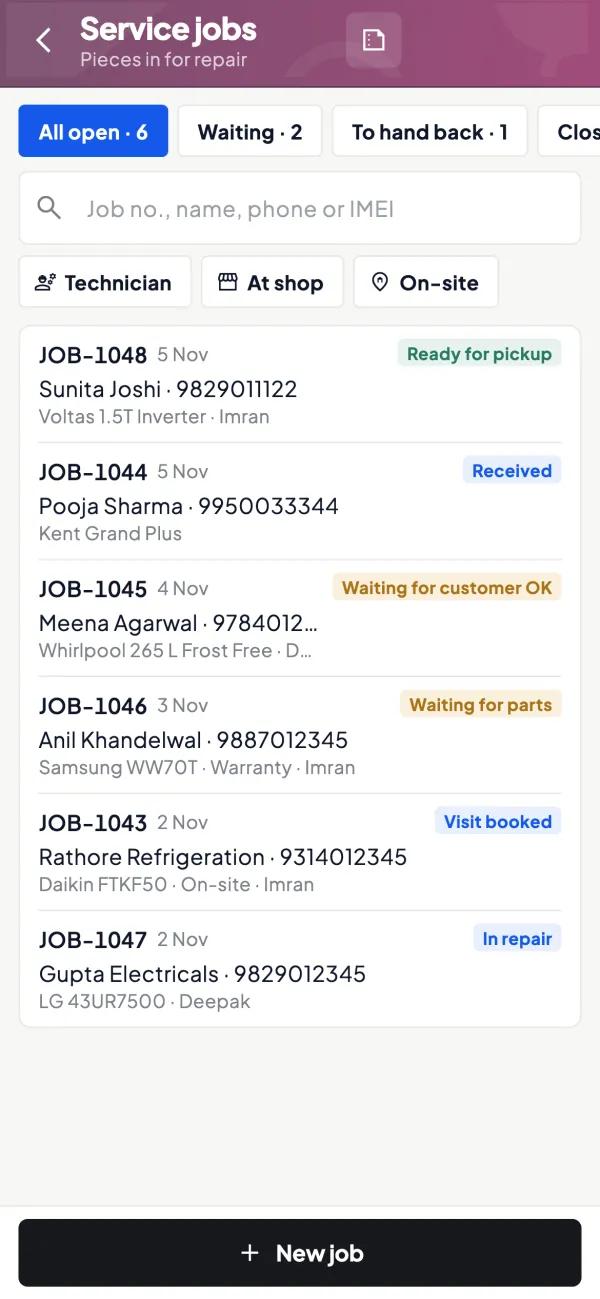
How it works. Book a repair, installation or pickup job, assign a technician, add parts or service charges, then close the job and create the invoice in Tally.
- No job left unbilled in a register
- Technician and customer on every job
- Invoice goes to Tally through the connector
In practiceTechnician Salim tops up gas on Mr. Iyer's split AC, adds a ₹2,500 service charge and a ₹650 stand, closes the job, and the bill is in Tally the same afternoon.
Brand, finance and customer balances
How it works. Bill-wise outstanding for customers and finance companies, and payables to brands and distributors, with ageing, synced from TallyPrime.
- See finance payouts still pending against bills
- Know which brand payment falls due this week
- Share a statement on WhatsApp in seconds
In practiceA ₹38,000 refrigerator sale shows ₹6,500 received from the customer and ₹31,500 still due from the finance company, ten days after delivery.

Model photos with your own names
How it works. Each Tally item can carry photos and a display name customers understand, beside the long Tally name. Share single items or a catalogue link.
- "1.5-ton 5-star inverter AC" instead of a code
- Catalogue customers open without the app
- Enquiries arrive on WhatsApp
In practiceBefore Dhanteras, the store sends its catalogue link to past customers, and enquiries for three washing machine models arrive on WhatsApp.

The day's numbers, even away from the store
How it works. Home shows sales, purchases, receipts, payments, cash and bank against the period before. Alerts flag changed or deleted vouchers.
- Evening summary of sales, receipts and payments
- Push alert for edits and deletions in Tally
- Compare today, month and year at a glance
In practiceOn a Diwali Saturday the owner, at the second branch, sees the main store's sales and receipts in the evening summary without calling the accountant.

Know your trade
A guide for electronics and appliance dealers
How the business works, where money gets stuck, and the GST points to watch.
How the electronics and appliance trade is set up
Televisions, refrigerators, washing machines, air conditioners, coolers, kitchen appliances and small gadgets reach the customer through a layered chain. Brands appoint regional distributors or sell direct to large dealers. The dealer runs a showroom or a multi-brand store, and some also supply smaller sub-dealers in nearby towns.
A typical multi-brand dealer buys from five to fifteen brands, each with its own price list, billing cycle and scheme calendar. Payment to the brand or distributor is usually against a credit period agreed in the dealer agreement, often backed by a cheque or a credit limit. On the selling side, most customers pay at the counter by UPI, card or cash, but a growing share buys on consumer finance, where the finance company pays the dealer a few days after delivery.
Schemes, finance and the real margin
In this trade the invoice margin is thin and the real margin sits in schemes: target-linked payouts, sell-out incentives per model, display support and festive offers. These normally reach the dealer as credit notes from the brand weeks after the sale. If nobody tracks them model by model, the dealer has no idea whether a ₹38,000 refrigerator sold at ₹36,500 made money or lost it.
Consumer finance adds another layer. The customer pays a down payment, the finance company pays the balance minus its subvention or processing charge. Book the full sale to the customer, the receipt from the finance company and the deduction separately, so the customer's ledger closes cleanly and the deduction shows up as a cost. Our guide on managing dealer schemes and discounts shows a simple way to track pending scheme claims.
A quick example
| Item | Amount |
|---|---|
| Sale price of a washing machine | ₹32,000 |
| Down payment by customer | ₹8,000 |
| Finance company payout after deduction | ₹23,200 |
| Subvention / charge borne by dealer | ₹800 |
If the ₹800 is not booked, the customer ledger shows ₹800 outstanding that nobody will ever pay.
Stock, seasons and serial numbers
Appliance demand is sharply seasonal. Air conditioners, coolers and refrigerators peak before and during summer; televisions and large appliances move fastest around Diwali, Dussehra and wedding months. Dealers stock up in advance on credit, so a slow season leaves expensive inventory sitting in the godown while the brand's payment date comes closer.
Each unit carries a model number and a serial number that matter for warranty claims and returns. Many dealers keep serial numbers in Tally's narration or batch fields, or in the brand's portal. Whatever method you choose, keep it consistent so a warranty call does not mean searching old bills. Watch for models being discontinued: old stock of a superseded model usually has to be cleared at a loss.
Installation, demo and service
Most large appliances need delivery, installation or a demo. The brand's service network often does this, but many dealers also run their own service desk for out-of-warranty repairs, stabiliser and stand sales, AC gas refilling and annual maintenance. These small jobs add up, yet they are commonly written in a register and billed late or never. If you run service, read our note on invoices for repair and service jobs.
GST and documents to keep in order
Appliances fall under different HSN codes and the GST rate depends on the product, so a single bill can carry more than one rate. Rates for some appliances have changed over the years, so check the current rate for each HSN on the GST portal rather than relying on an old price list. Brand scheme credit notes and finance company deductions should be recorded properly so your sales, tax and party balances agree. This is general information, not tax advice.
Common documents: purchase invoices from brands, scheme credit notes, sales invoices with model and serial details, finance company delivery orders, delivery challans for stock sent to sub-dealers, and job cards for service.
Running an appliance showroom with Tally and Cashflow OS
Cashflow OS syncs your TallyPrime data to the phone and web through a small connector on the Tally PC, so you can check brand payables, finance company dues and customer outstanding without sitting at the counter PC. Showroom walk-ins let staff look a customer up by mobile number and see past visits and wishlists, with interest marked hot, warm or cold, so the person who compared three TVs last Sunday gets a follow-up on WhatsApp. Item photos and an online catalogue link help you share models quickly. If you run repairs, service jobs let you add parts and charges, close the job and invoice it. See showroom walk-ins for how a visit is recorded. Tally stays the books of record.
This page is general information for Indian businesses, not tax, legal or financial advice. Rules and rates change — check the official portals or your CA before acting.
Set-up
Up and running in 4 steps
No new software to learn for your accountant — Tally stays as it is.
- 1
Install the Tally Connector on the PC where TallyPrime runs
- 2
Sign in with your mobile number and scan the QR the connector shows
- 3
Switch on walk-ins, wishlists and service jobs for the showroom
- 4
Invite sales and service staff with a link, each with their own role
Buyer’s checklist
What to look for in software for electronics and appliance dealers
Whatever you choose, check these before you commit.
- Finds a returning customer by mobile number and shows what they saw last time
- Records shortlisted models with notes and makes WhatsApp follow-up easy
- Tracks installation and repair jobs through to closure and invoice
- Shows brand payables and finance company dues by party and by bill
- Lets staff share model photos without digging through phone galleries
- Alerts the owner when bills are changed or deleted
- Works out GST per item, as appliances carry different HSN codes and rates
- Gives sales staff items and customers, not access to your accounts
Plans
Simple yearly plans
- 14-day free trial on your own books
- 3-year term saves up to 25%
- Premium modules (catalogue, field force, price lists, store…) priced extra
Start free trialGet the price for your business
Compare all plans- Growth₹3,000/year + GSTBooks, reports, outstanding and sharing
- Pro₹5,000/year + GSTEverything in Growth, plus entries into Tally
- Pro+₹7,000/year + GSTEverything in Pro, plus e-invoice and e-way bill
Why Cashflow OS
Why electronics and appliance dealers choose Cashflow OS
- Showroom firstWalk-ins, wishlists and follow-ups built for people who compare before they buy.
- Service that gets billedRepair and installation jobs end in an invoice in Tally.
- Tally stays the booksEverything syncs from TallyPrime; entries go back through the connector.
- Owner alertsKnow when a voucher is changed or deleted, wherever you are.
- Roles for every deskOwner, accountant, staff and salesperson each see what they need.
- 14-day free trialRun it through a busy weekend on your own data before deciding.