Feature
Service jobs
The service jobs module in Cashflow OS records repair and pickup jobs for your customers. As the work goes on you add items or service charges, and when it is done you close the job and invoice it, with your accounts staying in TallyPrime.
- Every job on record
- Parts and labour on one job
- Close the job, raise the bill
- Spare parts from your Tally
Start free trialBook a free demo
Works with your TallyPrime14-day free trialJaipur team, call +91 70738 53555

Who it’s for
Who uses service jobs
- Mobile and laptop repair countersDozens of devices in the queue, each with its own parts
- Appliance service centresWashing machines, fridges and TVs, in-shop and at home
- AC and RO service teamsInstallation, servicing and repair visits by technicians
- Printer, CCTV and computer techniciansOffice calls, part replacements and visit charges
- Two-wheeler workshopsLabour and spares on one bill when the bike goes out
- Dealers with an after-sales deskRepairs and installations alongside counter sales
- Pickup and drop repair servicesItems collected from the customer and returned fixed
- Workshop ownersEvery part used billed, every open job in view
Pain → fix
The problems service jobs solves
What goes wrong without it, and what changes with Cashflow OS.
- The problemPaper job slips get lost or go illegible
Then the item, the parts used and the labour done depend on someone's memory.
With Cashflow OSEach job recorded against the customerWho the customer is, what came in, what was done and what is to be charged, in one job record.
- The problemParts fitted but never billed
A ₹650 charging port goes in on Tuesday and nobody remembers it at handover.
With Cashflow OSAdd parts from your Tally items as they're fittedSpare parts are your Tally stock items, added to the job when the work is done, not reconstructed later.
- The problemCustomer wants a price before work starts
A verbal estimate becomes an argument when the final bill is higher.
With Cashflow OSSend a quotation before opening the jobA branded quotation as a PDF on WhatsApp sets the price in writing for large repairs.
Quotations - The problemTechnicians unsure which jobs are theirs
The morning starts with a phone round of who is going where.
With Cashflow OSDispatch each job to a technicianRepair, installation and pickup jobs are assigned to technicians, who add items and charges as they work.
Staff app - The problemThe bill is written by hand at handover
The customer waits while the counter adds up parts and labour from a slip.
With Cashflow OSClose the job and invoice itWhen the work is done, the job's items and service charges become the invoice, with your accounts in Tally.
Create Tally vouchers from your phone - The problemRepeat complaint, no record of the last repair
The customer says the same part was replaced last time, and you cannot check.
With Cashflow OSEarlier jobs show what was replacedJobs stay against the customer, so a repeat visit shows the parts and work from before.
What it does
What you can do with service jobs
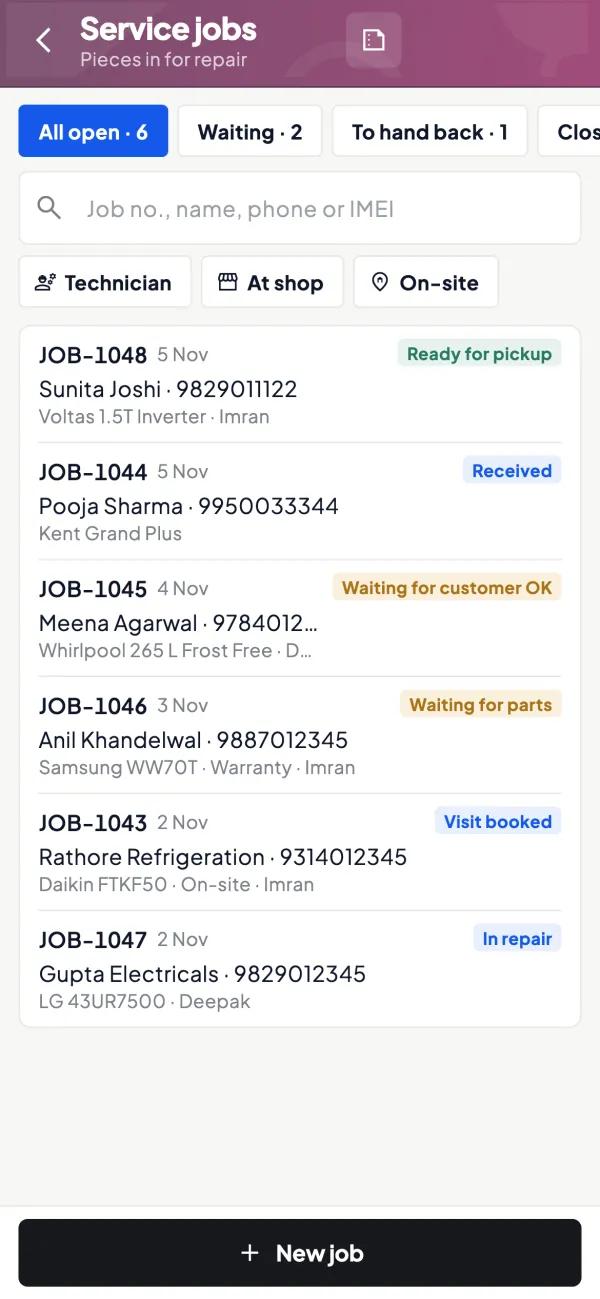
Open a repair, installation or pickup job
How it works. The counter opens a job under the customer's name and records what came in and the complaint. Pickup jobs carry the address and a convenient time for collection.
- One record per item, from intake to handover
- Repair, installation and pickup in one place
- Assign the job to a technician
In practiceRitu drops off a laptop that will not charge. The counter opens a repair job under her name and assigns it to Faizan at the bench.
Parts and service charges as the work goes
How it works. The technician adds spare parts from your Tally items and service charges for diagnosis, labour, visit or fitting as each is done, so the bill builds itself line by line.
- Parts come from your Tally stock items
- Standard charges instead of invented prices
- Goods and services kept on separate lines
In practiceFaizan adds diagnosis ₹250, charging port ₹650, a 65W adapter ₹1,100 and board-level repair ₹800, making ₹2,800 before GST.

Estimates before big repairs
How it works. For large repairs or annual maintenance work, send a quotation with your logo, letterhead and bank details as a PDF first. Open the job once the customer agrees.
- Price agreed in writing before work starts
- Your branding on every estimate
- Shared on WhatsApp in a minute
In practiceAn office asks for a CCTV repair across 8 cameras. The technician sends a ₹14,500 quotation, and the job is opened when the manager replies yes.

Close the job and invoice it
How it works. When the work is finished, close the job and invoice it. Writing into Tally needs the connector running and writing switched on by the owner; Tally validates the entry.
- No handwritten bills at the counter
- Every part used ends up on the invoice
- Stock and GST stay in your Tally books
In practiceRitu collects her laptop that evening. The counter closes the ₹2,800 job, invoices it with GST, and hands it over.

Guide
Service jobs: the full guide
How it works day to day, who does what, and the points to watch.
Why a job record matters
A sale is one moment; a repair is a process. The item comes in, sits in a queue, gets diagnosed, waits for a part, gets fixed and goes back. Over that time several people touch it and the bill grows line by line. A paper job slip can carry this, until it gets wet, lost or illegible. Then the customer's item, the parts used and the labour done all depend on someone's memory.
A job record keeps it in one place: who the customer is, what came in, what was done and what is to be charged. Our guide on the job card and service invoice covers what a good record should hold.
What the module does
- Repair jobs for items brought to your counter or workshop.
- Pickup jobs where you collect the item from the customer.
- Items added to the job: spare parts and goods from your Tally items.
- Service charges added for labour, inspection, visit or fitting.
- Close and invoice when the job is finished.
The module is switched on per company, like the other add-ons, so a business that does not do repairs never sees it.
Who uses it
Mobile and laptop repair counters, appliance service centres, AC and RO service teams, printer and CCTV technicians, two-wheeler workshops, and dealers who run an after-sales desk alongside their shop. In each case the counter opens the job, the technician works on it, and the owner wants to see that every part used was billed. See Cashflow OS for service centres for the wider picture of how such businesses run.
A worked example
A customer drops off a laptop that will not charge. The counter opens a repair job under the customer's name. The technician finds a faulty charging port and a worn adapter.
| Line | Kind | Amount before GST |
|---|---|---|
| Diagnosis | Service charge | ₹250 |
| Charging port | Item | ₹650 |
| Adapter 65W | Item | ₹1,100 |
| Board-level repair | Service charge | ₹800 |
The job totals ₹2,800 before tax. Each line was added when the work was done, not reconstructed at the counter while the customer waits. When the laptop is ready, the job is closed and invoiced, and the counter hands it over. If the same customer returns in three months with the same complaint, the earlier job shows exactly what was replaced.
Running the job queue day to day
A workshop with 15 to 40 open jobs needs a simple rhythm, or the record becomes as messy as the paper slips it replaced. In the morning, the senior technician goes through open jobs and decides the day's order: jobs promised for today first, then jobs waiting only for labour, then jobs waiting for a part. Jobs that are waiting on the customer, for example for approval of an estimate, should be followed up by the counter, not left open indefinitely.
At closing time the counter checks two things: every item handed back today has a closed and invoiced job, and every job marked done has actually been handed back or the customer informed. A pickup job adds one more step, since the item has to be collected and returned, so note the address and a convenient time when you open it. Ten minutes of this each day keeps the queue honest and lets the owner see at a glance how much work is in the shop.
Keeping GST and stock right
A repair bill often mixes goods and services, which can carry different HSN or SAC codes and sometimes different rates. Set up spare parts as stock items and labour as a service in Tally, with the correct codes and rates, so lines are taxed correctly. Our guide on GST for service and repair businesses walks through the common cases. This is general information, not tax advice; check current rates on gst.gov.in.
Tips
- Add parts when they are fitted, not at closing. That is the single habit that stops unbilled parts.
- Keep a short list of standard service charges (inspection, visit, fitting) so the counter does not invent prices.
- Close jobs the same day the item goes back; open jobs that are really finished make the workload look bigger than it is.
- Compare parts billed with parts consumed at month-end using stock summaries.
- Use quotations for large repairs or annual contracts before opening the job; see annual maintenance contracts.
What it does not do
- It is not a full field-service or warranty-claim system; it records jobs, items and service charges and closes them into an invoice.
- It does not send automatic status updates to customers.
- Writing anything into Tally from the app needs the connector running and writing switched on by the owner.
- It does not replace Tally for accounts, GST or stock.
This page is general information for Indian businesses, not tax, legal or financial advice. Rules and rates change — check the official portals or your CA before acting.
Set-up
Start using service jobs in 4 steps
Works on top of your TallyPrime — nothing to migrate, no second set of books.
- 1
Switch on the service jobs module for the company
- 2
Set up spare parts as stock items and labour as services in Tally
- 3
Open jobs at the counter and assign them to technicians
- 4
Add parts and charges as you go; close and invoice when done
Buyer’s checklist
What to look for in service jobs software
Whatever you choose, check these before you commit.
- One record per job: customer, item received, work done and charges
- Repair, installation and pickup jobs handled in the same place
- Spare parts picked from the stock items you already keep in Tally
- Labour and visit charges on separate lines from parts
- Correct HSN and SAC codes flowing from your masters into the invoice
- A clear close step, so finished jobs do not sit open
- Past jobs for a customer easy to find on a repeat complaint
- Invoices and stock kept in Tally, not in a separate repair system
Plans
Simple yearly plans
- 14-day free trial on your own books
- 3-year term saves up to 25%
- Premium modules (catalogue, field force, price lists, store…) priced extra
Start free trialGet the price for your business
Compare all plans- Growth₹3,000/year + GSTBooks, reports, outstanding and sharing
- Pro₹5,000/year + GSTEverything in Growth, plus entries into Tally
- Pro+₹7,000/year + GSTEverything in Pro, plus e-invoice and e-way bill
Why Cashflow OS
Why use service jobs in Cashflow OS
- Your Tally items on every jobSpare parts come from your TallyPrime stock items, so stock and GST stay right.
- From job to invoiceItems and service charges added during the work become the invoice when you close it.
- Only if you need itService jobs is a module switched on per company; businesses without repairs never see it.
- Estimates in writingQuotations with your branding settle the price before a big repair starts.
- Technicians on the same appJobs are assigned to technicians, who add parts and charges as they go.
- English or HindiCounter staff and technicians can each use the app in their own language.