Running the business Service
Running an after-sales service business
After-sales service — repairs, installations, pickups and warranty work — can be a steady profit line or a constant headache. The difference is a clear job process: record every job at intake, track it to closure, bill parts and labour correctly, and watch turnaround time.
- Electronics and appliance dealers
- Mobile phone service centres
- Solar and CCTV installers
- Two-wheeler workshops
- Service managers

On this page 12
Why service is worth doing well
For dealers of electronics, appliances, mobile phones, solar systems, CCTV or two-wheelers, service brings customers back to the counter. A customer whose repair is done on time and billed fairly is likely to buy the next product from you. A customer whose phone sat for three weeks without updates will not.
Service also earns in its own right: labour, parts margin, and contracts. But it only earns if every job is recorded and billed.
The service job flow
- Intake: create a job card with customer name, mobile number, product, serial or IMEI number, complaint, condition (scratches, missing parts) and accessories received.
- Acknowledgement: give the customer a job number, ideally on WhatsApp, with an expected date.
- Diagnosis and estimate: technician records the fault; estimate shared; customer approves before work starts.
- Work: parts issued against the job, labour recorded.
- Quality check: tested by someone other than the technician, where possible.
- Closure and invoice: parts and service charges billed; payment collected or recorded as credit.
- Delivery: customer collects or job is delivered; feedback taken.
A sample format is in job card and service invoice.
Billing parts and labour correctly
A repair bill usually has two parts: goods (spare parts) and services (labour, visit charges). GST rates on parts depend on the item's HSN, and service charges are billed under the relevant SAC. Show them as separate lines.
| Line | Amount (₹) |
|---|---|
| Compressor relay (part) | 650 |
| Gas refilling (service) | 1,800 |
| Visit charge (service) | 300 |
| Taxable value | 2,750 |
| GST as per applicable rates | as applicable |
For warranty jobs, parts may come from the brand and labour may be claimed from them; keep those jobs separate so claims are not missed. More on tax in GST for service and repair businesses. Confirm rates for your items with your CA.
Numbers to track every week
| Measure | How to calculate | Why |
|---|---|---|
| Open jobs | Jobs received but not closed | Backlog warning |
| Average turnaround | Days from intake to delivery | Customer satisfaction |
| Jobs older than 7 days | Count and list | Find stuck jobs |
| Revenue per technician | Billed labour ÷ technicians | Staff productivity |
| Repeat repairs | Same product back within 30 days | Quality problem |
| Unbilled closed jobs | Closed but no invoice | Revenue leak |
Common leaks in service businesses
- Parts used, not billed. Parts taken from stock without being linked to a job disappear from the books.
- Jobs delivered on credit, never followed up. Small amounts of ₹500–₹2,000 add up across hundreds of jobs.
- Uncollected products. Customers who never come back. Set a clear policy on how long you will hold items and inform customers at intake.
- Cash jobs without bills. A risk to both revenue and tax compliance.
Staffing and space
Plan the service area as carefully as the showroom. Each job needs a labelled bin or shelf position with the job number, so products are not mixed up. Keep parts in a separate store with one person responsible for issues. If technicians are paid partly by jobs closed, add a check on repeat repairs so speed does not come at the cost of quality.
Keeping customers informed
Most complaints in service businesses are not about the repair itself but about silence. A customer who drops off a washing machine and hears nothing for five days assumes the worst. Simple rules help:
- Send the job number and expected date on WhatsApp at intake.
- Message again when the estimate is ready, and do not start work without approval.
- If a part is delayed, say so the same day with a new date.
- Message when the job is ready, with the amount payable.
Keep message templates ready so staff send updates in a minute. For jobs at the customer's site, share the technician's name and visit window in advance. These small steps reduce the number of calls your counter staff handle and make customers more willing to approve estimates.
Building recurring revenue
Once jobs run smoothly, look at contracts. Customers with many units — offices, shops, housing societies — often prefer a yearly fee for maintenance. That turns irregular repairs into predictable income. See annual maintenance contracts.
Service jobs with Tally and Cashflow OS
Cashflow OS has a service jobs module for repair and pickup jobs. Staff open a job for a customer, add items or service charges as work progresses, then close and invoice it. Customers and items come from your Tally data, and the invoice can be posted to Tally through the connector when writing back is switched on. Outstanding from service customers then shows with the rest of your receivables. See service jobs.
Avoid these
Common mistakes
- MistakeIssuing parts without linking them to a jobDo this instead
Issue every part against a job number and match parts issued with parts billed every week.
- MistakeClosing jobs without raising an invoiceDo this instead
Make the invoice part of closing the job, and review the list of closed but unbilled jobs weekly.
- MistakeStarting work before the estimate is approvedDo this instead
Share the estimate on WhatsApp and start only after the customer says yes; note the approval on the job.
- MistakeWarranty jobs mixed with paid jobsDo this instead
Mark warranty jobs separately so parts and labour claims to the brand are filed and not missed.
Keep handy
Checklist
Running an after-sales service business — 8 checks. Tick them as you go.
In Cashflow OS
How Cashflow OS helps
Cashflow OS puts your TallyPrime books on every phone in the team. Where it fits this topic:
Service jobs from intake to invoice
Staff open a job for a customer, add items or service charges as work goes on, then close and invoice it. Customers and items come from your Tally data.
See Service jobs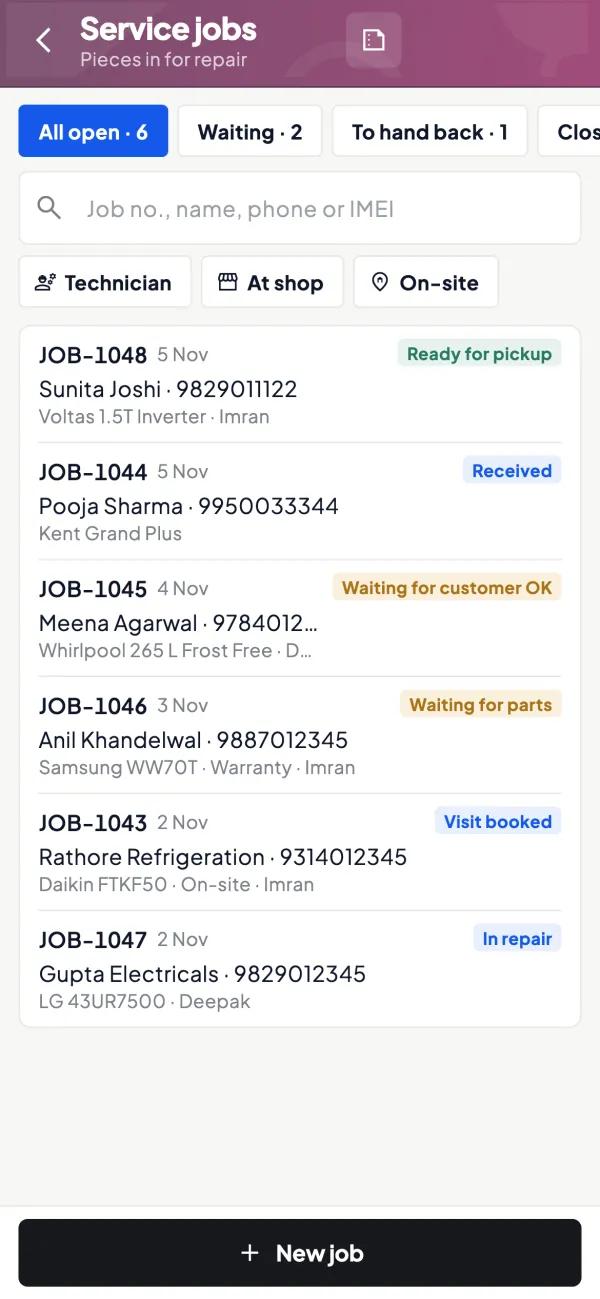
Service dues with your receivables
When the invoice is posted to Tally through the connector, amounts owed by service customers show in bill-wise outstanding with ageing.
See Outstanding receivables
Questions people ask
What should a service job card include?
Should parts and labour be shown separately on a repair bill?
What is a good turnaround time for repairs?
How do I stop parts going missing in service?
Should I charge a diagnosis or inspection fee?
How long should I keep items customers do not collect?
Do I need a separate GST registration for service work?
How do I judge technician performance fairly?
This page is general information for Indian businesses, not tax, legal or financial advice. Rules and rates change — check the official portals or your CA before acting.