Invoices & documents Service billing
Job card and service invoice
A job card is the internal record of one repair or service job, from intake to delivery. The service invoice is the bill at the end. When the two are linked by a job number, nothing is forgotten and nothing is billed twice.
- Repair workshops
- Appliance and electronics repairers
- Inverter and battery dealers
- Vehicle service garages
- Installation and AMC teams

On this page 12
What a job card is for
A job card, job sheet or service ticket travels with the device or vehicle through your workshop. It answers five questions anyone in the shop might ask: whose is this, what is wrong, what did we agree, who is working on it, and what has been used. It is not a GST document; the tax invoice raised at closing is. But a good job card is what makes the invoice accurate.
Paper job cards work for a small counter, but they get lost, smudged and stuck in drawers. The common symptoms: a customer calls and nobody can find their job, a part is fitted but never billed, or two technicians work on the same complaint without knowing it. Whether you use a printed book, a spreadsheet or an app, the fix is the same: one numbered card per job, one place where all open jobs can be seen, and a rule that no device leaves without the card being closed.
Job card fields
| Field | Example |
|---|---|
| Job number and date in | JOB/25-26/0617, 11-11-2025, 10:40 |
| Customer name, mobile, address | Anita Rao, 98xxxxxx21, Banjara Hills |
| Item, brand, model, serial | Inverter 1100 VA, serial INV9… |
| Complaint in customer's words | Beeps and switches off after 10 minutes |
| Accessories and condition received | No battery; scratch on top panel |
| Warranty / AMC / chargeable | Chargeable |
| Estimate and approval | ₹1,800, approved on WhatsApp 11-11, 15:05 |
| Technician | Imran |
| Parts used, labour, status, promised date | Relay card ₹950, labour ₹500; ready 13-11 |
Give the customer a copy or a message with the job number at intake. It is their receipt for the device.
Status stages
- Received: device in, job card opened.
- Diagnosed: fault found, estimate sent.
- Approved or Declined by the customer.
- Waiting for parts, with expected date.
- In repair.
- Ready: customer informed.
- Delivered and invoiced: job closed.
Count jobs in each stage every morning. A pile in waiting for parts is a purchase problem; a pile in ready means customers are not being called.
From job card to invoice
At delivery, the parts and labour on the job card become invoice lines. The Hyderabad inverter job closes like this (rates illustrative):
| Line | Taxable | GST |
|---|---|---|
| Relay card (part, HSN of the part) | ₹950 | At the part's rate |
| Repair labour (SAC 9987 group) | ₹500 | At the service rate |
| Total before tax | ₹1,450 |
The approved estimate was ₹1,800 including tax, and the final bill comes within it. If a bill is going to exceed the estimate, ask the customer before doing the extra work, not at the counter. How parts and labour are taxed together is covered in invoices for repair and service jobs. This is general information, not tax advice.
Pickup and on-site jobs
- Note pickup date, who collected the item and its condition, ideally with photos.
- When you transport a customer's goods to your workshop, there is no sale; keep the job card or a challan with the item. See when is a delivery challan required.
- For on-site visits, record arrival and finish times and get a signature or OTP on completion.
Measures worth tracking
| Measure | Why it matters |
|---|---|
| Average days from received to delivered | Customer satisfaction |
| Jobs declined after estimate | Pricing or trust problem |
| Repeat jobs within warranty period | Quality of repair |
| Revenue per technician | Workload and skill |
| Unbilled closed jobs | Leakage |
The last one surprises many owners. A device delivered as a favour, to be billed tomorrow, is often never billed. Read running an after-sales service business for more.
Daily routine
- Morning: review open jobs by stage and promised date.
- Call customers whose jobs are ready.
- Follow up on pending approvals and parts.
- Evening: close delivered jobs with invoices; no device leaves without one.
- Weekly: review unbilled and long-pending jobs with the senior technician.
Doing this with Tally and Cashflow OS
Cashflow OS has service jobs for repair and pickup work: open a job, add items and service charges as the work goes on, then close it and invoice. Parts come from your Tally stock items, and the invoice is posted to Tally through the connector, so stock and the customer's ledger stay correct. The owner can see the team's activity from the app.
Avoid these
Common mistakes
- MistakePaper job cards lost in drawersDo this instead
Keep one numbered card per job, and one place where every open job can be seen.
- MistakeNot noting accessories and condition at intakeDo this instead
Record what came in, scratches and missing parts, with photos if possible, and get the customer's signature or OTP.
- MistakeLetting a device leave without closing the cardDo this instead
Make it a rule: no delivery without an invoice, or a no-charge note on the job.
- MistakeDoing work beyond the estimate without askingDo this instead
If the bill will exceed the approved estimate, get the customer's approval before the extra work.
Keep handy
Checklist
Job card and service invoice — 8 checks. Tick them as you go.
In Cashflow OS
How Cashflow OS helps
Cashflow OS puts your TallyPrime books on every phone in the team. Where it fits this topic:
Jobs tracked from open to invoice
Open a service job, add items and service charges as the work goes on, then close it and invoice; the invoice is posted to Tally through the connector.
See Service jobs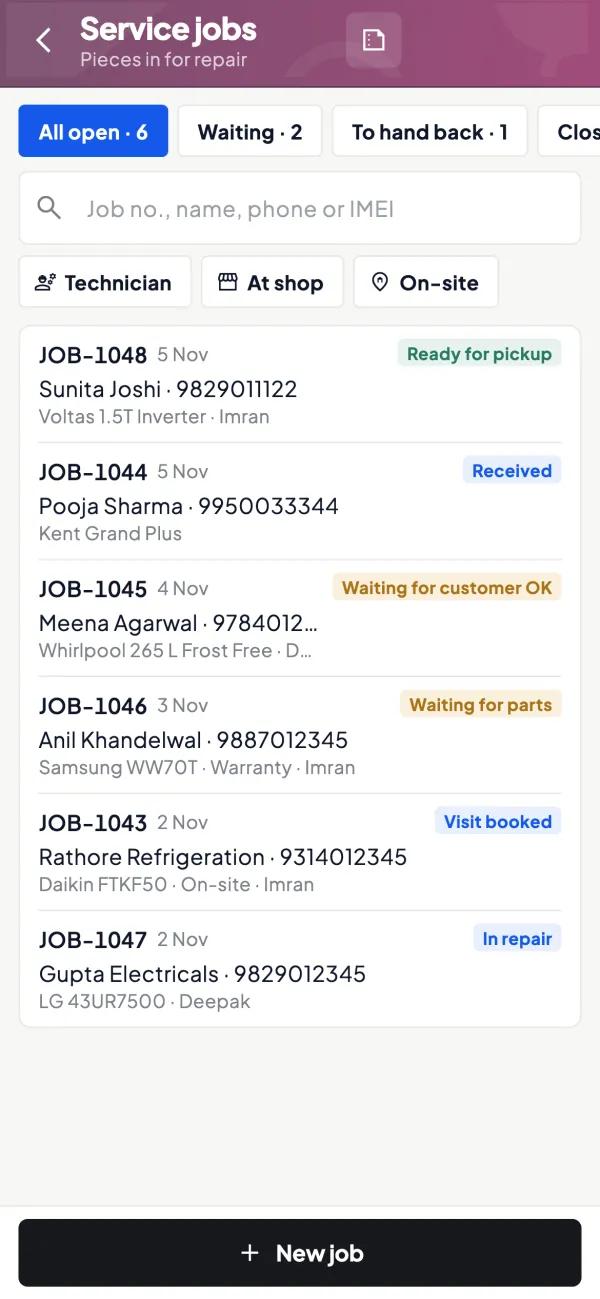
Parts and team activity in view
Parts come from your Tally stock items, so stock and customer ledgers stay correct, and the owner can see the team's activity from the app.
See Team roles and access
Questions people ask
Is a job card mandatory under GST?
Should the customer sign the job card?
Can one job card produce two invoices?
Can a job card be digital?
Should the customer get a copy of the job card?
What is a good turnaround time?
How should I handle jobs waiting for parts?
Should technicians see the company's accounts?
This page is general information for Indian businesses, not tax, legal or financial advice. Rules and rates change — check the official portals or your CA before acting.