Jewellery
Jewellery shops: daily rates, old gold and karigar balances
A jewellery shop prices every piece afresh from the day's metal rate, weight and making charge, takes old gold in exchange, and sends metal out to karigars. Accurate weight records matter as much as rupees.
- Wedding shortlists remembered
- Designs shared with photos
- Advances and dues on the phone
- Alerts on edited bills
Start free trialBook a free demo
Works with your TallyPrime14-day free trialJaipur team, call +91 70738 53555
Built for jewellery shops
Who it’s for
- Retail jewellery showroomsGold, silver and diamond pieces for walk-in families
- Family-run single-counter shopsKnown customers, old gold exchange, karigar work
- Bridal jewellery specialistsWedding orders with advances over months
- Gold jewellery manufacturersSupplying retail jewellers by weight and design
- Silver jewellery and articles dealersPooja items, gifting and light jewellery
- Diamond and studded jewellery storesCertificates, stone values and high-ticket follow-up
- Jewellery wholesalersReady pieces to retailers in nearby towns
Pain → fix
The problems we fix
The everyday headaches of jewellery shops, and what changes when the books are on every phone.
- The problemFamily shortlisted sets, and we forgot which
They return with the groom's side three weeks later and the salesman has moved counters.
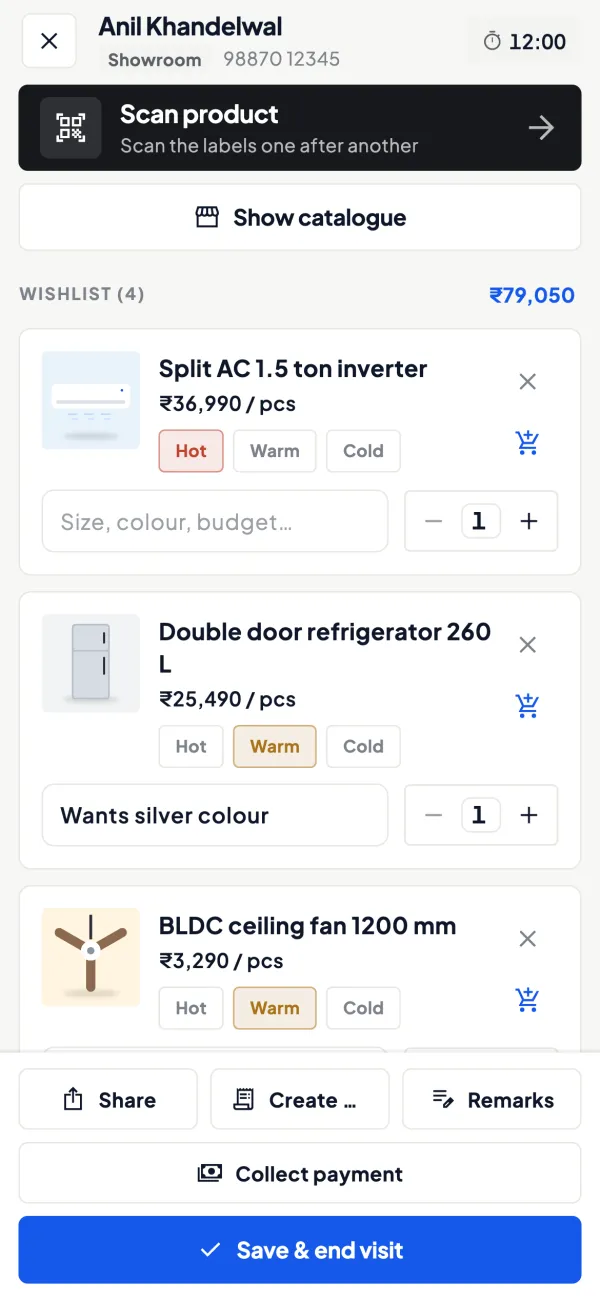
With Cashflow OSWishlist of designs with notes and interest levelRecord the pieces they liked against their mobile number, mark them hot, warm or cold, and share on WhatsApp.
See how it works - The problemRepeat customer, no record of past visits
A family that bought for one daughter's wedding is treated like a stranger for the next.
With Cashflow OSWalk-in looked up by mobile numberShowroom walk-ins show past visits and wishlists before the customer sits down.
See how it works - The problemDesign photos scattered across staff phones
A customer wants to see the necklace again and nobody can find the picture.
With Cashflow OSItem photos with your own display namesEach Tally item carries photos and a name customers understand, ready to show or share.
See how it works - The problemWedding advances paid in parts over months
The family asks how much they have paid and the counter has to call the accountant.
With Cashflow OSCustomer ledger and statement on the phoneAdvances recorded in Tally show in the customer's ledger; share it as a PDF or Hindi हिसाब on WhatsApp.
See how it works - The problemRepair and polish orders on paper slips
Slips get lost, pieces wait at the karigar, and small charges go unbilled.
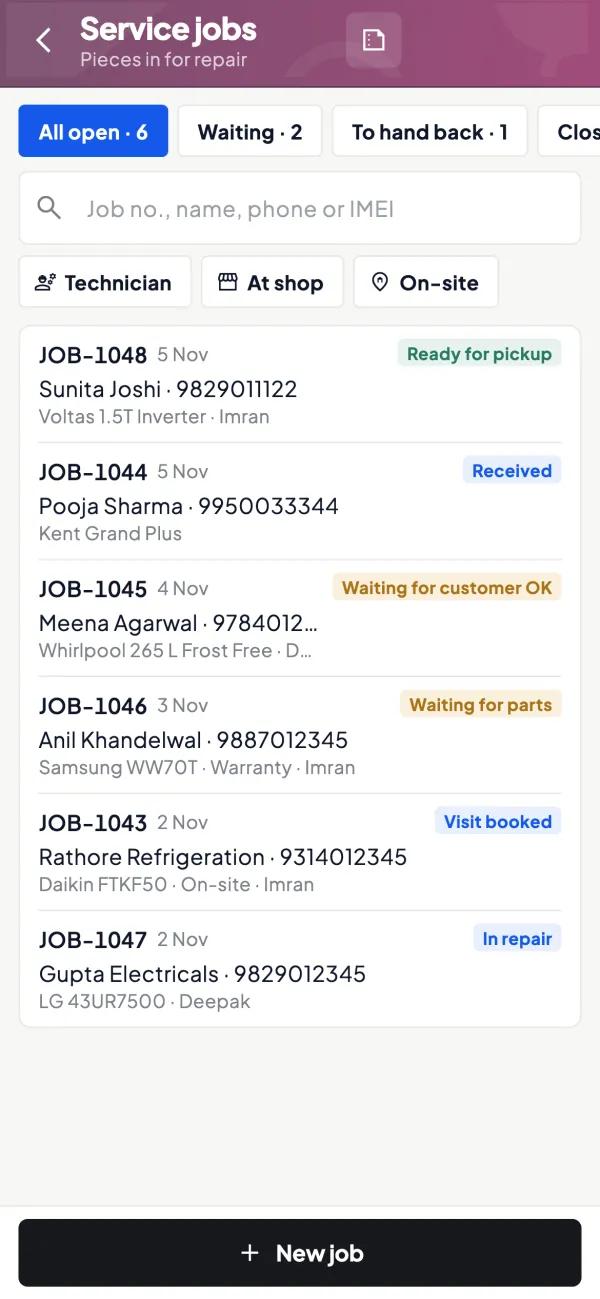
With Cashflow OSRepair jobs tracked, closed and billedService jobs record the piece, the work and the charges, then close and create the invoice.
See how it works - The problemBills edited or deleted when the owner isn't there
In a cash-heavy trade, a changed bill is the first thing an owner wants to know about.
With Cashflow OSPush alert when a voucher is changed or deletedOwners are notified when vouchers are added, changed or deleted in Tally, plus an evening summary of the day.
See how it works
Features
How Cashflow OS works for jewellery shops
Wedding shortlists kept for months
How it works. Look the family up by mobile number, record the designs they shortlisted with notes and interest level, and share the list on WhatsApp.
- Any salesman can continue the conversation
- Notes for the wedding date and preferences
- Shortlist becomes a sales order when confirmed
In practiceThe Agarwal family shortlists a bridal necklace set and two pairs of jhumkas for a February wedding; the wishlist is marked hot and shared with the bride's mother.
Every design with a photo
How it works. Add photos and your own display names to Tally items, beside the Tally name. Show them at the counter or share a piece or catalogue link.
- Show pieces kept in the locker
- Names customers recognise, not stock codes
- Send a design on WhatsApp in seconds
In practiceA customer from Pune asks for the temple jewellery set she saw at Diwali; staff find it by its display name and send the photos.

Advances and balances per family
How it works. Advances and part payments recorded in Tally show in the customer's ledger and outstanding, with a statement to share on WhatsApp.
- Answer "how much have we paid?" at the counter
- Statement in Tally's format or Hindi
- Advances visible to the owner anywhere
In practiceThe Agarwals paid ₹2,00,000 in October and ₹1,50,000 in December; both receipts show on their ledger before the final bill.

The day's sales and alerts on your phone
How it works. Home shows sales, receipts, payments, cash and bank against the period before. Alerts flag vouchers added, changed or deleted in Tally.
- Evening summary of the day's business
- Know when a bill is edited or deleted
- Compare this Dhanteras with last year's
In practiceOn Akshaya Tritiya the owner, at the second branch, follows both counters' sales and receipts through the day.

Repairs and polishing as jobs
How it works. Book each repair, resizing or polishing order as a job, add the charges, and close it with an invoice when the customer collects.
- No piece lost between counter and karigar
- Small charges billed, not forgotten
- Customer and promised date on every job
In practiceA chain repair and ring resizing for Mrs. Shah are booked with a ₹600 charge and closed with an invoice when she collects them on Saturday.
Know your trade
A guide for jewellery shops
How the business works, where money gets stuck, and the GST points to watch.
How a jewellery business works
Jewellers buy bullion from banks, bullion dealers and refiners, and buy ready jewellery from manufacturers and wholesalers in the main jewellery clusters. Many also get pieces made by karigars (artisans) on job work: the jeweller gives metal by weight, the karigar returns finished pieces by weight, and the difference is allowed wastage. Customers buy for weddings, festivals such as Akshaya Tritiya and Dhanteras, gifting and investment.
The business is weight-first. Stock is counted in grams of gold, silver and platinum by purity, plus pieces of diamond and stone jewellery with certificates. Money follows weight, not the other way round.
Pricing a piece
A customer's bill typically has three parts: the metal value (net weight times the day's rate for that purity), the making charge (per gram, a percentage, or a fixed amount), and stone or diamond value where applicable, plus GST. Hallmarking is required for most gold jewellery under BIS rules, and hallmark details are usually shown on the bill.
| Line | Basis | Amount |
|---|---|---|
| Gold value | Net weight x day's rate for purity | calculated daily |
| Making charge | Per gram or percentage | as agreed |
| Stones | Per piece or carat | as per certificate |
| GST | On the taxable value | as applicable |
Because rates change daily, a quotation should state the rate date and validity. Customers booking ahead may ask to lock a rate against an advance; set clear written terms for that.
Old gold exchange
A large share of sales involves old gold. The jeweller tests purity, weighs the metal, deducts an agreed percentage, and adjusts the value against the new purchase or pays out. Record old gold received as a purchase with weight and purity, and keep the customer's details and the test result. The old gold is later sent for refining or melting, and any loss in that process should be recorded. Ask your accountant how the exchange should be shown on the invoice; our guide to mandatory GST invoice fields lists what every bill must carry.
Karigars and job work
Metal sent to karigars is still your stock. Each issue should be recorded with weight and purity, and each receipt of finished pieces with gross weight, net weight and the wastage allowed. Keep a running metal balance per karigar, in grams, and settle it regularly. Unreconciled karigar balances are one of the most common reasons a jeweller's stock does not match. Our guide on GST on job work covers the tax side of sending goods out.
Wedding orders, schemes and follow-up
Wedding orders are planned months ahead. The family selects designs, places an order with an advance, sometimes in instalments, and takes delivery close to the date. Many jewellers also run monthly saving or purchase schemes where the customer pays instalments and buys jewellery at the end; such schemes are subject to specific legal rules, so take advice before starting one.
Remembering what a family looked at, which designs they shortlisted, and when the wedding is, is how a jeweller wins the larger order. Our guide on wishlist selling in showrooms shows how to keep that record.
Tax and compliance points
Gold, silver and jewellery have their own GST rate, and making charges for job work may be taxed differently; confirm current rates on the GST portal. Income-tax law restricts cash receipts above a limit and requires PAN or other identity details for large purchases, and there are reporting requirements for jewellers in some cases; check the current limits on incometax.gov.in with your CA. Keep hallmark and certificate details with stock records. This is general information, not tax or legal advice.
Where Cashflow OS fits
Cashflow OS syncs your TallyPrime books to the phone, so the owner can see daily sales, cash, bank and customer advances and dues anywhere. In the showroom, staff look up a walk-in by mobile number, see past visits, and keep wishlists of designs with notes and interest level, shared on WhatsApp. Item photos with your own display names help customers recall pieces. Weight, purity and karigar balances remain in Tally as you keep them; Cashflow OS does not run a separate metal-accounting system. See wishlists.
This page is general information for Indian businesses, not tax, legal or financial advice. Rules and rates change — check the official portals or your CA before acting.
Set-up
Up and running in 4 steps
No new software to learn for your accountant — Tally stays as it is.
- 1
Install the Tally Connector on the PC where TallyPrime runs
- 2
Sign in with your mobile number and scan the connector's QR
- 3
Add photos and display names to your designs, starting with bridal sets
- 4
Switch on walk-ins and wishlists, then invite counter staff by link
Buyer’s checklist
What to look for in software for jewellery shops
Whatever you choose, check these before you commit.
- Works with your Tally setup for weight, purity and making charges
- Remembers returning families and the designs they shortlisted
- Shows customer advances and part payments clearly before the final bill
- Keeps hallmark (HUID) details with stock records where you need them
- Alerts the owner when bills are changed or deleted
- Shares designs as photos from one place, not loose forwards from staff phones
- Separate access for owner, accountant and counter staff
- Does not create a second set of books outside your accounting software
Plans
Simple yearly plans
- 14-day free trial on your own books
- 3-year term saves up to 25%
- Premium modules (catalogue, field force, price lists, store…) priced extra
Start free trialGet the price for your business
Compare all plans- Growth₹3,000/year + GSTBooks, reports, outstanding and sharing
- Pro₹5,000/year + GSTEverything in Growth, plus entries into Tally
- Pro+₹7,000/year + GSTEverything in Pro, plus e-invoice and e-way bill
Why Cashflow OS
Why jewellery shops choose Cashflow OS
- Made for follow-upWalk-ins and wishlists for families who decide over months.
- Photos on every designShow and share pieces from the app, not a personal gallery.
- Owner alertsKnow when a voucher is added, changed or deleted in Tally.
- Tally stays in chargeWeight, purity and karigar records stay in Tally as you keep them.
- App lockFingerprint, face or PIN lock on the phone app.
- 14-day free trialTry it in the showroom on your own Tally data first.