GST GST payments
TDS and TCS under GST
Under GST, certain government buyers deduct tax at source (TDS) from payments to suppliers, and e-commerce operators collect tax at source (TCS) from sellers' payouts. Both amounts reach the supplier's electronic cash ledger once accepted on the portal.
- Suppliers to government offices
- Sellers on marketplaces
- Contractors to public bodies
- Accountants reconciling GST
- Owners chasing short payments

On this page 12
GST TDS and TCS are not income-tax TDS
Many owners confuse these with income-tax TDS (deducted on rent, contracts, professional fees) and income-tax TCS. They are separate laws with separate returns. The GST versions are narrow: TDS applies only when you sell to specified government-type buyers, and TCS only when you sell through an e-commerce operator. For income-tax TDS, see TDS basics for business owners.
GST TDS under Section 51
Who deducts: government departments, local authorities, government agencies and other persons notified (such as certain public sector bodies).
When: on payments to a supplier where the total value of taxable supply under a single contract exceeds ₹2,50,000 (excluding GST).
Rate: 2% of the taxable value: 1% CGST + 1% SGST for an intra-state supply, or 2% IGST for an inter-state supply.
Return: the deductor files GSTR-7 monthly and issues a TDS certificate.
Example. You supply furniture worth ₹5,00,000 + 18% GST (₹90,000) to a municipal office in your state. The office deducts ₹5,000 CGST + ₹5,000 SGST and pays you ₹5,80,000. You still pay the full ₹90,000 output tax, but ₹10,000 comes back to your cash ledger once you accept the TDS entry.
GST TCS under Section 52
Who collects: e-commerce operators that let sellers supply through their platform.
On what: the net value of taxable supplies made through the platform (sales less returns), excluding supplies on which the operator itself pays tax under Section 9(5).
Rate: a notified percentage of net taxable value, split CGST/SGST or IGST. The rate was reduced in 2024; confirm the current figure on cbic-gst.gov.in before you reconcile.
Return: the operator files GSTR-8 monthly, showing each seller's GSTIN.
Sellers on marketplaces should read GST for e-commerce sellers for registration and reporting points.
How the supplier claims the credit
- After the deductor or operator files, log in to gst.gov.in.
- Go to the TDS and TCS credit received section under Returns.
- Check each entry against your invoices and payment advices.
- Accept the correct entries and reject wrong ones (the deductor or operator then corrects them in a later return).
- File the acceptance. The amount moves to your electronic cash ledger.
- Use the cash ledger balance to pay GST in GSTR-3B, or claim a refund of excess balance.
The flow into the cash ledger is explained in GST electronic ledgers.
When TDS does not apply, and a checklist for government orders
TDS is not deducted on every payment from a government buyer. The ₹2,50,000 test is per contract and on taxable value, so a series of small, separate purchase orders may each fall below it. Exempt supplies are not counted. There is also no deduction where the supplier's location and the place of supply are in a state other than the one where the government buyer is registered.
Before you supply to a government office or notified body:
- Confirm the buyer's GSTIN, as TDS deductors have their own registration.
- Note in the order file whether the contract value crosses the TDS threshold.
- Invoice the full GST as usual; TDS never reduces your output tax.
- Ask for the TDS certificate and keep it with the payment advice.
- Check the credit on the portal in the month after payment, not at year end.
Booking it in your accounts
| Entry | Debit | Credit |
|---|---|---|
| Receipt from government buyer | Bank ₹5,80,000; GST TDS receivable ₹10,000 | Party ₹5,90,000 |
| After accepting on portal | Electronic cash ledger (CGST/SGST) ₹10,000 | GST TDS receivable ₹10,000 |
If the TDS receivable ledger keeps growing month after month, credits are not being accepted. Check the portal.
Common problems
- Wrong GSTIN in the deductor's return: the credit does not show up. Ask the deductor to amend it.
- Amount differs from your record: usually because TDS was worked out on the tax-inclusive amount. Reject and ask for correction.
- Marketplace TCS higher than expected: returns processed in the next month reduce net value later, so match TCS month by month with the settlement report.
- Party ledger shows a short receipt: book the TDS part, or the buyer will appear to owe you money they do not owe.
This is general information, not tax advice.
Tracking it with Cashflow OS
The receipt and the GST TDS receivable entry are made in TallyPrime. Cashflow OS syncs them, so on your phone you can see the receivable ledger balance and the party's bill-wise outstanding, which shows clearly when a bill was settled partly by TDS. The cash ledger and the acceptance itself are on the GST portal; Cashflow OS does not access them.
Avoid these
Common mistakes
- MistakeLowering output tax because TDS was deductedDo this instead
Charge and pay the full GST on the invoice; the TDS comes back as a credit in your cash ledger once accepted.
- MistakeNot accepting TDS or TCS entries on the portalDo this instead
Check and accept entries every month; until then the amount does not reach your electronic cash ledger.
- MistakeBooking only the bank amount from a government buyerDo this instead
Book the TDS part to a GST TDS receivable ledger, or the party will look as if it still owes you.
- MistakeMatching marketplace TCS once a yearDo this instead
Match TCS month by month with the settlement report, since returns in later months change net value.
Keep handy
Checklist
TDS and TCS under GST — 7 checks. Tick them as you go.
In Cashflow OS
How Cashflow OS helps
Cashflow OS puts your TallyPrime books on every phone in the team. Where it fits this topic:
Short receipts made visible
Bill-wise outstanding synced from Tally shows a bill settled partly by TDS, so you can see it was booked and not left as a balance due.
See Outstanding receivables
Receivable ledger on the phone
Open the GST TDS receivable ledger from your Tally books to see whether it keeps growing; acceptance itself happens on the GST portal.
See Financial reports from Tally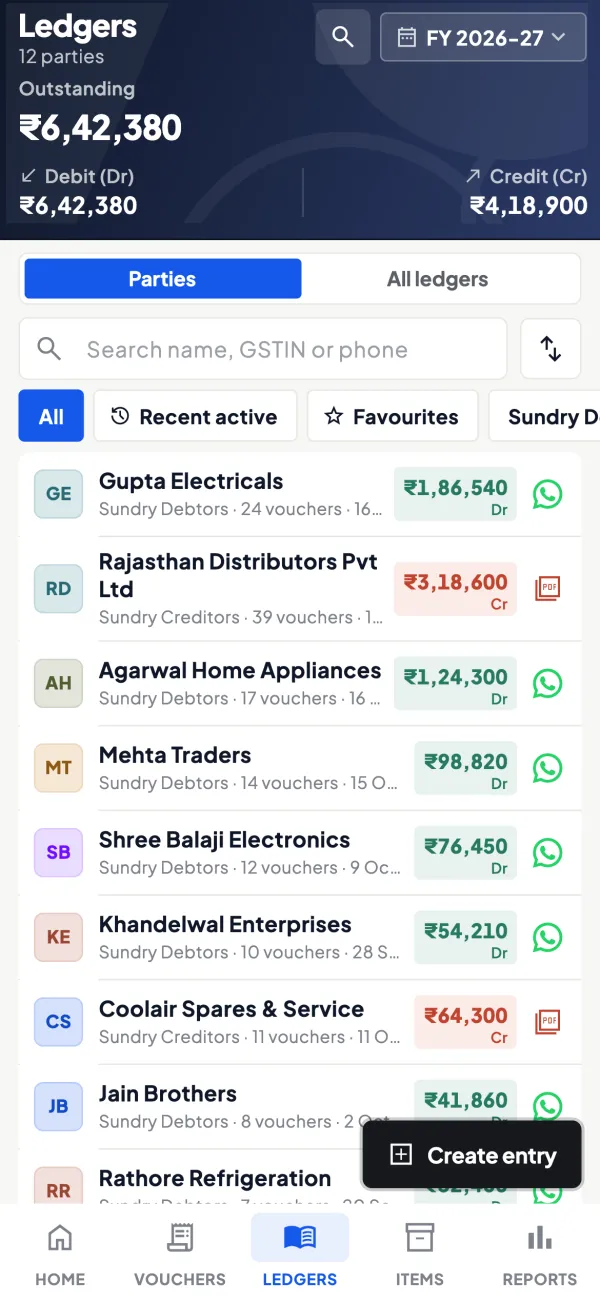
Questions people ask
What is the GST TDS rate?
Who files GSTR-7 and GSTR-8?
Where does GST TDS or TCS credit go?
Is GST TDS deducted on the GST amount too?
Do I need to file anything as a supplier when TDS is deducted?
Can I reject a wrong TDS entry?
Is GST TCS charged on returned goods?
Can the cash ledger balance from TDS be refunded?
This page is general information for Indian businesses, not tax, legal or financial advice. Rules and rates change — check the official portals or your CA before acting.