Glossary Tally
Stock group
Definition
A stock group is a heading that collects similar stock items, so stock and sales reports can be totalled by product line instead of item by item.

Example
A Kanpur sanitaryware dealer puts 650 items under five groups: Taps, Basins, Closets, Pipes and Fittings. The stock summary then shows Pipes holding ₹9,40,000 of stock against ₹1,20,000 of sales this month. That one line tells the owner where to cut the next purchase order.
Stock group in TallyPrime and in Cashflow OS
Where to find itIn TallyPrime
Stock groups are created in TallyPrime's inventory masters and chosen for each stock item. Groups can sit inside groups, carry GST details for their items, and the stock summary drills down from group to item.
 On your phoneIn Cashflow OS
In Cashflow OS, Tally stock groups are the categories in the item list and the online catalogue, and groups can be created, renamed or moved in Tally when writing back is on.
See Online catalogue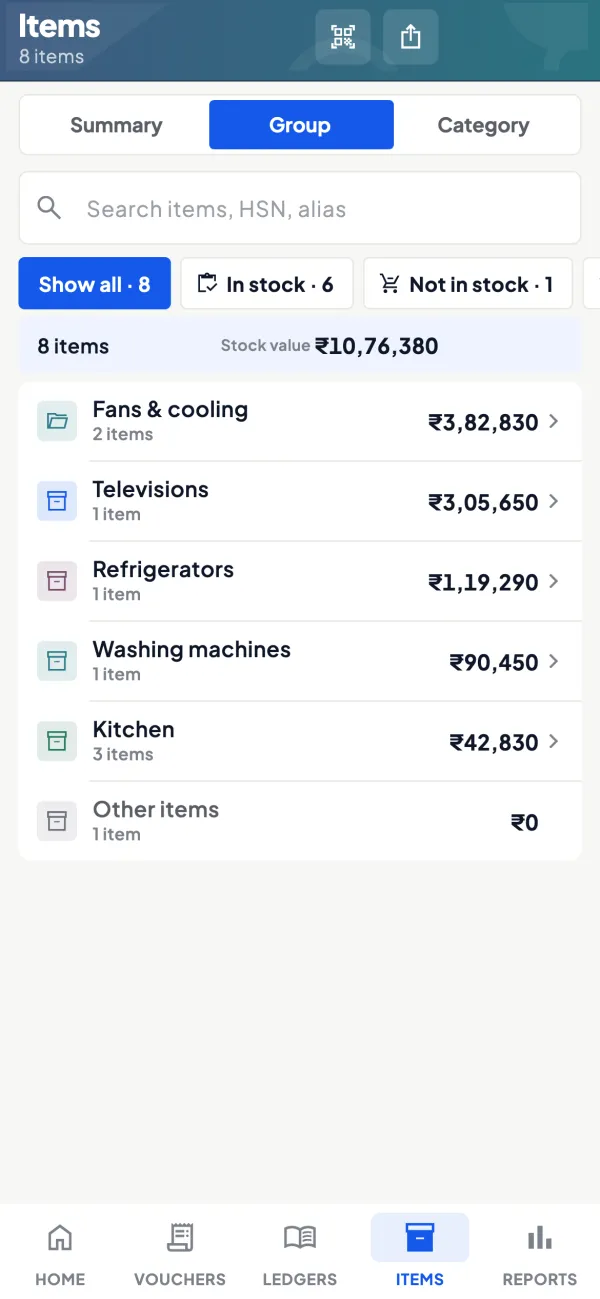
Common misunderstandings
- Watch outCreating one group per brand and per type together, instead of using stock categories for the second split.
- Watch outSetting HSN at group level and forgetting to override it for items that differ.
What stock groups do
A paint dealer may have 900 items: every shade, pack size and brand. Looking at 900 lines tells you little. Grouping them, for example Interior Emulsion, Exterior Emulsion, Enamel, Primer and Putty, gives a stock summary with five lines and totals you can act on. Groups can sit inside groups, so Emulsion can hold Interior and Exterior. GST details such as HSN and rate can be set at group level and inherited by items, which reduces setup errors.
Example
| Stock group | Items | Closing value | Sales this month |
|---|---|---|---|
| Interior Emulsion | 240 | ₹8,40,000 | ₹3,10,000 |
| Exterior Emulsion | 180 | ₹6,20,000 | ₹1,05,000 |
| Putty | 12 | ₹2,10,000 | ₹1,80,000 |
Exterior emulsion holds ₹6,20,000 of stock but sold only ₹1,05,000 this month. That is the group to look at for slow stock before the next order; our guide on inventory turnover and dead stock shows how to measure it.
Stock groups vs stock categories
Tally also has stock categories, a second, independent way of classifying the same items. A common pattern: stock group by product type, stock category by brand or price band. Then you can see Putty across brands, or one brand across all product types. Our guide on Tally stock groups and categories gives more patterns.
Where it shows up in TallyPrime
You create stock groups in TallyPrime's inventory masters and pick a group when you create each stock item. The stock summary opens at group level and drills down to items and vouchers. In Cashflow OS, Tally stock groups are used as the categories in the item list and the online catalogue, and stock groups can be created, renamed or moved in Tally from the app when writing back is switched on.
Related terms
Questions about Stock group
Can an item belong to two stock groups?
Should I set HSN at the stock group level?
Can I change an item's stock group later?
How many stock groups should I have?
Is a stock group the same as a ledger group?
This page is general information for Indian businesses, not tax, legal or financial advice. Rules and rates change — check the official portals or your CA before acting.