Business software & ERP Business software
Dealer management system explained
A dealer management system (DMS) keeps everything about your dealers in one place: who they are, what price they get, what they order, what they owe, and which salesperson looks after them.
- Distributors
- Wholesalers
- FMCG stockists
- Paint, plywood and electrical traders
- Agri-input suppliers
- Sales managers

On this page 12
Who needs a DMS
Any business that sells mainly through a network of dealers or retailers rather than directly to end customers: paint and plywood distributors, FMCG stockists, electrical and sanitaryware wholesalers, agri-input suppliers, tyre and battery distributors. Once the dealer count crosses a hundred or so, owners find they cannot keep dealer rates, credit and follow-ups in their head or in a register.
What a good DMS covers
| Area | What it holds |
|---|---|
| Dealer master | Name, GSTIN, address and location, contact, area, assigned salesperson, dealer type |
| Pricing | Dealer type or price tier, discount rules, schemes |
| Orders | Orders taken by salespeople or placed by dealers, approval, dispatch status |
| Credit | Credit limit, bill-wise outstanding, ageing, overdue alerts |
| Statements | Ledger and pending-bill statements the dealer can receive on WhatsApp |
| Visits | Beat plans, visit records, notes and photos |
| Performance | Sales by dealer, area and salesperson, compared with last period |
Dealer tiers and pricing, with an example
Most distributors classify dealers, even informally. A plywood distributor might use:
- A dealers: large buyers, ₹10 lakh+ a year, get 12% off list.
- B dealers: regular buyers, get 9% off list.
- C dealers: small or new, get 6% off list.
On top of that, there may be a brand-specific extra 2% for A dealers on one premium range. If salespeople calculate this by hand, rates drift and dealers compare notes. A DMS applies the right rate automatically when an order is booked. The price list management guide explains how to design these layers.
The connection to your books matters most
A DMS that is not connected to your accounts becomes a second set of numbers. The dealer's outstanding shown to the salesperson must be the same figure the accountant sees, or the salesperson will push for collection on bills already paid, which damages the relationship. Orders booked in the DMS must turn into invoices in the books without retyping.
So the first question to ask any DMS is: where does the outstanding figure come from, and how often is it updated?
Schemes and credit, handled properly
Schemes are where dealer management usually breaks. A quantity scheme ("buy 100 boxes, get 5 free"), a turnover scheme ("1% extra on ₹5 lakh quarterly purchase") and a cash discount for early payment all affect what the dealer pays and how GST is worked out. A DMS should record which scheme applied to which order, so the accountant can pass the right credit note later and the dealer can see why. The dealer schemes guide covers the accounting side.
Credit needs the same discipline. Set a credit limit and a credit period per dealer type, then let the system hold orders that would push a dealer over the limit, so the decision to extend credit is the owner's, not the salesperson's. A dealer at ₹2,80,000 outstanding against a ₹3,00,000 limit should not be able to place a ₹60,000 order without someone approving it.
Questions to ask before choosing
- Can each salesperson see only their own dealers?
- Can orders above a dealer's credit limit be held for approval?
- Do discount rules apply automatically by dealer type, item group or brand?
- Can dealers receive statements without the office making them by hand?
- Does it work in Hindi or the language your team speaks?
- Can you export all dealer and order data?
Mistakes to avoid when rolling out
- Importing a dealer list full of duplicates and old names. Clean it first.
- Defining too many dealer types. Three or four is usually enough.
- Letting schemes live outside the system "just this once". They never come back in.
- Not telling dealers. A short message explaining that statements and order confirmations will now come from the system builds trust.
Dealer management on top of Tally
If your accounts are in TallyPrime, Cashflow OS covers the dealer side without a separate database. Dealer outstanding and ledgers come from the synced Tally data. Price lists use dealer types such as A, B and C with layered discount rules that fill rates automatically in orders and documents. Field force tools record dealer locations, areas, route plans and visits. Sales orders, once approved where needed, are posted to Tally. See price lists and the page for dealers.
Avoid these
Common mistakes
- MistakeImporting a dealer list full of duplicatesDo this instead
Clean names, mobile numbers and GSTINs before importing, and keep one record per dealer.
- MistakeCreating too many dealer typesDo this instead
Three or four tiers are usually enough; extra rules go into item group or brand discounts.
- MistakeRunning schemes outside the systemDo this instead
Record which scheme applied to which order, so credit notes can be passed correctly later.
- MistakeKeeping dealer balances apart from the accountsDo this instead
Take outstanding from the books and turn orders into invoices without retyping.
Keep handy
Checklist
Dealer management system explained — 8 checks. Tick them as you go.
In Cashflow OS
How Cashflow OS helps
Cashflow OS puts your TallyPrime books on every phone in the team. Where it fits this topic:
Price lists by dealer type
Dealer types such as A, B and C with layered discount rules fill rates automatically in orders and documents.
See Price lists
Dealer locations, routes and visits
Field force tools record dealer locations, areas, route plans and visits, while outstanding comes from synced Tally data.
See Field force tracking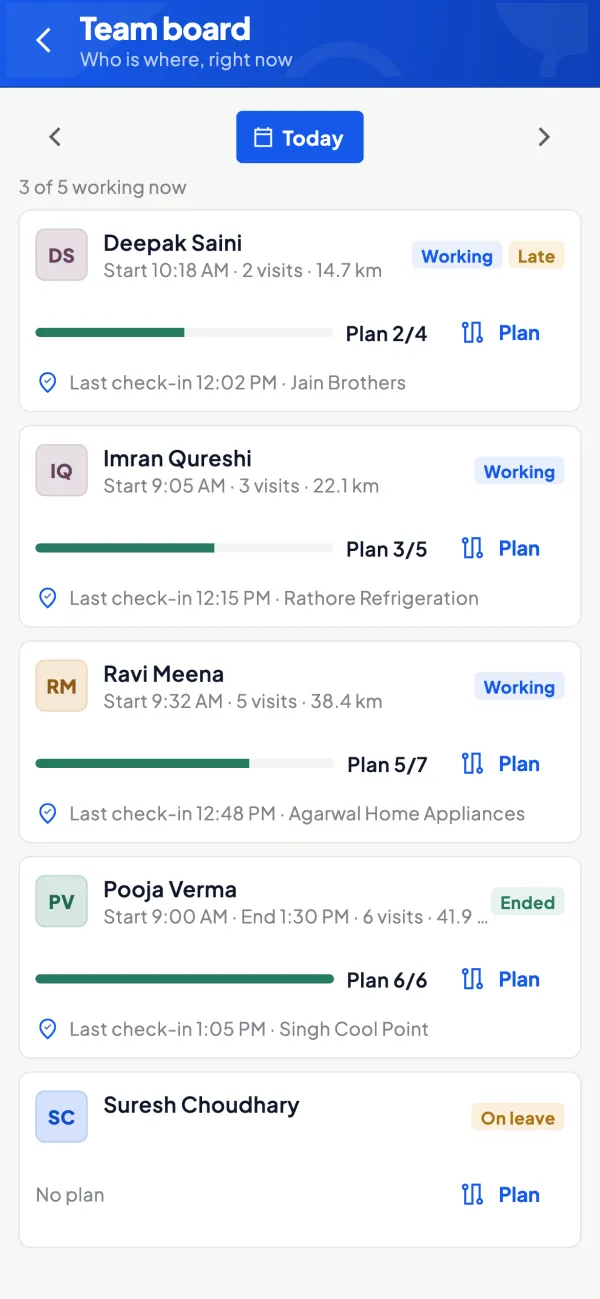
Questions people ask
Is a DMS the same as a CRM?
Can dealers place orders themselves in a DMS?
Can a DMS handle different rates for the same item?
Do I need a DMS if I have only 50 dealers?
What is a beat plan?
How should dealer tiers be decided?
Do schemes affect GST?
Can a DMS stop orders from dealers over their limit?
This page is general information for Indian businesses, not tax, legal or financial advice. Rules and rates change — check the official portals or your CA before acting.