Invoices & documents Invoices
Cancelling an invoice under GST
You can cancel an invoice cleanly only before it is reported in GSTR-1, and for e-invoices only within 24 hours on the IRP. After that, the correct route is a credit note. In every case, the cancelled number is never reused.
- GST-registered sellers
- Billing and counter staff
- Accountants
- Businesses issuing e-invoices
- Distributors and wholesalers
On this page 12
Why you would cancel
- The order was cancelled before goods left.
- The invoice was made for the wrong party or wrong GSTIN.
- A duplicate invoice was created by mistake.
- Quantity or rate was badly wrong and the buyer refuses the document.
GST law has no general cancel button for a tax invoice. What you can do depends on whether the invoice has been reported. This is general information, not tax advice.
Before cancelling, ask one question: has anything left the building? If the goods, the PDF or the e-way bill have already gone out, other people now hold copies of this invoice. The buyer may have entered it, the transporter may have it on record and the e-way bill system certainly does. Each of those needs to be told or reversed. If nothing has left, cancellation is a quick internal fix.
Decision table
| Situation | What to do |
|---|---|
| Invoice made, goods not sent, not yet in GSTR-1 | Mark it cancelled in your books, keep all copies, count it as cancelled in GSTR-1's documents-issued table |
| E-invoice with IRN, within 24 hours | Cancel the IRN on the IRP (whole invoice only); cancel any e-way bill too |
| E-invoice with IRN, after 24 hours | Issue a credit note, or amend through GSTR-1 where allowed |
| Already reported in GSTR-1 | Issue a credit note for the full value |
| Wrong buyer GSTIN, already reported | Amend in a later GSTR-1, within the time allowed |
See GSTR-1 amendments and credit note format.
Worked example: wrong party billed
On 10 November a Coimbatore pump dealer bills ₹84,000 + GST to Sri Murugan Agencies, but the order was from Sri Murugan Traders. Goods have not left.
- Invoice INV/25-26/0733 is marked cancelled; original, duplicate and triplicate are kept with CANCELLED written across.
- A new invoice INV/25-26/0734 is made for the right party.
- In the November GSTR-1, the documents-issued table shows 0733 among cancelled numbers.
Now suppose the mistake was found on 20 December, after November's GSTR-1 was filed with 0733 under Sri Murugan Agencies. The dealer would issue a credit note against 0733 for ₹84,000 + GST, and a fresh invoice to the correct party, or amend the recipient through the GSTR-1 amendment table, depending on what the CA advises.
Never reuse a cancelled number
Invoice numbers must be consecutive and unique for the financial year. Reusing 0733 for a different sale creates two documents with the same number and breaks the audit trail. For e-invoices, the IRP will not accept the same number again in that year even after the IRN is cancelled. See invoice numbering rules.
Cancel, delete or credit note?
| Action | What remains | When it fits |
|---|---|---|
| Cancel | Number stays with zero value and a reason | Not reported yet |
| Delete | Entry and number disappear from books | Only for internal mistakes like an accidental duplicate before printing; risky for printed invoices |
| Credit note | Original invoice plus a reversing document | Already reported, or goods already supplied |
Deleting a printed and shared invoice leaves a gap in the series with no explanation. Prefer cancellation, with a written reason.
Do not forget the e-way bill
If an e-way bill was generated for the invoice and the goods are not moving, cancel the e-way bill on the portal within its cancellation window, which is 24 hours from generation at the time of writing. Once a vehicle has been verified in transit, it cannot be cancelled. See e-way bill basics.
Controls that prevent cancellations
- Pick parties by GSTIN or mobile number, not by name.
- Let only authorised people cancel or delete invoices, and ask for a reason every time.
- Review the list of cancelled invoices every month. A rising count usually points to a training or process problem at one counter.
- Check order confirmation before billing, especially for phone orders.
Doing this with Tally and Cashflow OS
TallyPrime lets you cancel a voucher so the number is kept with a narration, which suits unreported invoices. In Cashflow OS, authorised users can delete a voucher in Tally with a reason, and the owner can see the team's activity; for invoices already shared or reported, create a credit note voucher from the phone instead. Where the IRN or e-way bill was made through Cashflow OS, an owner or admin can cancel it there within the portal's time limit; otherwise cancel it on the government portal. See create vouchers from the phone.
Avoid these
Common mistakes
- MistakeDeleting a printed and shared invoiceDo this instead
Cancel it with a written reason so the number stays in the series. Delete only accidental duplicates that never left the office.
- MistakeReusing the cancelled invoice number for another saleDo this instead
Numbers must be unique for the financial year. Issue the replacement on the next number; the IRP will not accept a reused number anyway.
- MistakeCancelling the IRN but forgetting the e-way billDo this instead
If goods are not moving, cancel the e-way bill on its portal within its window. Once verified in transit it cannot be cancelled.
- MistakeCancelling an invoice already reported in GSTR-1Do this instead
Once reported, issue a credit note for the value, or amend through GSTR-1 where allowed, as your CA advises.
Keep handy
Checklist
Cancelling an invoice under GST — 8 checks. Tick them as you go.
In Cashflow OS
How Cashflow OS helps
Cashflow OS puts your TallyPrime books on every phone in the team. Where it fits this topic:
Credit notes from the phone
For invoices already shared or reported, authorised users can create a credit note voucher in Tally from the phone or web; Tally validates it.
See Create Tally vouchers from your phone
Control who deletes vouchers
Only authorised users can delete a voucher in Tally, and only with a reason. Owners can see the team's activity and get an alert when vouchers are changed or deleted.
See Team roles and access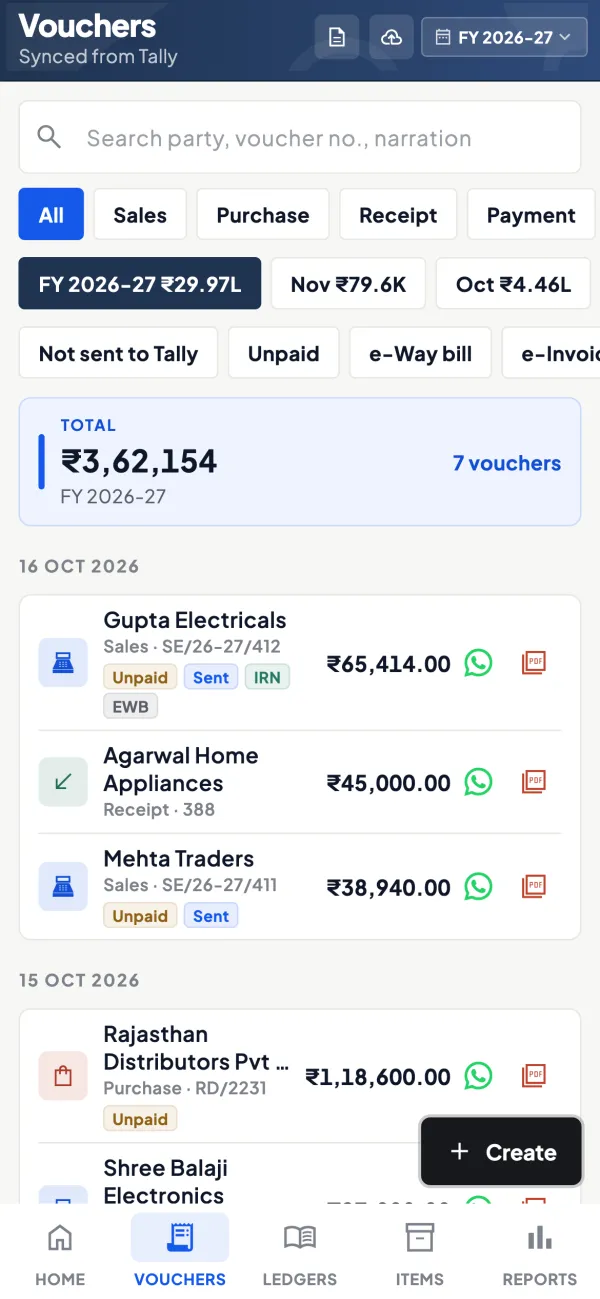
Questions people ask
Can I partly cancel an e-invoice?
Do cancelled invoices appear in GSTR-1?
What if the buyer already claimed credit on a cancelled invoice?
Is there a time limit for cancelling a non-e-invoice?
Should I delete or cancel a wrong invoice in Tally?
Who can cancel an e-invoice?
Can I cancel an e-way bill after the goods are delivered?
Does a credit note need the buyer's consent?
This page is general information for Indian businesses, not tax, legal or financial advice. Rules and rates change — check the official portals or your CA before acting.