Stockists, C&F
Cashflow OS for stockists and C&F agents
Stockists and carrying-and-forwarding agents are judged on two things: stock that matches the company's records and dispatches that go out on time. Cashflow OS gives the owner and the godown team the TallyPrime stock, delivery notes and party balances on the phone, and lets entries go back into Tally from the godown floor.
- Stock answers without the PC
- Dispatch notes from the bay
- C&F and stockist books apart
- Company ledger reconciled
Start free trialBook a free demo
Works with your TallyPrime14-day free trialJaipur team, call +91 70738 53555

Built for stockists and C&F agents
Who it’s for
- Pharma super stockistsDistributors in a territory, on credit
- FMCG super stockistsFeeding distributors and wholesalers
- Pharma C&F agentsCompany stock, dispatch on instruction
- Consumer durables C&FHigh-value stock and claims
- Paint and building material depotsBulk stock to dealers in the region
- Agri input stockistsSeasonal stock to dealers
- Electrical and lighting stockistsFast-moving lines to distributors
- Beverage and dairy depotsDaily dispatches, tight stock control
Pain → fix
The problems we fix
The everyday headaches of stockists and C&F agents, and what changes when the books are on every phone.
- The problem'Is it in stock?' asked twenty times a day
Every question from a salesman or the company's area manager needs someone at the Tally PC.
With Cashflow OSStock and item summaries on every phoneStock synced from Tally, so the owner and the godown team can answer from wherever they are.
See how it works - The problemDispatch paperwork typed twice
Delivery notes are written at the bay and entered in Tally hours later.
With Cashflow OSDelivery notes posted from the loading bayOnce writing is on, the godown posts delivery notes, receipt notes and stock journals from the app; Tally validates each.
See how it works - The problemChallans handwritten for every dispatch
Hard to read, easy to lose, and no copy when there's a dispute.
With Cashflow OSBranded delivery challans as PDFChallans with your logo, letterhead and signature, shared on WhatsApp or email.
See how it works - The problemCompany statement and your ledger never match
A few bills or credit notes are missing on one side, and nobody knows which.
With Cashflow OSExport the company ledger and tick it offExport the principal's ledger for the month to Excel and match it line by line with their statement.
See how it works - The problemScheme credit notes sit unbooked for months
The company has issued them; your books still show the higher payable.
With Cashflow OSMissing credit notes posted from the appFind the gap in the ledger and post the credit note into Tally from the phone, once writing is on.
See how it works - The problemOwner travels, the godown runs on phone calls
Problems surface when the owner is back, not when they happen.
With Cashflow OSAlerts on vouchers and an evening summaryPush notifications when vouchers are added, changed or deleted in Tally, and a summary of the day.
See how it works
Features
How Cashflow OS works for stockists and C&F agents
Stock on the phone
How it works. Stock and item summaries from Tally, with photos and display names, for the owner, the godown in-charge and anyone you invite.
- No call to the godown for a stock check
- Same figures Tally shows
- Display names the team recognises
In practiceThe company's area manager asks how many cases of a cough syrup SKU are left; the owner answers from a train in under a minute.

Dispatch and receipt entries from the bay
How it works. With writing switched on, delivery notes, receipt notes and stock journals are created in the app and posted into Tally through the connector.
- Nothing leaves the gate without an entry
- Refused entries come back with Tally's reason
- Stock right by evening, not next morning
In practiceA truck of 420 cartons is loaded for three distributors in Nagpur; the godown in-charge posts the three delivery notes before it leaves.

Challans with your letterhead
How it works. Delivery challans with your logo, letterhead and signature, shared as a PDF on WhatsApp or email, and convertible into Tally entries.
- A clean copy for every dispatch
- Shared with the driver and the receiver
- Proof of dispatch when a claim is raised
In practiceThe C&F godown sends a challan for 60 refrigerators to a dealer in Raipur, and the PDF reaches the dealer before the truck does.

Company and distributor ledgers
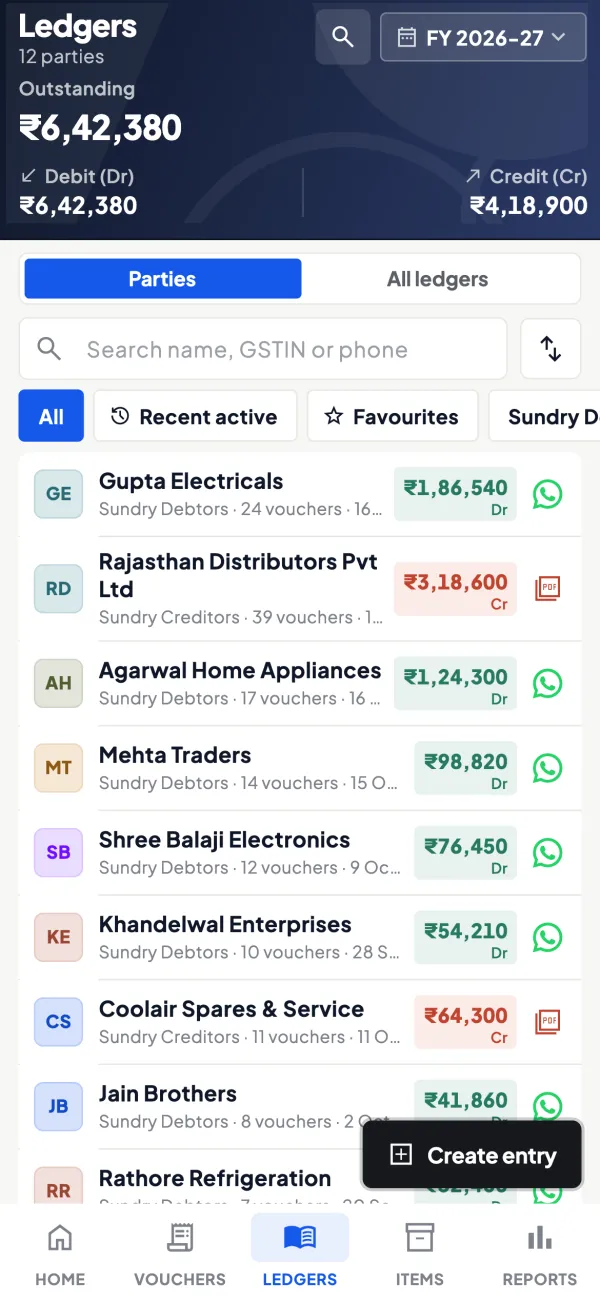
How it works. The principal's ledger and every distributor's ledger with live balances, statements as a PDF in Tally's format, and exports to Excel.
- Monthly reconciliation in minutes
- Distributors get statements on WhatsApp
- C&F and stockist companies switched in one app
In practiceThe company shows ₹18,42,500 payable; your ledger shows ₹18,06,200. The ₹36,300 gap is two scheme credit notes of ₹21,800 and ₹14,500 not yet booked.
The owner's view while travelling
How it works. Home shows the day's sales, purchases, receipts, payments, cash and bank; alerts flag vouchers added, changed or deleted.
- Evening summary of the day
- Know when a dispatch entry is altered
- Same view on the web app at the office
In practiceOn a two-day company meeting in Mumbai, the owner sees each evening's dispatch value and receipts without calling the godown.

Know your trade
A guide for stockists and C&F agents
How the business works, where money gets stuck, and the GST points to watch.
Daily pressure points
- "Is it in stock?" asked twenty times a day by salesmen, distributors and the company's area manager.
- Dispatch documents: delivery notes and challans prepared in a hurry and entered in Tally later.
- Reconciliation: the company's statement and your Tally ledger do not match, and someone has to find the bill that is missing on one side.
- Godowns: stock split across locations; see godowns and multi-location stock in Tally.
- Claims and schemes: credit notes from the company that arrive late or not at all.
What Cashflow OS gives a stockist or C&F agent
- Stock on the phone: stock and item summaries synced from Tally, so the answer to "is it in stock?" does not need the PC.
- Delivery notes and receipt notes into Tally: once writing is switched on, the godown can post delivery notes, receipt notes and stock journals from the app through the connector. Tally validates each entry.
- Delivery challans with your branding: logo, letterhead and signature, shared as a PDF on WhatsApp or by email.
- Ledgers and statements: the company's ledger and each distributor's ledger with live balances; statements as a PDF in Tally's format.
- Several companies: if the stockist business and the C&F business are separate Tally companies, both sit in one account and you switch between them.
Reconciling with the company
Most disputes with the principal company come down to a few bills or credit notes. A disciplined monthly routine:
- Get the company's statement for the month.
- Open the company's ledger in Cashflow OS for the same dates and export it to Excel.
- Tick matching entries. Anything on the company's side and missing in yours is usually a credit note or a scheme claim not yet booked; anything on your side and missing in theirs is usually a dispatch they have not recorded.
- Book the missing items in Tally (from the app, if writing is on) and send the difference list back.
A worked case: the company shows ₹18,42,500 payable by you; your ledger shows ₹18,06,200. The ₹36,300 difference turns out to be two scheme credit notes of ₹21,800 and ₹14,500 that the company has issued and you have not booked. Ten minutes with two exported statements finds it; a week of phone calls often does not.
Roles for the godown team
Roles are per company: owner, admin, accountant, staff and salesperson. Pick a role for the godown in-charge that fits the work he does, give the accountant the accountant role, and remember that salespeople see items and their own customers but not the accounts. Writing into Tally is off until the owner switches it on, and the owner can see the team's activity in the app. The phone app can be locked with fingerprint, face or PIN.
What it will not do
Cashflow OS works on top of TallyPrime and needs the connector running for live data and for posting entries. It does not connect to the principal company's own systems. On plans that include them, e-invoices and e-way bills can be generated for a synced Tally sales voucher. Stock positions are what Tally shows, so godown discipline in Tally remains the foundation: if goods leave the godown without a delivery note in Tally, no app will show the right balance. A simple rule helps here. Nothing moves out of the gate without an entry, whether that entry is made on the godown PC or on a phone at the loading bay. For a C&F agent this is also what protects the fee: the dispatch record is the evidence of work done.
This page is general information for Indian businesses, not tax, legal or financial advice. Rules and rates change — check the official portals or your CA before acting.
Set-up
Up and running in 4 steps
No new software to learn for your accountant — Tally stays as it is.
- 1
Install the Tally Connector on the PC where TallyPrime runs
- 2
Sign in to the app with your mobile number and scan the connector's QR
- 3
Keep C&F and stockist books as separate Tally companies
- 4
Invite the godown in-charge; switch writing on after a few test entries
Buyer’s checklist
What to look for in software for stockists and C&F agents
Whatever you choose, check these before you commit.
- Stock visible to the owner and godown team without the office PC
- Delivery and receipt notes entered at the bay, not hours later
- Clean dispatch challans with your name on them
- Ledger exports that make monthly company reconciliation quick
- Separate books for C&F and stockist work, in one login
- Godown staff access that doesn't show your accounts
- Alerts when entries are changed or deleted
- Honest limits: stock is only as right as the entries in your books
Plans
Simple yearly plans
- 14-day free trial on your own books
- 3-year term saves up to 25%
- Premium modules (catalogue, field force, price lists, store…) priced extra
Start free trialGet the price for your business
Compare all plans- Growth₹3,000/year + GSTBooks, reports, outstanding and sharing
- Pro₹5,000/year + GSTEverything in Growth, plus entries into Tally
- Pro+₹7,000/year + GSTEverything in Pro, plus e-invoice and e-way bill
Why Cashflow OS
Why stockists and C&F agents choose Cashflow OS
- Tally stays the stock recordEverything goes through the connector, and Tally validates each entry.
- Entries where the goods moveDelivery notes, receipt notes and stock journals from the phone.
- Two businesses, one loginC&F and stockist companies side by side; switch between them.
- Reconciliation made routineExport the principal's ledger and match it in minutes.
- Owner away, still informedPush alerts on voucher changes and an evening summary.
- 14-day free trialTest it on your own godown's Tally books first.