AI and GST compliance
AI can speed up the checking side of GST work, such as spotting missing GSTINs, odd tax rates and mismatches between your books and GSTR-2B, but rates, credit decisions and the filing itself must stay with you, your CA and the GST portal.
- GST-registered traders
- In-house accountants
- CAs and tax practitioners
- Distributors with many B2B bills
- Owners who review returns

On this page 11
Why GST is a tempting job for AI
GST compliance in a small business is mostly volume: hundreds of invoices, each with a GSTIN, place of supply, HSN, rate and tax; purchase bills to match against GSTR-2B; credit notes to report. Errors are small but costly: a missing GSTIN moves a B2B invoice into B2C and the buyer loses credit; a wrong state code charges IGST instead of CGST and SGST. Checking all this by eye is slow. Pattern-spotting is what AI does well.
Checks AI can help with before you file
- Missing or invalid GSTINs on B2B invoices, including wrong length or a state code that does not match the party's state.
- Tax type against place of supply: IGST on a sale where the supplier and place of supply are in the same state, or the reverse.
- Unusual rates for an item: the same HSN billed at 5% on some invoices and 18% on others, often a sign that an old rate is still set on some item masters after a rate change.
- HSN summary gaps: items without HSN or with too few digits.
- Invoice number gaps or repeats in a series.
- Purchase vs GSTR-2B differences: bills in your books not on the portal, and the other way round, grouped by supplier.
- Credit notes without a linked original invoice.
Each of these produces a list for a person to look at, not a correction made automatically. For the manual process, see reconciling GSTR-2B with the purchase register and common GSTR-1 errors.
Where AI fails on GST
| Question | Why AI answers can be wrong | Where to check |
|---|---|---|
| What is the GST rate on this item? | Rates change by notification; classification depends on facts | cbic-gst.gov.in, your CA |
| What is the GSTR-1 due date? | Dates get extended; QRMP differs | gst.gov.in |
| Is this ITC allowed? | Blocked credits, conditions, time limits depend on facts | Your CA |
| Do I need an e-invoice or e-way bill? | Thresholds and exemptions change | e-invoice and e-way bill portals |
The risk is not that AI says “I don't know”. It is that it gives a crisp, outdated or invented answer, sometimes with a section or notification number that does not exist. Treat any rate, date or threshold from an AI as a lead to verify, never as the answer.
A safe monthly GST routine with AI
- Finish entries for the month in your accounting software.
- Run AI-assisted checks on sales: GSTINs, tax type, rates, HSN, numbering.
- Fix the source entries in the books, not just the return data.
- Download GSTR-2B from the portal and run the comparison with purchases; follow up suppliers on the gaps.
- Prepare GSTR-1 and GSTR-3B figures from the books, and have the accountant or CA review them.
- File on the GST portal yourself or through your authorised representative.
Keep a short note of what the checks found each month. Repeating errors (the same party with a wrong GSTIN, the same item at the wrong rate) point to a master data fix.
Example prompts
- “Here is my sales register for October with GSTIN, state, place of supply and tax columns. List rows where the tax type does not match the place of supply, and rows with B2B value but no GSTIN.”
- “Compare these two lists, my purchase bills and GSTR-2B, by supplier GSTIN and invoice number. Show bills present in only one list, and bills where tax differs by more than ₹10.”
- “Group these items by HSN and show any HSN that appears with more than one tax rate.”
Notice that none of them ask the tool what the law says. They ask it to compare data you give it.
Data privacy with GST data
Sales registers contain customer GSTINs, names and amounts. Before uploading them to any AI tool, know where the data goes and whether it is kept or used for training. Removing names and keeping only GSTINs and amounts does not fully anonymise the data, since GSTINs identify businesses.
Doing this with Tally and Cashflow OS
Cashflow OS prepares GSTR-1 and GSTR-3B views from your synced Tally data, with GSTR-1 tiles that open bill-wise and HSN-wise detail and a JSON download for the GST portal. Its AI assistant can answer questions about the same data, such as which B2B invoices this month have no GSTIN. Filing is still done on the GST portal, and the assistant does not give tax advice. See preparing GSTR-1 from Tally.
This is general information, not tax advice.
Avoid these
Common mistakes
- MistakeTaking a GST rate or due date from an AI answer as finalDo this instead
Treat it as a lead and confirm on cbic-gst.gov.in or gst.gov.in, or with your CA, because rates and dates change by notification.
- MistakeCorrecting the return data but not the booksDo this instead
Fix the source invoice or item master in your accounting software so the same error does not repeat next month.
- MistakeUploading full sales registers to any AI toolDo this instead
Check where the data goes and whether it is kept or used for training; GSTINs identify businesses even without names.
- MistakeLetting AI decide which input tax credit to claimDo this instead
Use AI to sort GSTR-2B mismatches; the decision on what to claim and the supplier follow-up stay with you and your CA.
Keep handy
Checklist
AI and GST compliance — 8 checks. Tick them as you go.
In Cashflow OS
How Cashflow OS helps
Cashflow OS puts your TallyPrime books on every phone in the team. Where it fits this topic:
GSTR-1 and GSTR-3B views from Tally
Prepared from your synced Tally data, with tiles that open bill-wise and HSN-wise detail and a JSON download for the GST portal. Filing is still done on the portal.
See GST reports from your Tally data
Ask questions about your GST data
The AI assistant answers from the synced books, for example which B2B invoices this month have no GSTIN. It does not file returns or give tax advice.
See AI assistant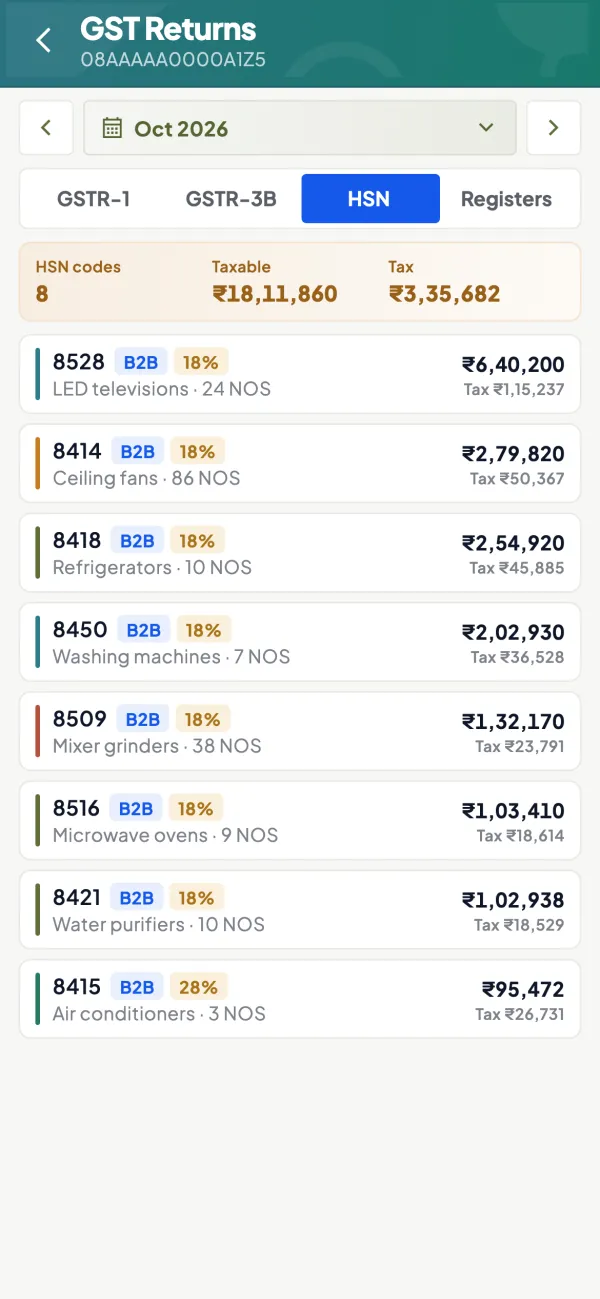
Questions people ask
Can AI file my GST returns?
Can AI tell me the correct HSN code for an item?
Is it worth using AI for GSTR-2B matching?
Can AI find invoices where I charged IGST instead of CGST and SGST?
Is it safe to share my sales register with an AI tool?
Can AI tell me if I need an e-invoice?
What GST checks give the most value each month?
Should I still use a CA if I use AI checks?
This page is general information for Indian businesses, not tax, legal or financial advice. Rules and rates change — check the official portals or your CA before acting.