GST GST compliance
Common GST notices and how to respond
Most GST notices to small businesses come from mismatches the portal can see: returns not filed, GSTR-1 sales higher than GSTR-3B, or ITC above GSTR-2B. Read the form number first; it tells you what the officer wants and where to reply.
- GST-registered businesses
- Accountants handling notices
- CAs and tax practitioners
- Small traders and shops
- Owners with a pending notice

On this page 11
First steps when a notice arrives
- Log in to gst.gov.in and open the notice under the notices and orders section. Notices are also emailed, but the portal copy is the one that counts.
- Note the form number, the tax period, the amount and the reply-by date.
- Check the notice carries a document identification number (DIN) or is issued through the portal.
- Pull the matching data from your books: sales register, purchase register, GSTR-1, GSTR-3B and GSTR-2B for that period.
- Reply on the portal before the date, even if only to ask for more time with reasons.
The notices small businesses see most
| Form | What it means | How you respond |
|---|---|---|
| GSTR-3A | Return not filed by the due date | File the pending return with late fee and interest |
| ASMT-10 | Scrutiny of returns found discrepancies | Reply in ASMT-11: accept and pay, or explain |
| DRC-01B | Liability in GSTR-1 is more than tax paid in GSTR-3B | Pay the difference, or explain the reason in Part B |
| DRC-01C | ITC in GSTR-3B is more than available in GSTR-2B | Reverse or pay the excess, or explain the reason |
| DRC-01A | Intimation of tax found due, before a formal notice | Pay with interest, or file your objections |
| DRC-01 | Summary of a show cause notice | Reply in detail, usually with professional help |
| REG-03 | Clarification needed on a registration application | Reply in REG-04 with documents |
| REG-17 | Show cause for cancelling registration | Reply in REG-18 explaining why it should continue |
Mismatch notices: working out the difference
DRC-01B example. For a month your GSTR-1 shows output tax of ₹2,40,000 but GSTR-3B shows ₹2,15,000. The ₹25,000 gap triggers the intimation. Common genuine reasons:
- An invoice reported in GSTR-1 was cancelled and the tax was correctly left out of GSTR-3B, but the GSTR-1 amendment was not made.
- Tax on that invoice was paid in an earlier month's GSTR-3B (for example, on an advance).
- A credit note was reduced in GSTR-3B but reported in a later GSTR-1.
List each item with invoice number and amount. If no explanation holds, pay the difference with interest. The same logic applies to DRC-01C on ITC; matching ITC to GSTR-2B is covered in reconciling GSTR-2B with the purchase register.
Scrutiny under ASMT-10
An ASMT-10 lists points the officer noticed, such as ITC higher than the purchase pattern suggests, e-way bill values higher than reported sales, or RCM not paid. Answer point by point. Attach reconciliations, not just statements. If you accept a point, pay through DRC-03 and quote it in your reply. If the officer is satisfied, the matter closes; otherwise further proceedings can follow.
Registration notices
REG-17 is often issued when returns have not been filed for a continuous period, or when the officer believes the place of business does not exist. File all pending returns first, then reply in REG-18 with proof of business: rent agreement, electricity bill, photographs of the premises and signboard. If registration has already been cancelled, a revocation application has its own time limit, so act quickly.
Mistakes that make it worse
- Ignoring a notice because 'the CA will see it'. The time limit runs regardless.
- Replying with a one-line denial and no reconciliation.
- Paying an amount through DRC-03 without linking it in the reply.
- Correcting the books but not the returns, so the next period triggers the same notice.
Time limits, forms and procedures change. Always follow the reply date and instructions on the notice itself. For anything beyond a simple mismatch, get your CA involved. This is general information, not tax advice. A planned GST audit preparation checklist also helps you stay ready.
Getting the figures together with Cashflow OS
Replying fast depends on finding invoices quickly. Cashflow OS lets you open the GSTR-1 view for the period from your Tally data and drill into bill-wise and HSN-wise detail, check the day book and party ledgers, and export reports to Excel or PDF for your CA, from any custom date range. The reply itself is filed on the GST portal.
Avoid these
Common mistakes
- MistakeIgnoring a notice because the CA will handle itDo this instead
The reply date runs regardless. Forward the notice to your CA the same day and agree who replies by when.
- MistakeReplying with a one-line denialDo this instead
Answer point by point with invoice numbers, amounts and a reconciliation from your books.
- MistakePaying through DRC-03 without linking it in the replyDo this instead
Quote the DRC-03 payment details in your reply so the officer can see the amount is settled.
- MistakeCorrecting the books but not the returnsDo this instead
Amend the returns too, or the same mismatch will trigger another notice next period.
Keep handy
Checklist
Common GST notices and how to respond — 8 checks. Tick them as you go.
In Cashflow OS
How Cashflow OS helps
Cashflow OS puts your TallyPrime books on every phone in the team. Where it fits this topic:
Find the invoices behind a mismatch
Open the GSTR-1 view for the period from your Tally data and drill into bill-wise and HSN-wise detail. The reply itself is filed on the GST portal.
See GST reports from your Tally data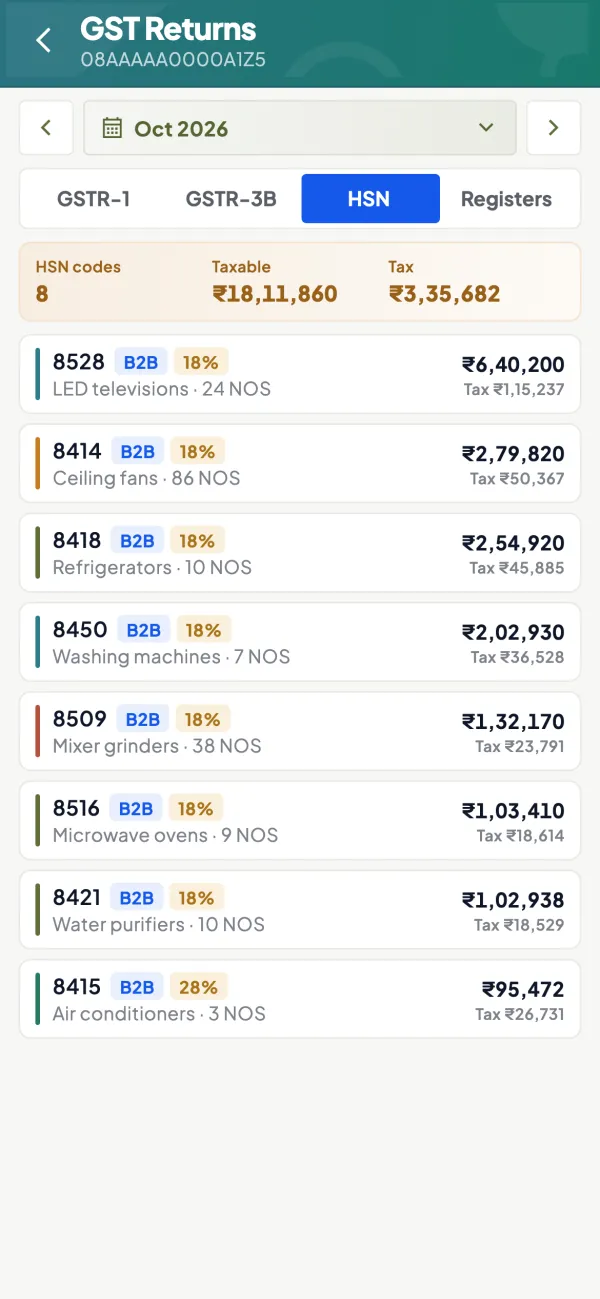
Reports for your CA
Day Book, party ledgers and registers for any custom date range, exported to Excel or PDF for the reconciliation.
See Reports in Excel and PDF
Questions people ask
What is DRC-01B?
What is the difference between ASMT-10 and DRC-01?
Where do I reply to a GST notice?
What if I cannot reply by the due date?
What is GSTR-3A?
What is DRC-01C?
How do I reply to ASMT-10?
Can my registration be cancelled for not filing returns?
This page is general information for Indian businesses, not tax, legal or financial advice. Rules and rates change — check the official portals or your CA before acting.